teamspace

Project portfolio software: every project in the leadership view.

Leadership builds its target portfolio on a virtual milestone and tests it against revenue and capacity goals. Margin, forecast and a traffic light per project, with drill-down to the single booking. Part of the teamspace project management platform.
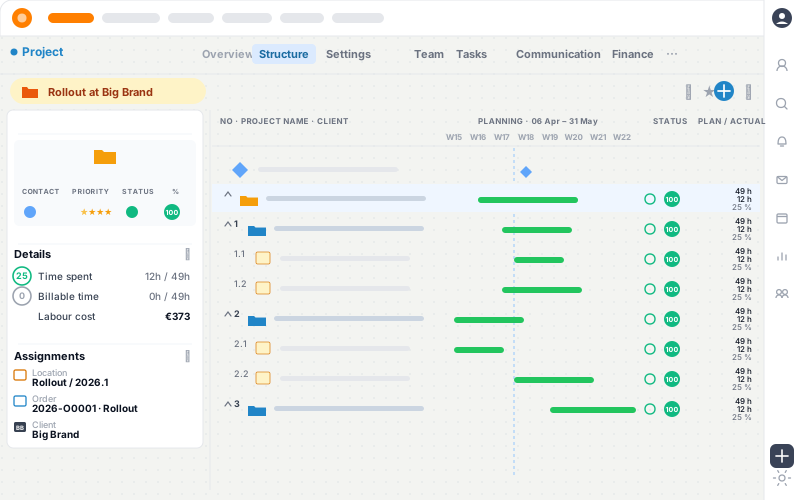
teamspace project portfolio: target portfolio on a virtual milestone, tested against revenue, capacity and the share of internal projects

Build the portfolio

The portfolio takes shape on a virtual milestone.

You assign work packages from across the whole project landscape to one reference date and read off at once whether revenue and capacity fit together.

Scenario A Scenario B Statistics
Virtual milestone · target 30 Sep 2 of 4 selected

Project landscape · effort

Customer portal · relaunch

PRJ-014 · external

240 h

Release 4.0

PRJ-033 · internal

180 h

Maintenance Stadtwerke

PRJ-021 · external

90 h

Audit Müller GmbH

PRJ-040 · external

120 h

Goal check · end of quarter

Revenue €82 / 80k
Capacity 1,940 / 2,000 h
Internal share 32 % · target 30 %
Portfolio meets the targets
Change selection · compare scenarios 420 h allocated

What counts

The portfolio view answers three questions.

Every active project in one view

  • Filter by directory, client and volume
  • Status and progress per project
  • Drill-down to the single booking

A margin that aggregates

  • From internal rates, hours and cost
  • Per project and per directory
  • Current to the day in the Analysis tab

An early warning before it tips

  • Three alert levels per project
  • Threshold as a value or a percentage
  • Notification to the project lead

Two views

The portfolio view asks different questions from project steering.

Project portfolio software gives the strategic view of every project running at the same time. It answers the questions leadership asks: which engagements are profitable, where does the risk sit, and is utilisation enough for the next quarter?

The project lead wants to know something else, namely which task comes next and who has logged which hour. teamspace serves both from the same data. An hour logged on a work package flows into the aggregated view. From the aggregated figure, drill-down leads back to the single booking. More on the operational side on the multi-project management software.

Comparison

The Excel portfolio soon hits its limits.

Feature

Excel portfolio

teamspace

Recommended
Every active project in one view
manual
Margin per project current to the day
Forecast from remaining effort
Resource conflict is flagged
Drill-down to the single booking
Project history on structural change
Hosting in Germany
varies

Directories

Project directories aggregate the effort per quarter.

Project directories work like folders. They group the projects by financial year, quarter or project type and can be nested. Each directory aggregates the total effort of its projects and so supports the quarterly plan.

The portfolio knows three states. Active projects count fully into the aggregate. Closed projects stay as a comparison base and show how accurate earlier estimates were. Planned ventures from acquisition hang on the CRM software and become a project as soon as the order is in.

“Staff in both support and project planning can see orders and invoices. That was not possible before.”

The same view of orders and projects across departments.
A+W Software GmbH

Margin

The margin arises in every project.

Per project, teamspace calculates the margin from the fee volume, the internally valued hours and the cost of travel and material. The portfolio sums across the active projects, switchable by client or order type.

This view often brings a pattern to light. A small share of engagements carries a large share of the result, and first engagements often sit below the follow-on work. Where a figure stands out, drill-down leads to the booking that caused it.

Forecast

The remaining effort becomes the forecast.

teamspace projects the remaining work. From planned cost, earned value and actual cost come the variance and an efficiency that shows early whether a project is running off course. This is the earned value analysis that runs along in every project.

At the portfolio level, utilisation comes in. The capacity planning of the enterprise edition measures the planned hours against the available time to quarter end, per person and per team. Whoever sits below utilisation for long works on sales; whoever sits above it risks overtime.

More in project management

What hangs on the portfolio view.

The overview aggregates what arises in these areas. The shortest routes there.

Multi-project management

The operational view: who works on which project, and when.

Learn more

Capacity planning

Utilisation per person and team, forecast to quarter end.

Learn more

Project controlling

Plan vs actual, forecast and margin down to the booking.

Learn more

Project time tracking

The logged hour becomes the portfolio figure.

Learn more

Resources

Resource conflicts surface early.

Two project leads plan the same person for the same week without noticing. The capacity planning of the enterprise edition reconciles the planned hours against the contracted time and accounts for leave and sickness. If the sum runs over the free capacity, a conflict marker appears.

One click shows the projects and people affected. Resolving it is down to planning itself: capacities can be moved by drag-and-drop or fixed. teamspace makes the conflict visible, the planner makes the decision.

Early warning

Thresholds alert before a project tips.

Every project has three alert levels: notice, warning and critical, in green, amber and red. The threshold is set as a fixed value or as a percentage, per project. When consumption reaches the threshold, the notification goes to the project lead automatically.

In the portfolio the traffic lights sit side by side. Leadership sees at a glance which engagements are on plan and which are tipping, without opening each project one by one.

15 minutes to your project structure.

We look at how you group projects, what the quarterly goal is and where the margin sits.

Lessons

Closed projects sharpen the next estimate.

Once a project is closed, its plan vs actual comparison stays: how long the concept phase really took, what share went into testing, where the margin turned. On the next similar engagement, the project lead gets these reference points.

Project templates and project types capture this. A template brings phases, milestones and roles; a project type adds the matching status flow and the approval rule. So experience moves into the structure and does not hang on individual people.

Flow

From the order to the portfolio entry.

  1. 1

    Order in the CRM

    The accepted quote becomes the order. Volume and client sit in the client record.

  2. 2

    The order becomes a project

    With one click the order becomes a project. Order items become sub-projects or work packages.

  3. 3

    Entry in the portfolio

    The project appears in the directory, with planned effort, an owner and a planned margin.

  4. 4

    Live steering

    With every logged hour the figure updates. Thresholds alert when a project runs off plan.

  5. 5

    Close and comparison

    On close, plan vs actual and the effort structure stay as a comparison base for the next estimate.
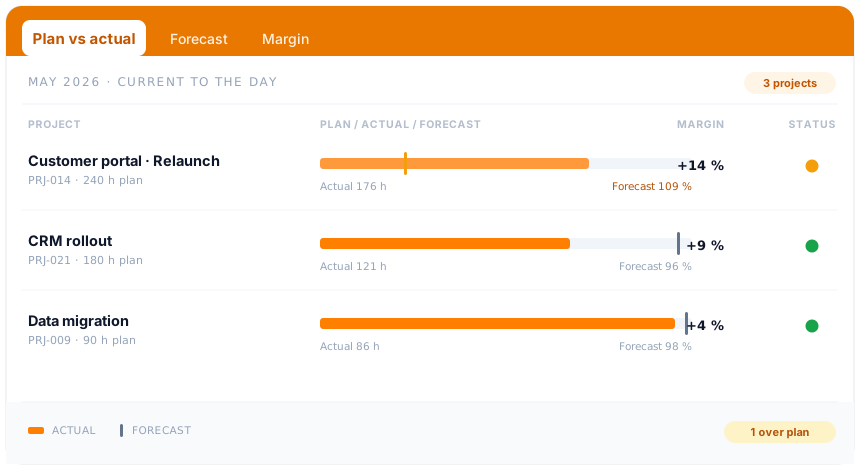
teamspace project management: steering cockpit with plan vs actual, forecast and a traffic light per project

In project management

The portfolio view sits in project management.

The portfolio is the top level of the same system in which projects are planned, documented and steered. Structure, time, margin and boards hang together, from the work package to the leadership view.

View project management

Feature set

Features around the project portfolio.

View

  • Active and closed projects
  • Directories by financial year, quarter and type
  • Progress rolls up from the work packages
  • Drill-down to the single booking
  • Excel import and export of the structure

Steering

  • Margin per project, current to the day
  • Forecast of the remaining project work
  • Three alert levels with a threshold in value or percentage
  • Resource conflicts are flagged (enterprise)
  • Automatic project log on changes

Strategy

  • Compare scenarios with virtual milestones
  • Project templates and project types
  • Closed projects as a comparison base
  • Views by client and order type
  • Global milestones across many projects

Terms

Portfolio and programme management pursue different goals.

Project portfolio management and programme management are two forms of multi-project management. They differ in their core idea.

In programme management, several projects work towards a shared goal, for example a product release. They need not be related in content; steering is on the overarching goal.

In project portfolio management, the projects compete for the same resources. From the whole project landscape, leadership picks the ones that, under the given conditions, make the greatest contribution. In teamspace the virtual milestone captures both: you assign work packages to it across all projects, date it to the reference day and read off its statistics whether revenue and capacity goals fit together.

Frequently asked questions about project portfolio software

What is the difference between a project portfolio and multi-project management?
Both deal with several projects, but with a different focus. The portfolio is the strategic view (which projects are profitable, where is the risk), while multi-project management is the operational view (who works on which project, and when). teamspace runs both views from the same data.
How are resource conflicts spotted?
Capacity planning (enterprise) reconciles the planned hours of all active projects with the contracted working time of the assigned people and accounts for leave and sickness. If the sum runs over the free capacity, a conflict marker appears with drill-down to the projects and people affected. Moving or fixing is down to planning itself.
Can we evaluate projects separately by area?
Yes. Project directories group the projects by financial year, quarter or type and can be nested. The permission system governs who sees which projects and evaluations. Leadership sees the whole portfolio; a unit head sees only their own part.
How does the margin arise in the portfolio?
Per project, teamspace calculates the margin from the fee volume less the internally valued hours, the travel cost and material. The portfolio sums across the active projects, switchable by client or order type. Drill-down to the single booking shows where the figure comes from.
Are planned projects from the pipeline shown too?
Active projects count fully into the aggregate. Planned ventures sit as a sales opportunity in the CRM software, with stage and probability, and become a project with one click as soon as the order is in. So acquisition moves into the portfolio without double entry.
Can we compare scenarios?
Yes, with virtual milestones. You set up a milestone, date it to the reference day and assign it work packages from all projects. The milestone shows a statistic (revenue, capacity, share of internal projects). With several milestones you map different portfolios and compare them.
Where is the portfolio data stored?
All data is processed in an ISO 27001 certified data centre in Frankfurt am Main, exclusively within the EU. teamspace is made in Germany and GDPR-compliant. The contracting party is 5 POINT AG, based in Darmstadt.

First call

Let us talk about your portfolio.

In 15 to 30 minutes we go through your project structure, the margin logic and the thresholds. You get a clear first read on whether teamspace fits the way you work.