
Central and searchable
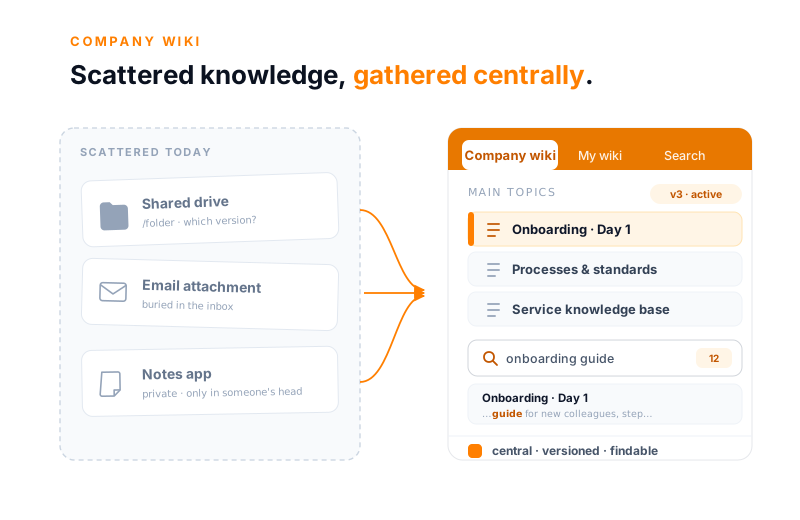
- One place instead of drive and inbox
- Preview search with the hit in context
- Main topics lead the way in
In the teamspace company wiki, the team gathers what otherwise sits in people's heads and inboxes. Every page is versioned, hangs off projects and customers and is findable in context through search. Part of the teamwork software, included in every edition.
Context
A company wiki gathers this knowledge in one place, searchable and versioned, instead of scattered across drive, inbox and people's heads.
The core
A company wiki bundles the knowledge of an organisation in one searchable place: guides, processes, onboarding material, service knowledge, decisions. Instead of one guide sitting on the drive, a specification in an inbox and a ruling in a note app, everything lives in one spot.
In teamspace you type a keyword into search, and the result shows the hit in the context of the page. That way you see at once whether the page holds the answer you want, without opening every hit one by one.
A wiki page in teamspace is not just a document. In the detail manager it carries its versions, the access permission, a forum discussion and the associated files. Knowledge, permissions and history sit on the page itself, not in four separate tools.
Scope
Traceable
Whoever saves a page lays down the previous version as a version. Editor and timestamp stay visible, and you bring back an older state with one click. That keeps it traceable who changed what and when.
If the question "What applied back then?" comes up later, the historical state of the page can be reconstructed.
Linking
Wiki pages do not live in a silo. A page hangs off a project, a customer or a record, and the discussion around it runs in the forum directly on the page. Whoever opens the customer has the relevant specification one click away.
How knowledge comes together on the project is explored in the project documentation; the customer-centred view is covered in the digital customer record.
Next step
In half an hour we talk through what sits in your people's heads, inboxes and drives, and which of it belongs in a company wiki. You get an honest assessment of whether and where the switch pays off.
From practice
Six areas where a well-kept wiki pays off quickly in day-to-day work.
Induction checklists, tool overviews and contacts for the first day. New colleagues find their way around on their own.
How sales, delivery and support run, documented as binding rather than only in people's heads. One page that everyone points to.
Known issues, workarounds and solution paths, findable for the service desk instead of buried in old tickets.
Why was it solved this way, which options were there? One page per decision, with date and rationale, instantly findable later.
Work instructions, inspection checklists and guidelines in one place, versioned and protected by permissions.
Quote building blocks, standard emails and briefing templates that everyone knows and reuses, instead of rebuilding them.
Term
A company wiki, also called an internal wiki, corporate wiki or knowledge base, is a central, searchable knowledge platform within an organisation. Staff read, add to and maintain content there together: guides, process descriptions, specifications, onboarding material, glossaries and templates.
Unlike a classic intranet or a folder drive, a wiki thrives on shared upkeep. Everyone with access creates pages and improves them, instead of a central editorial team writing everything alone. That keeps the knowledge current, because it arises where the work happens.
The term goes back to the software "WikiWikiWeb" by Ward Cunningham from 1995. The word wiki means "quick" in Hawaiian, and that is exactly the aim: knowledge is shared and found without a hurdle.
Industries
How different service providers shape their company wiki, depending on which knowledge drives their day-to-day.
A toolkit of workshop formats, sector know-how per industry, pitch templates and onboarding paths by seniority level.
Industry pageDecisions per engagement, maintenance guides, a knowledge base for the service desk and guides per project.
Industry pageBrand guidelines per customer, briefing templates, a supplier directory and proven approaches per campaign type.
Industry pageAccess
Not every page belongs in front of every pair of eyes. In teamspace you set per page who sees it and who edits it, governed through central user groups rather than through individual people.
That way a partner sees exactly the released page and nothing else of the internal stock.
Structure
A single large wiki soon becomes hard to navigate. teamspace lets you create topic-specific wikis alongside the central company wiki, such as a CRM wiki or a project management wiki. That way everyone knows at once where a piece of information sits.
You write content in the editor with headings, lists, tables, images and embedded files, linked via the wiki syntax.
In numbers
What makes the difference between scattered notes and a knowledge base the whole team relies on.
reactivatable
with editor and timestamp per save
its own permissions
read and edit via user groups
preview search
the keyword appears right in the page
in Darmstadt
5 POINT AG, self-funded
The comparison
Introducing
Introducing a company wiki in your business does not mean writing everything at once. Nobody starts with a finished wiki; it grows along the way once the structure is in place.
Set up the main areas as entry pages, such as onboarding, processes, service knowledge. They appear in the main-topics box.
Mark a template for recurring pages: guide, decision, onboarding step. New pages take on the frame.
Five to ten core entries are enough as a start. The rest grows while the work happens, not as a special task.
Set per area who reads and who edits, governed through the user groups rather than through individual people.
A solved ticket becomes a knowledge base page, a kickoff becomes minutes. That way the wiki arises in day-to-day work, instead of being left undone.
More from Teamwork
The company wiki is one area of the teamwork software. These areas sit right alongside and share the same user groups.
Open items and tasks, connected to the matching wiki pages.
Learn moreDocuments and Office files, versioned and filed in the same context.
Learn moreTopic areas and news, the discussion on the wiki page in one place.
Learn moreAppointments, leave and milestones of the team in one view.
Learn moreOne-to-one and group chat, content from the system shared directly.
Learn moreTasks as cards, on the same project as the associated knowledge.
Learn more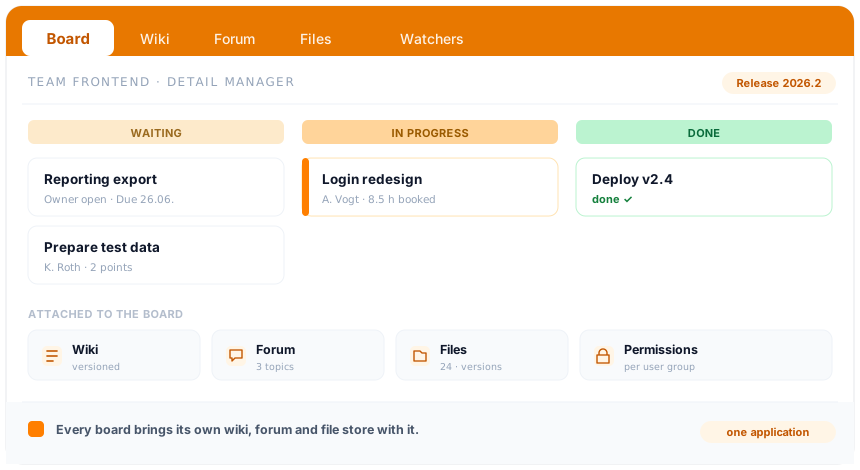
At a glance
The wiki holds the knowledge, the board the work, the calendar the time. How teamspace brings tasks, appointments, knowledge and files together in one application is shown in the overview of the teamwork software.
To the teamwork softwareBackground
Whether a company wiki is worth anything is decided not by its size but by its upkeep. A wiki that was filled only once quietly grows stale. One that the whole workforce writes along with grows with the house.
Let it arise during the work. The best page nobody writes as a special task. It falls out along the way: a solved ticket becomes a service page, a kickoff becomes minutes, a ruling becomes a guide. That keeps the stock current, because it arises where the work happens.
Shorten the ramp-up. Whoever starts fresh reads checklists, processes and responsibilities up in one place, instead of piecing them together from three inboxes. When someone leaves, the knowledge stays in the wiki instead of walking out with them.
Keep it readable. Templates and consistent headers give every page the same frame, so that nobody rebuilds formatting and one entry looks like the next. That keeps the wiki clear to navigate, even when many hands write on it.
Related modules
Whoever holds knowledge centrally almost always works on the project, on the customer and on the logged hour too. Here are the shortest routes there.
From the knowledge on the project comes the project plan: structure, phases and plan vs actual, up to date by the day.
From the contact comes the customer record: rules, records and history in one place.
From the task comes the logged hour: attendance, project time and digital timesheet with approval.
No obligation
You show us your knowledge landscape today, we show you what a company wiki replaces of it. Then you decide whether the switch is the right path for your team.
Intro call
We talk through your knowledge landscape today and which tools can be bundled into a company wiki. You get an honest assessment of where the switch pays off.