
Progress counts, not consumption
- The earned value measures what was actually delivered.
- Full hours against half the progress show up at once.
- No gloss from effort figures alone.
Earned value analysis reads a project on three axes: planned value, earned value and actual cost. From these teamspace works out the schedule and cost variance, the schedule and cost efficiency, and projects the remainder of the project, long before a plain plan-vs-actual comparison shows the drift. Part of project management, with no module surcharge.
Why three values
A project can spend every planned hour on plan and still be in trouble if progress falls behind. Earned value analysis therefore measures not the consumption but the value delivered.
Method
An earned value analysis places three figures side by side at every reporting date: the planned value, the earned value and the actual cost. Only the relationship between the three yields a statement about schedule and budget that the bare hour count cannot give.
The value of the work due by the reporting date, the plan cost as the baseline.
The value delivered up to the reporting date, valued at plan prices. It measures progress, not consumption.
The cost actually incurred. Its distance from the earned value shows the cost position.
The pivot point
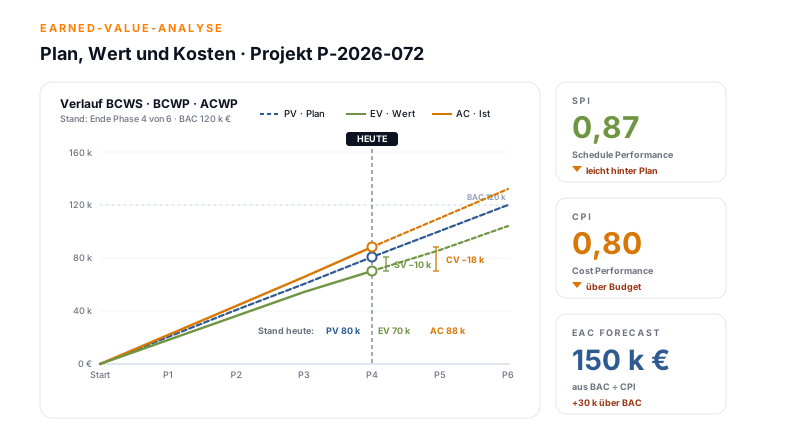
The earned value sits in the middle. Read against the planned value it gives the schedule diagnosis, read against the actual cost it gives the cost diagnosis. The same value, two directions of view.
Planned value
at reporting date
Earned value
delivered
Schedule variance
− 34 k €
Schedule efficiency
0.74
Actual cost
incurred
Earned value
delivered
Cost variance
− 8 k €
Cost efficiency
0.92
One value, two diagnoses: the same earned value tells schedule and cost at a single reporting date.
How teamspace shows it
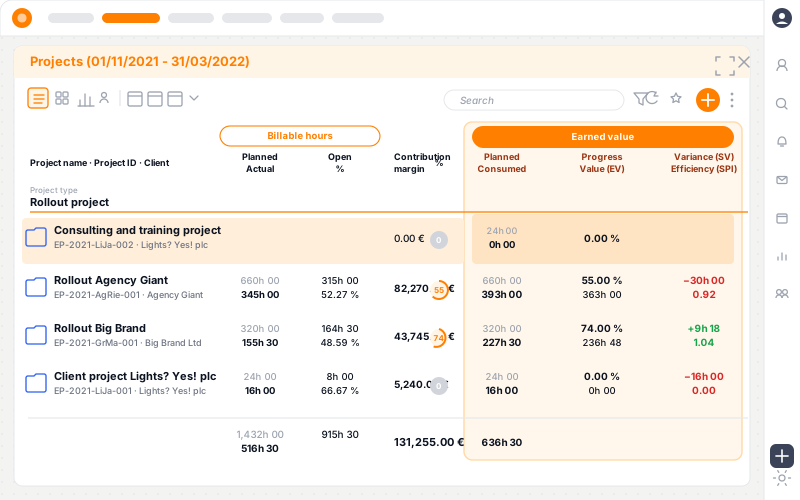
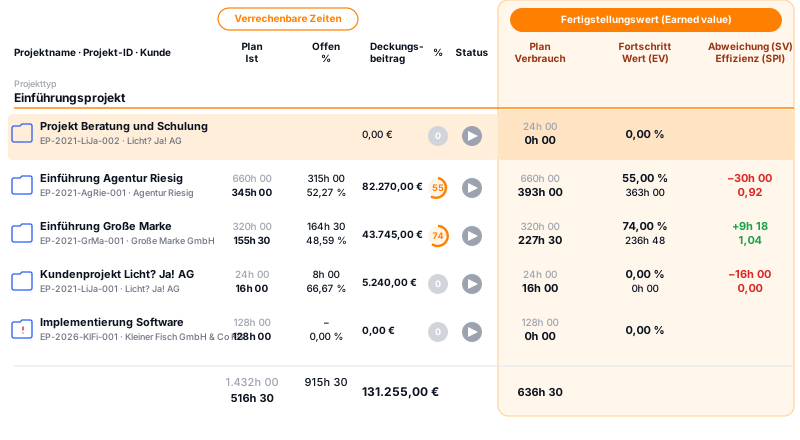
teamspace shows the earned value figures not in a separate chart but right in the project list, next to plan and actual hours and the margin. One row per project, every value side by side, scannable at a glance even across dozens of projects.
Planned hours against the hours actually logged, right next to the billable time, so consumption and value sit on one row.
Percent project progress times plan budget gives the earned value. For example: 55 percent progress on 660 planned hours gives 363 hours of delivered value.
Schedule and cost variance in colour: red when behind, green when ahead. One look at the row, no drill-down needed.
Groupable by project type, client, phase or owner. Totals per group and overall, export as CSV or Excel for your own analyses.
Phases and work packages with planned hours and cost. The planned value per reporting date follows from how they spread over time.
Per work package you record progress in percent. The progress of the levels above is worked out from it automatically.
Logged hours, travel cost and material per work package make up the actual cost, the same figures as for billing and margin.
teamspace works out the schedule and cost variance and the schedule and cost efficiency, current to the day with every new entry.
If performance so far holds steady, teamspace projects the end effort and end cost from it. Early warning on drift.
“Time tracking is far simpler and more convenient than in Excel.”

| Feature | Plan-vs-actual | Earned value |
|---|---|---|
| Hours spent against hours planned | ✓ | ✓ |
| Project progress taken into account | - | ✓ |
| Schedule efficiency as an index | - | ✓ |
| Cost efficiency as an index | - | ✓ |
| Remainder of the project projected | - | ✓ |
| Early warning before the month close | - | ✓ |
| Project log on status change | - | ✓ |
Early indicators
Two ratios make the position tangible. Schedule efficiency sets the earned value against the planned value. Cost efficiency sets it against the actual cost.
Above 1 means faster or cheaper than planned, below 1 means slower or more expensive. Values under 0.9 are a clear escalation signal: a project at 0.82 and 0.88 is not slightly behind plan but, without countermeasures, lands well over budget.
20 minutes
In 20 minutes we talk through your project sizes, your progress logic and the points where an earned value read carries for you. You get a clear first read on whether teamspace fits your setup.
Forecast
Whoever sees at the reporting date that cost efficiency sits below 1 can calculate the end position instead of hoping for it. teamspace carries the efficiency so far forward onto the remaining budget and names the expected end amount. The distance to the planned budget shows how much steering the project still needs.
That lets you say early whether a project will land within its schedule and cost. "We'll catch up" is usually not the reality, and the projection shows it before the phase is over.
At a glance
From three captured values come the figures that let you steer a project rather than only describe it.
Base values: plan, earned value, actual
Variances: schedule and cost
Efficiencies: schedule and cost
Projected remainder of the project
What the read delivers
Three analysis figures build on one another: first the difference, then the ratio, then the look ahead to the project end.
Variance
The difference between earned value and plan, and between earned value and actual.
Efficiency
The ratio rather than the difference, as an index that stays comparable across projects.
Projection
From performance so far the likely end position, instead of a gut estimate.
Measuring progress
The earned value stands and falls with an honest progress figure. In teamspace you enter progress per work package in percent; the state of the phase and the project is worked out from it automatically.
How you set the percent figure per work package is left to your project: by time fraction, by milestones reached or as the judgement of the people doing the work. For critical deliverables the value often counts only on full completion, for work in flight the proportional state.
More from project management
Earned value analysis shares its data with these areas, with no one keeping anything twice.
Plan, actual and forecast current to the day, with margin and warning levels.
Learn morePhases and work packages as the anchors that plan and progress hang on.
Learn moreEfficiency and forecast across many parallel projects in view.
Learn moreUtilisation per person and team, forecast to quarter end.
Learn moreChecked hours become the invoice, fixed price and T&M side by side.
Learn moreLog time on phase or task, the source of the actual cost.
Learn more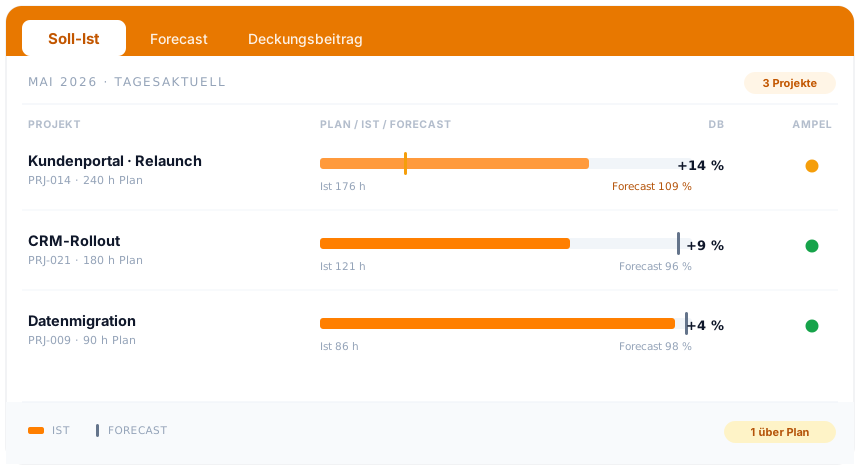
Part of project management
Plan, earned value and actual cost are not an add-on module but a view of the projects you run in teamspace anyway. From the work breakdown structure through time tracking to controlling, on one data set.
See project managementWhere it fits
An earned value analysis carries where projects run long and progress is plannable. It is effort, and that effort does not pay off on every engagement. It is typically valuable on projects from around six months in duration, where a fixed-price share ties the margin to effort discipline, and on strategically important work where an early escalation counts. In a regulated setting, such as plant engineering, it is often a contract clause anyway.
For short, agile sprints a simple burndown usually does, and for a one-day workshop engagement the method would be overhead. Where it fits, a second point pays off too: because teamspace records every plan adjustment and every status change in the project log, the state at an earlier reporting date can be traced at any time. In a later dispute over fixed-price contracts or in an external audit, that is exactly the reproducibility that matters.
Related modules
The earned value read lives on the data of the hour, the invoice and the order. Here are the shortest routes there.
Logged hours are the actual cost that efficiency and forecast compute on.
The same checked hours become the invoice, fixed price and T&M side by side.
The accepted quote becomes the project that the analysis measures later.
Intro call
You show us your project sizes and your progress logic, we show how teamspace turns them into variance, efficiency and a forecast you can rely on.