teamspace

Order management software for professional services firms: from quote to final invoice.

An order management software runs the order from acceptance through to the final invoice. teamspace bundles effort, fixed price, maintenance and hardware in one order, keeps the status up to date day by day and hands invoice-ready line items over to billing.
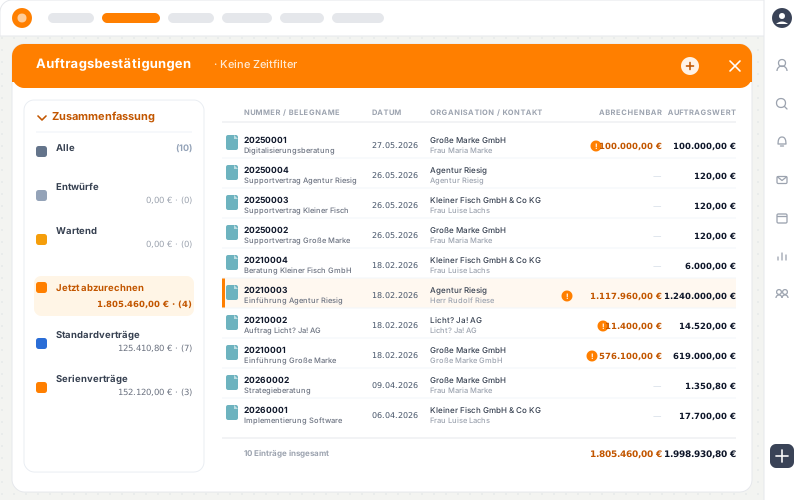
teamspace order management in the app window: on the left the summary by contract and billing data (All, Drafts, On hold, To be billed now 1,805,460 euros, standard and recurring contracts), on the right the list of order confirmations with number, document name, date, organisation, billable amount and order value; open items marked in orange, total sums at the bottom.

In daily use

What holds an order together.

In the professional services business an order is rarely a single product. teamspace holds three things together in one place.

Every contract form in one place

Effort, fixed price, flat rate, maintenance and hardware sit as line items in the same order, each with its own conditions.

Every order up to date in its status

Order, delivery, invoice and payment status run in parallel. The document overview filters by open, on hold and to be billed now.

From order to invoice and project

Invoice-ready line items go to billing. From the same line items the project is created with work packages.

Acceptance

The quote becomes the order.

When the customer says yes, the quote is converted into the order with one action. The line items carry over, the quote status switches to ordered, the order confirmation is ready.

  • Line items carried over, with quantity, conditions and sections from the quote.
  • It works without a quote too, then the line items are created directly in the order.
  • Master data comes from the CRM, customer, contact and layout for the document.

No one types the line items in a second time.

To creating quotes

Process

How an order runs through teamspace.

  1. 1

    Accept the quote

    From the accepted quote the order is created with line items, conditions and sections.

  2. 2

    Build the order

    Effort, fixed price, maintenance and hardware sit as line items in the order, each with its own billing type.

  3. 3

    Deliver and book

    Book hours onto the work packages, delivery notes are created, the status keeps up to date day by day.

  4. 4

    Bill

    Invoice-ready line items go to billing, via instalments, payment plan or rules.

  5. 5

    Close out

    Final invoice, payment receipt, post-calculation. The full order history stays in the CRM.

The order detail manager

One order, many contract forms in a single view.

In the detail manager all line items of an order sit side by side, each with its own billing type, delivery status and amount. Four statuses run in parallel, the post-calculation compares order, project actuals and invoice.

PositionenAbrechnungNachkalkulationHistorie
Auftrag 20260042 · Müller GmbH
Auftrag laufend Lieferung in Teilen Rechnung Abschlag Zahlung offen

Konzept & Umsetzung

Konzeptphase 12.000 €
Umsetzung · Seniorsatz 9.280 €

Wartung & Hardware

Wartungspauschale 480 €
Hardware · 4 Lizenzen 3.600 €

Auftrag

25.360 €

beauftragt

Projekt-Ist

22.910 €

Ist gebucht

Rechnung

21.480 €

gestellt

Die Nachkalkulation vergleicht alle drei, bis auf die Position.

The comparison

An end to the Excel list and Office documents.

Address file and Office documents

  • Customer data lives in a separate file, every document is typed out anew.
  • Which quotes have been ordered is in no list you can rely on.
  • Maintenance and subscriptions are tracked by hand and forgotten.
  • Plan and actual sit in separate spreadsheets, the margin stays in the dark.
Recommended

Order management in teamspace

  • Master data comes from the CRM, the document fills itself at the push of a button.
  • The document overview filters open, on hold and to be billed now.
  • Recurring contracts renew and bill themselves on a recurring basis.
  • The post-calculation sets order, project actuals and invoice side by side.

Billing

The order controls when billing happens.

Per order teamspace sets the condition under which a line item is billed. Only once the criterion is met does it appear as to be billed now.

  • Five billing modes: rules, manual, payment plan, billing rules and billed.
  • Payment plan with instalment, percentage, line item and final invoice, which always comes last.
  • Coupled to the project progress, also per sub-project, or to a status that has been reached.

From the same logic come on-account invoices, cumulative invoices and the final invoice.

To order billing

“Staff in both support and project planning can see orders and invoices. That was not possible before.”

A+W gives support and project planning insight into orders and invoices, which previously was not possible in separate programs.
A+W Software GmbH

Recurring

Maintenance and subscriptions bill themselves.

Maintenance, licences and service costs run via duration line items. The order becomes a recurring contract and issues its invoice in the set rhythm, monthly, quarterly or yearly.

  • Automatic renewal, as long as the contract has not been cancelled.
  • Recurring line items can be bundled: a duration line item from a completed order moves into a running maintenance order. No order stays open just because a small residual line item runs on.
  • The recurring contracts filter shows what falls due next.

Price increases do not hit long terms by hand either. Via price lists teamspace adjusts the rates for many orders or a whole article type at once. New prices take effect, if you wish, only from the next period, the running contracts keep their value.

Product view

Licences across many orders in view.

Licences, managed services and maintenance grow over years, spread across many quotes and orders. So that the connection is not lost, every document line item hangs on a product, no matter which document it comes from.

  • teamspace counts for itself: extracted from the orders, you see the currently running licences per customer.
  • Up and down stays traceable: how the licence count has developed over time is recorded in the product.
  • Since when and at what price a customer has been buying a product is visible at a glance.

Product management brings together what otherwise stays scattered across individual orders.

To product management

Initial call

How is your order structured?

We look at your order type: which contract forms come together, in which rhythm billing happens and how the order moves into the project.

Into the project

The order becomes the project.

Straight from the order a project is created, as a main project, sub-project or work package of an existing project. The line items become work packages, the team can book hours onto them right away.

  • One data foundation: order and project share the line items, book hours once.
  • Booked time finds the right billing line item via the link.
  • Billable, as soon as the associated line item is due.

So the work begins on the day of the order, not only after a project has been set up.

To project management

Document overview

Every order stays visible in its status.

In the order overview a summary sorts all orders by contract and billing data. So you quickly find what needs attention, without opening every order one by one.

Running

Active contracts

neither cancelled nor ended

Now

To be billed now

line items are due

On hold

Checked, locked

billable, but still held back

Recurring

Recurring contracts

renew automatically

What it is about

What makes up order management.

An order management runs an order across its whole lifecycle: from the accepted quote through delivery and billing to the final invoice. Line items, conditions, status and billing sit in one place instead of scattered across file, spreadsheet and document template.

The benefit becomes tangible in daily use: customer data comes centrally from the CRM, documents fill themselves at the push of a button, no transfer errors arise. Orders in the professional services business often carry several components in parallel, concept, delivery, maintenance, hardware. teamspace bundles them in one order logic and hands invoice-ready line items over to order billing. The hours are captured in time tracking, the work is steered in project management.

Order data is among the accounting-relevant data. teamspace reverses an invoice in full and maps partial corrections via the invoice correction as a separate document. In activated GoBD mode, which is set by 5 POINT, released documents can no longer be deleted, the system enforces retention over ten years. Operations run in an ISO-27001-certified data centre in Frankfurt am Main, data processing exclusively in the EU, an audit trail documents every order change. The contracting party is 5 POINT AG, a German stock corporation under German law.

Scope of functions

Order management at a glance.

Order and delivery

  • Quote to order in one click
  • Effort, fixed price and duration per line item
  • Sections with their own subtotal and prefix
  • Delivery notes and delivery status
  • Own rates, price lists and tiered prices per customer
  • Move line items as a reference into another order

Control and billing

  • Five billing modes per order
  • Payment plan with instalment, percentage, line item and final invoice
  • Billing coupled to project progress or status
  • Post-calculation: order, project actuals and invoice
  • Higher-level price adjustment via price lists
  • Full reversal and invoice correction

Integration

  • Handover to order billing
  • Product management bundles line items across all documents
  • Project from the order, hours on work packages
  • DATEV-certified interface (Enterprise)
  • Standard exports (CSV, Excel) and REST API
  • Audit trail over every order change

Use cases

Around the order.

The order is the centre. These use cases share with it the same line items, documents and interfaces.

Order billing

From invoice-ready line items the invoice is created, via instalments, payment plan or rules.

Learn more

Creating quotes

Structured quotes from the CRM, from them the order at a click.

Learn more

Following up on quotes

Track open quotes systematically, with a reminder on the due date.

Learn more

Writing dunning notices

Open receivables climb in several stages, each stage with its own deadline.

Learn more

Digital receipt capture

Receipts by photo, stored centrally and assigned to the order.

Learn more

DATEV export

Hand over invoices and reversals via the certified interface.
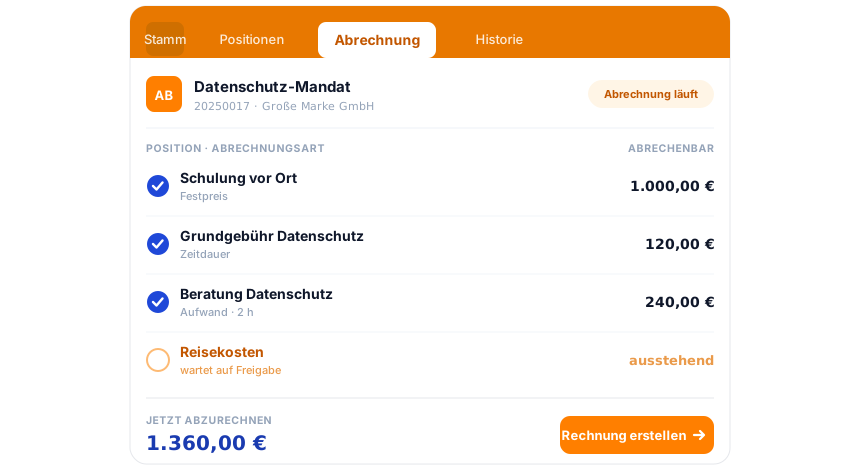
teamspace invoicing software: an order in the Billing tab, three line items billable with a blue tick, one line item waiting for release, below them the sum to be billed now and the action Create invoice.

Part of the invoicing software

The order is the billing hub.

Hours, flat rates and travel costs gather at the order until it proposes the finished invoice. Quote, dunning, e-invoicing and the DATEV posting data service run in the same system. How it all connects is shown in the invoicing software overview.

To the invoicing software

Initial call

Order structure outlined in 15 minutes.

Together we sketch how your orders run from acceptance to the final invoice, and where teamspace takes out the manual effort.

Frequently asked questions about order management software

What is the difference between order management and order billing?
Order management organises the order itself: line items, conditions, delivery and status. Order billing turns the invoice-ready line items into the invoice. In teamspace both share the same line items, the transition works without double entry.
Can we manage hardware and licences on the order?
Yes. Hardware, licences and other delivery line items sit as line items on the order, with quantity and price from article and price list. Delivery note and invoice take account of them. Anyone who calculates hardware with purchase and sales price and margin uses product management for that.
How does status tracking work?
Per order, order, delivery, invoice and payment status run in parallel. The order overview filters by draft, running contracts, on hold, to be billed now, standard and recurring contracts. So what comes next is visible at a glance.
Can maintenance contracts be billed automatically?
Yes. Maintenance and subscriptions run via duration line items. The order becomes a recurring contract, renews automatically and issues its invoice in the set rhythm, monthly, quarterly or yearly. Price changes take effect, if you wish, only from the next period.
How do I keep an overview of many orders with licences?
Every document line item can be hung on a product, independent of the document type. Product management brings together the line items from all quotes and orders and shows per customer the currently running licences along with their development over time, since when the contract has been running and at what price. More in product management.
Can we reverse or change orders?
teamspace reverses an invoice in full, there are no partial reversals. For corrections of individual line items the invoice correction serves as a separate document. Every change is in the history. In activated GoBD mode, which is set by 5 POINT, released documents can no longer be deleted.
How does order management connect with project management?
From an order a project with phases, tasks and team is created at a click, the line items become work packages. Order and project share the data: book hours once, the view is in both modules. More in project management.
How does the handover to accounting work?
Via the DATEV-certified interface to DATEV Unternehmen online, invoices, reversals and incoming invoices go into financial accounting in the Enterprise edition as a cloud API, no CSV export. Other systems such as Lexware or Sage take over the data via standard exports (CSV, Excel) or the REST API. More on DATEV export.