
Private messenger
- A ticket or quote can only be shown as a screenshot
- A second tool alongside the work system, maintained separately
- Messages sit on third-party servers, often outside the EU
- No link to a project, customer or record
In teamspace team chat, your people write 1:1 or as a group and drop a contact, a ticket or a quote straight into the conversation. If you use Microsoft Teams, you keep it. Runs as an installable web app on almost any device. Part of the teamwork software, included in every edition.
The comparison
One to one and as a group
The team chat knows two ways. In a direct chat, two people write 1:1, as directly as in a private messenger. In a group chat, several people come together around a project, a department or a topic.
So the occasion decides whether it stays a quick shout or becomes a circle that works on something together.
Scope of functions
Three things by which a chat for daily business can be measured. All three run where the work already sits.
Sharing content
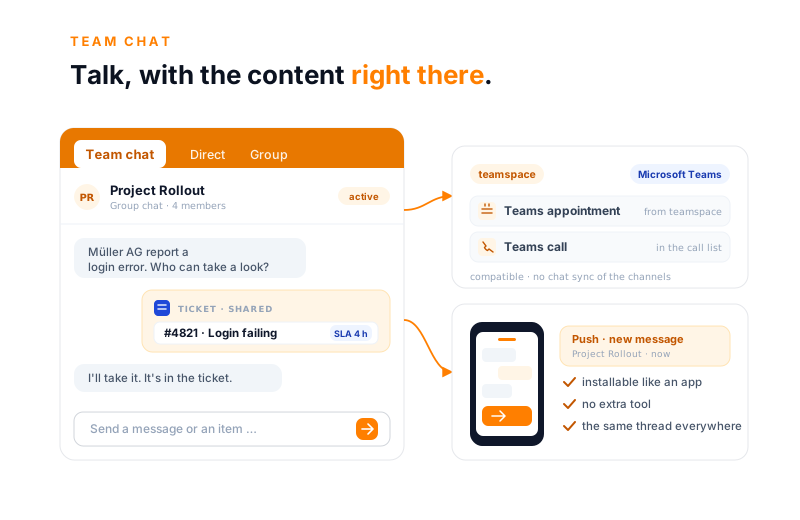
In the team chat you do not just share text. A contact, a ticket or a quote from teamspace moves into the conversation as a real item, with its status and one click back to the record. No screenshot, no typed-out number.
Projekt Rollout
Gruppenchat · 4 dabei
Müller AG meldet einen Login-Fehler. Wer schaut drauf?
Ich übernehme. Status steht im Ticket selbst.
Ein Ticket, ein Kontakt, ein Angebot wandert in den Chat und bleibt das echte Element, mit Status und einem Klick zurück zum Vorgang.
Next step
15 minutes along your own routes.
You show us where talking happens with you today, we show how conversation and record come together in one window. Afterwards you know whether teamspace fits.
Microsoft Teams
Many organisations make calls and meet in Microsoft Teams. teamspace does not replace that, it works alongside it. The customer activates the connection with their own Microsoft account.
There is deliberately no chat sync of the Teams channels. How the connection works in detail is explained on the Microsoft Teams integration.
“Staff in both support and project planning can see orders and invoices. That was not possible before.”

With you everywhere
You have the team chat with you everywhere. teamspace runs as an installable web app on almost any device, without anyone switching application or setting up an extra tool.
So someone answers a question from the train, and the next morning it is there at the desk in the same thread.
More from teamwork
The chat is one area of the teamwork software. These areas border directly on it and share the same user groups.
An arrangement becomes an open item with an assignee, a deadline and a status.
Learn moreFor topics that run longer, instead of disappearing in the chat thread.
Learn moreThe team's appointments, leave and milestones in one view.
Learn moreWhat gets asked more often belongs versioned in the wiki, not in the chat.
Learn moreStore shared files versioned, on the project and the customer.
Learn moreConnect Teams meetings and calls with teamspace.
Learn moreTerm
A team chat, also called a company chat or business messenger, is a messaging service within a company. Staff write to each other 1:1 or in groups, instead of using private messengers or long email distribution lists.
The difference from WhatsApp or a private messenger lies in the place. A team chat belongs to the company, runs on its servers and follows its permissions. In teamspace it sits in the same system as projects, customers and tickets, so a record from the system moves straight into the conversation.
For service providers, what matters most is that communication does not sit beside the work but on it. Whoever talks about an order has the order in the same window, not in a second tool.
At a glance
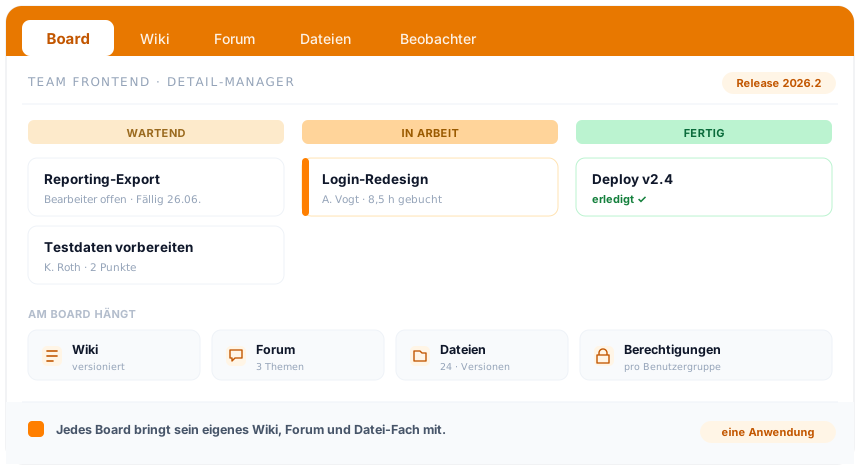
Talking is one thing, the rest of working together is another. How teamspace bundles boards, wiki, forum, team calendar and the chat in one application, each board with its own wiki, forum and file shelf, is shown in the overview of the teamwork software.
To the teamwork softwareBackground
Whether a company chat is any good is decided less by emojis and more by whether it hangs on the work. A messenger that knows nothing about the project only moves the conversation to one more place.
At the record, not beside it. Because the team chat sits where projects, tickets and customers live, a record goes straight into the conversation. Nobody types out a ticket number or looks the contact up again. Whoever opens the record is back there with one click.
In the EU, in every edition. Messages and data sit in an ISO 27001 certified data centre in Frankfurt am Main, exclusively in the EU, GDPR compliant. The team chat belongs to the teamwork layer and is included in every edition, with no surcharge for a separate module. The contractual partner is 5 POINT AG from Darmstadt.
Related modules
Whoever writes in the team is almost always talking about a project, a customer or a logged hour. Here are the shortest routes there.
An arrangement becomes project work: structure, phases and plan vs actual, up to date.
The shared contact is the customer file: records, history and terms in one place.
The discussed ticket becomes the logged hour: billable or internal, kept separate.
A team chat does not replace the phone and does not replace the meeting. It takes up the short back and forth that arises in daily business: a question about an order, a quick alignment on a ticket, a note to a colleague. In teamspace this happens in the same system as the work itself.
The difference from a private messenger is the link to the matter. Whoever talks about Müller AG drops the contact or the open ticket straight into the conversation, as a living record with status. Nobody types out a number or sends a screenshot that is out of date the next day.
The team chat knows two ways. In a direct chat, two people write 1:1, as directly as in a private messenger. The group chat brings several people together around a project, a department or a topic. Team members can be invited, so everyone is in the picture and can join the conversation.
Who writes and reads along follows the same user groups as everywhere else in teamspace. So the same permission logic applies in the chat as with projects, customers and files, without a separate set of rules.
The core of the team chat is sharing. Instead of describing a matter, you drop the real item into the conversation:
Whoever clicks a shared item is at the record itself, with its current state. So the arrangement stays connected to the work, instead of creating a copy that goes out of date separately.
Many organisations make calls and meet in Microsoft Teams. teamspace does not replace that, it works alongside it. The customer activates the connection with their own Microsoft account.
There is deliberately no chat sync of the Teams channels. So the familiar Microsoft 365 world stays, and the link to projects and customers arises in teamspace. More on this on the Microsoft Teams integration.
You have the team chat with you everywhere. teamspace runs as an installable web app (PWA) on iOS and Android, without anyone switching application or setting up an extra tool.
So someone answers a question from the train, and the next morning it is there at the desk in the same thread.
Messages and data sit in an ISO 27001 certified data centre in Frankfurt am Main, exclusively in the EU, GDPR compliant. The team chat belongs to the teamwork layer and is therefore included in every edition, with no surcharge for a separate module. The contractual partner is 5 POINT AG from Darmstadt.
In the 15-minute first call we show the team chat on an example.
First call
We discuss where you communicate today and what of it belongs in the system. You get an honest assessment of whether the switch is worth it.