teamspace

A team forum for service providers that structures discussions, polls and news.

A team forum organises exchange into topic areas instead of letting it drift past in the chat stream. In teamspace, teams discuss in forums with their own permissions, vote on options and publish company news. Part of Teamwork, the light foundation of teamspace, included in every edition.

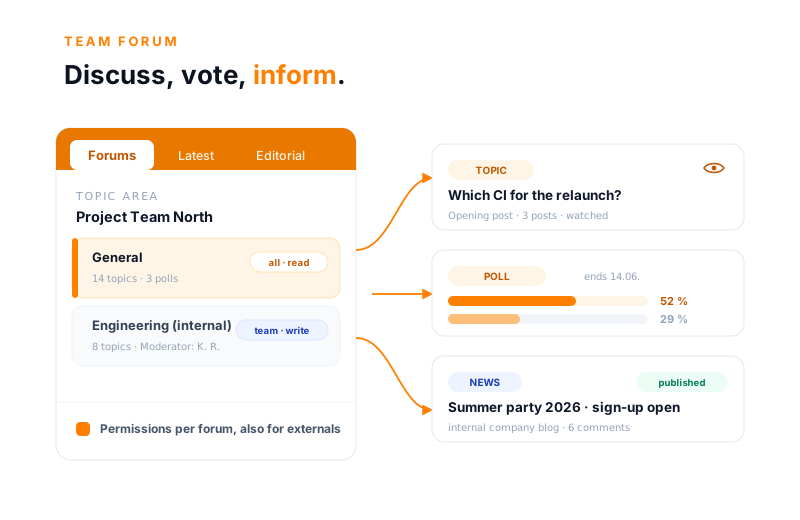
teamspace team forum: a forum area Project Team North with two forums and their own permissions, from it a discussion topic with posts, a running poll with a deadline and a published news article from the internal company blog.

Starting point

The decision gets lost in the chat stream.

Chat stream and mailing list

  • Long discussions scroll past in the chat, after a few days the status is unclear
  • A vote runs as a mail chain with reply-to-all messages
  • Company news goes out by group mail, follow-up questions vanish in the inbox
  • Whoever joins later can no longer find the start of the discussion
Recommended

Team forum in teamspace

  • Topics sit neatly in forums, the entire history stays readable
  • Polls collect votes up to the deadline, the outcome is preserved
  • Company news lives in the internal blog, everyone reads and comments in one place
  • Whoever watches a topic is notified on every new post

Day to day

Discuss, vote, inform.

Three things a team forum has to carry day to day. All three run through the same forums and the same permissions.

Every team has its own area

  • Topic areas, forums and topics cleanly separated
  • Read and write permissions per forum
  • Moderators steer sensitive topics

Polls with a real outcome

  • Single, multiple choice or as a rating
  • Public, secret or anonymous
  • The winner becomes an appointment, project or open item

Company news reaches everyone

  • The editorial team writes, the team reads and comments
  • Controlled with a publication period
  • As a news tile on the home page

Structure

Every team gets its own area.

A single forum that everyone writes everything into quickly becomes cluttered. teamspace therefore organises exchange into levels: a topic area groups several forums, a forum holds the individual topics and polls.

  • Topic area, forum, topic: The topic area is the bracket, such as "General" or "Project Team North". Beneath it sit the forums, and within them the topics and polls.
  • Your own structure: In the structure view you create topic areas and forums and sort them. That way every team or department gets its own forum.
  • Permissions per forum: Who reads or writes in a forum is decided by the permission, not by a tool subscription. Only management sees an admin forum, only the team sees a project forum.

The "Current topics" page collects the most recent posts by Today, Yesterday and Past. That keeps the overview intact, even when many forums run in parallel.

Polls

A vote that leaves a result behind.

A poll in the forum is more than a thumbs-up. It runs through a clear process, and its winner becomes a real record in the system.

anlegen

Entwurf

Optionen, Stichtag und Abstimmungsart festlegen

optional

Sammelmodus

jeder Berechtigte ergänzt eigene Optionen

läuft

Abstimmung

einfach, mehrfach oder als Bewertung

öffentlichgeheimanonym
erledigt

Gestoppt

Zwischenergebnis bleibt erhalten

Aus dem Sieger wird ein echtes Element
Termin → KalenderProjektOffener PunktDatei

“Staff in both support and project planning can see orders and invoices. That was not possible before.”

At A+W Software GmbH, discussions and decisions sit in one place for everyone authorised. What a forum records, no one has to piece together from individual inboxes.
A+W Software GmbH

Company blog

Company news that everyone gets.

Alongside discussion, the forum runs an internal company blog. In the editorial team a small group writes the posts, and the whole company reads them. So a news tile replaces the group mail that no one finds twice anyway.

  • The editorial team writes, everyone reads: Anyone without editorial access reads the articles and can add a post of their own beneath them. The announcement turns into an exchange.
  • Publication period: Every article has a from and a to and an owner. What is no longer current disappears from the view on its own.
  • Assigned to a forum: News belongs to a forum and can be filtered accordingly. The sales update sits somewhere other than the HR notice.

That gives the summer party, the new policy or the quarterly review a fixed place where everyone finds it again, instead of sinking into the inbox.

Intro call

Where do you discuss and decide today?

In 20 minutes we look at where your discussions, votes and company news sit today and how a forum bundles them in one place. You get honest initial feedback on whether teamspace fits.

Book a call

Process

How a topic runs in the team forum.

  1. 1

    Create area and forum

    In the system configuration, topic areas come into being, and beneath them the forums, for example one per team or department. The read and write permissions sit per forum.

  2. 2

    Start a topic or poll

    An opening post defines the topic. Alternatively you create a poll with options and a deadline. When it is created, the permission decides who takes part.

  3. 3

    Discuss or vote

    Posts accumulate in the topic. With a poll, voting is single, multiple choice or as a rating, public, secret or anonymous.

  4. 4

    Watch and be notified

    Whoever watches a topic gets a message in the system on every new post. That way you stay on it without constantly checking.

  5. 5

    Find it again in Current topics

    The Current topics page sorts by Today, Yesterday and Past. Filters bring older discussions back too.

Discussion

Whoever watches a topic misses no post.

A topic begins with an opening post that sets the question or the proposal. Beneath it the participants' posts accumulate, and unlike in the chat the entire history stays in one place.

  • Watch instead of asking: One click on the eye next to the topic is enough. On every new post a message arrives in the system, without your having to open the forum constantly.
  • Full status for latecomers: Whoever joins only in the second week reads the discussion from the top, instead of searching back through a thousand chat lines.
  • Current topics in view: A dedicated view shows what ran today, yesterday and earlier. Filters lead quickly back to the relevant discussion.

That turns exchange into something that stays: a question of method from today is still readable in three months, along with everything that was said about it. The quick stays in the team chat, the lasting in the forum.

Permissions

Sensitive topics stay within a small circle.

Forum content is often delicate: internal criticism, strategic questions, HR matters. In teamspace the permission per forum decides who reads along and who writes, governed through the same user groups as in the rest of the system.

  • Permissions per forum: Everyone reads an open forum, only the team in charge writes in an internal one, an admin forum stays reserved for management.
  • Moderators: For individual forums and topics, moderators can be appointed to steer and order the discussion.
  • External partners kept apart: A supplier or customer can be given access to exactly one forum, without insight into the rest.

Because the structure inherits hierarchically, the permission of an area applies to the forums beneath it, as long as nothing narrower is set. So confidential matters stay separate, without anyone having to think about it for each individual post.

More from Teamwork

Use cases around the forum.

The forum is one building block of Teamwork. These areas border on it and tap the same user groups.

Team Chat

Quick exchange 1:1 or in a group, when it does not belong in the forum.

Learn more

Company Wiki

A clarified question becomes a versioned wiki page that stays.

Learn more

Task Management

Open items with an owner and a due date, also as a poll type in the forum.

Learn more

Kanban Board

Tasks as cards that travel through status columns from Waiting to Done.

Learn more

Team Calendar

Appointments for the whole team, such as the winner of an appointment poll.

Learn more

File Management

Store documents versioned, on the board, project and customer.

Learn more

What it is

What is a team forum?

A team forum is an internal platform for structured exchange: discussions, polls and notices, organised into topic areas and forums with their own permissions. Unlike a chat, it holds topics in place instead of letting them drift past.

The need becomes tangible as soon as more than a dozen people work together. Then a shout across the room no longer suffices, and the chat becomes a stream in which yesterday's decision has already disappeared today. A question of method, a best-practice exchange, a vote on the next step: all things that concern several people and still count weeks later.

In teamspace the forum belongs to the light edition and therefore to every account. It shares user groups and permissions with the rest of the system, so a poll can file its winner as an appointment in the team calendar or a forum can be attached to a project.

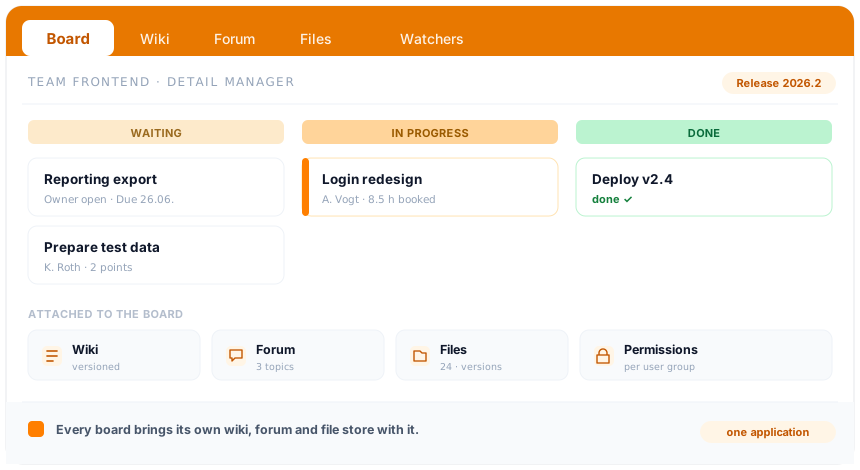
teamspace Teamwork: a board in the detail manager with the tabs Board, Wiki, Forum, Files and Watchers, beneath it the columns Waiting, In Progress and Done. Every board brings its own wiki, forum and file drawer.

At a glance

The forum is one building block of Teamwork.

Discussion, voting and news are one part of how a team coordinates its day. How teamspace bundles boards, team calendar, wiki, forum and chat in one application, every board with its own wiki, forum and file drawer, is shown by the Teamwork overview.

To the Teamwork area

Feature set

The team forum in detail.

The features, grouped by area. All governed through the same user groups.

Structure & discussion

  • Topic areas with forums beneath them
  • Structure view for creating and sorting
  • Topics with an opening post and posts
  • Watch topics with a notification in the system
  • Current topics by Today, Yesterday and Past

Polls

  • Voting type: single choice, multiple choice or rating
  • Mode: public, secret or anonymous
  • Five types: Standard, Appointment, File, Open Item, Project
  • Lifecycle: draft, collection mode, voting, stop
  • The winner is saved as a real element

News & permissions

  • Editorial team with publication period and owner
  • News tile on the home page, read and comment
  • Read and write permissions per forum
  • Moderators for forums and topics
  • Give external partners access to individual forums

Security

  • Hosting in Frankfurt am Main, processing in the EU
  • ISO 27001 certified data centre
  • GDPR compliant with a data processing agreement
  • Installable web app (PWA) for on the go

Background

What stays in the inbox, no one finds again.

The difference between a mail and a forum post rarely shows on the day it is written. It shows weeks later, when someone asks: "How did we decide that back then?" The mail is then sitting in five different inboxes, each with a different state of the reply-to-all chain.

A forum turns that around. The discussion sits in one place, the history stays complete, and whoever watches the topic has kept up with the status without searching for it. A vote produces not only votes, but a decision that lives on as an appointment or record in the system. And a piece of company news stays a page that is found again, not an attachment that disappears with the inbox.

That is the quiet gain: not the loud today, but the calm later. Whoever joins in six months reads up on what happened, instead of asking the people who happened to be there. So communication becomes knowledge that belongs to the company, not to individual inboxes.

Intro call

Bring order to your discussions.

You describe to us how your team exchanges, votes and distributes news today. We show how teamspace turns that into orderly forums that everyone can see at a glance.

What a team forum delivers for service providers

A team forum is an internal platform for structured exchange: discussions, polls and notices, organised into topic areas and forums. In teamspace it belongs to Teamwork, the light foundation, and shares user groups and permissions with the rest of the system.

Unlike the team chat, in which quick messages drift past, the forum holds in place what counts longer. An architecture decision, a best-practice exchange, a vote on the next step: all topics that concern several people and stay relevant even after weeks. Whoever joins later reads the complete history, instead of clicking back through a thousand chat lines.

Topic areas, forums and topics

For a forum to stay clear, teamspace organises exchange into three levels:

  • Topic area: the overarching bracket, such as “General” or “Project Team North”. It contains no discussions itself yet.
  • Forum: sits in the topic area and holds the topics and polls, often one per team or department.
  • Topic: the individual discussion, opened with a post that sets the question or the proposal.

In the structure view you create topic areas and forums, move them and sort the order. The “Current topics” page shows the most recent posts by Today, Yesterday and Past, with filters for older discussions.

Polls with a real outcome

Alongside discussion, the forum offers a full poll feature. A poll has a voting type (single choice, multiple choice or a rating on a scale), a mode (public, secret or anonymous) and a type.

It runs through a clear process: from the draft through an optional collection mode, in which everyone authorised adds their own options, up to the voting with a deadline. A running poll can be stopped, the interim result is preserved.

The special part lies in the type. If a poll is set to Appointment, Project, File or Open Item, the winner is saved as a real element in the system after the voting. Voting on a shared appointment therefore means having it stand directly in the team calendar afterwards.

News and editorial team: the internal company blog

The editorial team and the news together form an internal company blog, a digital staff magazine. In the editorial team a small group writes the articles, with a title, teaser and a publication period, and assigns them to a forum.

The news shows the published articles. Staff without editorial access read them through the news tile on their home page and can add a post of their own beneath them. So a notice becomes an exchange, and the summer party, the new policy or the quarterly review gets a fixed place instead of a group mail.

Watch instead of asking

A forum thrives on no one missing anything without constantly checking. For that there is watching: one click on the eye next to a topic is enough, and on every new post a message arrives in the system.

So you stay on the topics that count, without having to read along with the others. Whoever rarely opens a forum anyway is still informed as soon as something happens in a watched discussion.

Permissions per forum, also for external partners

Forum content is often sensitive: internal criticism, strategic questions, HR matters. teamspace governs access through the same user groups as in the whole system, and the permission sits per forum.

Everyone reads an open forum, only the team in charge writes in an internal one, an admin forum stays reserved for management. For individual forums and topics, moderators can be appointed. An external partner is given access to exactly one forum, without insight into the rest. Because the structure inherits hierarchically, the permission of an area applies to the forums beneath it, as long as nothing narrower is set.

Made in Germany, GDPR compliant

teamspace runs in two geo-redundant data centres in Frankfurt am Main, exclusively in the EU. The data centre is ISO 27001 certified; teamspace itself does not hold this certification. teamspace is Made in Germany and GDPR compliant, with a data processing agreement as standard. On the go, the forum runs as an installable web app.

The contracting party is 5 POINT AG, a German public limited company based in Darmstadt, which has been developing teamspace since 1999. In the intro call we show the team forum with example topics and a running poll.

Frequently asked questions about the team forum

What is the difference between team chat and team forum?
The team chat is for quick, short-lived exchange, 1:1 or in a group. The team forum is for topics meant to run longer and stay ordered: discussions in forums, polls and the internal company blog. In the chat much flows past, in the forum the history stays in one place. Many teams use both in parallel.
How is the forum structured?
In three levels: a topic area groups several forums, a forum holds the individual topics and polls. In the structure view you create topic areas and forums and sort them, for example one forum per team or department. Read and write permissions sit per forum.
How do polls in the forum work?
A poll has a voting type (single choice, multiple choice or rating), a mode (public, secret or anonymous) and a type. It runs through draft, optionally a collection mode in which everyone adds their own options, then the voting up to the deadline. With the Appointment, Project or Open Item type, the winner is saved as a real element in the system, a chosen appointment lands in the calendar, for example.
What is the editorial team, what is the news?
The editorial team and the news form an internal company blog. In the editorial team a small group writes articles with a title, teaser and a publication period. Staff see them as a news tile on the home page, read them and can add a post of their own beneath them. So the blog replaces the group mail for notices to the whole company.
Can external partners access the forum?
Yes, kept apart. Through the permissions, an external partner can be given access to exactly one forum, without insight into the rest. The permissions sit per forum and inherit hierarchically within a topic area.
Can the forum be connected with projects?
Yes. Every project has its own forum tab for the exchange about the undertaking. So the discussion sits at the project, not in a separate program. The same user groups govern who reads and writes in the project forum.
Where is the forum data stored?
In two geo-redundant data centres in Frankfurt am Main, exclusively in the EU. The data centre is ISO 27001 certified; teamspace itself does not hold this certification. teamspace is Made in Germany and GDPR compliant, with a data processing agreement. The contracting party is 5 POINT AG, a German public limited company based in Darmstadt.