
Anchored to the record
- File against project, customer, order, ticket
- Found instantly from within the record
- No second tool for access
Files sit against the project, the customer, the order and the ticket, not on an isolated drive. Every version is kept, and every file inherits the permission of its record. Part of the teamwork software from teamspace, included in every edition.
Day to day
Three things decide whether a team store works or whether, in the end, everyone hoards their own version again.
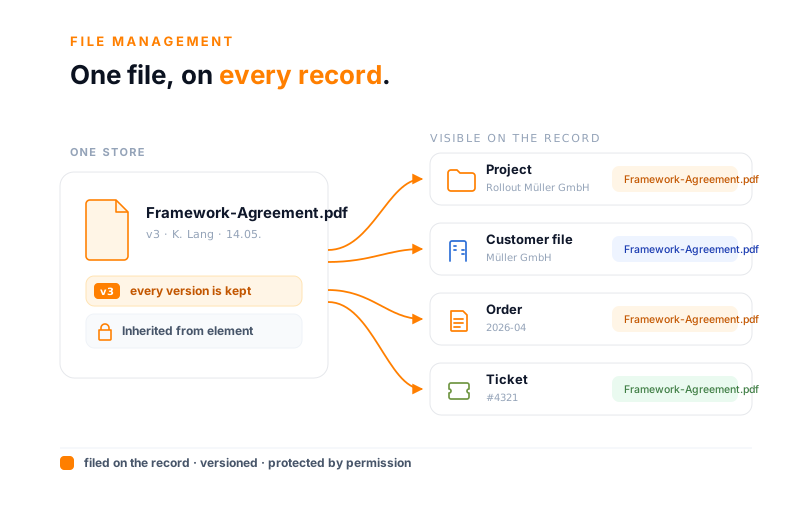
On the network drive a file lives in a path that everyone pictures differently. In teamspace it sits against the record being worked on and inherits its access. The same file is visible from the project, the customer record and the order.
Kein Ordnerpfad, den jeder anders kennt, sondern eine Ablage am Projekt, Kunden und Auftrag.
On the record
In teamspace, every project and every customer has its own file store. Whatever belongs to the record sits where the work on it actually happens, rather than on a separate drive.
That way you see every deliverable from within the project and every contract from within the customer, without hunting for the folder first.
Versions
Uploading a file afresh does not overwrite the old state. Version control sets the previous draft aside, with editor and timestamp, and you bring an earlier state back with one click.
That way no file names like "contract_v3_final_FINAL.docx" appear, because the version lives in the system, not in the name.
“Staff in both support and project planning can see orders and invoices. That was not possible before.”

Feasibility
Show us a typical project folder of today. Together we look at which files belong against the record and what the permissions look like afterwards.
Access
Not every document belongs in front of every pair of eyes. In teamspace you set access through four modes, governed via central user groups rather than via individual people.
That way management sees the contract details, while the junior consultant finds only the deliverables of her project. Subdirectories get their own read and write rights.
Uploading and editing
From drag and drop to a mounted drive: the routes into the store and the work on a file run straight in the browser.
The classic way via browse, by drag and drop, as a photo through the webcam or via WebDAV. You photograph physical receipts through digital receipt capture straight into the system.
You open Word, Excel and PowerPoint with a click of the mouse and edit them online. Anyone who wants to work offline downloads the file and locks it for the duration of the editing.
Mount the store as a drive via WebDAV and work as usual. New documents come from stored templates, plus four link types to a file, directory, website or local target.
More from teamwork
File management is one area of the teamwork software. These areas sit right next to it and share the same user groups and permissions.
Open items with an editor and a deadline, with an attachment on the task.
Learn moreGuides and knowledge versioned, connected to the matching files.
Learn moreTopic areas and news, the discussion about a file in one place.
Learn moreAppointments, leave and milestones of the team in one view.
Learn moreOne-to-one and group chat, content from the system shared directly.
Learn moreTasks as cards on the same project as the related files.
Learn moreReview
Some documents do not go out unchecked. In the detail manager you hand a file to another person for review, for instance to a manager, and follow the state through to approval.
That way it stays traceable which state has been signed off, without anyone piecing the trail together from an email chain.
External
Anyone giving a file to a customer need not open the whole store to them. Through a public link you share exactly one file, with a validity period after which the link lapses.
That way a partner gets exactly the acceptance report they need, and nothing else from the internal store.
In figures
What makes the difference between a scattered drive and a store the whole team relies on.
is kept
with editor and timestamp per save
per file
through user groups, by need to know
not in the path
project, customer, order and ticket
in Darmstadt
5 POINT AG, self-financed
The comparison
Term
File management for teams is a shared online store in which documents are not merely saved but connected to their working context: to the project, the customer, the order or the ticket they belong to. That way everyone finds the right file where they are working anyway.
The difference from a classic network drive lies in the connection. On a drive a file lives in a folder path that everyone pictures differently, and no one is sure which draft applies. In teamspace it hangs off the record, carries its own version history and inherits the permission of the record. The benefit becomes tangible at growing service providers, usually between 10 and 250 staff, when too many hands work on too many documents.
Because the store is part of the same application as projects, customers and tasks, a file does not live in a silo. Whoever opens the customer has the contract one click away, and whoever works the ticket sees the customer's attachment without switching programs.
Data protection
Project files contain contracts, quotes and correspondence, exactly the things that ought to be protected. teamspace stores the data in an ISO 27001 certified data centre in Frankfurt am Main, with processing exclusively within the EU.
That keeps the store set up in a GDPR-compliant way, without anyone shuffling files back and forth between tools.
At a glance
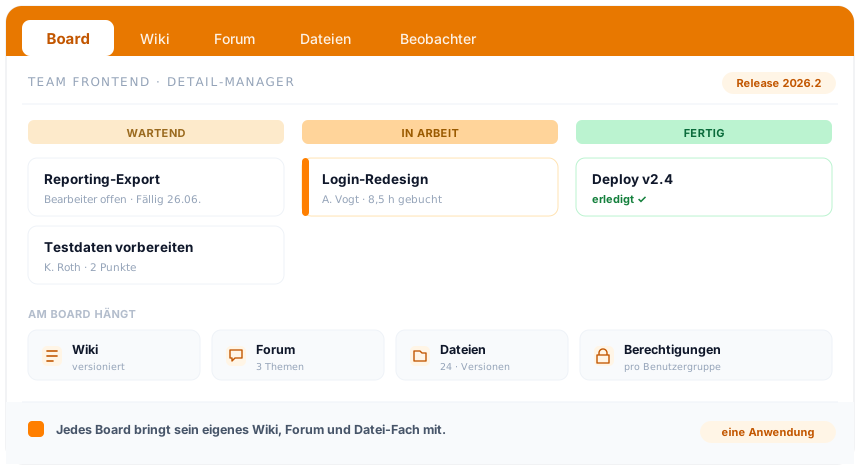
The file holds the document, the board the work, the calendar the time. How teamspace brings these areas together under one surface, with shared user groups and permissions, you see in the overview of the teamwork software.
To the teamwork softwareBackground
Whether a file store is worth anything is decided not by its size but by whether, in the end, everyone finds the same draft. A drive on which everyone imposes their own order becomes, over time, a guessing game. A store against the record stays sorted, because the structure follows from the work.
One version, no guesswork. Instead of "quote_final_v2_new" in the file name, the file keeps its versions in the system, with editor and date. Whoever wants to know what applied last week brings the state back, rather than asking three colleagues.
Access that grows with you. Whoever joins the project sees, from day one, what the project sees, because the rights hang off the group and the record, not off a person. Whoever leaves takes no folder share with them that no one ever resets.
One place instead of four. Contract on the customer, deliverable on the project, attachment on the ticket: because everything sits in the same application, the shuffling between drive, mailbox and cloud drive ends. That is the point at which a central store gives time back, instead of creating new upkeep.
Related modules
Whoever files against the record almost always works on the project, the customer and the booked hour too. Here are the shortest routes there.
The files against the project become the project plan: structure, phases and plan vs actual, up to date by the day.
The contact becomes the customer record: contracts, records and history in one place.
The task becomes the booked hour: attendance, project time and digital timesheet with approval.
Where you stand
You show us your file landscape of today, we show you what teamspace replaces of it and what the permissions on the record look like. Then you decide whether the switch is the right path.
Intro call
We discuss your file structure, the permissions on the record and the move off the drive. By the end you know which documents to bring into teamspace first.