teamspace

Key account management: grow your strategic customers systematically.

With teamspace key account management, you steward your most important customers across group, subsidiary and engagement levels. Key contacts, cross-sell view, contract terms and communication history in one place. Part of teamspace CRM software, no module surcharge.
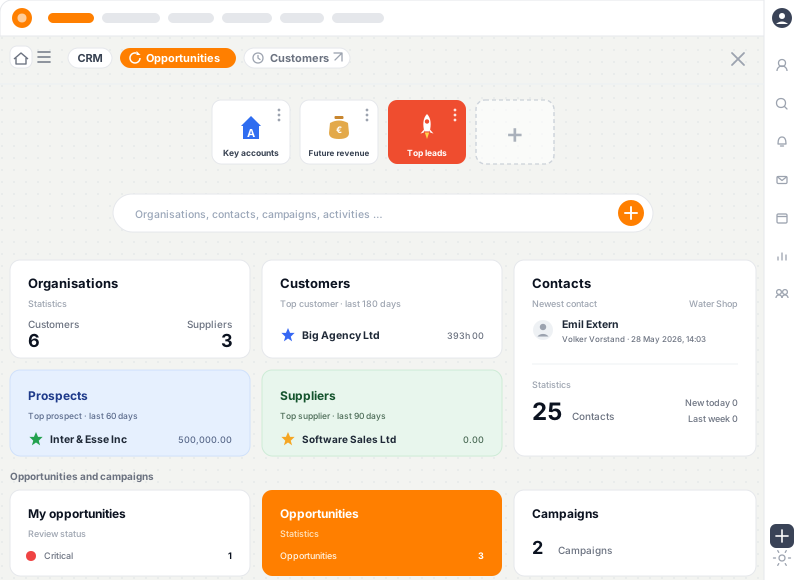
teamspace key account management: pipeline of key customers, communication history per group, cross-sell view

What key account management with teamspace delivers

1

Group, subsidiary, engagement in one view

Holding company with subsidiaries, each subsidiary a separate buyer with shared account owner. Reporting aggregates at every level, permissions configurable per level.

2

Key contacts and stakeholder map

Who decides, who delivers, who signs off, who blocks. Roles, functions and relationships structured per contact, with reminders per person.

3

Cross-sell potential transparent

Which subsidiary has not been engaged yet, which areas are still open, which contracts are ending. Account owners see follow-on potential at a glance.

How key account management runs in teamspace

  1. 1

    Map the group structure

    Holding, subsidiaries, business units and locations modelled hierarchically. Own buyer numbers per level, shared account owner.

  2. 2

    Maintain key contacts

    Contacts with function, decision authority and relationship status. Stakeholder map at the account, reminders ahead of important dates.

  3. 3

    Bundle activities at the customer

    Emails, calls, meetings, quotes, active engagements, open tickets, all activities in one timeline.

  4. 4

    Steer cross-sell and renewals

    Account owner sees contracts, terms, renewal dates, cross-sell potential. Renewal reminders run automatically.

  5. 5

    Quarterly review with data

    Customer value, margin, lifetime value per group and subsidiary. Drill-down to individual engagements.

Capabilities for key account management at a glance

Structure and relationships

  • Group, subsidiary, engagement levels with own views
  • Key contacts with role and decision authority
  • Stakeholder map with relationship status
  • Account owner and co-owner per group
  • Engagement structure across multiple locations

Steering and reporting

  • Customer value and lifetime value per level
  • Cross- and upsell view across the customer base
  • Renewal reminders with escalation
  • Quarterly review with aggregated KPIs
  • Custom dashboards for key account managers

Integration

  • Handover to [project management](/project-management/) when an engagement starts
  • Linked with [service desk](/service-desk-software/) for customer tickets
  • Campaigns from [campaign management](/campaign-management/) on the account
  • Email integration with Microsoft 365 and Google Workspace
  • REST API for custom integrations

What key account management delivers

Key account management is the structured stewardship of your most important existing customers, often called A-customers or key accounts. In growing service firms, half of the revenue typically comes from 10 to 20 percent of customers. That concentration calls for its own steering layer, separate from classical sales or pipeline management.

teamspace bundles group structure, key contacts, active engagements, contracts and cross-sell potential per key account in one view. Account owners see day-by-day what is happening at the customer, which contract dates are coming and where follow-on potential exists.

Group, subsidiary, engagement structured

Growing service firms often have customers with multiple subsidiaries, business units or locations. teamspace models this complexity natively:

  • Holding at the top with account owner and consolidated reporting
  • Subsidiaries as separate buyers with their own buyer numbers
  • Business units and locations beneath the subsidiary
  • Engagements as operational delivery units at the business unit
  • Permissions per level, who is allowed to see what

This structure offers more than a classic CRM provides and is exactly what senior account managers need for strategic customer work.

Key contacts and stakeholder map

Key account management lives off relationship quality. teamspace helps maintain it systematically:

  • Key contacts with function, decision authority and relationship status
  • Stakeholder map at the account, champions and sceptics visible
  • Reminders ahead of birthdays, anniversaries, contract dates
  • Activity history complete per contact, even when the responsible person leaves
  • Microsoft Teams integration for call and chat context at the contact

The result is real continuity in the customer relationship, rather than handover by Excel.

Cross-sell and renewals steered

For existing customers, the biggest growth potential lies in existing relationships. teamspace makes it transparent:

  • Cross-sell view across all subsidiaries and units
  • Renewal dates with automatic reminders 90, 60, 30 days before expiry
  • Contract terms centrally managed with escalation paths
  • Follow-on potential visible from active engagements
  • Customer value over time as lifetime value view

Account owners see aggregated views, leadership sees trends, employees see their own responsibilities.

Integration with the service business

The full impact of key account management comes through linkage to the other modules:

Data is captured once and available in every view, no CSV export, no integrations.

Made in Germany, hosted in Frankfurt

Key account data is particularly sensitive: contract details, conditions, relationship quality, internal assessments. teamspace is:

  • Hosted in an ISO-27001-certified data centre in Frankfurt am Main (the data centre is certified, not teamspace itself)
  • GDPR compliant with standard data processing agreement
  • Operated exclusively in Frankfurt am Main, EU processing
  • Need-to-know permissions per account, engagement and contact
  • Made in Germany, contracting party 5 POINT AG, German contract law

In the 15-minute requirements check we walk through key account management on a sample customer.

Frequently asked questions about key account management

Why does a service firm need key account management?
Once a few large customers account for a substantial share of your revenue, structured stewardship pays off. Key account management bundles relationships, contracts, active engagements and cross-sell potential per group customer rather than spreading them across Outlook categories and Excel workbooks.
How does teamspace model group structures?
teamspace runs holding, subsidiaries, business units and locations hierarchically. Each level can have its own buyer number, conditions and permissions. Reports aggregate at group, subsidiary or engagement level.
Can we have multiple account owners per group?
Yes. Per group and per subsidiary, account owners and co-owners can be defined with clear responsibilities and reminders. Substitutions are mapped through roles.
How does the cross-sell view work?
Account owners see per group which subsidiaries already have engagements, which areas are untouched, which contracts expire in the next 6 months and what follow-on potential is visible from active engagements.
How is lifetime value calculated?
From all logged hours, flat rates, licences and travel costs of active engagements, the customer value over time is derived. Aggregated at group, subsidiary and engagement level. Daily-fresh, no CSV export.
Does this work without other CRM modules?
Key account management is part of teamspace CRM software, no module surcharge. Full impact comes in combination with lead management, sales forecast and customer records.

Key account management reviewed in 15 minutes.

In the requirements check we discuss your group structure, account owner logic and cross-sell needs.