
Plan, actual and forecast in one view
Planned budget, logged hours, projected end state. Per project, phase or task, down to the single entry.
Project leads and leadership see at any moment whether a project is on plan, how the margin is developing and when the budget tips. From logged hours, flat rates and travel expenses, with no Excel bridge. Part of project management in teamspace.
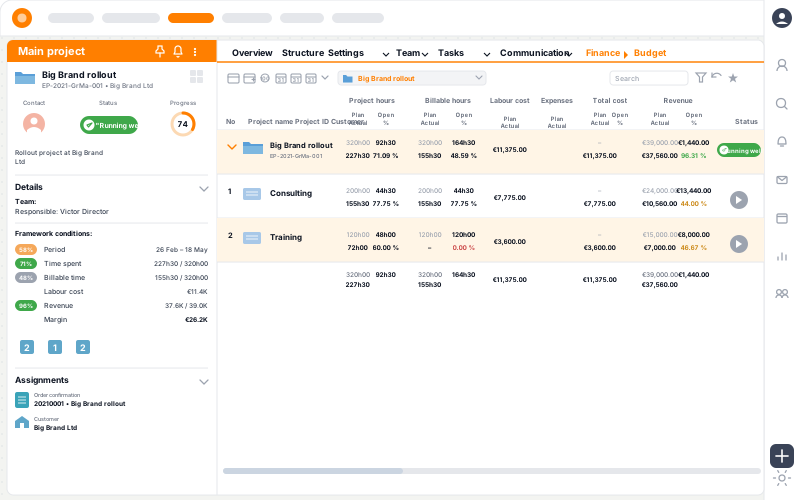
Keep the overview
Good project controlling is the difference between steering and chasing. With project management in teamspace you keep an eye on the questions that count in daily work:
teamspace answers these and many more, from the progress and the status of each project. When something runs off plan, the software flags it on its own, instead of you finding out at the month-end close.
Feature set
Planned budget, logged hours, projected end state. Per project, phase or task, down to the single entry.
Fee volume less the valued hours, travel expenses and material. Per client, contract type or project, not a snapshot from last month.
Warning levels flag when a project crosses its budget threshold or the margin falls below a line. Room to react before the client complains.
From overview to cause
A figure that stands out in the portfolio leads in a few clicks to the entry that caused it. Through project, phase and work package, with no hour lists to search.
Migration service
PRJ-009
Customer portal · relaunch
PRJ-014
CRM rollout
PRJ-021
Concept
completed
Delivery
phase running
Test & sign-off
planned
Frontend
6 packages
API integration
3 packages
Infrastructure
2 packages
Plan
estimated
Actual
logged
Interface rework
K. Lange · 14 May
From the portfolio to the single hour: every figure is traceable.
Plan vs actual
The most important lever in controlling is the comparison at phase level. For each phase, teamspace places the planned hours, the logged and approved hours and the forecast to phase end side by side. Three drift patterns become visible early this way, instead of only at the close.
Margin
teamspace calculates the margin continuously: from internal hourly rates, logged hours and incurred cost. The result sits in the Analysis tab, not in a spreadsheet someone fills in at the quarter close.
The view switches with the question:
15 minutes
In 15 to 30 minutes we go through your phase structure, your margin structure and your thresholds. You get a clear first read on whether teamspace fits your setup.
“We mostly work with the budget column.”

Earned value
The forecast is not a gut estimate but a calculation. teamspace sets the planned cost, the value already completed and the actual cost in proportion and projects the remainder of the project from them. So you can see early whether a project will land within its time and cost frame.
Phases, work packages, planned hours and internal rates. Templates from earlier projects speed up the build.
The team logs time on a phase or task; travel expenses and material come in through the installable web app (PWA). One entry feeds payroll and the project view.
The dashboard shows day by day which phase is on plan, which is overrunning and where the margin is drifting. No weekly snapshot.
From planned cost, completed value and actual cost, teamspace projects the project remainder, current to the day with each new entry.
Warning levels flag the drift; the project lead steps in before it can no longer be recovered.
Warning levels
teamspace works with three warning levels on the traffic-light method: notice, warning and critical warning, in green, amber and red. For each key metric you set the threshold, as a fixed value or as a percentage.
When a project crosses a threshold, the notice goes out automatically, by email on request. Every milestone also has an advance-warning date, so a looming delay is on the radar early.
More from project management
Project controlling shares its data with these areas, with no one maintaining anything twice.
Steer progress and cost together, with earned value and efficiency.
Learn moreApproved hours become the invoice, fixed price and time-and-material side by side.
Learn moreUtilisation per person and team, forecast to quarter end.
Learn moreSteer several projects in parallel, surface resource conflicts early.
Learn moreMain project, subproject, work package, phase and milestone, freely combined.
Learn moreLog time on a phase or task, the source of every controlling figure.
Learn more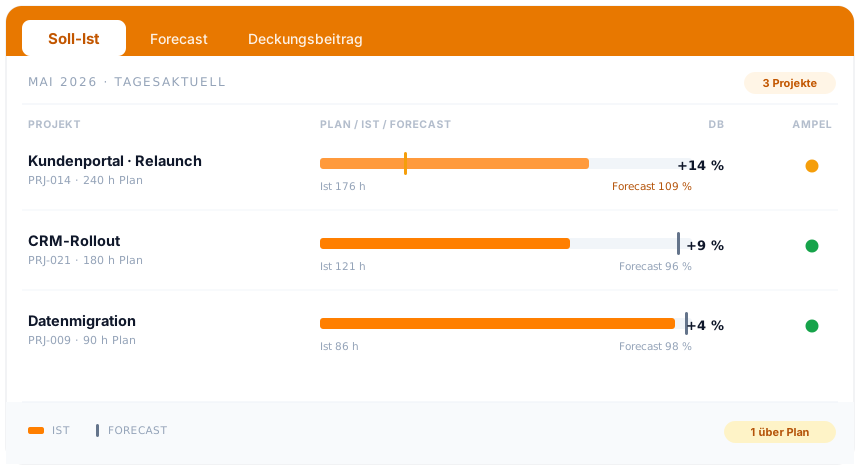
Part of project management
Plan, actual and forecast are not an add-on module but the steering view on the projects you already run in teamspace. From the work breakdown structure through billing to capacity planning, in one overview.
See project managementControlling day to day
Project controlling software, often also called a project controlling tool, places plan, actual and forecast of a project side by side and shows whether it is running within its time and cost frame. The difference between a time book and real controlling is not more figures but when they arrive: on the day of the entry instead of at the month-end.
teamspace bundles the common methods on one data set. Plan vs actual sets planned and consumed hours, labour cost, external cost and revenue against each other. The margin shows how profitably a project is running, continuously and with no manual rework. The earned value analysis projects the project remainder from the completed value. The traffic-light method translates deviations into green, amber and red. And the milestone trend analysis turns the milestones re-set across the project reports into a trend line that shows early whether a date is slipping.
Because all of this works on the hours and cost already logged, every metric is traceable down to the single entry. Whoever wants to steer does not have to gather data first, they see it.
Project controlling looks at the single project. For the view across all projects, clients and departments, with cost centres, allocations and contribution margin II, there is controlling in teamspace with contribution margin accounting.
Related modules
Project controlling lives off the data of the hour, the invoice and the order. Here are the shortest routes there.
Hours land on the work package and are the basis for plan vs actual, margin and billing.
Completed project work becomes the invoice, with hourly rates, flat rates and billing rules.
The accepted quote becomes the project. Order and customer file stay linked to the project.
Intro call
Let's talk 30 minutes about your project steering.
You show us your phases and thresholds, we show how teamspace turns them into a daily view.