
An overview, not an Excel list
- Every running project with status and progress
- Ordered by project type and directory
- Global milestones across all projects
Consultancies and IT service providers rarely run just one project. teamspace gathers the whole project landscape into one overview: ordered by type and directory, with status, progress, global milestones and utilisation across every project. Part of project management in teamspace.
What many projects demand
A single project all but steers itself. Once ten or thirty run in parallel, something else decides the outcome: whether the landscape stays ordered, who is working on what and when, and when a project starts to drift.
The whole project landscape
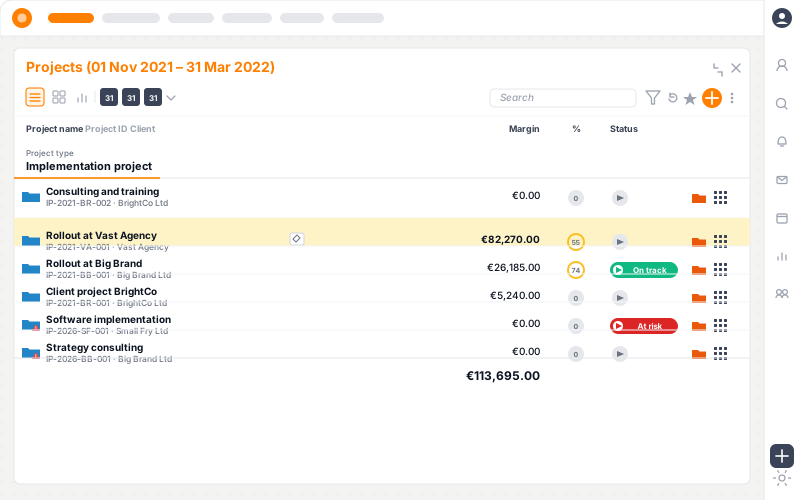
The multi-project overview shows each running project with status and progress. Project directories order the landscape like folders, project types group it by kind, and global milestones show the standing of several projects at once.
Directories · Effort
Customer portal · Relaunch
PRJ-014
62 %
ERP rollout North
PRJ-021
38 %
Website relaunch
PRJ-033
100 %
CRM data migration
PRJ-009
24 %
Structure
Running many projects, you do not want to start from scratch each time. In teamspace every project takes a project type, such as customer project, rollout project or maintenance. A type brings its own workflow and its own approval rule, and through a template it also brings the phases, milestones and roles.
A new project inherits this structure automatically. When it comes from a confirmed order, that happens in one click, line items included as subprojects or work packages. Project directories break the landscape down further, by financial year, office or practice, mounted as a drive via WebDAV if you wish.
Directories nest and aggregate the effort of the projects inside them. A "Development" directory with a subfolder per quarter shows at a glance which projects are due in Q1 to Q4 and how many hours sit in each, a simple way to lay the year's scheduling out in front of you.
Milestones
In multi-project management, milestones are more than a deadline per project. teamspace knows three kinds. A project milestone belongs to a single project. A global milestone is visible in every project and so can be shared across many, a trade-show date or a release that several projects depend on.
A virtual milestone goes a step further: it surfaces a scenario, a particular combination of projects, without wiring those projects rigidly together. Global milestones appear in the team calendar if you wish, so a shared date shows up everywhere it counts.
“We mostly work with the budget column.”

Utilisation
The most common bottleneck in multi-project management is not a single project but one person scheduled across four at once. teamspace schedules staff across several projects and totals their load. Absences through leave and sickness flow in automatically.
Schedule someone beyond their free capacity and the staffing assistant flags the clash before the project starts. The view switches between project, person and organisation, so the same person shows up once per project and once across all projects. The full depth sits in capacity planning (enterprise).
20 minutes
We'll look at your project landscape.
In 20 to 30 minutes we go through your project types, your directory structure and your utilisation. You get a clear first read on where teamspace fits with you.
Three angles
Project leads, resource owners and leadership look differently at the same data. teamspace switches the view rather than duplicating the data.
Project
Person
Organisation
Early warning
teamspace works with three warning levels by the status-light method: notice, warning and critical warning, in green, amber and red. For each key metric you set the threshold, as a fixed value or as a percentage. When a project breaks a threshold, the notice goes out automatically, by email if you wish.
Across the portfolio that means: you see at a glance which of the running projects is on green, which breaks the budget threshold and which has a date slipping. Every milestone carries an advance-warning date too, so a looming delay is on the radar early, not only at the month-end close.
Reporting
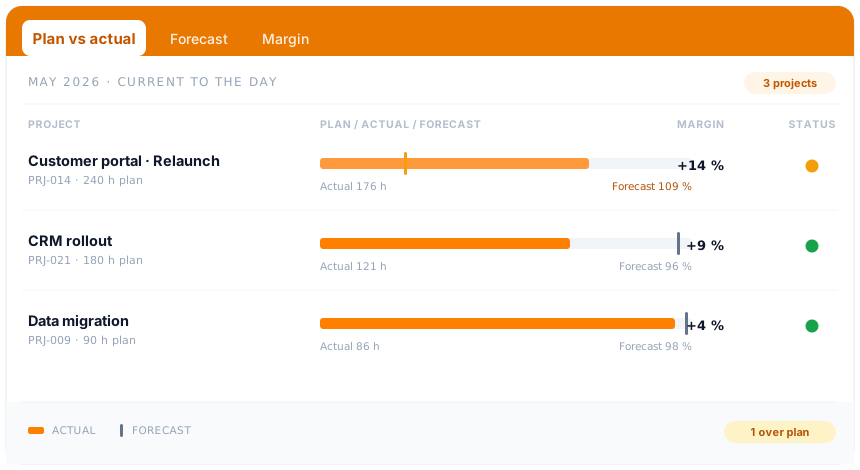
In multi-project management two vantage points matter. Per project, plan vs actual, margin and earned value analysis are available current to the day, from the hours and cost already captured. Across all projects, the overview shows the standing of the landscape with status, progress and global milestones.
Because both levels work off the same capture, every figure in the portfolio leads in a few clicks down to the single entry that caused it. How deep that goes per project, project controlling shows.
Part of project management
Steering several projects in parallel is not an add-on module but the view from above onto the projects you already run in teamspace. From the work breakdown structure through capacity planning to controlling, in one overview.
See project managementMore from project management
The multi-project view shares its data with these areas, without anyone maintaining anything twice.
Schedule staff across projects, utilisation per person and week, clashes visible early.
Learn morePlan, actual and forecast current to the day, with margin and status light down to the single entry.
Learn moreProject the rest from the value completed, with schedule and cost variance.
Learn moreMain project, subproject, work package, phase and milestone, freely combined.
Learn moreApproved hours become the invoice, fixed price and time-and-material side by side.
Learn moreLog time on project, phase or task, the source of every utilisation and controlling figure.
Learn moreWiki, files and minutes stay on the project, findable across every project.
Learn moreMove work packages in an agile flow, the same element in the structure and on the board.
Learn morePace a backlog from several projects into sprints, by owner and capacity.
Learn moreIn overview
Multi-project management software runs several projects in parallel from a shared data base: it orders the project landscape, takes on multi-project resource planning across all projects and makes the standing of every project visible at once. The difference from a single project plan lies not in more functions but in the vantage point: not one project in detail, but many projects in relation to one another.
Two variants are often drawn apart. In programme management, several projects pursue a shared goal and have to be aligned with one another. In project portfolio management, the projects have different goals but compete for the same people and budgets. teamspace covers both cases, because projects, utilisation and analysis sit on one capture. Anyone who puts the strategic selection front and centre finds it in the project portfolio software.
Day to day, good multi-project management comes down to one thing above all: never maintain anything twice. The hour a consultant logs on a work package feeds utilisation, controlling and later the invoice. Global milestones appear in the team calendar if you wish. And a work package can be worked classically in the work breakdown structure or in an agile flow on a Kanban or Scrum board, without being created twice.
Related modules
Steering many projects almost always means dealing with the hour, the invoice and the contact. Here are the shortest routes there.
Hours land on the work package and are the basis for utilisation, controlling and billing.
Completed project work becomes the invoice, with hourly rates, flat rates and billing rules.
The accepted quote becomes the project. Order and customer file stay linked to it.
Call
You show us how many projects run in parallel and where it snags today. We show how teamspace turns that into an ordered overview.