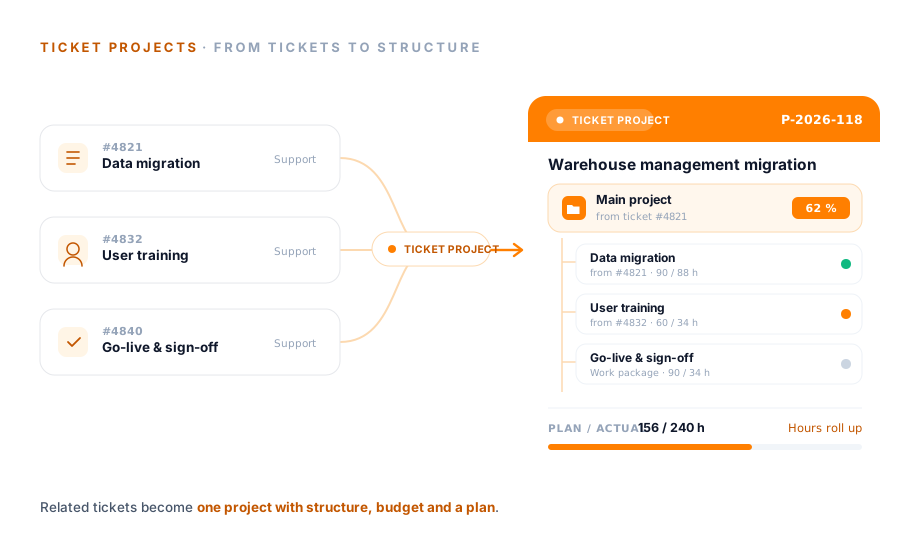
Hauptprojekt
aus Ticket #4821
Plan / Ist
240 h / 156 h
Datenmigration
aus #4821Anwender-Schulung
aus #4832Go-Live & Abnahme
ArbeitspaketSome service requests are settled with a single reply. Others grow over weeks, with several people involved and a budget of their own. teamspace turns a complex ticket into a project with structure, phases and planned-versus-actual, without anyone switching tools. Part of Service Desk in teamspace, with no module surcharge.
Structure
The complex ticket becomes the main project, related tickets become sub-projects or work packages beneath it. Each node carries its source ticket, and hours and progress roll up to the top.
Hauptprojekt
aus Ticket #4821
Plan / Ist
240 h / 156 h
Datenmigration
aus #4821Anwender-Schulung
aus #4832Go-Live & Abnahme
ArbeitspaketJedes Ticket wird ein Knoten der Projektstruktur. Stunden und Fortschritt rollen automatisch nach oben.
Why at all
While a request stays small, a ticket is enough. As it grows, a pile of single tickets lacks what a project brings with it from the start.
Linking
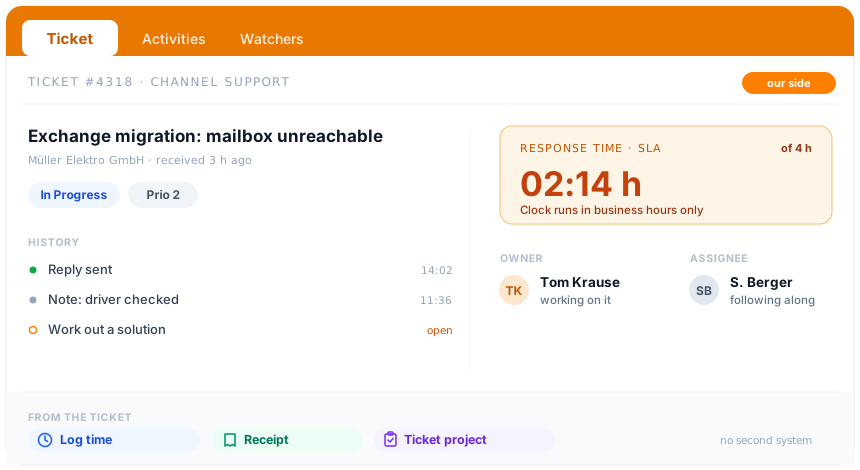
Turning a ticket into a project takes one click. Through the "Create ticket project" action, the service manager chooses whether a main project, a sub-project or a work package is created. For a sub-project or work package, teamspace asks which parent project it belongs under.
This keeps the line between quick support and a genuine undertaking fluid. No one has to decide up front whether a request is a ticket or a project before it is clear how large it will become.
Collection point
As soon as the ticket project exists, it has one place where everything comes together. A project's "Activities" tab bundles what belongs to the matter, without anyone switching between views.
What used to be spread across a ticket system, a project tool and a spreadsheet now sits in one place. No one has to gather the figure that matters at month-end from three sources any more.
“We mostly work with the budget column.”
Use cases
The ticket project is the path from service to undertaking. These areas go deeper into the steps before and after, each on its own page.
Run requests as tickets with channels, status and responsibility.
Learn moreTickets from email, internal and external access, with workflows per channel.
Learn moreService effort from the ticket logged to project and invoice.
Learn moreResponse times per customer, with time remaining and a warning in the ticket.
Learn moreCustomers open tickets themselves and see status and history.
Learn moreAn email in the mailbox becomes a ticket, without leaving Outlook.
Learn moreManagement
A ticket project is a full project. It is managed with the same figures teamspace keeps for every project, rather than surfacing at the end of the period as uncosted effort.
That way service management sees early when an undertaking is going off track, and not only once the hours have long been logged.
Process
The service manager sees it: several tickets belong to one overarching requirement, such as migrating an application or rolling out new hardware.
The complex ticket becomes a main project, related tickets are set up as a sub-project or work package beneath it. Phases and budget are defined.
The tickets stay visible in the Service Desk; the project gathers them. Hours are logged per ticket and totalled per sub-project and project.
Planned-versus-actual up to date daily, contribution margin continuous, traffic-light warning levels at thresholds, project remainder projected through to completion.
Periodically or at project close-out, the receipt is created from recorded hours, flat rates and line items. The project stays linked to the source tickets.
Intro call
We look at a concrete example: which tickets belong together, what budget is behind it, how it is billed in the end. After that you will know whether it fits your service operation.
Billing
A ticket project is billed like the engagement behind it. Different components run in parallel, without anyone setting up a separate model for each phase.
Service intervals and time budgets control when and how billing happens. ZUGFeRD, XRechnung and the DATEV handover run through invoicing, with no CSV export.
Comparison
Where the route via a ticket tool plus a separate project tool becomes more expensive than one end-to-end system.
Feature
Ticket tool + separate project tool
teamspace
RecommendedScope of functions
What the ticket project makes of service operations divides into three areas of work. The actual billing logic belongs in invoicing and is triggered here, not claimed.
Glossary
Commonly confused terms, placed precisely in the teamspace model.
At a glance
The ticket project leads from service to undertaking. How teamspace orders the whole of service, from channels through SLA and escalation to billing from the ticket, is shown in the Service Desk Software overview.
To Service Desk SoftwareWhen it pays off
A ticket project is a project that arises from one or more service requests and stays firmly linked to them. It pays off as soon as a request becomes too big for a ticket: when several people work on it, when it runs over weeks, when there is a budget behind it.
Typical cases from day-to-day systems-house work: migrating a business application with tickets for data migration, training and go-live; rolling out new hardware across several sites with one ticket per site; introducing a cloud solution with tickets for concept, implementation and handover. In each case the complex ticket becomes a main project, and the related tickets become sub-projects or work packages beneath it.
The gain is not the conversion itself, but what becomes possible afterwards: log hours per ticket and total them per phase, read a budget against the actual status, see a margin before the undertaking is finished. Anyone running service and project in separate tools rebuilds this view by hand from two sources every time. In teamspace it stays in one place, from the first ticket to the final invoice.
Security
A ticket project holds what makes up a customer undertaking: terms, efforts, internal notes, conflicts. teamspace addresses that on several levels, without management having to worry about the infrastructure.
The contracting party is 5 POINT AG, a German public limited company under German law. teamspace itself does not hold ISO 27001 certification; it is the data centre that is certified.
Related modules
Anyone turning service requests into projects almost always deals with the contact, project management and the hour. Here are the shortest routes there.
The ticket hangs off the contact; the ticket project inherits it as the client of the undertaking.
The ticket project is a full project with structure, planned-versus-actual, forecast and roles.
Service hours logged from the ticket to the project and the basis for billing.
Intro call
Half an hour is enough for an honest look: which tickets belong together, how the undertaking gains structure and budget, and how it is billed in the end. After that you will know whether teamspace fits your service operation.
Ticket projects arise when one or more service requests turn into a larger requirement that has to be planned and billed in a structured way. The complex ticket becomes a project in one click, optionally as a main project, sub-project or work package. Ticket and project then stay firmly linked.
teamspace runs ticket and project operations in one system. Instead of a ticket system for service, a project tool for the undertaking and a spreadsheet for the connection, there is one structure. The tickets remain individually manageable and are at the same time aggregated within the ticket project.