
Capture project hours
- Log live or after the fact in the system.
- Capture daily working time with check-in and check-out.
- In the office, working from home or on the move via the web app.
With teamspace project time tracking your team logs hours online: in the office, working from home or on the move via the web app. Live or after the fact, with a stopwatch, templates or a time matrix. Client billing runs through the built-in invoicing software, and activity records and timesheets are produced automatically.
At a glance
Project time tracking software logs every working hour against a project, an activity or a task. That makes visible who worked on what, whether the time is billable to the client, and how economically a project is running.
Definition
Project time tracking means capturing every working hour not just as attendance, but assigning it to a concrete project, an activity and a team member. The plain time thus becomes a statement about what was worked on, whether the hour is billable to the client and how economically a project is running.
For service firms this project-based time capture is the basis of every billing and every steering decision: without it, effort, margin and utilisation stay invisible. Project time tracking software makes logging fit for everyday use and carries the hour without a break in the chain from capture through approval all the way into invoice and analysis.
Two views
With teamspace your team keeps two views without logging hours twice. The attendance time documents the whole working day including breaks: you check in and out flexibly, in the office, working from home or on the move.
The project time covers only the blocks logged against concrete projects, for example two hours on project A and three on project B. Breaks do not count, but every entry assigns the hour to one activity and one project unambiguously. If project time differs from attendance, the system flags it.
A normal day's work, a routine day or capture to the minute: My Day, template, time matrix and stopwatch all feed the same project time account. Each person takes the route that fits the moment.
My Day
Monday, 11/05/2026
Müller GmbH
Consulting · Concept
Schmidt AG
Rollout · Workshop
Internal
Team call
Template · Standard day
3 projects pre-filled
Time matrix · W20
Mon–Frione week, all projects at a glance
Order becomes project
Service firms usually assign their project hours to concrete client orders. In teamspace an order becomes a project in one click: the effort line items become work packages the team logs hours against straight away. That avoids double upkeep between order and project.
If you need a deeper breakdown, you plan the project classically with a work breakdown structure of phases and work packages. Either way the bridge to later billing stands from the start, because every hour knows which line item it belongs to.
Approval and proof
Checkable
Automatic
Kept apart
Category and area
As you log, teamspace assigns every project hour a category that sets its billability, and optionally an area. So at the point of capture it is already settled whether an hour is billable to the client, stays internal or is not billed at all.
Both can be filtered and analysed. The ratio of billable to captured time gives the utilisation rate per person, team or project, without anyone sorting hours by hand at month-end.
No obligation
In the call we walk through your capture routine: how your team logs, what is billable, and how the hour runs from the entry to the margin.
Traceable
Project hours can be locked: by the staff themselves, centrally by an authorised person or automatically after a deadline, separately for attendance and project hours. Per person you can set how many days back changes are allowed.
teamspace records every correction with editor and timestamp, so start, end and change stay traceable without gaps. Once approved, the hours are locked. That keeps capture cleanly documented in line with the legal duty to record working time, without anyone maintaining an Excel history.
“Time tracking is far simpler and more convenient than in Excel.”

Billing
Thanks to the built-in invoicing software, billable hours are released for the next invoice automatically, with no transfer into a second system. Hourly rates hang on items and client-specific price lists; a different rate can be set for individual people or subprojects.
teamspace adds surcharges for night, weekend and public-holiday work automatically, and a client's or order's individual payment plans and billing rules apply at approval. How hours, flat rates and travel expenses become an invoice is shown by project billing.
Controlling
How much working time went into which project? Which one overruns on time, which on labour cost? teamspace answers this current to the day, not only at month-end close. Custom reports show exactly the metrics your project controlling needs.
From captured hours and stored rates the system calculates margin per project automatically. Planned and logged hours can be set side by side and feed into capacity planning. So bottlenecks become visible while there is still room to steer.
Choosing
The tools look alike at first glance; the difference shows in everyday use. These points decide whether a project time tracking tool is really carried by the team:
Who it's for
teamspace is built for service firms whose value comes from the work of their team members.
Hours per engagement, utilisation per consultant and team, margin per project.
Industry pageHours on orders and service contracts, with checkable timesheets per client.
Industry pageCapture per work phase, travel time and travel expenses per project.
Industry pageMore from project management
The captured hour is the raw material for steering and billing. These areas go deeper into individual questions around the project, the numbers and the plan.
Plan vs actual, forecast and margin, current to the day from the logged hours.
Learn moreHours, flat rates and travel expenses become the invoice in one click.
Learn morePhases, work packages and milestones to log the hours against.
Learn morePlanned against logged hours, utilisation per person and week.
Learn moreSeveral projects in parallel, each with its own utilisation and margin.
Learn moreSteer progress and cost together, with schedule and cost variance.
Learn more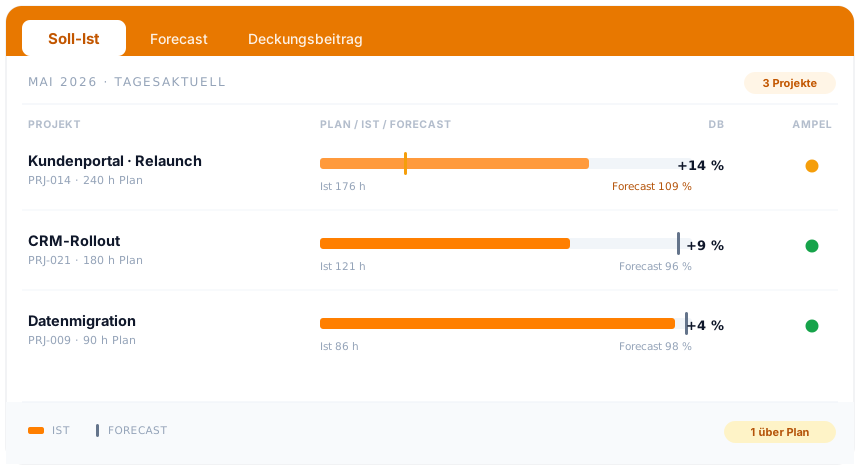
At a glance
The logged hour is the start. From it come plan vs actual, forecast, margin and billing. How teamspace plans, steers and analyses projects, from structure through controlling to capacity, is shown by the project management overview.
To project managementIncluded in the plan, no module surcharge.
End to end
Project time tracking does not pay off at a single point but along the whole way from the entry to the margin. An hour is logged, assigned to a category, checked and locked via the timesheet where needed, valued at the right rate and booked as a billable line item or as internal time. From the same data come the invoice, the activity record and the margin, without anyone switching between spreadsheets.
This is where project time parts from plain working time. Working time says when someone worked, project time says on what, and it assigns each block to an activity and a project. Only complete capture makes the actual labour cost visible and sets it against the revenue. Both views can be kept on their own or combined.
teamspace has been developed in Darmstadt since 1999 and is run in an ISO 27001 certified data centre in Frankfurt am Main, with data processing staying within the EU. For service firms that have kept capture, billing and steering in separate tools, this is the point where everything traces back to the same logged hour.
Related modules
Behind every logged hour stand the capture itself, the invoice and the client with their terms. These three modules mesh directly.
Attendance and project time, the basis for plan vs actual, margin and billing.
Billable project hours become the invoice, with rates, flat rates and rules.
The client's address, contacts and terms sit on the contact.
Intro call
You show us how your team captures and bills hours today. We line up logging, approval and billing to match, then you know whether teamspace fits your projects.