
1
Operational processes
Six core processes run day to day: sales, project, billing, cost, customer care, workforce.
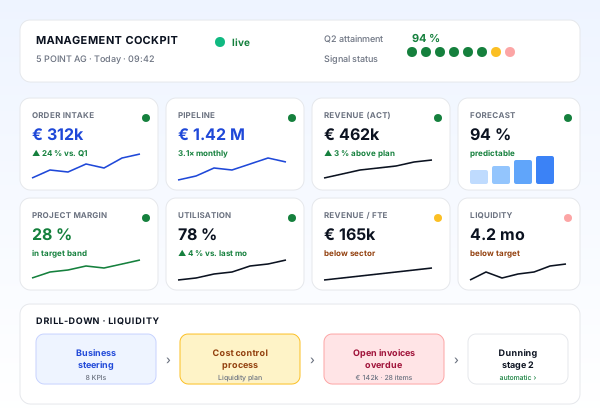
Above the six operational processes sits a central steering layer: the management dashboard with eight key KPIs. teamspace compresses data from every process into a single cockpit for leadership and oversight, with individual thresholds and an honest maturity model.
Six core processes run day to day: sales, project, billing, cost, customer care, workforce.
Each process has its own cockpit with KPIs, thresholds and explicit ownership.
Eight key KPIs compress the firm's state. Leadership decides on a data basis.
Deliberately reduced to eight. More dilutes focus, fewer drops crucial information.
How does future revenue develop? Green ≥ revenue target × 1.2. Leading indicator for growth and buffer.
How much potential sits in sales? Green: 2 to 4 times monthly revenue, safe pipeline for stable utilisation.
How is the business performing now? Green: on plan or slightly above. Core performance KPI.
How will revenue evolve? Green: at least 90 percent predictable. Basis for strategic decisions.
Are we earning on our projects? Green: 15 to 30 percent margin, industry dependent.
Are we using resources well? Green: 70 to 85 percent. Key to efficiency and flexibility.
How productive is the firm? Industry typical 100 to 250 thousand EUR per year. Scalability indicator.
Are we financially stable? Green: 2 to 6 months of fixed costs covered. Safety and freedom to act.
Common pitfalls
Many management dashboards are full and yet useless. Too many KPIs without structure, no link to processes, no current data. Our answer is a deliberately lean dashboard that forms a real steering layer.
Showing 40 KPIs signals helplessness. Eight key numbers are enough for the top view.
Pipeline, revenue and cashflow require different logic. A sensible layout follows the value chain.
A KPI without an owner is decoration. Every number belongs to a process with ownership.
What is a week old does not drive decisions. Live data or at least daily updates.
KPIs in concert
The eight KPIs are not read in isolation. The combination reveals the true picture. Real-world examples:
The team works a lot but earns little. Sign of inefficient projects, rates too low or scope creep.
Invoices go out, payments do not arrive. Structural risk, often in dunning or client mix.
Many leads, few wins. False comfort, often from unqualified leads or weak activity steering.
Steering by gut feel and a few spreadsheets. No consistent KPIs.
Monthly reports from spreadsheets, often weeks late. Definitions vary across areas.
Defined KPI set, manual consolidation across tools. Quarterly reporting works, monthly is shaky.
BI tool pulls data from operational systems. KPIs defined but sources need daily care.
Integrated steering system with live dashboard. Thresholds per KPI, 12-month forecast.
Real-time cockpit with early warning, drill-down from KPI to single transaction, suggested actions.
Individual targets
The green ranges in the concept are guidance, not dogma. Optimal targets depend on industry, business model, size, project mix (fixed price vs. time and material) and strategic goals. teamspace lets you set targets and thresholds individually and adjust them over time.
Each KPI has thresholds for green, amber and red, individually per firm.
Growth, market shifts and strategy moves bring new targets. The system stays steerable.
Accepted targets beat ignored ones. Realistic thresholds are actually used for decisions.
| Feature | Classic reporting | teamspace business steering |
|---|---|---|
| Data sources | Collected from various tools via export | One integrated platform, data lives in the processes |
| Currency | Monthly report mid next month | Live or at least daily |
| KPI definitions | Vary by area, debate around the meaning of 'revenue' | Eight uniformly defined KPIs, consistent across processes |
| Ownership | KPI without an owner | Every KPI has a process and an owner |
| Drill-down | Ends with the PowerPoint chart | From KPI to single transaction in seconds |
| Thresholds | Not present or hard coded | Individually configurable, adjustable |
Pipeline, forecast, conversion, activity KPIs.
Learn moreMargin, plan/actual, earned value, early warning.
Learn moreRevenue, forecast from open orders and contracts.
Learn moreUtilisation and forecast across all staff and skills.
Learn moreRevenue per employee, attrition, skills.
Learn moreSLA attainment and service cost as part of profitability.
Learn moreA steering system only works when relevant information is presented clearly, compactly and decision-oriented. A good management dashboard reduces the firm’s complexity to a few decision-relevant figures and creates the basis for active, data-driven business steering.
The reality: dashboards often get built so everyone adds their own thing, which makes them grow without gaining clarity. Showing 40 KPIs signals helplessness rather than overview. Eight key figures, defined cleanly and equipped with thresholds, are the most productive reduction in practice.
teamspace runs three steering layers on a shared data set. Operations runs the day to day. Process steering compresses operational data per process into KPIs, forecasts and dashboards. Business steering joins all processes into a management view.
Each layer sees the same reality from the right altitude. The benefit: no debate over definitions, no inconsistencies, no double data. When leadership clicks on a red pipeline in the dashboard, two more clicks land at the individual opportunities causing the problem.
A high-maturity steering process turns reporting into steering. KPIs become early warning, not retrospective. Ownership is clear per process, not diffuse. Discussions revolve around actions, not numbers. That is the difference between a firm that depends on luck and one that is led systematically and predictably.
How do we consistently win the right work?
How do we deliver projects reliably and profitably?
How do we convert work into revenue quickly?
How do we keep costs and liquidity under control?
How do we serve clients by value with high quality?
How do we steer capacity, skills and motivation optimally?
In a 15 to 30 minute requirements call we score your management reporting against the maturity model and show how the top cockpit can become a reliable standard in a few weeks.