teamspace

Invoicing software for the efficient billing of projects, hours and licences

Create professional invoices in minutes: automated, legally sound and neatly tied into your business processes.


The teamspace invoicing software brings quotes, orders and invoices together in one end-to-end workflow.

All data comes straight from CRM, projects and time tracking, with no manual steps and no external interfaces. From the quote to the paid invoice, everything stays in one system.

  • From quote to invoice in a few clicks
  • Recurring invoices run automatically
  • E-invoicing in both directions: ZUGFeRD and XRechnung

Definition

What is invoicing software?

Invoicing software creates, sends, archives and manages quotes, orders, invoices and dunning notices digitally. Unlike a plain invoicing program, integrated invoicing software is cloud-based, multi-user and connected to sales, projects, time tracking and accounting. Anyone writing orders and invoices with it manages the open items, the recurring documents and the dunning stages in the same place. In teamspace the invoice therefore grows out of the order and the approved hours, not out of a second spreadsheet.

Billing hub

The order tells the invoicing software what is billable.

Booked hours, flat rates and travel expenses collect on the order. As soon as the condition is met, it switches the line item to due, without anyone piecing the invoice together by hand.

StammdatenPositionenAbrechnungHistorie

Datenschutz-Mandat

20250017 · Große Marke GmbH

Abrechnung läuft
Position · Abrechnungsart Abrechenbar
  • Schulung vor Ort

    Festpreis

    1.000,00 €
  • Grundgebühr Datenschutz

    Zeitdauer

    120,00 €
  • Beratung Datenschutz

    Aufwand · 2 h

    240,00 €
  • Reisekosten

    wartet auf Freigabe

    ausstehend

Jetzt abzurechnen

1.360,00 €

Rechnung erstellen

From quote to payment

In the invoicing software one path leads from the quote to the paid invoice.

Five steps from the billing module. Every document grows out of the previous one; address, line items and layout travel with it, so nobody enters anything twice.

  1. 1

    Create and follow up the quote

    A quote is built from the product catalogue, with price list, options and discounts. The status stays visible, and the Next Steps module is a reminder to follow up as long as there is no answer.
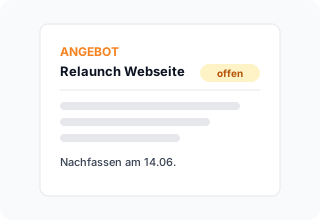
    Quote QU-2026-0184 to Müller & Partner GmbH with four line items, status Sent, activity history and a Next Steps panel with a follow-up date on 14 June.
  2. 2

    Order from the quote

    One click turns the accepted quote into the order, and the line items come along. The order is also the billing hub: it holds the payment plan, the billing rules and the status of every line item.
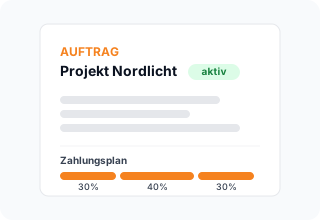
    Order detail view OR-2026-0207 with four line items, status chips and a payment plan panel with three instalments, converted from an accepted quote.
  3. 3

    Record the work

    The order line items become work packages in the project. Hours are booked in the browser or in the web app, while flat rates and travel expenses come across from the project.
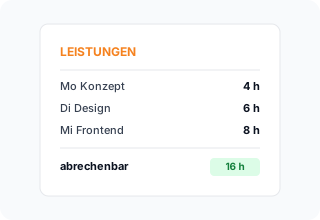
    Time booking view with four project time entries, a running stopwatch indicator and a totals bar showing recorded and billable hours.
  4. 4

    Invoice or e-invoice

    The order shows the billable line items and the invoice is created with one click. Depending on the setting, as a PDF, as ZUGFeRD or as XRechnung. Recurring invoices run on the schedule you set.
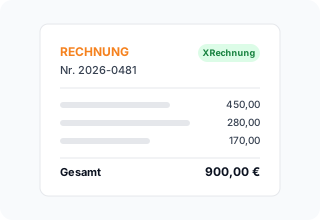
    Invoice with automatically adopted order line items on the left and the format choice PDF, ZUGFeRD, XRechnung on the right, XRechnung active, plus a Send button.
  5. 5

    Payment and dunning

    Open items sort themselves by status, and colour dots show the payment state. Dunning stages go out with their deadline and wording, either after approval or automatically.
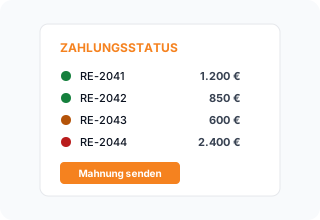
    Open items list with five invoices in green, yellow, orange and red status plus a four-stage dunning ladder from payment reminder to collections.

Billing types

Every line item gets its own billing type.

Time and materials, fixed price or duration: the type decides how a line item bills. One order mixes them in a single document.

Position · Beratung

Auftrag 20250017

Abrechnungsart
Aufwand Festpreis Zeitdauer
gebuchte Zeit 142 h × 95 €
Position 13.490,00 €
unabhängig von der Zeit pauschal
Position 1.000,00 €
regelmäßig, je Periode monatlich
Position 120,00 € / Monat

Where it fits

Invoicing software can do more than a plain invoicing program.

Plain invoicing program

  • The invoice is typed by hand
  • Hours are transferred via Excel
  • Dunning happens sporadically
  • The margin is only known after the fact
Recommended

teamspace

  • The invoice grows out of the order
  • Approved hours flow in automatically
  • Dunning runs on its own once approved
  • The margin is current on the same order

Level of automation

You bill by hand first and automate the billing module step by step.

You do not have to automate the invoicing software fully on day one. You begin with the manual route and raise the level of automation exactly when your processes are ready, in the same system and with no move to a different program.

  1. 1

    Stage 1 · Manual

    You create the invoice from the order when it suits you.

    The order shows the billable line items, you review them and trigger the invoice with one click. As lean as a plain invoicing program, only without retyping from a second spreadsheet.

    Invoice from the orderSend as PDF
  2. 2

    Stage 2 · Rules and templates

    Rules take over the recurring billing.

    Assignment rules place approved hours on the right line item, recurring invoices run on the schedule you booked, and dunning works through its stages on its own once approved.

    Recurring invoicesAssignment rulesDunning stages
  3. 3

    Stage 3 · End to end

    Billing runs through from the order into your accounting.

    The order turns into an e-invoice as ZUGFeRD or XRechnung, incoming documents are recognised by their barcode symbol, and the DATEV booking data service hands the entries over as a cloud API. From document to the books with no intermediate step.

    E-invoicingIncoming invoicesDATEV booking data service
Document overview

The document overview collects every document by status.

In the invoicing software, quotes, orders, invoices and dunning notices sit in one place, filtered by state. Anyone allowed to see colleagues' documents has the whole firm in view, not just their own list.

  • One overview for quote, order, invoice, letter, purchase order and incoming invoice.
  • A summary by status on the left: what is open, what is waiting for review, what falls due.
  • Colleagues' documents are visible with the right permission, not hidden away in individual mailboxes.
To the billing tool
Belegüberblick
Meine Belege
Eingang

12

Angebote

8

Aufträge

34

Rechnungen

5

Offen

Beleg · OrganisationStatusNetto
Große Marke GmbH Auftrag · 20250017 100.000 €
Agentur Riesig Rechnung · 20260042 4.760 €
IngBüro Stark Angebot · 20260040 12.840 €
Heyer Plan AG Mahnung · 20260039 5.760 €
Offene Forderung 48.260 €
Assignment

Booked hours land on the right line item.

Eight rules in the invoicing software decide which time entry belongs to which line item. Priority, assignee, category or period sort the hours before the invoice is created.

  • Eight assignment rules per line item: priority, assignee, category and area, maximum time, from-to period and more.
  • Approved hours go into the line item at the agreed rate, rather than every recorded minute.
  • Project time splitting divides hours up when a line item has an upper limit.
  • The invoice is generated from the order as soon as the hours are assigned.
To order billing
Verrechenbare Zeiten
Positionen
Regeln

KW 20 · Projekt Müller

freigegeben
Bearb.RubrikStd.Position
AB Beratung 5h 50 → Beratung
CD Schulung 8h 00 → Schulung
AB Reise 1h 20 → Beratung

Acht Regeln sortieren, bevor die Rechnung entsteht

Recurring

Maintenance contracts bill themselves month after month.

Maintenance, subscriptions and service charges run through duration line items. teamspace issues the invoice on the schedule you booked, monthly, quarterly or annually.

  • Duration line items bill automatically at the interval you set, without anyone having to remember the date.
  • Series contracts renew after their term and can be paused, cancelled or marked as complete.
  • Price changes only take effect from the next period, never retrospectively.
  • The system warns you when a retrospective price change would cause a billing error.
To the billing tool
Serienvertrag
Positionen
Verlängerung

Zeitdauer-Position · Wartung

monatlich
Mai 2026 120,00 €
Juni 2026 120,00 €
Juli 2026 120,00 €

Preisänderung gilt ab nächster Periode

Who it is for

The invoicing software is built for these professional services firms.

Professional services firms that sell work rather than products, across industries.

IT service providers

Maintenance contracts on a monthly cycle, time and materials and fixed price in the same document. Incoming e-invoices are adopted with one click.

Industry page

Management consultancies

Fee invoices by consulting day and seniority rate, travel expenses per client. One collective invoice at month end instead of loose individual documents.

Industry page

IT systems houses

Service retainers, SLA hours and licences bill themselves on the schedule booked. No forgotten billing run.

Industry page

Architecture and engineering practices

Interim invoices by stage of completion, fixed-price and time-and-materials contracts. Change orders stay documented on the project.

Industry page

Agencies

Bill retainers and pass on freelancer costs. Interim and final invoice per campaign, cleanly separated.

Industry page

“I save a lot of time writing invoices.”

At con|energy consult, invoices are created directly from the recorded work. What used to be typing is now done in a few clicks.
con|energy consult

“Staff in both support and project planning can see orders and invoices. That was not possible before.”

At A+W Software GmbH, support and engineering see the same orders and invoices. The document overview replaces the separate mailboxes.
A+W Software GmbH

Case Study

An IT agency replaces the Excel transfer.

A hypothetical practical example to illustrate how this works. Actual figures depend on your starting point, industry and implementation and are not guaranteed. A typical use case: an IT agency with 28 employees, separate time tracking, Excel lists and a stand-alone invoicing program.

Starting point

Hours were exported monthly, prepared in Excel and transferred into the invoicing program. Entries were lost along the way, the billing run dragged on for days, and dunning only happened sporadically. Receivables grew because nobody saw the open items in one place.

Solution

In the invoicing software, hours, flat rates and travel expenses land directly on the order. The order shows what is billable and assembles the invoice from it. ZUGFeRD and XRechnung go out without switching tools, and the multi-stage dunning runs on its own once approved.

1 click

from approved hours to the invoice

−12 days

shorter days sales outstanding, dunning runs on its own once approved

~4 %

of entries previously lost, now on the invoice

E-invoicing

E-invoices go out and come in.

When sending, teamspace produces a ZUGFeRD PDF and an XRechnung XML, depending on the setting. An incoming e-invoice is recognised by the barcode symbol in the mail attachment, and one click turns it into an incoming invoice with the data already read out.

Ausgang · Rechnung versendet
RE-2026-0042 4.760,00 €

Beim Versand entsteht

ZUGFeRD · PDF XRechnung · XML
Leitweg-ID für Behörden 991-12345-67
Eingang · Anhang erkannt

E-Rechnung im Anhang

per Barcode markiert

Eingangsrechnung ausgelesen
fällig 14 Tage 2.380,00 €

Dunning

Dunning collects on open invoices.

In the invoicing software, open items sort themselves into Open, Due and Overdue. If payment fails to arrive, the claim climbs four stages, each with its own deadline, fee and wording.

RE-2026-0042

offene Forderung

überfällig
Stufe 1

Zahlungserinnerung

Frist +7 Tage
Gebühr 0,00 €
Stufe 2

Mahnstufe 1

Frist +14 Tage
Gebühr 5,00 €
Stufe 3

Mahnstufe 2

Frist +21 Tage
Gebühr 10,00 €
Stufe 4

Inkasso

Frist Übergabe
Gebühr nach Aufwand

Pro Stufe lassen sich Frist, Gebühr, Sachbearbeiter und Text einstellen. Der Lauf geht automatisch oder nach Freigabe.

Controlling

The invoicing software shows whether the order holds its margin.

The billing analysis shows open receivables and billable amounts as at today. The post-calculation puts plan, project actuals and invoice side by side, on the same order, with no second spreadsheet.

Fakturaanalyse Nachkalkulation Einnahmen

Große Marke GmbH · Mai 2026

tagesaktuell

Offene Forderung

48.260 €

Abrechenbar offen

12.840 €

Marge Ø

+ 11 %

Nachkalkulation · Mandat Große Marke

Plan 76.520 €
Projekt-Ist 71.300 €
Berechnet 74.900 €
aus Auftrag, Projekt und Rechnung im Plan

Comparison

The invoice sits at the end of a chain.

Where invoicing software with order, project and time differs from a plain invoicing program.

Feature

Classic invoicing program

teamspace

Quotes, orders and invoices
Receiving and sending e-invoices
partly
Hours direct from time tracking
The order as billing hub
Recurring invoices
limited
Multi-stage dunning
manual
automated
Incoming invoices with the DATEV booking data service
partly
enterprise
HOAI via base value and percentage line items
Post-calculation of plan, actual and invoice
Own layouts and number ranges per location
Hosting in an ISO 27001 data centre in Frankfurt
varies

Scope

What the invoicing software covers.

Six areas from the finance module. Incoming invoices, the DATEV interface and the online bank reconciliation belong to the enterprise edition.

Quotes and orders

  • Document types quote, order, invoice, letter, purchase order
  • From quote to order with one click
  • Areas, alternative and optional line items in the quote
  • Five billing modes per order
  • Payment plan with interim payment, percentage, line item, final invoice
  • Post-calculation: plan, project actuals and invoice compared

Invoices and e-invoicing

  • Invoice from the billable order line items
  • Three billing types: time and materials, fixed price, duration
  • Recurring invoices via duration line items
  • Sending and receiving ZUGFeRD and XRechnung
  • Routing ID per recipient for public authorities
  • Invoice cancellation and invoice correction

Dunning and payments

  • Status Open, Due, Overdue with colour dots
  • Multi-stage dunning with deadline, fee and wording
  • Dunning run automatic or after approval
  • Online bank reconciliation of incoming payments (enterprise)

Incoming invoices and DATEV

  • Digital receipt capture by photo or drag and drop (enterprise)
  • Text recognition optionally via the Google Vision API
  • DATEV-certified booking data service, cloud API (enterprise)
  • Travel expense accounting with per diem rates

Prices and layouts

  • Product catalogue, price lists and currencies
  • Tiered prices, volume discounts and quantity structures
  • Layouts in the customer's corporate design
  • Own invoice layouts and number ranges per location
  • Manage layouts and price lists yourself (enterprise)

Connections and security

  • Next Steps module with open points, emails, web hooks
  • REST API with its own access permission
  • Electronic signature via Skribble and Scrive
  • GoBD mode can be activated on request

Which edition includes the invoicing software.

The billing module starts in the office edition. Incoming invoices, the DATEV booking data service and the bank reconciliation belong to the enterprise edition. The prices shown are annual prices per user per month.

Funktion
light
7 €
office
19 €
enterprise
24 €
Quotes, orders, invoices
Quotes, orders, invoices, letters, purchase orders
Five billing modes per order
Sending ZUGFeRD and XRechnung
Recurring invoices via duration line items
Multi-stage dunning with deadline, fee and wording
Post-calculation: plan, project actuals and invoice
Own layouts and number ranges per location
Incoming side and accounting
Incoming invoices and digital receipt capture
DATEV booking data service (cloud API)
Online bank reconciliation of incoming payments
Manage layouts and price lists yourself

In 15 minutes

Let us walk through your billing path together.

In thirty minutes we look at your path from the quote to the incoming payment and tell you where teamspace saves the most effort. You hear where a switch is worth it and where it is not.

More modules

teamspace beyond the invoice.

The billing module sits between sales, projects and time tracking. Eight further modules work on the same master data.

Time tracking

  • Project time and attendance on the employee
  • Approved hours go into the billing
  • Stopwatch, browser, web app

Project management

  • The project grows out of the order
  • Plan, actual and forecast per phase
  • Flat rates and phases into the invoice

CRM

  • Organisation, contact and opportunity
  • Address and layout for the document
  • Quote from the opportunity

Service desk

  • Bill tickets against an hour pool
  • Remaining SLA time affects the priority
  • Outlook add-in for mail to ticket

HR software

  • Record and bill travel expenses
  • Commission from gross profit or a fixed amount
  • Internal cost rate for the margin

Incoming invoices

Incoming invoices travel into the DATEV cloud.

In the enterprise edition the invoicing software also manages the incoming side: documents are photographed or pulled in by drag and drop, an e-invoice is recognised by the barcode symbol in the mail attachment and becomes an incoming invoice. The DATEV booking data service transfers invoices, cancellations, incoming invoices and travel expenses to DATEV Unternehmen online as a certified cloud API, with no CSV export.

To the DATEV interface

E-invoicing requirement

The e-invoicing requirement arrives in three stages.

An e-invoice in the legal sense is a structured format such as the ZUGFeRD invoice or the XRechnung; a PDF sent by email does not qualify. The invoicing software handles both formats for sending and receiving. Since 2025 the obligation to receive applies in German B2B business, from 2027 the obligation to send for companies above 800,000 euros of prior-year revenue, and from 2028 for every company.

To the e-invoicing software

HOAI

HOAI fees arise from a base value and percentages.

Architecture and engineering practices bill their work phases under the German fee scale HOAI. The invoicing software models this through two line item types: a base value carries the estimated total construction costs, and every work phase sits on top of it as a percentage line item. Billing then runs through the same order as any other work, with interim payments and a final invoice.

Platform

1999
teamspace from Darmstadt
Frankfurt
hosting, processing in the EU
from 19 €
per user/month, billing from office
5 to 250
employees per customer

Integration

The invoice draws on time, project and contact.

The real lever in billing lies not in the document but in what it is made of. An invoice in teamspace is assembled from three sources that nobody has to retype.

  • From the approved hours in time tracking, at the agreed rate and on the right line item.
  • From the project, which carries the flat rates, phases and materials; it was created out of the order.
  • From the CRM, which supplies the organisation's address, contact person, payment terms and layout.

The post-calculation on the order then compares plan, project actuals and invoice. That way you can read off the order whether the calculated margin really arrives in the invoice.

Security

Invoice data stays in Frankfurt am Main.

Invoice data is sensitive: terms, margins, receivables. The invoicing software processes it exclusively in the EU, hosted in two geo-redundant, ISO 27001 certified data centres in Frankfurt am Main. On request you can activate the GoBD mode, which makes approved documents technically undeletable and enforces retention for ten years.

To security

Migration

The switch happens in the first week.

Invoicing software should take friction out, not create new friction. On the first day the company, logo and master data are set up and a test invoice is written; in the first week existing customers, open orders and products are added, via Excel, CSV or the REST API. After that, recurring invoices, dunning stages and, in the enterprise edition, the DATEV booking data service go live.

Quotes

No quote is left without a follow-up.

Sales rarely fails on the first quote, it fails on the forgotten second contact. The invoicing software keeps every quote by status in one overview, creates a follow-up item with a deadline automatically on validation, and turns the accepted quote into the order with one click.

To quote follow-up

Templates

Documents appear in your corporate design.

Quote, invoice and dunning notice should look as though they came from one house. The invoicing software sets up the layouts in the customer's corporate design, created once and valid for every document type. The product catalogue and price lists fill the line items, with tiered prices, volume discounts and a separate price list per customer.

Locations

Every location bills under its own name.

Anyone working across several locations wants to appear separate on the outside and work together on the inside. Every location bills with its own invoice layout and its own number range, and reporting runs per location or across all of them. The separation of locations is available from the office edition onwards, where the billing module begins.

Glossary

Key invoicing software terms briefly explained.

Frequently confused terms around invoicing software, placed precisely in the teamspace model.

Billing type
Determines how a line item bills: time and materials (booked time), fixed price (independent of time) or duration (recurring at regular intervals). Selectable per line item and combinable within an order.
Billing mode
Steers the whole order: Rules, Manual, Payment plan, Billing rules or Billed. It determines when a line item appears as billable now.
Duration line item
A line item that bills repeatedly at the interval you set, for example a monthly maintenance charge. Price changes only apply from the next period.
Base value
In HOAI billing, the estimated total construction costs used as a reference. It is not billed itself; the work phases sit on top of it as percentage line items.
ZUGFeRD
A hybrid e-invoice: a PDF with an embedded XML file. Readable for people and machine-processable at the same time.
XRechnung
A pure XML e-invoice following the German federal standard, used above all for public sector clients.
Routing ID
The address identifier for e-invoices to public authorities. In teamspace it is stored on the CRM contact in the Buyer Reference field.
GoBD mode
Can be activated on request by 5 POINT. With the mode active, invoices, cancellations and approved documents can no longer be deleted technically, and the system enforces retention for ten years.
Booking data service
The DATEV-certified cloud interface to DATEV Unternehmen online. It transfers invoices, cancellations, incoming invoices and travel expenses directly, with no CSV file. Edition: enterprise.
Post-calculation
A tab on the order that compares planned values, project actuals and actual invoice values. It shows whether the calculated margin arrives in the invoice.

First call

Invoicing software reviewed in thirty minutes.

We discuss your specific billing situation and give a clear first opinion on whether teamspace is a fit. Free of charge, no commitment.

Book an initial call

Fit

Which billing teamspace suits, and which it does not.

Less of a fit

  • A pure online shop or till business selling products rather than work.
  • Mass invoicing with no link to a project or an order.
  • Lead, pipeline and forecast steering, which is the job of the CRM.
  • Payment processing via Stripe or PayPal as a core function.
Recommended

A good fit

  • Project-based professional services firms billing booked hours, flat rates and expenses.
  • Mixed billing from time and materials, fixed price and flat rate on one order.
  • Recurring invoices from maintenance or subscriptions via series contracts.
  • Firms that need e-invoicing (ZUGFeRD, XRechnung) and a DATEV hand-off with no extra tool.

What professional services firms look at when choosing

Invoicing software for a professional services firm convinces less through a pretty invoice printout than through an unbroken path from the quote to the incoming payment. Anyone selling work rather than products looks at three points in practice:

  • Hours into the invoice without a detour: booked time lands on the right line item at the agreed rate, with no CSV export and no copy and paste.
  • Mixed billing in one document: time and materials, fixed price and recurring line items often occur together, sometimes on the same order.
  • Recurring work runs on its own: maintenance, service retainers and licences bill themselves on the schedule booked, including renewal, pause and a price change from the next period.

This is exactly where teamspace comes in: the order is the billing hub where booked hours, flat rates and dates collect until the finished invoice is ready.

Frequently asked questions about teamspace invoicing software

What is invoicing software?
Invoicing software creates, sends and archives quotes, orders, invoices and dunning notices digitally. The difference from a plain invoicing program lies in the connections: integrated invoicing software draws its data from sales, projects and time tracking and passes it on to accounting, instead of having it retyped.
Which invoicing software suits professional services firms?
Invoicing software suits a professional services firm when quote, order and invoice are built on the same data instead of in separate programs. Booked hours, flat rates and travel expenses then flow into the invoice with no Excel transfer. teamspace is built as billing software for professional services firms with 5 to 250 employees and covers ZUGFeRD, XRechnung, multi-stage dunning and the DATEV booking data service. The GoBD mode makes invoices and documents unchangeable on request, and hosting is in an ISO 27001 data centre in Frankfurt am Main. In the initial call we assess whether teamspace fits the way you bill.
Does teamspace combine quotes and invoices in one piece of software?
Yes. In teamspace, quote, order and invoice are one continuous process: one click turns the accepted quote into the order, and the order into the invoice. Line items, address and layout travel with it, so nobody enters them a second time. Software for quotes and invoices therefore saves the double entry between sales and accounting.
Is there software that covers order and invoice together?
That is exactly the core of teamspace: the order is the billing hub where booked hours, flat rates and travel expenses collect until the invoice falls due. Order and invoice therefore sit in one piece of software, not in two separate programs with a spreadsheet in between.
How does an invoice come out of recorded hours?
Staff book their hours on the project that grew out of the order. Eight assignment rules decide which entry belongs to which line item, for example by assignee, category or period. Once the hours are approved, the order shows the billable total and the invoice is created with one click.
Why is the order the billing hub?
The order holds the payment plan, the billing rules and the status of every line item. Through five billing modes teamspace checks what is due, for example by date, project progress or project status. The Billable now filter collects every line item that can be invoiced.
Can I create and receive e-invoices with teamspace?
Yes, in both directions. When sending, teamspace produces a ZUGFeRD PDF, an XRechnung XML or both, depending on the setting. Incoming e-invoices are recognised by the barcode symbol in the mail attachment and become an incoming invoice with the data read out at one click. For public authorities the routing ID is stored on the contact.
How does the DATEV connection work?
Through the DATEV-certified booking data service in the enterprise edition. Invoices, corrections, cancellations, incoming invoices and travel expenses go straight to DATEV Unternehmen online as a cloud API, with a separate booking batch per DATEV engagement. This is not a CSV export. There is no LODAS or payroll interface.
Can recurring invoices be automated?
Yes, through duration line items. Maintenance, subscriptions or service charges bill automatically on the schedule you set, monthly, quarterly or annually. Orders become series contracts that can be renewed, paused or cancelled. Price changes only take effect from the next period.
Which billing types are available per line item?
Three: time and materials, where the booked time determines the amount; fixed price, independent of time; and duration for regularly recurring amounts. One order can mix all three in a single document.
Does teamspace cover HOAI billing?
Yes, through two additional line item types. The base value corresponds to the estimated total construction costs and is not billed itself. Every work phase is created as a percentage line item on the base value, and surcharges as a percentage line item on an area. The HOAI calculator shows the result in advance.
How does dunning work?
Open items sort themselves into Open, Due and Overdue, with colour dots for the payment state. Dunning has four stages, from the payment reminder through dunning levels 1 and 2 to collections. Deadline, fee, case handler and wording can be set per stage, and the run goes out automatically or after approval.
Can I cancel or correct an invoice?
An invoice can be cancelled in full; when cancelling you are asked whether the associated times and costs should be released again. Partial cancellations are not possible, but there is the invoice correction for that. With the GoBD mode active, invoices and cancellations are retained unchangeably.
Does teamspace support several branches or locations?
Yes. Every location can run its own invoice layout and its own number range, and reporting can be run per location or across all of them. Projects, master data and coordination remain shared, while separate work stays separate. The function is available from the office edition onwards, so everywhere invoices can be written.
What does the invoicing software cost?
The prices quoted are annual prices per activated user per month. Half-yearly (plus 10 per cent), quarterly (plus 15 per cent) or monthly terms (plus 20 per cent) can also be booked. Notice period: three months on an annual term, one month on a monthly term. We work out the right edition in the call.