
DATEV interface
Outgoing and incoming invoices, credit notes and travel expenses go to DATEV Unternehmen online as a posting batch, one per client, without a CSV file. Certified, from the enterprise edition.
Learn moreMost handovers happen inside teamspace without any interface at all, because every module shares the same data record. To the outside, teamspace connects through ready-made integrations such as DATEV, Microsoft Teams and Outlook, through an open REST API for your own tools, and through an MCP server of its own for your AI assistants.
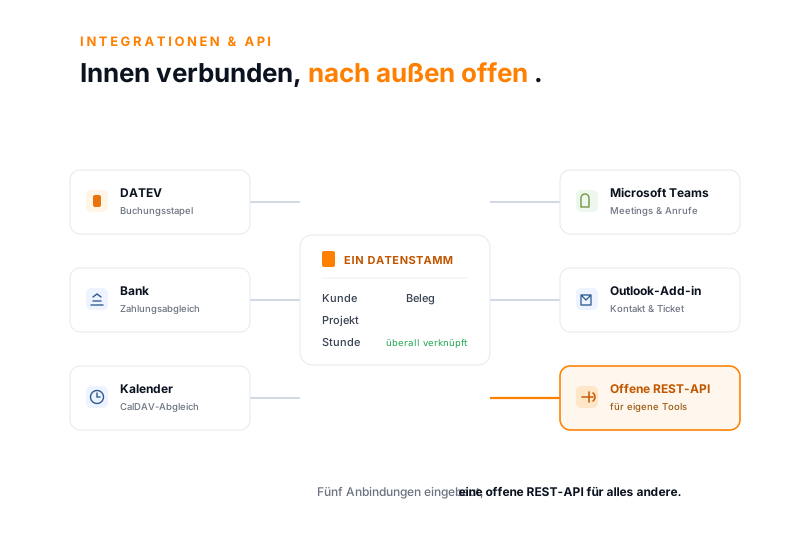
Built-in integrations
Integrations you can use without a project of your own. Depending on the edition, with no separate middleware.
Outgoing and incoming invoices, credit notes and travel expenses go to DATEV Unternehmen online as a posting batch, one per client, without a CSV file. Certified, from the enterprise edition.
Learn moreThe bank interface reconciles incoming payments and automatically marks the matching invoice as paid. You only assign unclear payments by hand. From the enterprise edition.
Learn moreYou create Teams meetings in the teamspace calendar and join them with one click. Every Teams call appears in the CRM call list and turns into a contact, a time, a ticket or a follow-up. In every edition.
Learn moreFrom an email in Outlook you create a contact, a ticket or a task in teamspace directly, without switching applications.
Learn moreThe teamspace calendar syncs via CalDAV with Outlook, Apple Calendar and other programs, so appointments stay maintained in one place.
Learn moreThe teamSync telephony interface connects your phone system with the CRM, so incoming calls show the contact and conversations are logged as an activity.
Learn moreOpen REST API
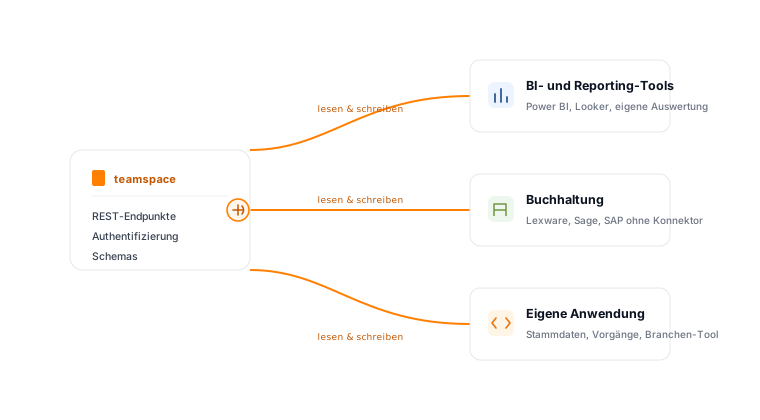
Where no ready-made integration exists, you read and write data through the REST API. It is included from the enterprise edition and described in the developer documentation, with endpoints, authentication and schemas.
Metrics from teamspace flow into Power BI, Looker or your own reports, without anyone exporting lists and copying them together.
For Lexware, Sage or SAP there is no ready-made connector. The exchange runs through standard exports or the REST API.
You bring existing contacts, projects or staff data over at the start through Excel or the REST API, instead of typing them in.
Tickets and records can be synced with adjacent systems, so both sides see the same state.
Why little interfacing is needed on the inside
Many companies connect time tracking, projects, invoicing and CRM through interfaces between separate programs. Each of these connections has to be set up, monitored and checked after every update. In teamspace this effort disappears, because every module shares the same data record: a logged hour belongs to the project, the invoice and the utilisation at the same time, without anyone transferring it.
You only need an open API at the boundary to the outside, for example to accounting, to a BI tool or to an industry application. That is exactly where the REST API is available. Inside teamspace, the integration is already done.
MCP server and AI
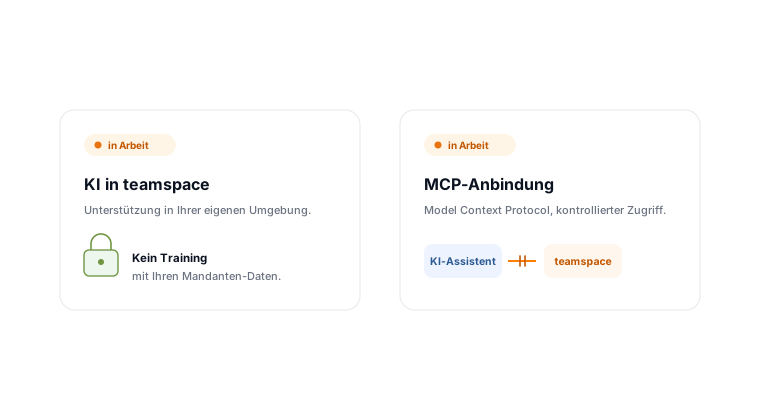
teamspace comes with its own MCP server, in every edition. Through the Model Context Protocol (MCP) you connect teamspace to AI assistants such as Claude, ChatGPT or Cursor, and you stay in control: for each connection you decide which tools are available and who may use it. Everything else is on the MCP server and AI in your ERP pages.
You create as many MCP connections as you need: a read-only one for the whole team, one for the HR department, one for invoice controlling. Each connection gets its own address, its own selection of tools and its own permission group.
Three barriers stand in the way: the release of the configuration, the OAuth consent and the signed-in user's own rights. The last one cannot be switched off. Anyone who may not see a personnel file in teamspace will not see it through an AI assistant either. Write access is a separate permission that you grant on its own, and the audit records who allowed which client to do what, and when.
For the AI features inside teamspace you enter your own AI account: endpoint, model and key. Your administrator enables each feature individually, such as condensing long ticket histories or analysing reports. teamspace does not run a language model of its own and does not pass your data to any third-party AI service.
A short call
Are you planning a connection to a particular system or your own application via the API? We clarify the requirements in a short first call and tell you what goes through a ready-made integration and what goes through the REST API.
In a short first call we go through your existing tools and show which are connected out of the box and what runs through the open REST API.