
Every open item is followed up
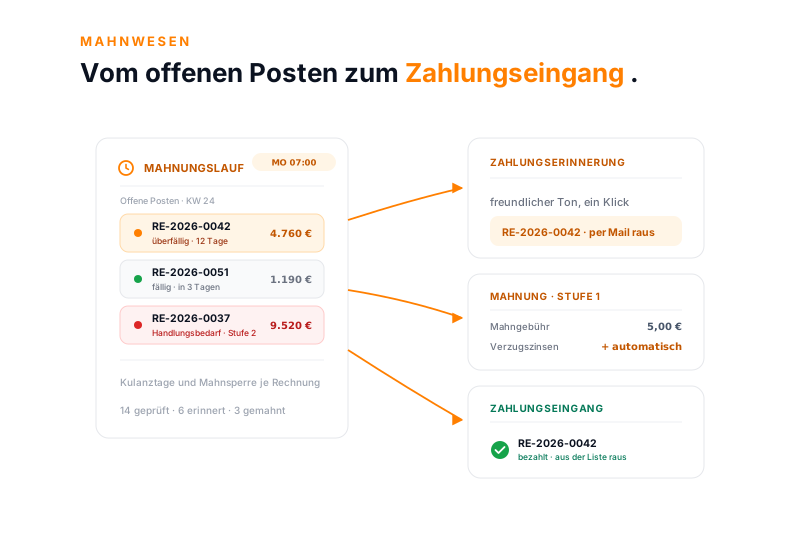
The dunning run checks the open items in the set rhythm and duns what no one else would remember at the end of the month.
You set dunning levels, deadlines and fees per invoice, the dunning run handles the rest in a fixed rhythm. teamspace adds late-payment interest itself, paid items disappear from the list. Part of the invoicing software, with no module surcharge.
A calm pool of receivables
Three things stand between a calm pool of receivables and a growing list of open items.
The dunning run checks the open items in the set rhythm and duns what no one else would remember at the end of the month.
From the friendly reminder to the collection level: four levels, each with its own deadline, its own fee and its own text.
The optional bank interface matches incoming payments and automatically marks the right invoice as paid. You only assign unclear payments by hand.
The workflow
Five steps from dunning. Every item moves on, no one keeps a second list.
The invoice arises from the order with a payment target and discount, pre-filled per client and visible on the document.
Dispatch by email, as ZUGFeRD or XRechnung. teamspace records the dispatch date, the deadline runs from there.
Once the payment target is exceeded, the next dunning level takes effect. Deadline, fee and text are fixed per invoice.
Full or partial payment is posted, the status follows from the receivable still open. In the Enterprise edition the bank interface does the matching.
What remains are the documents that need action, not an Excel list with hundreds of items.
Dunning levels
Payment reminder, dunning level 1, dunning level 2, collection. With each level the tone becomes firmer, the deadline shorter, the fee higher.
RE-2026-0042
offene Forderung
Per level you set deadline, fee, processor and text. The run goes automatically or after approval, teamspace adds late-payment interest from a set level.
With one click
No one types a dunning letter anew. teamspace generates the document from the invoice, contact and document data come along automatically. What you set up once beforehand repeats by itself.
That turns an overdue document into a finished, ready-to-send dunning letter with one click.
Dunning run
Instead of going through the open items every week, you set up the run once. It checks all invoices, changes the level and sends out what is not blocked. How far it goes is up to you.
Zeitplan
jeden Montag, 07:00
danach prüft ein Bearbeiter
RE-2026-0051
fällig · in 3 Tagen · Kulanz 2 Tage
RE-2026-0042
überfällig · 12 Tage · Stufe 0 → 1
RE-2026-0037
Handlungsbedarf · Stufe 1 → 2
RE-2026-0033
Großkunde · Mahnsperre aktiv
Mahnungslauf-Kachel
Lauf vom 10.06.
Der Lauf prüft Fälligkeit und Kulanztage, wechselt die Mahnstufe und versendet, was nicht gesperrt ist.
Incoming payment
When the money arrives, you post the incoming payment against the invoice. teamspace determines the status from the ratio of open receivable to amount paid, a partial payment leaves the remaining receivable standing cleanly.
What is paid no longer appears in the next run. Only the genuinely open receivables remain.
“I save a lot of time writing invoices.”

Receivables management
In the document overview each invoice appears in its status, recognisable by a coloured dot. That way you see at a glance where action is needed, instead of searching a list by hand.
Partial payments show the remaining receivable, fully paid invoices drop out of the list. The pool of receivables stays up to date.
Where you stand
What does your list of open items look like?
Show us your dunning levels and payment targets. In twenty minutes we set up the run together and you see what it takes on.
Late-payment interest
From the point of default you are entitled to late-payment interest. You define the rate once in dunning and set the dunning level from which it takes effect. teamspace adds the interest to the receivable itself from that level.
That way the interest claim is not left on the table just because doing the maths is a nuisance.
Cancellation and correction
Sometimes an invoice is not right. Then you cancel it and reissue it corrected, without a trace disappearing. teamspace keeps a separate history for each invoice.
5 POINT activates GoBD mode on request. The system then enforces retention over ten years.
Use cases
The dunning letter sits at the end of the document path and draws on these areas.
The invoice that later becomes due arises from the order.
Learn moreContract data, status and hand-over to billing.
Learn moreStructured quotes that become an order with one click.
Learn moreZUGFeRD and XRechnung to private and public clients.
Learn moreInvoices and cancellations to DATEV Unternehmen online.
Pass on checked travel expenses on the client invoice.
Learn more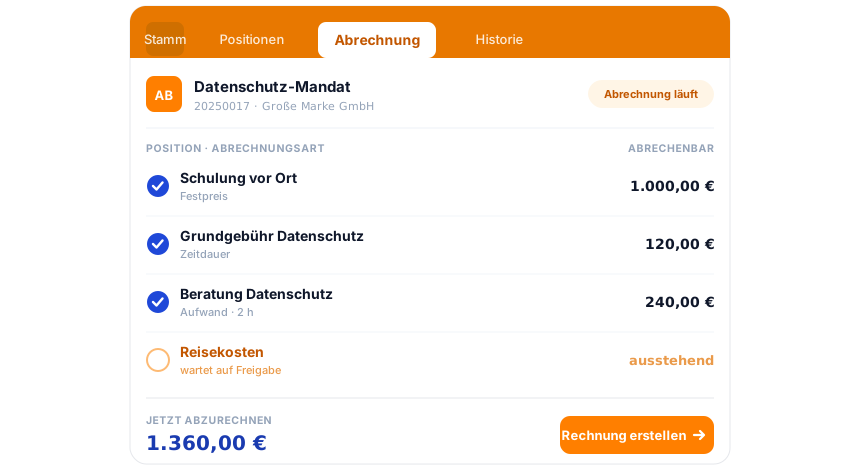
Part of the invoicing software
Hours and items become the invoice, the invoice becomes the dunning letter on default, and at the end the posted incoming payment. Everything runs in the same system, from the quote to the pool of receivables. How it all connects is shown by the invoicing software overview.
To the invoicing softwareWhat it is about
Dunning is the regulated path by which a company collects overdue invoices: from the payment reminder through several dunning levels to, in the extreme case, hand-over to collection. A dunning software follows this path automatically, with its own deadlines, fees and texts per level.
Whether a client is in default depends on the recipient: business clients fall into default without an agreed deadline 30 days after receipt of the invoice, for private clients it takes the note on the invoice or a first dunning letter. teamspace maps both paths via the dunning levels.
Dunning data is relevant to accounting. teamspace processes it exclusively in the EU, in an ISO 27001 certified data centre in Frankfurt am Main, GDPR-compliant with a data processing agreement as standard. Recording and billing happen in the invoicing software, the order arises from the CRM process, the work comes from time logging. The contracting party is 5 POINT AG, a German public limited company.
Related modules
The dunning letter draws its data and its context from three modules.
The approved hours are the basis of every invoice that can later become due. Recording and billing run on the same employee.
The project with budget and phases arises from the order. What is billed flows back into the pool of receivables.
Organisation and contact supply the address, contact person and payment behaviour. The dunning letter goes to the right place.
Requirements check
Bring your dunning levels and a few typical receivables. In a short call you see how the dunning run and the payment matching would look at your organisation.