teamspace

Service desk software for service providers that bundles enquiries and bills them.

Service desk software collects customer enquiries as tickets, steers them through channels and response times, and bills the service time. In teamspace, an incoming email recognises the contact, the status shows whose turn it is, and from the ticket you log time, write a receipt or turn it into a project.

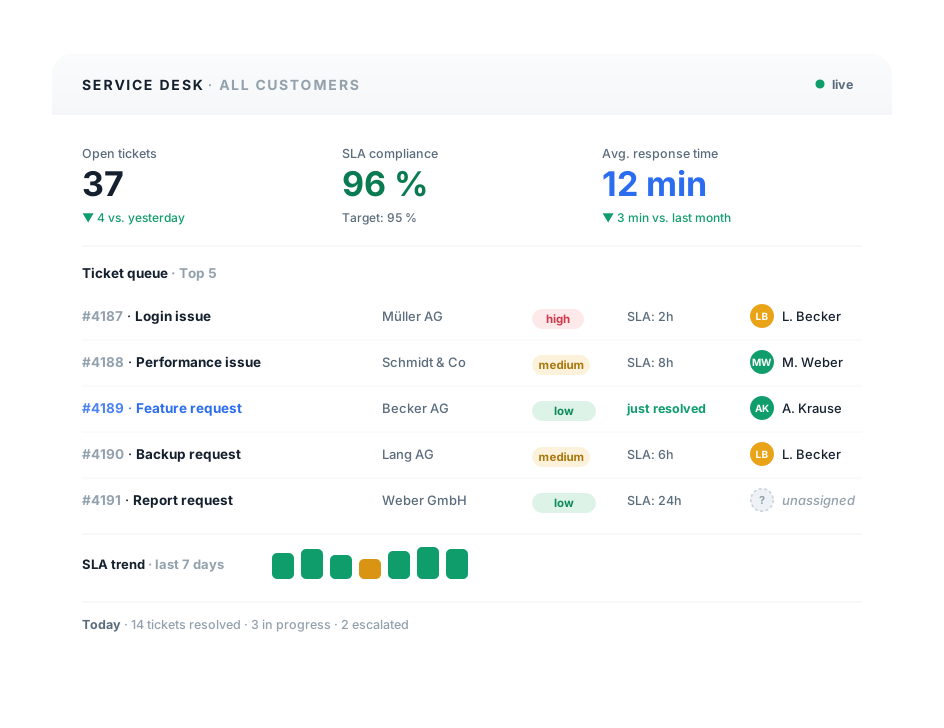
teamspace Service Desk: a ticket dashboard with the tiles Open tickets, SLA compliance and Response time, below it a ticket queue with SLA traffic lights and assignee allocation, plus an SLA trend over the last seven days.

Intake, responsibility, closure

Every enquiry becomes a ticket.

A ticket bundles email, phone call and note into one enquiry. teamspace carries it from intake through the responsible channel to billed service time, without anyone switching between four tools.

Intake

Email, phone call and note under one number.

Every ticket gets a unique number. Follow-up emails attach themselves to the same ticket by that number, with no sorting in the mailbox.

  • Three ticket types: internal, from email, on behalf from an enquiry
  • Incoming email recognises the contact via the sender address
  • Closed tickets reopen when a query comes back

Responsibility

The channel decides who handles it.

Per channel it is fixed who sees a ticket and who handles it. The status moves responsibility back and forth between you and the customer.

  • Support, sales, internal and accounting as separate channels
  • The owner handles it, the assignee stays informed
  • Escalation releases the owner when the deadline is running

Closure

The ticket turns into time and an invoice.

Work on the ticket logs time to the project. From it comes a receipt or a consolidated invoice, at the rates of the maintenance project.

  • Time straight from the ticket to the linked project
  • Receipt or ticket project in one step
  • Billing to the minute, by interval or flat rate

Responsibility

The channel determines who handles it.

A ticket does not land in one big pool but in a channel. Per channel it is recorded who is responsible and who only reads along.

Neue Anfrage #4319

Anbindung Schnittstelle

Heyer Plan AG

Support

IT-Team

4 offen
KS K. Sturm bearbeitet
TL Teamleitung liest mit

Standard bearbeitet · informell liest mit

Vertrieb

Account

1 offen
MR M. Roth bearbeitet

Standard bearbeitet · informell liest mit

Buchhaltung

Finanzen

2 offen
AS A. Stein bearbeitet
JL J. Linke liest mit

Standard bearbeitet · informell liest mit

Each channel team only sees its own tickets.

Intake

Incoming emails find their contact.

An enquiry comes in by email or phone. Before anyone opens the ticket, it is already attached to the right contact: teamspace matches the sender address to the CRM record and fills the customer file.

  • Incoming email is matched to the CRM contact via the sender address, so the ticket sits at the customer file straight away.
  • On a phone call the telephone interface shows you who is calling and which tickets are open, before you pick up.
  • Follow-up emails carry the ticket number in the subject line and land in the same ticket automatically, rather than as a new enquiry.
  • Optionally via Microsoft Teams: a Teams call becomes a ticket in one click, to be activated by the customer.
Inbox
Calls
Teams

28 May · CRM mailbox

auto-matched

Email

Re: AN-2026-118

v.voigt@heyer-plan.de

Call

04:12 min

+49 30 4567 1820

Teams

Strategy workshop

V. Voigt · Heyer Plan AG

three channels, one contact

Responsibility

The status shows whose turn it is.

A ticket runs through several stations from the first enquiry to closure. At each one it is clear who has to act now, your team or the customer. Nobody has to hand over responsibility by hand; it travels with the status.

bei uns

Neu

liegt im Kanal, noch ungelesen

bei uns

In Arbeit

Besitzer bearbeitet das Anliegen

SLA-Restzeit 02:14 h
beim Kunden

Beantwortet

wartet auf die Rückmeldung

erledigt

Erfolgreich geschlossen

keine Verantwortung mehr offen

Eskalation

Keine Änderung in der Frist? Der Besitzer wird automatisch frei, das Ticket wechselt den Kanal. Urlaub oder Krankheit halten es nicht auf.

Service level

The traffic light shows how much time is left.

Anyone who has promised a customer a response time sees a traffic light in the ticket: how much time remains before the deadline, coloured by urgency.

  • SLA per customer or per ticket, with its own response time for each urgency level.
  • Business hours define the window in which the SLA clock counts; at night and at the weekend it stands still.
  • Warning before expiry, not after: the people involved are notified while there is still time left.
  • Owner and assignee are on the ticket, so everyone knows who responds and who reads along.

Ticket · SLA

#4318 · Priority 7 / 9

Heyer Plan AG Answered, open

02:14 h

Response time until SLA deadline

Warning sent before the deadline expires

Owner

K. Sturm

Assignee

Team lead

Follow-up items

A ticket opens three follow-up items.

Some enquiries are settled with a single reply, others pull work behind them. From the ticket you log time to the project, write a receipt or turn the ticket into a project of its own.

Ticket #4318

Heyer Plan AG · Support

Anbindung läuft nicht, Aufwand fällt an

Zeitbuchung

Aufwand landet auf dem verknüpften Projekt, auf Wunsch automatisch beim Statuswechsel.

1,5 h · PRJ-2026-114

Beleg

Aus dem Ticket entsteht ein Angebot oder Auftrag, der Kontakt wird übernommen.

AN-2026-118 → Faktura

Ticketprojekt

Wächst das Anliegen, wird ein eigenes Projekt daraus, fest mit dem Ticket verknüpft.

Hauptprojekt
34 %
Billing

Every service minute ends up on the invoice.

The time logged on the ticket runs to the customer's maintenance project. At the end of the month an invoice is created from it, with the right rates and automatic premiums.

  • To the minute, by service interval or flat rate: the billing method is fixed per contract.
  • Rates of the maintenance project, also by employee or customer; premiums for night, weekend and public holiday work are calculated by teamspace automatically.
  • Internal and goodwill time can be excluded from billing without losing the booking.
  • Single or consolidated invoice: many tickets for one customer go out as a single document, for example at the end of the month.

Ticket billing

#4318 · Heyer Plan AG

to the minuteintervalflat rate
Handling · 1.5 h €142.50
Maintenance project rate €95/h
Weekend premium +25 %
Consolidated invoice May €1,486.00
14 tickets one receipt at month end

“Staff in both support and project planning can see orders and invoices. That was not possible before.”

At A+W Software GmbH, support and the project team work from the same data. Whoever handles a ticket sees the order and the invoice right alongside it.
A+W Software GmbH

Case Study

From shared mailbox to a guided service desk.

Hypothetical practical example to illustrate how it works. Specific figures depend on the starting point, sector and implementation and are not guaranteed. A typical switching scenario: a growing IT service provider with 22 staff, one shared support mailbox and an Excel list for the maintenance hours.

Starting point

Enquiries ran through a shared mailbox. Who was handling which email was often unclear, two people replied twice or no one did. Promised response times were set out in contracts, but in day-to-day work nobody could see how much time was left. Maintenance hours were pieced together at the end of the month from memory and notes, and part of the work performed never appeared on the invoice.

Solution

Enquiries now arrive as tickets in separate channels, each with clear responsibility. Incoming emails attach to the CRM contact, follow-up emails land in the same ticket via the number. A response time is stored per customer, the traffic light shows the time remaining, and escalation releases a ticket that has been left lying. Time is logged on the ticket and runs to the maintenance project, with the consolidated invoice created at the end of the month.

1

ticket pool instead of a shared mailbox

3

channels with clear responsibility

0

enquiries without an identifiable owner

Intro call

We take a look at your service intake.

Show us how enquiries reach you today and who handles them. We will tell you honestly where a guided ticket system saves work and where your mailbox is enough.

Use cases

Six paths through the service desk.

Six focal points around the service desk, each on its own page.

Ticket system

  • Three ticket types, a unique number, items per ticket
  • Four statuses with a shift of responsibility
  • Merge tickets, split them, put them on follow-up

Ticketing software

  • Intake from email, phone and web service
  • Channels for topics and responsibility
  • Automatic acknowledgement of receipt per channel

SLA management

  • Response time per customer or ticket
  • Time remaining as a traffic light by urgency
  • Escalation releases the owner

Customer portal

  • Customer-specific login with restricted access
  • Raise tickets themselves, mandatory forms
  • View invoices, share released files

Ticket billing

  • To the minute, by interval or flat rate
  • Rates and premiums from the maintenance project
  • Single or consolidated invoice at the end of the month

Ticket projects

  • Turn a ticket into a main project, sub-project or work package
  • Firmly linked, with progress
  • Time and finances on the project

Scope of functions

Functions from intake to billing.

Four areas that carry the ticket system, from the first intake to the consolidated invoice.

Intake

  • Three ticket types: internal, from email, from an enquiry
  • Intake from email mailboxes, phone and web service
  • Optionally Microsoft Teams, a ticket from the Teams call
  • Incoming email matched to the contact via the sender address
  • Unique ticket ID, follow-up emails assigned automatically
  • Priority 1 to 9, categories and colour markings

Steering

  • Channels for topics and responsibility, subscription standard or informal
  • Four statuses with a shift of responsibility, custom statuses can be added
  • Owner and assignee as two roles
  • Workflows per channel, permitted status transitions
  • SLA per customer or ticket, time remaining as a traffic light, business hours
  • Time-based escalation, releases the owner or switches the channel

Further processing

  • Log time from the ticket to the linked project
  • Receipt, that is a quote or order, from the ticket
  • Ticket project as a main project, sub-project or work package
  • Appointment from the ticket, assigned to the ticket automatically
  • Merge tickets, move or copy items
  • Watchers and alerts, ticket reminder for follow-up

Billing and analysis

  • Billing to the minute, by interval or flat rate
  • Correct hourly rates, also by employee and customer
  • Premiums for night, weekend and public holiday work automatically
  • Internal and goodwill time can be excluded
  • Single or consolidated invoice, for example at the end of the month
  • Statistics: count, handling effort, dwell time, response time

Comparison

Shared mailbox versus guided tickets.

Where a ticket system with channels and SLA differs from a shared email mailbox.

Feature

Shared mailbox

teamspace

Recommended
Unique number, follow-up emails assigned automatically
Intake from email, phone and web service
limited
Channels with fixed responsibility
Owner and assignee separated
Incoming email at the CRM contact
manual
SLA time remaining as a traffic light, with business hours
Escalation releases the owner
Time from the ticket to the project
manual
Receipt or ticket project from the ticket
Billing to the minute, by interval, flat rate
manual
Customer portal for customers
Hosting in an ISO 27001 data centre in Frankfurt
varies

What comes together on a ticket.

Intake, steering and billing hang on the same ticket. Analyses and integrations grow from the same items, not from parallel lists.

3
ticket types

internal, email, from an enquiry

4
standard statuses

New, In progress, Answered, Closed

1999
developed in Darmstadt

5 POINT AG, self-financed

Frankfurt
hosting in the EU

ISO 27001 certified data centre

Self-service

Customers raise tickets themselves.

Some customers do not want to write an email every time but to see for themselves where an enquiry stands. For that, teamspace gives them their own access, separate from your internal system.

  • A customer-specific login with restricted, simplified access. The customer raises new tickets or asks follow-up questions on existing ones.
  • Mandatory forms ensure the enquiry comes in with the fields your team needs to handle it.
  • Status and history of their own tickets can be viewed, which saves queries about the current state.
  • Through the portal customers can also view invoices and share released folders.
To the customer portal

Intake

Every email becomes a ticket.

Most enquiries still come in by email. teamspace takes in entire mailboxes, so every email arriving at the service address becomes a ticket. Anyone who prefers to stay in Outlook uses the add-in.

  • Outlook add-in from Microsoft AppSource: create a ticket from an email, synchronise contacts and appointments, hand attachments over to file management.
  • Phone and web service as further channels: a form on your own website raises tickets straight into the matching channel.
  • Optionally Microsoft Teams, to be activated by the customer: a Teams call becomes a ticket with a contact reference in one click.
To the Outlook add-in

Ticket project

When a ticket grows, it becomes a project.

Not every enquiry is solved with a single reply. When an enquiry turns into real work, you turn the ticket into a project, firmly linked to the ticket.

  • Main project, sub-project or work package: the ticket project fits into your project structure in the right place.
  • Progress and phases as in any project; you log time and finances on the project, no longer only on the ticket.
  • Ticket and project stay connected: whoever opens one sees the other.
To ticket projects

When a service desk pays off

As soon as several hands work on the same enquiries.

A shared mailbox carries you for a while. It tips over as soon as several people respond to enquiries in parallel, as soon as response times are promised, and as soon as service hours are worth money that should not go to waste.

At growing service providers this usually happens between five and fifteen staff in service. From then on it helps to have a clear channel per topic, a status that shows whose turn it is, and billing that grows by itself from the logged hours. That is exactly the point at which a mailbox becomes a service desk.

Cover

A holiday does not hold up a ticket.

The responsible handler is off sick or on holiday, but the customer's ticket runs against the deadline all the same. So that it is not left lying, escalation kicks in.

  • Time-based escalation: if a ticket does not change within the deadline, teamspace releases the owner automatically or switches the channel.
  • The channel team takes over without anyone changing permissions; the escalation is recorded as an internal item in the ticket.
  • Watchers and a ticket reminder keep a ticket on follow-up until it is due again.
To SLA management

Security

Service data stays in Frankfurt.

Tickets often hold sensitive things: access credentials, infrastructure, the route to solving a problem. teamspace processes this data exclusively in the EU.

  • Hosting in an ISO 27001 certified data centre in Frankfurt am Main. It is the data centre that is certified, not teamspace itself, and we say so honestly.
  • GDPR-compliant setup, with a data processing agreement; encryption via TLS, storage encrypted in the data centre.
  • Permissions per channel, plus single sign-on via Microsoft Entra and two-factor authentication.
  • The contracting party is 5 POINT AG, a German public limited company based in Darmstadt.

Terms

The key service desk terms.

Six terms that come up again and again in the service desk.

Ticket
An item that bundles an enquiry: all the emails, calls and notes on it, with a unique number.
Ticket channel
A thematic channel, for example support or sales. Per channel it is defined who sees tickets and who handles them.
Owner and assignee
Two roles on the ticket: the owner handles the enquiry, the assignee stays informed.
SLA
Service level agreement, a promised response time per customer or ticket. The time remaining is shown as a traffic light.
Escalation
A time-based rule: if a ticket stays unchanged for too long, the owner is released or the channel is switched.
Ticket project
A project that grows out of a ticket and stays firmly linked to it, as a main project, sub-project or work package.

Intro call

Let's talk about your service processes.

In a short call we work out whether switching from a shared mailbox to teamspace pays off for your team.

Common questions about teamspace service desk software

Which channels does the service desk accept for ticket intake?
teamspace accepts tickets from email (entire mailboxes can be connected), phone (via the telephone interface) and a web service on your own website. Optionally Microsoft Teams is added, to be activated by the customer. There is no chat function inside tickets; tickets are asynchronous chains of items.
How does teamspace assign an incoming email?
Incoming emails are matched to a CRM contact via the sender address, so the ticket hangs on the customer file straight away. Every ticket has a unique number; follow-up emails with that number in the subject line land in the same ticket automatically.
What is the difference between the owner and the assignee?
The owner handles the ticket, the assignee stays informed about the items. Both can be changed when an item is created. In addition, people or groups can be added as watchers; the creator and owner are included automatically.
How does SLA monitoring work?
A response time can be stored per customer or per ticket. In the ticket the time remaining is shown as a traffic light by urgency, and the people involved are warned before expiry. Business hours define the window in which the SLA clock runs. Contractually assured response times of 12 hours (SLA Standard) or 6 hours (SLA Premium) apply only within the respective SLA plan.
What happens when a handler is on holiday?
Escalation levels let you specify that a ticket's owner is released automatically or the channel is switched if no change happens within a deadline. That way the channel team takes over without the ticket being left lying. The escalation is documented as an internal item.
Can we bill service time directly?
Yes. The time logged on the ticket runs to the linked project, usually a standard maintenance project per customer. Billing is to the minute, by service interval or flat rate, with the correct rates and automatic premiums for night, weekend and public holiday work. Internal and goodwill time can be excluded, and billing runs as a single or consolidated invoice.
What is a ticket project?
When an enquiry needs more than one reply, you turn the ticket into a project, firmly linked to the ticket. It is created as a main project, sub-project or work package and brings progress, time and finances with it. More on this on the Ticket projects page.
Is there a customer portal for customers?
Yes. Through a customer-specific login with restricted access, customers raise tickets themselves, ask follow-up questions and see the status and history of their enquiries. Mandatory forms ensure complete information. Through the portal customers can also view invoices and share released files.
How does the service desk connect with project and invoicing?
Tickets can be assigned to a project, with effort flowing into the planned-versus-actual comparison. From the ticket comes a receipt in the invoicing software or a ticket project. Maintenance, project work and billing work on the same items, not via interfaces.
Which analyses does the service desk offer?
The ticket statistics show the number of enquiries, handling effort, dwell time and response time. The analyses can be filtered and exported. There is no freely buildable report designer; more advanced analyses run via Excel export or the REST API.
Where is the service desk data stored?
All data is processed in an ISO 27001 certified data centre in Frankfurt am Main, exclusively in the EU. It is the data centre that is certified, not teamspace itself. The contracting party is 5 POINT AG, a German public limited company based in Darmstadt, with a data processing agreement and GDPR-compliant architecture.
Can teamspace be used as a service desk only at first?
Yes. The ticket system sits in the office edition, together with CRM, project and billing. You can start with the service desk and use the other modules later, without a second roll-out project, because they build on the same data.

Intro call

Service desk reviewed in 15 minutes.

Tell us about your service enquiries, contracts and response times. Within 15 to 30 minutes you will hear whether teamspace is a fit.