
Wartungsvertrag · Heyer Plan AG Zeitbudget 20 h / Monat
20 h · aufgebraucht
6,0 h
5,0 h
5,0 h
4,0 h
2,5 h
im Budget · pauschal gedeckt über Budget · nach Aufwand
Agents log their hours straight on the ticket. Those hours turn into the invoice: against a time budget, by effort, or both, individually or consolidated at month-end. Sent as ZUGFeRD or XRechnung, handed over to DATEV. Part of the Service Desk software in teamspace, with no module surcharge.
Starting point
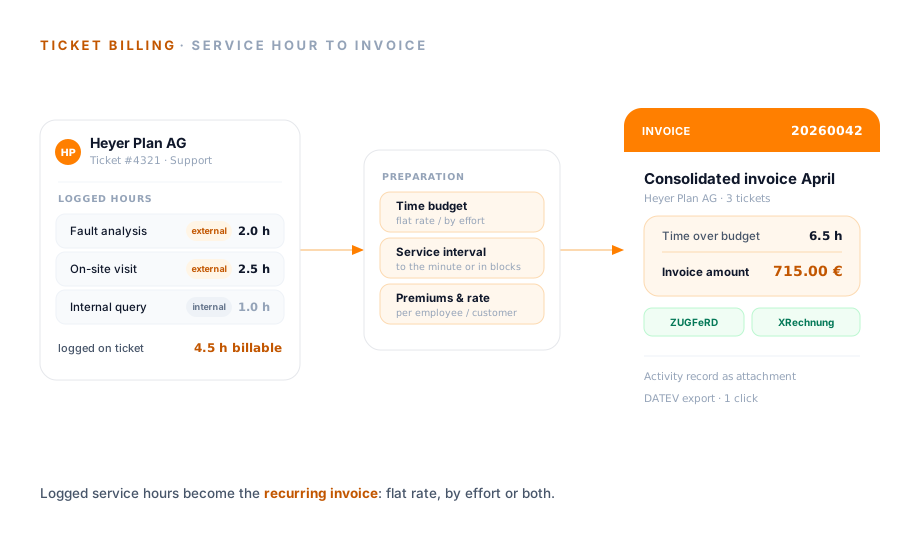
Work that has been done sits idle instead of reaching the invoice.
Transfer
Whoever resolves a request logs their time on the ticket. teamspace carries that same entry into the associated order, with an activity description and ticket reference. No one collects hours from emails and notes at month-end.
Time budget
A maintenance contract gets a time budget per period. Logged ticket hours fill it up. At the threshold the system recognises that it is used up and bills every further hour according to the stored rule.
Die Stunden bis zur Budgetgrenze sind mit dem vereinbarten Pauschalbetrag abgegolten, ohne Einzelposten.
Jede weitere Stunde läuft nach der hinterlegten Regel: minutengenau, im Service-Intervall oder zum Stundensatz des Vertrags.
Das Budget meldet sich selbst. Das System erkennt selbst, wann das Zeitbudget aufgebraucht ist, und verrechnet jede weitere Stunde nach der hinterlegten Regel.
Three levers
Ticket billing does not force an artificial split. It mirrors how service contracts actually look in reality. Three settings carry that.
Service interval
Set the calculation interval per contract. Work is calculated in a fixed rhythm, for example every half hour, or to the minute.
Internal and external times
Distinguish between internal and external times where you wish. This lets you bill minimum flat rates or exclude goodwill time from the invoice.
Hourly rate and premium
teamspace applies the correct hourly rate, including by employee or customer. Premiums for night, weekend and public holiday work are added automatically.
Capture
The lever of integrated billing lies in capturing at the source. Whoever handles a request logs their time during or right after the resolution, rather than reconstructing it at the weekend.
Hourly rate
Which rate applies to an entry rarely comes down to a single number. teamspace resolves this automatically, even when the rules differ by employee and customer, and adds the premiums that are due.
“I save a lot of time writing invoices.”

Scope of functions
Three things decide whether work that has been done turns into an invoice without friction.
Period
You bill a ticket individually or bundle a customer's entries, for example at month-end. You can store your own rules for each case. teamspace creates the invoice proposal, you check it, approve and send.
Scope of functions
What can be set per contract, how hours turn into an invoice and what travels along on dispatch.
Next step
Let's work through one contract together.
One real maintenance contract is enough. We go through its mix of time budget, service interval and premiums step by step, and you see where logging on the ticket shortens the month-end close.
Use cases
Billing sits at the end of the service chain. These areas show what happens before it, each on its own page.
Three ticket types, channels, statuses and responsibility in detail.
Learn moreRequests from email, phone and web service become a ticket.
Learn morePromised response times run as a traffic light on the ticket.
Learn moreCustomers open tickets themselves and see the status.
Learn moreTurn a ticket into a main project, sub-project or work package.
Learn moreCreate a ticket from an email in Outlook.
Learn more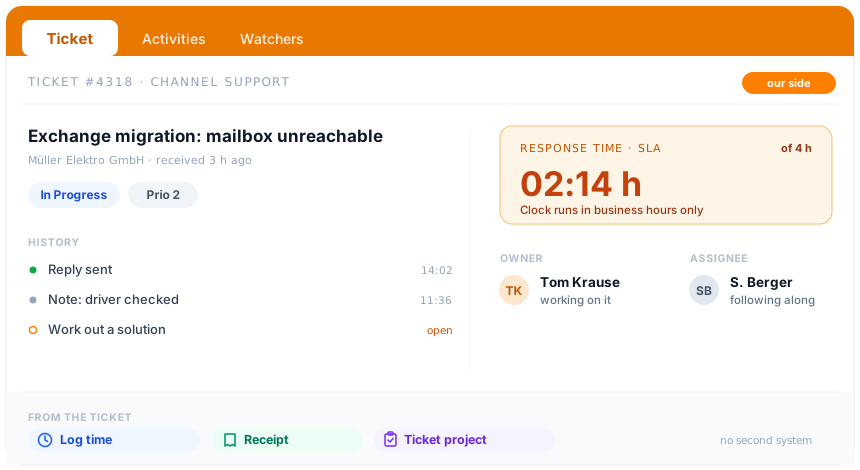
At a glance
Ticket billing turns the hours that have been worked into the invoice. How teamspace runs the entire service, from channels through statuses and escalation to time on the ticket, is shown in the Service Desk software overview.
To the Service Desk softwareSecurity
Maintenance contracts and tickets hold conditions, hourly rates and customer agreements. teamspace processes this data exclusively in the EU, without management having to worry about the infrastructure.
Hosting is in an ISO 27001 certified data centre in Frankfurt am Main, with processing exclusively in the EU. For billing-relevant data you can activate the GoBD mode: approved invoices, cancellations and receipts can then no longer be deleted, and retention is audit-proof. The system is set up in line with GDPR, with a data processing agreement as standard. Development, support and operations sit with 5 POINT AG, based in Darmstadt, since 1999.
Related modules
Conditions come from the customer, the effort from the project, the hours from time tracking. Three areas feed every service invoice, this way.
The ticket hangs on the contact, the order on the customer. The hourly rate and document layout come from the customer record.
A growing request becomes a ticket project, whose effort flows into the planned-versus-actual comparison.
Service hours are logged straight from the ticket onto the project and form the basis of billing.
Initial call
Bring along your maintenance contracts, with time budgets, service intervals and premiums. On one real contract you see whether teamspace fits your service.