CRM software for service providers: customer records and sales management
CRM software brings organisations, contacts and activities together in one place. In teamspace, incoming emails attach themselves to the contact, callers are recognised, and every open activity turns into a follow-up, without a separate reminder list.
4.8 / 5.0ProvenExpert·More than 20,000 users·Since 1999
Organisations, contacts and activities build on each other. Emails, appointments, quotes, tickets and hours are stored automatically in the right spot, captured once and found everywhere, without anyone maintaining things twice.
Tools for the daily work
Quotes, emails and mail merges are created straight from the organisation's master data, with address, contact person and layout, with no retyping.
Support for sales
Sales opportunities, sales funnel, key account management and campaigns are integrated and draw on the same data, so sales can be run without a second system.
Digital customer record, activity, relationship
Emails, appointments and quotes land automatically on the same contact
The digital customer record fills itself: teamspace gathers activities, quotes, tickets, emails and appointments on the contact and brings them together. Manual entries can be added at any time, but the automatic build-up is what makes it valuable. So sales and account care work on the same master data.
Digital customer record
A timeline per organisation, a profile per contact.
Emails, appointments, quotes, tickets and hours land automatically in the digital customer record; manual entries add to it. Anyone new to an account is up to speed in a quarter of an hour.
Organisation as the root, contact as the person, activity as the touchpoint
Parent organisation for holdings and divisions
Master data, activities and files in one place
ABC analysis per organisation for sales, customer and supplier
Emails, calls and Teams meetings find the right contact.
The Outlook add-in synchronises contacts and appointments. Incoming emails are matched to the CRM contact. The phone system and Microsoft Teams show the caller and the key account manager as the phone rings.
Outlook add-in from the Microsoft AppSource
CalDAV sync with Outlook, Apple and Google Calendar
You see who is calling before you pick up
Microsoft Teams integration for meetings and calls
Six steps from the CRM module. Each step is an activity on the contact, all activities hang on the same organisation, without anyone creating things twice.
1
First contact becomes an activity
An enquiry by email, phone or web form lands as an activity on the contact. Source, date and owner are saved with it. Whoever opens the activity sees the whole digital customer record of the organisation.
2
Maintain the organisation and its contacts
From the contact grows the organisation, from the organisation a tree with a parent organisation and subsidiary entries. The address is inherited by the contacts, each contact gets its own profile and its own activity view.
3
Qualify the activity and set a follow-up
The activity moves to enquiry, to need, to quote. On a quote you can record probability and revenue. As long as the closing date is open, teamspace keeps the follow-up on the owner.
4
Quote from the organisation's master data
The activity becomes the quote in invoicing. Address, contact person, payment terms and layout come from the organisation's master data. Sent by email, status returned to the digital customer record.
5
The order becomes the project
When the order is placed, the project is created with budget, team and phases. The handover from sales to delivery runs on the same organisation, not across an interface.
6
Follow-on order from the digital customer record
After the project closes, the organisation stays active in the digital customer record. Key account managers and VIP managers see follow-on activities, upsell potential and maintenance contracts. Cross-selling becomes visible because every touchpoint hangs on the same contact.
Customer knowledge that does not get lost.
Email, appointment and quote land on the customer, not in individual inboxes.
Highlight 1
Everything on the customer, not in the inbox
Email, call, appointment, quote and activity land on the organisation. Whoever takes over sees the whole history.
Highlight 2
The digital customer record survives a staff change
When an account owner leaves, the relationship is not gone. The deputy sees straight away what is due.
Highlight 3
The quote becomes the project
Accepted quotes become an order and a project. Customer data, hours and invoice stay connected.
Data model
One organisation, its contacts, its activities.
Whoever documents a touchpoint in the CRM writes it to three connected places. Everything is built from these three kinds of record: the digital customer record, the follow-ups, the reports. Every activity runs back to the root.
V. Voigt
v.voigt@heyer-plan.de
+49 30 4567 1820
K. Stark
k.stark@heyer-plan.de
+49 30 4567 1834
Mail eingehend
Re: AN-2026-118
Anruf
V. Voigt · 04:12
Termin
Strategie-Workshop
Angebot
AN-2026-118 · 28.400 €
Ticket #4321
gelöst · K. Stark
Notiz
Cross-Selling Modul 2
Datei
Vertrag-Heyer.pdf
Stunde
1:45 · Beratung Heyer
Seen in a few minutes
See the CRM live.
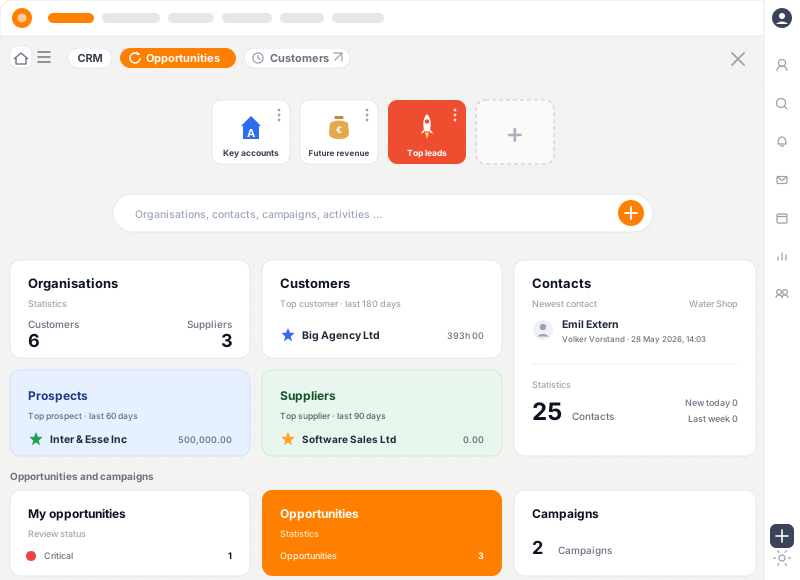
A short look at the teamspace interface: maintaining contacts and organisations, documenting activities, reading the digital customer record as a timeline.
Digital customer record and activities
Email, appointment and quote land on the organisation, in chronological order in the digital customer record.
One view of everything
Orders, invoices, hours and tickets are reachable from the contact.
Follow-ups
Open activities turn into follow-ups, with no separate reminder logic.
Use cases
Six focus areas from the CRM.
Six focus areas from the CRM module, each on its own page.
Digital customer record
Timeline with emails, appointments, quotes and projects
Parent organisation and subsidiary entries as a tree
At WAHLER HR, contacts, quotes and projects sit in one place. With no tool switching, the team finds its way around at once and stays close to the customer.
“Staff in both support and project planning can see orders and invoices. That was not possible before.”
At A+W Software, support and project teams see the same customer data. Orders, invoices and activities hang on the organisation and are reachable from every contact.
Case Study
A strategy consultancy with 35 consultants: out with Excel, in with the digital customer record.
Hypothetical practice example to illustrate how it works. Concrete values depend on the starting point, industry and execution and are not guaranteed. A typical migration scenario: 35 consultants, one Excel contact list, Outlook categories as a lead tracker.
Starting point
Existing contacts sat in three parallel Excel sheets, maintained by changing office managers. Calls were noted in Outlook categories, follow-ups ran through personal calendars. When the account team changed, follow-on potential was lost, because the communication history stuck to people, not to organisations. Cross-selling topics were pulled together by hand in the quarterly meeting.
Solution
All existing contacts are moved onto teamspace in one migration, with parent-organisation trees mapping the group structures of the larger clients. Emails and calls are matched automatically. Every open activity becomes a follow-up. When an order is won, the project is created from the quote, with no data transfer. The customer analysis shows the contribution margin per customer each month, the CRM analysis shows activities by type and owner.
+18 %
follow-ups kept, instead of lost in a private calendar
1
digital customer record including subsidiaries, instead of three Excel lists
+1
follow-on activity per existing customer, visible in the digital customer record
Three aspects
An organisation lives in the CRM as three aspects at once.
Sales, customer and supplier are not tags but three separate master-data areas on the same organisation. Whoever opens the entry sees at a glance which roles they hold with the firm, which ABC class they sit in and who in the firm is responsible for them.
HP
Heyer Plan AG
Berlin · 87 staff
Sales A class
Revenue potential240 k €
Last rating2026-03
Acquisitionactive
Customer since 2019
SLA response4 h
KAMM. Roth
Standard projectConsulting Heyer
Supplier Q ★★★★
Cost★★★
Punctuality★★★★
NDA · terms✓ · ✓
VIP VIP manager J. Lange works across modules, including caller recognition
In 15 minutes
We check whether teamspace fits the way you run sales and customer work.
In 30 minutes we walk through your organisation structure, activity logic and the links to email, phone and Teams. You get an honest opinion, not a sales demo.
Emails find the contact, callers are recognised before you pick up.
The Outlook add-in brings contacts and appointments into the system in both directions. Incoming emails are matched to the CRM contact by address; Teams meetings and calls land on the same record.
Outlook add-in for email-to-ticket, contact sync and appointment sync. CalDAV interface for Outlook, Apple and Google Calendar.
Emails land on the contact, without anyone sorting them. Whoever opens the contact sees the whole correspondence in the activity view.
Teams meetings are created straight from the CRM calendar; a Teams call becomes a note or a time entry in one click.
When someone rings, you know before you pick up who you are speaking to and which activities are open.
The digital customer record is the timeline of the organisation.
Whoever opens the digital customer record sees every activity in chronological order: the last email, the open quote, the next appointment. teamspace gathers activities, quotes and tickets on the contact automatically and brings them together; manual entries add to the record at any time, but the automatic build-up is what makes it valuable. The organisation's master data is inherited by the contacts, without anyone maintaining it twice.
Overview, master data, org chart, contacts, activities, files, forum as tabs in the detail manager.
Parent organisation maps holding structures: subsidiaries appear as connected organisations, and a contact's activities are visible at organisation level.
ABC analysis per aspect (sales, customer, supplier), sorted into 20 / 60 / 20 per cent, with the calculation configurable per aspect.
Standard project per organisation: tickets and hours land automatically on the right account.
Open activities become follow-ups, with no separate reminder logic.
Every activity carries a date. Once the date is reached and the activity is not closed, teamspace reminds the responsible owner. So a reliable chasing system grows out of ordinary activity upkeep.
Three activity groups: soft activities (enquiry, acquisition, chasing), hard factors (need, quote, order, cancellation), internal (status, internal question).
On quotes, probability and revenue can be recorded, so the value feeds the sales-opportunity view.
No double reminder system: the follow-up is the activity itself, visible in the personal overview and in the digital customer record.
A call activity holds several call attempts in one entry, instead of creating a new one for each attempt.
aus offenen Vorgängen, ohne separate Erinnerungs-Liste
Feature scope
The CRM core in five areas.
Five areas that carry the CRM core module. Pipeline, weighted forecast and sales analyses belong to the separate sales-process module and are framed further down.
Organisations and contacts
Organisations as prospect, customer or supplier, roles combinable
Parent organisation as a tree structure for holding and division hierarchies
Detail manager with overview, master data, org chart, contacts, activities, files, forum
Contact with profile, activities, external access
Standard project per organisation for ticket and time-entry routing
Service notes per organisation, visible module by module
Activities and follow-ups
Three activity groups: soft acquisition, hard factors, internal note
Quote with probability and revenue
Follow-up automatically from an open activity when the date passes
Deputy rule via the key account manager
ABC analysis per organisation for sales, customer, supplier
Supplier rating across cost, quality, time, NDA, terms
Communication
Outlook add-in in the Microsoft AppSource
Contact sync with Outlook, Mac and smartphone
CalDAV interface for Outlook, Apple and Google Calendar
Automatic email matching to the CRM contact
Phone interface with caller recognition
Microsoft Teams integration for meetings and calls
Campaigns and reports
Campaign with email, mail merge, address labels, CRM activity as activity types
Automated email series with a repeat interval
Campaign status visible per contact, opt-outs in a blocked list
Customer analysis with contribution margin per customer
CRM analysis of activities over time
Sales-opportunity report and stage analysis
Security and compliance
Hosting in an ISO 27001 certified data centre in Frankfurt am Main
Data processing exclusively in the EU, DPA as standard
Set up to be GDPR compliant
Need-to-know permissions per organisation and contact
Single sign-on via Microsoft Entra (Azure AD and Microsoft 365)
Contracting party: 5 POINT AG, a German public company
Comparison
A digital customer record instead of a contact list.
Where a CRM with a digital customer record and activities differs from a contact app.
Feature
Stand-alone CRM
teamspace
Parent organisation as a tree structure
rarely
Activities in three groups, quote with probability
limited
Follow-up from an open activity
Digital customer record as a timeline
varies
ABC analysis per sales / customer / supplier
Automatic email matching to the contact
manual
Caller recognised on the CRM contact
rarely
Microsoft Teams integration for calls
Campaigns with mail merge and labels
varies
Quote, order, project on one data foundation
Hosting in the ISO 27001 data centre in Frankfurt
varies
Contracting party: a German public company
varies
What comes together in a digital customer record.
Contact, activity and digital customer record hang on the same organisation. Reports and integrations grow from the same records, not from parallel lists.
3
kinds of record
organisation, contact, activity
3
activity groups
soft, hard, internal
ABC
analysis per aspect
sales, customer, supplier
1999
developed in Darmstadt
5 POINT AG, self-funded
Cover
When the account owner is away, the deputy sees what is due.
A sick note on Monday, a holiday in the middle of the quote phase, a job move in sales: in the weak moment of an account relationship it is decided whether the digital customer record is visible to everyone or whether the knowledge hung on a person who is now out of reach.
A key account manager per customer, optionally with a deputy. Whoever is entered as deputy has the same view of the customer record as the owner, without anyone changing permissions.
CRM data can be restricted to the account manager. Sensitive accounts stay visible only to the assigned team; the permission applies in every module the customer appears in.
VIPs get their own VIP manager. The marker works across modules: when a VIP contact rings, the responsible manager sees the activity first, even if they are not on the account team.
Whoever has read the customer record sees the latest state: the most recent quote, the last email, the next agreed meeting. No one has to guess whether the owner has already been in touch.
Cross-selling and follow-on orders often arise when a deputy fills a gap and spots a follow-on point the original owner overlooked. That assumes the digital customer record is visible, not sitting in a personal Outlook folder.
Pipeline, funnel and stage analysis as an extension of the enterprise edition.
Anyone who steers sales actively adds the sales-process module to the CRM. It sits close to the CRM data model but is a separate stage. Not every mid-sized firm needs this degree of control: the digital customer record and the ABC view carry their weight without a pipeline.
Sales opportunities per customer, with stage, probability and expected revenue. The combination gives a realistic revenue plan: stage times probability times revenue.
Sales funnel from first contact to close, with configurable stages. For each opportunity you can track where it currently stands.
Stage analysis: the distribution of opportunities per stage becomes visible; where the funnel thins out can be read off, not guessed.
The edition is enterprise. We mention it here because the question comes up in most requirements checks; we do not sell it actively. Anyone after a pure CRM with a digital customer record, follow-ups and communication stays in office. Anyone who wants to steer sales in stages sees the extension cleanly framed.
Offen Versendet Angenommen Abgelehnt
Q2 · 4 Angebote
TypOrganisationNetto
20260017
Bauherr Lichtenstein
76,5 k €
20260015
Stadt Frankfurt
124,0 k €
20260013
Wohnungsbau Süd
42,8 k €
20260011
Privatbau Halle
18,0 k €
Summe261,3 k €
Reports
Customer analysis, CRM analysis and sales opportunities as standard reports.
Instead of freely buildable dashboards, teamspace offers three standard views that cover the daily work of sales leadership.
Customer analysis: contribution margin and average hourly income per customer. Filter by main customers or by division. The calculation draws on the internal cost rate from the HR portal.
CRM analysis: all CRM activities by type over time. Split by owner or customer, showing count and revenue, with quotes weighted by probability.
Sales-opportunity view (with the sales-process module): all opportunities with their current value and stage, filtered per customer or account manager. The distribution per stage becomes visible.
Three fixed standard views instead of freely buildable dashboards. Anyone who needs more gets it into their own BI tool via the REST API. Anyone who needs less stays with the three standard views.
Today, AI in the teamspace CRM mainly means that your AI assistant can read the customer record too. Through the MCP server, included in every edition, you ask in plain language in Claude, ChatGPT or Cursor, for example "Who is our contact at Bauer KG, and which of their tickets are still open?" or "Which meetings did we have with Müller GmbH last quarter?". The answer comes from the CRM contacts, activities, appointments and tickets in your teamspace.
Two conditions always apply: a suitable MCP connection has been configured and enabled for you, and you are allowed to see the data in teamspace yourself. If Bauer KG is restricted to its account team and you are not on it, the AI will not show you anything about them either. Nothing goes through MCP that you could not do in teamspace yourself. Whether a tool only reads or may also write is set by your administrator for each connection.
A CRM data fetcher as a built-in AI feature is in the works but not yet available. teamspace does not run a language model of its own, and your CRM data is not used to train AI models.
Email, mail merge and address labels from one activity type.
A campaign bundles contacts and activity types in one place. Possible types are email, mail merge as a PDF, address labels and CRM activity, so the same recipient list serves several channels without duplicating data.
Automated email series with a repeat interval, instead of sending every chasing email by hand.
Status per contact traceable: who was reached, who responded, where to chase.
Opt-outs via the unsubscribe link land automatically in a blocked list.
So a campaign grows from existing data, without a separate newsletter tool and without an address export.
One digital customer record per customer, which survives a staff change.
CRM software manages organisations, contacts and activities in one place. The term stands for Customer Relationship Management and means more than an address list: the goal is one digital customer record per customer, where the touchpoints between firm and customer stay traceable, even when the account owner changes.
The need becomes tangible as soon as several people maintain the same base of customers and follow-on orders should no longer depend on personal memory. At growing service providers this usually tips between 5 and 15 staff, when emails sit in Outlook categories, appointments in private calendars and knowledge leaves with the salesperson.
Anyone who makes the move early has a smaller migration effort. Anyone who delays drags data silos into the new world, whose untangling later costs more than the switch itself.
For small businesses
Which CRM fits a small business?
For a small business, the CRM that fits is one that runs contacts, activities and the customer history in one place, with no in-house IT department and no months-long roll-out. teamspace runs in the browser, is basically configured within a few days and starts with the CRM core, included in every edition, from 19 euros per user per month (office). Especially when knowledge has so far sat in Outlook categories and private calendars, a CRM for a small business makes the customer relationship visible to the whole team for the first time, instead of tying it to individual people.
Unlike a pure address app, teamspace grows with you: quotes, orders and projects are created out of the CRM on the same data basis. A small team starts with contacts, the digital customer record and follow-ups, and later switches on campaigns, caller recognition or the sales process, without changing systems.
Migration
Migration in two to four weeks, with a fixed end date.
Mid-sized service providers are typically fully productive after two to four weeks. The plan follows a proven pattern.
Week 1: set up master data, import organisations, contacts and staff, configure ABC aspects and key account managers. A pilot group tests the digital customer record.
Week 2: roll out the Outlook add-in and CalDAV sync, switch on email matching, connect the phone interface.
Week 3: configure activity types, test follow-up rules, set up campaign layouts.
Week 4: the first quarterly meeting based on customer analysis and CRM analysis, instead of pulled together from Excel.
Anyone who needs data migration from existing systems gets it from the 5 POINT AG customer success team. The import path runs through contacts and generic Excel or CSV sources; specific connectors to HubSpot, Salesforce or Pipedrive do not exist. Anyone coming from those systems exports there to Excel and imports here; that runs in a single pass.
MigrationPlan
4 weeks · SMEactive
W1Master data and pilot
W2PWA rollout
W3Approval workflow
W4Go live with payroll
Day 18 of 28on track
Security
Hosting in Germany, data protection from the start.
CRM data is sensitive. It contains business relationships, terms, internal notes and personal communication with contacts. teamspace addresses that on several levels, without management having to worry about the infrastructure.
Hosting in an ISO 27001 certified data centre in Frankfurt am Main, with processing exclusively in the EU.
Set up to be GDPR compliant, with a data processing agreement as standard.
Sensitive accounts are seen only by the account team; permissions can be fine-tuned per organisation and contact.
Single sign-on via Microsoft Entra (Azure AD and Microsoft 365). Per user, the login can be disabled, allowed or enforced.
Made in Germany: development, support and operation by 5 POINT AG, based in Darmstadt, since 1999.
The contracting party is 5 POINT AG, a German public company under German law. Incoming emails to the CRM application stay in the EU; with the Microsoft Teams integration switched on, data flows into the customer's Microsoft tenant, which is made transparent in the requirements check.
Security · hosting EU only
ISO 27001
data centre
GDPR
with DPA
AES-256
encrypted
Frankfurt
Made in Germany
Contracting party5 POINT AG, Darmstadt
Glossary
Terms around CRM software.
Frequently confused or inconsistently used terms, precisely placed in the teamspace model.
CRM
Customer Relationship Management. In teamspace, the module that runs organisations, contacts and activities. Included in every edition.
Sales process
A separate module for sales opportunities with stage, probability and revenue, a sales funnel with configurable stages and a distribution view per stage. Edition: enterprise. It shares the data model with the CRM.
Activity
Every touchpoint with a contact or an organisation. Three groups: soft activities (enquiry, chasing), hard factors (need, quote, order), internal (status, note).
Follow-up
An open activity whose target date has been reached. teamspace reminds the responsible owner, with no separate reminder list.
Parent organisation
The superordinate organisation in the data tree. It maps holding and division hierarchies. A contact's activities are visible at organisation and parent level.
Key account manager (KAM)
The responsible contact within the firm for a particular organisation. Optionally with a deputy. CRM data can be restricted to the KAM.
VIP
A marker for especially important contacts or organisations. Gets its own VIP manager, visible also in caller recognition.
ABC analysis
Sorting organisations into three classes (top 20 per cent, middle 60, weakest 20) per aspect: sales, customer, supplier. The calculation rule is configurable per aspect.
Standard project
A project held per organisation, onto which tickets and hours are booked automatically when the customer is recognised.
Caller recognition
Recognition of the CRM contact on an incoming call by phone number. Before you pick up, you can see who is calling and which activities are open on this contact.
Requirements check
Let's talk about your digital customer record.
Half an hour is enough to walk through your organisation structure, activity logic and the links to email, phone and Teams. You get an honest opinion, not a sales demo.
Which kind of sales teamspace fits, and which it does not.
Fits less well
B2C mass sales with email marketing and lead nurturing.
Pure pipeline and forecast management with no project link.
Cold acquisition with mass mailing as the core function.
Sales with no handover from the quote into the project.
Recommended
Fits well
B2B service providers where a quote becomes an order and a project.
Account management over multi-year customer relationships.
Teams that want to run organisation, contact and activity in one record.
Small businesses that want to start with a CRM without an in-house IT department.
Follow-on and cross-selling business on the same customer after the project closes.
Frequently asked questions about teamspace CRM software
What is CRM software?
CRM software (Customer Relationship Management) manages organisations, contacts and activities in one place. In teamspace this becomes a digital customer record per customer: emails, appointments, quotes, tickets and hours are gathered automatically on the contact and brought together, so the customer relationship stays traceable, even when the account owner changes.
Is the CRM suitable for small businesses too?
Yes. teamspace works as a CRM for small businesses: it runs in the browser, needs no in-house IT department, is basically configured within a few days and starts with the CRM, included in every edition, from 19 euros per user per month (office). Small teams begin with contacts, the digital customer record and follow-ups, and expand later with campaigns, caller recognition or the sales process, without changing systems.
What is the difference between the CRM and the sales-process module?
The CRM (in every edition) runs organisations, contacts and activities. The digital customer record, follow-ups from open activities, ABC analysis, key account managers, VIPs, campaigns and the CRM standard views belong to it. Sales opportunities with stage and probability, the sales funnel and the stage distribution sit in the separate sales-process module (enterprise edition), which builds on the CRM data model.
How does the CRM integrate with projects and invoicing?
When an activity becomes a quote, the quote runs in invoicing from the organisation's master data. From the order, the project is created with budget, phases and team. Data is not entered twice; the handover from sales to delivery runs on one master record, not across an interface.
Can we import existing contacts?
Yes. Imports are possible from Excel and CSV, plus via the REST API. Migration from HubSpot, Salesforce, Pipedrive or other systems runs through their export to Excel and the import into teamspace; specific connectors to those tools do not exist.
How does the email integration work?
Through the Outlook add-in from the Microsoft AppSource and through the CalDAV interface. Incoming emails are matched to the CRM contact by email address. Whoever opens the contact sees the email in the activity view. There is no generic IMAP mailbox synchronisation as a standard mail-server sync.
How does the connection to the phone system work?
Incoming callers are recognised on the CRM contact by phone number through the teamSync phone interface. Before you pick up, you can see who is calling and which activities are open; the call log lands on the contact. Other phone systems can be connected via the REST API, without supplied connectors.
How does teamspace map group structures?
Through the parent organisation. An organisation is assigned a superordinate organisation, so holding and division structures become visible as a tree. A subsidiary contact's activities are visible at organisation and parent level. Three dedicated invoicing and permission levels per group account are not provided; the model is more open, with the standard project and the parent relationship as anchors.
What does the CRM offer for key account management?
Every organisation gets a key account manager, optionally with a deputy. Whoever is entered as deputy has the same view as the owner; if the owner is away, the digital customer record carries on. CRM data can be restricted to the assigned team. Especially important contacts are additionally marked as VIPs, with their own VIP manager. When a VIP contact rings, the responsible manager sees the activity first.
What reports are there in the CRM?
Three standard views. The customer analysis shows contribution margin and income per hour per customer, with a filter by main customers. The CRM analysis shows all activities by type and over time, split by owner or customer. With the sales-process module comes the view of all sales opportunities with stage and probability, plus the distribution per stage.
How do campaigns work?
A campaign brings together contacts and activity types. Possible activity types per campaign are email, mail merge as a PDF, address labels and CRM activity. Email series can be automated with repeat intervals. Campaign status per contact is traceable, and opt-outs via the unsubscribe link land in a blocked list.
Can external people access parts of the CRM data?
Yes. Selected customer contacts get an external login. By default they are authorised only for their own tickets, project activities and files; a view of all data for their organisation is also configurable.
How long does the rollout take?
The basic configuration takes a few days. Mid-sized service providers are typically fully productive on teamspace within 2 to 4 weeks. Data migration from existing systems is handled by the 5 POINT AG customer success team, optionally as a fixed price.
Where is the CRM data stored?
In an ISO 27001 certified data centre in Frankfurt am Main, exclusively within the EU. teamspace is made in Germany, GDPR compliant, with data processing exclusively in the EU. The contracting party is 5 POINT AG, a German public company based in Darmstadt.