
1
One ledger for everything
Client and contacts live once, not in parallel across accounting, CRM and time tracking. One address change applies everywhere.
With teamspace customer records you run clients, contacts, files, history and permissions in one cloud. From first contact to ongoing relationship in one ledger. Part of [CRM software](/crm-software/), seamlessly linked to quotes, invoices, tickets and hours.
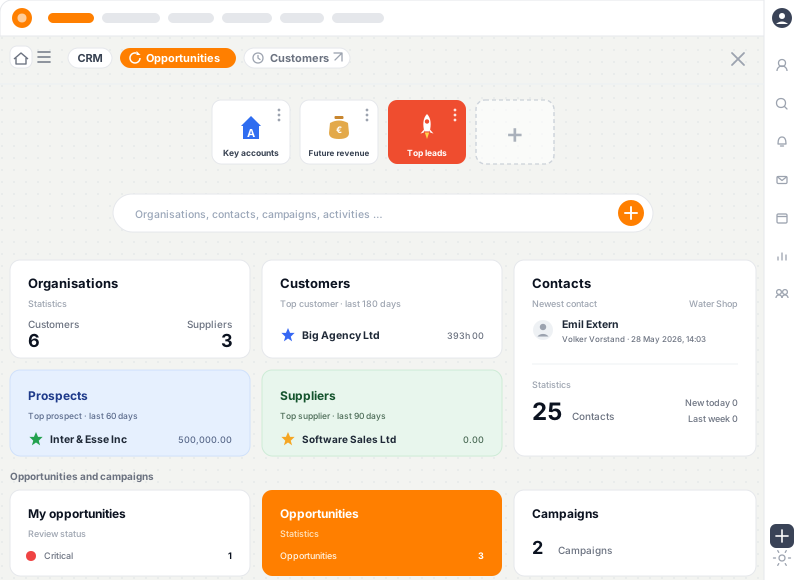
Three properties that make the difference between a CRM that supports your work and one that gets in the way.
Client and contacts live once, not in parallel across accounting, CRM and time tracking. One address change applies everywhere.
Orders, invoices, hours, emails and tickets per client in one view. Drill-down to a single entry, no tool switch.
Need-to-know principle per role. Sales sees its pipeline, customer success its clients, accounting open items. Audit trail documents access.
Seen in 90 seconds
A quick look at the teamspace interface: create a contact, link organisations and people, read the timeline, open a quote or ticket directly from the contact. All in one cloud application, no tool switch.
Several contacts per client with role and responsibility, group hierarchies for multi-level structures.
Orders, invoices, hours, appointments and tickets reachable directly from the client.
Microsoft Outlook synchronisation keeps contacts consistent without duplicate maintenance.
In teamspace you collect business cards digitally. You also store far more than a card can hold.
Name, address, email, phone, industry, VAT ID, customer and supplier number.
Bank details, payment terms, discount, agreed rates, separate billing address.
Salutation, preferred form of address, key account manager, account notes, custom fields as needed.
Contracts, NDAs, credit reports, certificates, with versioning and per-file permissions.
Flag special contacts such as data protection officers, emergency contacts or VIP customers with their own tag.
Anything else you want to track about a contact can be configured as a custom field, no coding.
Timeline per contact
Every contact has its own dashboard with a chronological timeline. Orders, quotes, invoices, hours, tickets, emails and call notes appear in the order they happened. Customer success managers respond in seconds, without searching across three tools for context.
Appointments, tickets, invoices, hours and mails searchable in one place.
Jump from the timeline straight into the linked record, no second search.
Tickets only, quotes only, mails only: the timeline can be restricted to one type.
Customer records are not a passive address book. Operational work starts from the client itself.
Open a new quote from the contact, address and terms are carried over.
Learn moreAll invoices per client with payment status, dunning level and open items.
Learn morePast and upcoming appointments per contact, linked to the [team calendar](/team-calendar/).
Service requests from the [service desk](/service-desk-software/) are visible inside the contact.
Learn moreMicrosoft 365
Whoever wants to access contacts in Microsoft Outlook synchronises teamspace and Outlook in both directions. Addresses, phone numbers and emails live in one place and only need to be changed once. Mails from Outlook can be attached to the contact with a single click.
Changes in Outlook flow to teamspace and vice versa, with conflict resolution.
From Outlook, attach a mail to the client with one click, including attachments and history.
Through the [Microsoft Teams integration](/microsoft-teams-integration/), contacts and tickets are visible directly.
Three typical roles that work with customer records every day.
Pipeline per region, contacts with role and decision weight, agreed rates per client, lead sources per campaign.
Full history per client, open tickets in view, service level agreements with response time, past hours for renewals.
Master data with VAT ID and bank details, open items per customer, dunning levels, payment terms per client.
Customer records are part of an integrated CRM. These sister areas build on top.
Strategic accounts with account plans, stakeholder maps and renewal forecast.
Learn moreAll documents, contracts, tickets and projects per client in one file.
Learn moreSend-out per audience, response to lead, ROI per campaign.
Learn moreLead qualification, pipeline stages, probabilities and follow-ups.
Learn moreForecast, hit rate, lost reasons and lead sources per sales rep.
Learn moreOverview of the integrated CRM module in teamspace.
Learn moreCustomer records are the master-data foundation of a service organisation. Whoever runs clients in Excel knows the problem: addresses live in accounting, contacts in CRM, contracts in SharePoint, rate cards in the time-tracking tool. An address change must be applied in four places, otherwise inconsistencies arise.
teamspace runs the client in one ledger that time tracking, order processing, invoicing, dunning, CRM and HR use simultaneously. A change is immediately visible everywhere, without a CSV bridge or sync script.
The whole team accesses contacts anywhere, anytime, particularly handy from home or on the road. Single contacts can also be shared by link, no full licence required on the other side. Whoever works offline syncs automatically on the next online session.
Both people and organisations can be created as contacts. Subsidiaries and departments inside an organisation are mapped through the group hierarchy. Special contacts like data protection officers, emergency contacts or VIP customers get a tag so they stay quickly visible across the team.
Wondering whether teamspace can consolidate customer records in your organisation? In a 15 to 30-minute call we look at your client structure, the permission logic and the Outlook integration.
Use cases that build directly on customer records.
In the requirements check we discuss your client structure, the permission logic and the Outlook integration. You receive an honest first feedback, free of charge and non-binding.