
The pipeline in view at any time
How many prospects sit in which stage, you read off the funnel. An Excel list that someone has to maintain is no longer needed.
In mid-sized companies, the question of how much revenue the next quarter will bring is often answered by gut feel. In teamspace sales controlling, a funnel maps every opportunity with its stage and probability; the revenue forecast follows from that.
Overview
Three things a professional services firm wants to know about its sales, without piecing spreadsheets together.
How many prospects sit in which stage, you read off the funnel. An Excel list that someone has to maintain is no longer needed.
From the stage and probability of every opportunity, a revenue forecast per quarter emerges, with drill-down to the individual opportunity.
Which stage loses the most prospects and which customer brings contribution margin, the reports show at the touch of a button.
The funnel
Set up one or more funnels, each with its own stages and a probability per stage. Every sales opportunity has a target value and a stage; from these teamspace continuously calculates the current value and the forecast.
Wahrscheinlichkeit pro Phase
Umsatzprognose · Q3
Forecast Q3
294 k €
Die Wahrscheinlichkeit ist eine Schätzung, die Sie jederzeit anpassen.
Aus Phase, Wahrscheinlichkeit und Zielwert errechnet teamspace den aktuellen Wert jeder Chance.
Revenue forecast
Through the funnel teamspace shows how many opportunities sit in the pipeline, with what value and what probability. From the sum, the expected revenue forecast for the quarter emerges, instead of a number from the head of the sales lead.
teamspace runs the forecast through the funnel in the enterprise edition. Anyone who at first only needs activities and follow-ups on the contact stays in the office edition.
Conversions
You map the sales process one to one with the stages of the funnel. That way you can track how many prospects move on per stage and at which point most of them drop out.
Whoever knows the weak stage aims their follow-up exactly where it fills the funnel again.
Next step
We look at your pipeline with you.
In 20 minutes we go through your funnel stages and probabilities and check which reports your sales lead really needs.
Analysis
The sales opportunity analysis answers two questions that active and future sales ask. teamspace keeps both apart, instead of mixing them into one number.
Both time angles and the handler filter draw on the same sales opportunities, without anyone maintaining anything twice.
Care
Sales controlling does not end with the forecast. teamspace also shows how well important customers are looked after and where the greatest potential lies.
“Staff in both support and project planning can see orders and invoices. That was not possible before.”

Your own metrics
Not every opportunity is worth the same, and not every order weighs the same. In teamspace you decide yourself how the value of a sales opportunity is calculated.
That way sales controlling rates opportunities by your logic, not by an external standard formula.
Early warning
Through the funnel you see not only where things stand today, but also what is coming towards the firm. How many closings are likely in which weeks becomes a preview of incoming orders.
That way the pipeline becomes an early warning system that makes bottlenecks and idle time visible in advance.
Scope of functions
Funnel, opportunities and reports mesh together. The evaluations arise from the same activities that sales works with anyway.
More from the CRM
From the same contact base, several views emerge. These areas go deeper into individual questions around sales.
Every touch chronologically on the organisation, from the email to the quote.
Learn moreOrganisations and contacts maintained centrally, the basis of every evaluation.
Learn moreImportant customers with their own contact person and deputy.
Learn moreMass mailings and campaigns to selected contacts, steered from the CRM.
Learn moreThe lead becomes the activity, the open activity becomes the follow-up.
Learn moreWhat sales controlling is about
A sales controlling makes the sales process measurable: it maps the pipeline with its stages, rates every opportunity by value and probability and derives a revenue forecast from that. So the question of how the quarter is going becomes an answer with a number instead of gut feel.
The difference to a plain contact list lies in the steering. When every opportunity carries a stage, a target value and a probability, management sees where revenue arises and where the funnel gets thin. The probability remains an estimate that sales is responsible for, not a prediction from pattern recognition.
The need becomes tangible as soon as several people steer the same sales and the revenue planning should no longer come from a private Excel spreadsheet. Funnel and forecast are the expansion stage of the enterprise edition in teamspace; the ABC and customer analyses carry the controlling even without them.
At a glance
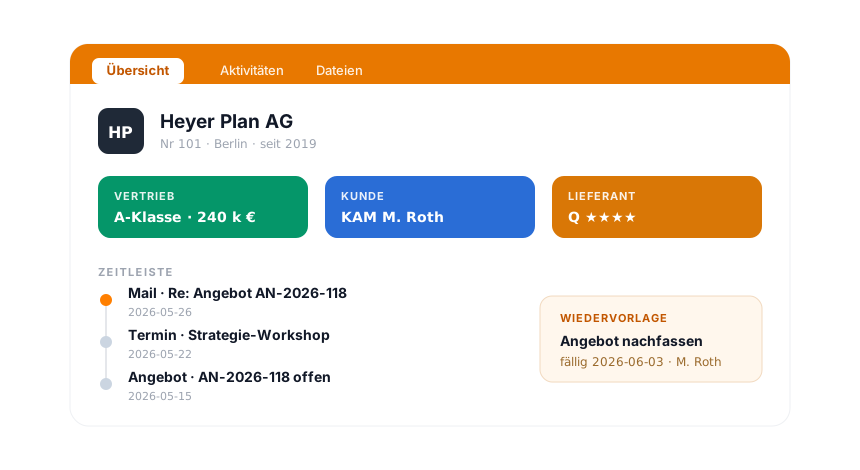
Funnel, opportunities and reports work with the same organisations, contacts and activities as the rest of the CRM. How teamspace runs the customer record, follow-ups and the connection to mail, phone and Teams is shown in the CRM software overview.
To the CRM softwareRelated modules
A won opportunity becomes an order, a project and an invoice. Here are the shortest paths there.
From the won order, the project emerges with budget, phases and team.
The quote becomes the invoice, with hourly rates, flat fees and e-invoice.
A customer's enquiries run as tickets, with SLA and standard project on the contact.
Requirements check
You show us your sales process, we tell you how teamspace maps pipeline, forecast and evaluation and which edition fits for it.