teamspace

HR software for service businesses: because your people decide your success

HR software brings contract data, accounts and the employee record together on the individual. In teamspace, working time, hourly rate, leave and bonus live on one timeline; sick notes sit with their certificate on the digital employee record. The financial accounting goes to DATEV; payroll itself stays in your external payroll system.

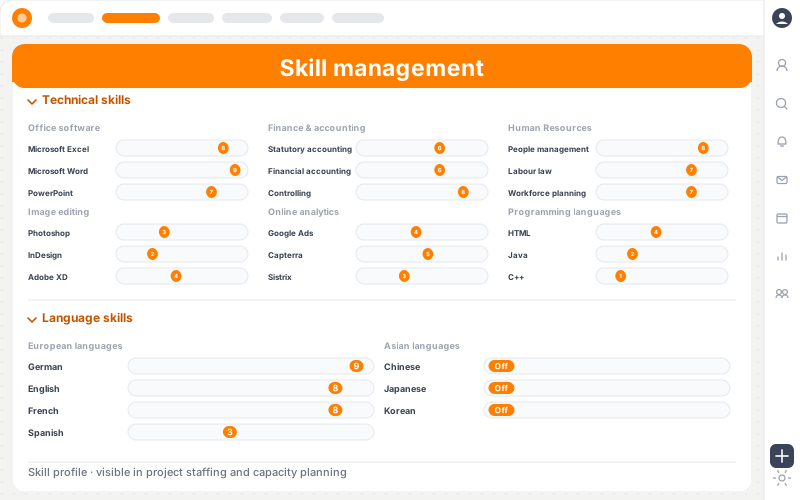
teamspace HR software in the app window, its work surface cycling through four processes: skill profile, employment data on the timeline, recording project time and a leave request

Vendor

1999
5 POINT AG, owner-led, based in Darmstadt
DACH
Service businesses from 10 to 250 staff
ISO 27001
Data centres in Frankfurt am Main
EU
Processing exclusively, DPA as standard

Run all personnel processes centrally, digitally and transparently

HR teams in mid-sized businesses face the same challenge: too many island tools, manual processes and a lack of transparency. teamspace bundles the central personnel processes in one integrated system – from leave planning through personnel and pay data to HR metrics and reports. Excel lists, emails and one-off tools cost time, create errors and slow growth; an integrated system creates clarity, automates recurring work and keeps personnel data together in one place.

  • Central HR data instead of scattered information
  • Clear processes for HR, managers and staff
  • Automated workflows instead of manual coordination
  • Reliable metrics for well-founded decisions

Employee record and accounts

The employee record and the accounts converge on one person.

Modern HR software keeps contract data, hourly rate, leave entitlement and bonus time-versioned per employee. Change one fact and time tracking, project costs and the payroll handover recalculate automatically. Every module shares the same employee.

To the digital employee record
Übersicht Stammdaten Konten Akte
MB

Mara Berger

No 042 · HR · since 2019

active

Weekly hours

40h00

from 2026-09

Hourly rate

€115

from 2025-01

Leave

28.5 days

from 2024

Zeitleiste

2026 Weekly hours back to 40h, hourly rate €115
2024 Weekly hours cut to 32h, leave to 28.5
2022 Joined at 38h, hourly rate €95

Three aspects of the employee

Record, accounts and visibility hang on the same person.

What sets teamspace apart in HR: not a digital filing cabinet, but the time-versioned reality per employee and a clean separation of who gets to see what.

Employee record

Everything in one detail view.

Master data from the CRM contact, activities, HR data on the timeline, protected files, employee reviews and a forum tab, six tabs on one person.

  • Six tabs without a separate employee-record module
  • Master-data upkeep in one place, visible everywhere
  • Reviews and training chronological, with attachment

Accounts

Contract data and accounts live versioned.

Working time, hourly rate, leave entitlement and salary are not today's values but the result of periods. A retroactive change recalculates everything that depends on it.

  • Overtime account with monthly threshold, monthly and absolute cap
  • Leave account with previous-year carry-over and expiry date
  • Time-account traffic light per employee

Visibility

Permissions sit on the group.

Who approves leave, who sees sick notes, who opens protected documents is governed by user groups. File directories per employee are access-protected; only the authorised group sees them.

  • Approval via groups, not via individuals
  • File directories per employee access-protected
  • Staff see their own accounts and their own employee record
Overtime

The overtime account knows three thresholds.

A monthly threshold says from when extra work counts as overtime. A monthly cap cuts it off. An absolute cap limits the account so it does not grow without end. The basis is configured per employee: attendance, project time or trust-based working time.

  • Three thresholds: monthly threshold, maximum monthly overtime, absolute account cap.
  • Reduction paths: leave request “reduce overtime”, conversion into leave days, payout via the employee billing.
  • Traffic-light view for managers: green, amber, red, at a glance where the account sits in the green zone.
  • Trust-based working time as a basis: no over- or under-time account, time recording still documents.
To overtime tracking

Overtime account · K. Schreiner

As of 30 May
Threshold 8 h Max 25 h

Account

+18,5 h

green
Reduce overtime Convert to leave Payout
Leave

Remaining leave from the previous year stays visible.

When a date range is selected, the system shows the remaining leave straight away. Managers approve with a green tick or reject with a red cross. Who approves whom is governed by the user group. A leave category can switch on “return on sickness”. Then the system writes days back if someone falls ill during their leave.

  • Leave types selectable on request: recreation, special, overtime reduction, half or full days.
  • Previous-year carry-over with an expiry date per category, automatically on the set date.
  • Special-leave allowances and reward days sit separately alongside the recreation entitlement.
  • Sickness during leave writes days back when the category provides for it.
To leave management

Leave planner · week 24

K. Schreiner
Mon 10 requested
Tue 11 requested
Wed 12 requested
Thu 13 approved
Fri 14 approved
Remaining leave 2026 12 / 30
Carry-over from 2025 3 days
Reward leave +2
Remaining leave 12 / 30
Sickness

The certificate hangs on the employee record.

Staff report sick in the system where their permissions allow, and upload the doctor's note as a PDF. The case records whether a certificate is on file; the sickness history per employee is available in the employee record. Reviews and training follow the same pattern: a note with an assessment, a certificate as an attachment, in chronological order.

  • Self-reported sickness via the installable web app, with a deputy note.
  • Certificate flag on the case: doctor's note on file, yes or no.
  • Sickness history on the employee record per employee, visible to the authorised group.
  • Reviews and training chronological, with file and assessment.
To sickness management

Sick report · case

KM-2026-118
K. Schreiner Certificate on file

22 May → 26 May

3 working days · deputy J. Linke

PDF

Doctor's note

214 KB

on the employee record

Personnel work without the paper chase.

Master data, accounts and evidence hang on the same employee, instead of scattered across Excel and a filing cabinet.

Highlight 1

One employee record instead of three lists

Master data, contracts, leave, sickness and reviews hang on the same employee, chronological, with attachment, not spread across inbox, cabinet and spreadsheet.

Highlight 2

Four accounts calculate themselves

The hours, overtime, recreation and reward accounts run off the recorded time. Every threshold traceable, every balance with evidence.

Highlight 3

Deadlines remind on their own

Fixed terms, probation periods and expiry dates flag themselves in time. The employee billing hands over to DATEV on schedule, without anyone keeping the calendar in their head.

Accounts on the employee

Four accounts on the same employee.

Time, extra work, recreation and reward as separate accounts. Every balance with evidence, every threshold traceable.

+4.3 h

Hours account

As of today, difference in the current month

+18.5 h

Overtime account

Monthly threshold 8 · max month 25 · max absolute 80

12 / 30

Recreation leave

Carry-over from last year 3 · expiry 31-03

+2

Reward leave

Bonus days for 2025 granted manually

Warning systems

Three warning systems keep an eye on the employee.

Beyond the plain account balance, three systems flag early when something runs out of bounds: the hours traffic light, utilisation and target attainment. Each can be set individually per employee.

Overtime traffic light

Green, amber, red per employee.

Staff and managers see the current hours balance at a glance. That keeps it in view that flexitime is not over-used.

  • Individual limits for green, amber and red
  • Thresholds downward and upward (under- and overshoot)
  • Self-service view for staff, aggregate view for managers

Utilisation & scheduling

Well scheduled, well utilised?

Over freely defined time windows, the system checks utilisation – for example whether someone is scheduled for the next three weeks or was well utilised in the past two.

  • Time window with from and to freely chosen, forward and backward
  • Three levels: notice, warning, critical – each for under- and overshoot
  • Thresholds in minutes or percent as preferred

Target attainment

How much billable time should it be?

A target for billable time can be set per employee, checked monetarily or in time via performance time.

  • Target measurable monetarily or as time (performance time)
  • Performance time as its own category alongside internal and external (billable)
  • Marks important time that counts towards target attainment

At a glance

HR in teamspace: the basics and the operating concepts.

Shown in a few minutes: how the employee record, the accounts and permissions interact in the personnel area.

  • Employee record on the person

    Master data, accounts and evidence in one detail view instead of scattered lists.

  • Accounts calculate from time

    The hours, overtime and leave accounts run off the recorded time.

  • Visibility via user groups

    Who approves leave and opens protected files is governed by the user group.

Target groups

Who the digital employee record pays off for.

Service businesses that lead people rather than merely administer them, across industries.

IT service providers

Certificates with expiry dates and training records on the employee record, available to the authorised group.

Industry page

Management consultancies

Skills for project staffing and travel days on the employee, not scattered across HR spreadsheets.

Industry page

Systems houses

Master data, accounts for leave and overtime, and certificates on the same employee, available to the authorised group.

Industry page

Architecture and engineering practices

Qualification records, certificates with expiry dates and travel time between sites kept on the employee record.

Industry page

Agencies

Permanent and freelance staff, flexible models, overtime in peak periods. Every hour cleanly accounted for.

Industry page

IT consulting

Skills and certifications per consultant on the profile. They stay with the person and become visible for capacity planning.

Industry page

Practice example

One digital employee record instead of three lists.

Hypothetical practice example for illustration. Concrete values depend on starting point, industry and execution and are not guaranteed.

The challenge

A consultancy with 50 staff keeps leave in an Excel list, sickness comes in by phone to the HR inbox, employee records live in a cabinet, and Personio runs in parallel for the applicant pipeline. At month-end HR assembles the handover to the tax advisor from three sources.

With teamspace

The consultancy pulls master and contract data into one detail view per employee. Leave requests run via self-service, sickness with a PDF attachment on the employee record, overtime accounts calculate from attendance time. At month-end, per-diems and payouts sit in the employee billing; the tax advisor receives the financial accounting via the certified interface to DATEV Unternehmen online.

−1 day

HR month-end, instead of gathering from three sources

1

Digital employee record instead of three lists and a cabinet

on schedule

Contract and fixed-term deadlines reminded automatically

A hypothetical example for illustration. Concrete figures depend on the starting point and execution.

Other modules

The other eight modules.

HR sits in the interplay with time, project and invoice. Here are the neighbours the personnel data works with every day.

Time tracking online

  • Attendance, breaks, project time
  • Clock in via browser, app, tablet
  • Handover to the HR accounts and the invoice

Project management

  • Phases, work packages, plan vs actual
  • Capacity planning by skill and contract time
  • Hourly rates from the HR timeline

Invoicing software

  • Fees from approved project times
  • E-invoicing as ZUGFeRD and XRechnung
  • Handover to DATEV Unternehmen online

CRM

  • Contacts and organisations
  • Master data shared with the HR contact
  • Follow-ups on the contact

Service desk

  • Tickets from mail, phone, portal
  • SLA remaining time affects priority
  • Book time on the ticket

Quality management

  • Process descriptions and sign-offs
  • Audit trail for QM documents
  • Employee training linkable

“Our staff appreciate how simple the system is.”

WAHLER HR brings working time, travel expenses and billing together in one system. A familiar interface that new staff settle into without training.
WAHLER HR

Scope

What the HR function covers.

Three natural areas: the employee record on the person, the accounts and time logic, and visibility and the bridges to the outside.

Employee record and master data

  • Employee detail view with master data, activities, HR tabs, protected files
  • Master data shared with the CRM contact, upkeep in one place
  • Employee reviews chronological, with file and assessment
  • Training with certificate attachment
  • Org chart as the organisational structure
  • Skill profile per employee for capacity planning in the PM module

Contract data, time and accounts

  • Weekly working time, leave entitlement, public-holiday calendar as a timeline
  • Hourly rates and pay components time-versioned
  • Time-recording basis per employee: attendance, project time, trust
  • Overtime account with monthly threshold, monthly and absolute cap
  • Leave account with previous-year carry-over, expiry, special leave, reward days
  • Half working days, half public holidays, day limit, time-account traffic light

Visibility, security and bridges

  • Approvals via user groups, not via individual people
  • File directories per employee with access protection
  • Hosting in two geo-redundant, ISO 27001 certified data centres in Frankfurt
  • DPA as standard, data processing exclusively in the EU
  • Employee billing (HR+, office): per-diems, commissions, payouts
  • Financial-accounting handover to DATEV Unternehmen online; no payroll run in teamspace

Comparison

Four lists or one employee.

Anyone coming from an Excel list, a standalone HR tool, a separate payroll program and a filing cabinet knows the discrepancy between the four sources. teamspace pulls that together into one digital employee record – and stays honest about what it does not do itself.

Feature

Excel + standalone HR + payroll tool + cabinet

teamspace

Contract data time-versioned
manual
Hourly rate historically correct in project costs
Leave request with account view in self-service
paper/mail
Overtime account with thresholds and payout
manual
Sick note with PDF attachment on the employee record
phone
Training and reviews chronological
folders
Permissions via groups, not via people
everyone-knows
Financial-accounting handover to DATEV Unternehmen online
manual
Own payroll run in the tool
extra program
no, preparatory
Hosting in DE, ISO 27001 data centre
varies

Which HR function sits in which edition.

The basic functions are in the light edition. HR+ in the office edition adds the employee billing; capacity planning comes with enterprise. Each higher edition includes the smaller one.

Funktion
light
office
enterprise
Basic functions (light)
Employee record and master data
Contract data on the timeline
Leave account in self-service
Overtime account with thresholds
Sick note with certificate
Employee reviews and training
Billing (HR+, from office)
Employee billing
Per-diems
Commission configuration
Overtime payout
Steering (from enterprise)
Capacity planning by skill

Benefits

What the HR function delivers day to day.

Personnel data in one place

  • Employee record, contracts, accounts and evidence on the same employee
  • Visible only to the authorised group
  • No filing cabinet, no parallel list

Less effort at month-end

  • Accounts calculate automatically from the recorded time
  • Billing and per-diems to DATEV on schedule
  • Deadlines remind, instead of living in the calendar

More reliability for everyone

  • Self-service for leave and sick reports
  • Every balance traceable, every threshold evidenced
  • One truth instead of three sources

First call

Let's look at your HR world together.

Half an hour is enough to talk through contract data, account rules, permissions and the DATEV handover. You get an honest opinion on whether teamspace fits your HR.

Interplay

Time and HR share the same employee.

From the HR function come the weekly target time, the public-holiday calendar, the hourly rate and the leave entitlement. Time tracking writes attendance and project time onto the same person. From both come the hours account, the activity record and – via the versioned hourly rate – the internal project costing. There is no interface contract between the two, because they share the same employee.

In practice that means: change an hourly rate retroactively in HR and you get a recalculated margin on old projects. Adjust a weekly working time and you see the effect in the time-account traffic light. Set a contract type to trust-based working time and you switch off the overtime account for that person.

Skills

Skills sit in the profile, visible to planning.

Competences can be kept per employee, in the categories technical, language and social skills, with a rating. These skills stay on the personnel profile but become visible when project management plans by skill: who is available, who has the necessary qualification, who sits in the right utilisation window for capacity planning.

There is no dedicated recruiting module, no applicant pipeline and no job-board integration. Anyone who wants to run applications uses the CRM for it; anyone who needs competence reporting across the whole workforce builds it via the REST API.

Organisational structure

An org chart as a tree, not a list.

Your own organisational structure can be kept as a tree: subsidiaries, departments and sites as subordinate organisations with their own master data or an inherited address. Anyone managing several clients also sees the structures of the customer organisations in the same tree. Contacts and activities appear on the right node.

In practice the org chart serves two purposes: your own hierarchy for approval paths, the customer hierarchy for the activity view in account management.

Platform

geo-redundant
Two data centres in Frankfurt am Main
AES-256
Storage encrypted, transfer over TLS
Microsoft Entra
Single sign-on optional
DPA
Standard, processing in the EU

Financial-accounting bridge

What goes to DATEV and what does not.

teamspace has a certified interface to DATEV Unternehmen online for financial accounting. Invoices, receipts and postings go across there. A dedicated DATEV payroll interface, such as LODAS, does not exist. teamspace also runs no payroll itself. That is the honest clarification every managing director should hear straight away in the selection meeting.

What the HR function provides instead is the preparatory data. Overtime payouts, sick days, per-diems and commissions move as line items into the employee billing (HR+, office) and are released there for payout. Income tax, social-security contributions and the actual run happen in the external payroll system or with the tax advisor. teamspace prepares the data; the payroll run itself stays in the payroll system.

Working-time recording

How teamspace supports the recording obligation.

Attendance and project times can be recorded per employee, with break rules, a day limit, a correction workflow and write-once locking. With that, teamspace supports time recording in the spirit of the ECJ ruling C-55/18 on working-time recording.

Whether the configuration fully meets the requirements of working-time law for a specific company depends on the operational setup: on the stored break rules, on the approval procedure, on the retention practice. We check that in the first call together with your HR and, where relevant, your data protection officer.

Employee billing

Per-diems come from the templates.

The configuration holds templates with country-specific rates for the per-diem. When recording a trip, staff pick a rate from the template; the system calculates the correct amount, depending on trip duration and destination country. The per-diem runs as a line item into the employee billing and is checked, approved and released for payout in the same process.

This function is part of HR+ (office). Anyone who also runs travel expenses finds the bulk of that in the invoicing area. Per-diems are the HR-owned piece, because they are assigned to staff and go into the payout, not into the customer invoice.

First call

We talk through your HR topics in one meeting.

The DATEV bridge, contract models and working-time recording: three topics we clarify together.

Visibility

Who sees what about the employee.

In teamspace, permissions sit not on individual people but on user groups. Who approves leave, who sees sick notes, who opens protected documents is governed by the group. Whoever is a member of a group gets its rights; whoever leaves loses them automatically.

File directories per employee can additionally be kept access-protected. Staff see their own accounts, their own master data and their own employee record. Managers and HR see what their respective group allows. What no one may open does not appear in the view at all.

Migration

What comes across from the previous system.

Master data can be brought to the CRM contact via Excel import. That is the fastest bridge out of Excel lists, Outlook exports and most HR tools. Contract data, opening account balances and the permission groups are set up by the customer success team from Darmstadt in the onboarding workshop, together with your HR.

There is no dedicated connector to Personio, sage HR or hr-works. The import runs via Excel exports from those tools and standard utilities. How long that takes in practice depends on how cleanly the source data is available; we clarify that before the rollout, with a concrete estimate rather than a blanket number of weeks.

HR terms

HR terms in one sentence.

What the functional language means when it points to contract data, accounts and thresholds.

Timeline contract data
Contract data as a sequence of periods; a retroactive change recalculates all dependent calculations.
Versioned hourly rate
The internal hourly rate valid on the booking date flows into project costing, even when it is a different one today.
Account threshold
Three thresholds on the overtime account: monthly threshold (from when extra work counts as overtime), monthly cap (anything above expires) and absolute account cap (the ceiling).
Trust-based working time
A time-recording basis without an over- or under-time account. Time may still be recorded; no account is kept.
Remaining-leave carry-over
Leave days not taken in the previous year, with a configured expiry date per category.
Return leave on sickness
A leave category can be switched so the system writes leave days back when someone falls ill during their leave.
Half working day
A configuration option for part-time models where weekdays have different lengths; half public holidays are counted in.
Day limit
A threshold value beyond which no further project or attendance time can be recorded on a calendar day.
Time-account traffic light
A view for managers: green, amber, red. Where each employee's working-time and overtime account stands.
Employee billing (HR+)
An HR tab in which per-diems, commissions and overtime payouts are released for payout per employee. Part of HR+ in the office edition.
ECJ ruling C-55/18 (CCOO)
Case law on working-time recording; teamspace supports time recording in the spirit of this ruling.
Utilisation warning
Checks utilisation and scheduling per employee over freely defined time windows and reports under- or overshoots in three levels (notice, warning, critical), in minutes or percent.
Performance time
A separate time category alongside internal and external (billable) time. It marks important time that counts towards target attainment, even when it is not billed directly.


What HR software is

HR software brings personnel data together in one place.

HR software bundles personnel data, contract times, accounts and the employee record in one place, from which other modules calculate: time tracking pulls the weekly target time, project costing pulls the hourly rate, the payroll handover pulls bonus, commission and per-diem. Maintain the employee record once and you change the reality for every downstream process.

teamspace solves this not via a separate employee-record module but via a composed detail view per employee. Master data comes from the CRM contact, activities from the linked cases, HR data from the time-versioned timeline, files from protected directories. Six tabs, four accounts, one truth per person.

First call

We check whether teamspace fits your HR world.

30 minutes for contract models, account rules, permissions and the financial-accounting handover. You get an honest opinion, no sales pressure.

Frequently asked questions about teamspace HR software

Does teamspace run payroll?
No. teamspace prepares the data for payroll and hands the financial accounting to DATEV Unternehmen online (DUO). Social-security contributions, income tax and the actual payroll run happen in the external payroll system or with the tax advisor. A DATEV payroll interface such as LODAS does not exist.
What runs over the DATEV interface?
The certified interface to DATEV Unternehmen online transfers the financial accounting: invoices, receipts, postings. It is the bridgehead to the financial accounting at the tax advisor. Payroll data does not go over this interface; for that you need a separate payroll system.
Can staff see their own accounts?
Yes. The hours account, remaining leave, overtime balance and their own employee record are visible in the personal login. Whatever the user group permits is visible; everything else does not appear in the view.
Which warning systems does teamspace offer in the HR area?
Three: the overtime traffic light with individual limits for green, amber and red, downward and upward; the utilisation and scheduling warning over freely defined time windows that reports under- and overshoots in three levels (notice, warning, critical) in minutes or percent; and target attainment via billable time, checked monetarily or in time via performance time.
How does sick reporting work?
Staff report sick in the system where their permissions allow, and upload the doctor's note as a PDF. The case records whether a certificate is on file. An automatic retrieval of the electronic certificate (eAU) from the health insurers is not implemented.
How does leave management work?
Staff submit a request with a choice of leave type: recreation, special, overtime reduction, half or full days. When a period is selected, the system shows the remaining leave straight away. Managers approve with a green tick or reject with a red cross. Who approves whom is governed by the user group.
What happens with remaining leave from the previous year?
Remaining leave from the previous year is shown in the account; expiry happens automatically on the configured date per leave category. Special-leave allowances and reward days sit separately and follow their own expiry rules.
Do you model collective agreements?
Pay components and hourly rates can be kept time-versioned per employee; the contract data lives on a timeline. teamspace does not calculate collective premium logic for night, weekend or holiday work on its own. The recording of attendance and project times forms the basis; the premium calculation happens in the external payroll system. We clarify specific collective-agreement situations in the first call.
How does teamspace protect personnel data?
Hosting in two geo-redundant, ISO 27001 certified data centres in Frankfurt am Main; data processing exclusively within the EU. Permissions via user groups, file directories per employee access-protected. Sign-in via Microsoft Entra (single sign-on) is optionally possible. DPA as standard.
Is the digital employee record audit-proof and GoBD compliant?
Personnel data and documents sit per employee in access-protected directories, hosted in two geo-redundant, ISO 27001 certified data centres in Frankfurt am Main, processing exclusively within the EU, DPA as standard. Audit-proof, GoBD-compliant archiving with write-once locking applies in teamspace to tax-relevant receipts in GoBD mode; for the employee record, the access protection via user groups and the EU-compliant storage are the focus. We clarify the specific retention and deletion requirements of your HR in the first call.
What distinguishes the HR basics from HR+?
The basic functions in the light edition carry the employee record, contract data on the timeline, the leave and overtime accounts, sick reporting with a certificate, employee reviews and training. HR+ in the office edition adds the employee billing with per-diems, commission configuration and payouts – everything that flows as a line item into the payroll handover to the tax advisor.
How effortful is the rollout?
Master data comes in via Excel import to the CRM contact. That is the fastest bridge out of Excel lists or most HR tools. Contract data, opening account balances and user groups are set up by the customer success team from Darmstadt in the onboarding workshop, together with your HR. We clarify the timeframe in the first call; it depends on how cleanly the source data is available.
Where is the HR data stored?
In two geo-redundant, ISO 27001 certified data centres in Frankfurt am Main, processing exclusively within the EU. The contracting party is 5 POINT AG, a German public company based in Darmstadt.