teamspace

Sickness management: record sick reports digitally and evaluate them fairly.

In teamspace, staff report sick themselves, the team sees the absence in the calendar, and the sick day stays overtime-neutral. Three sickness types are kept separately, sick reports and absences evaluated separately. Who may see a sick report is governed by the permission.

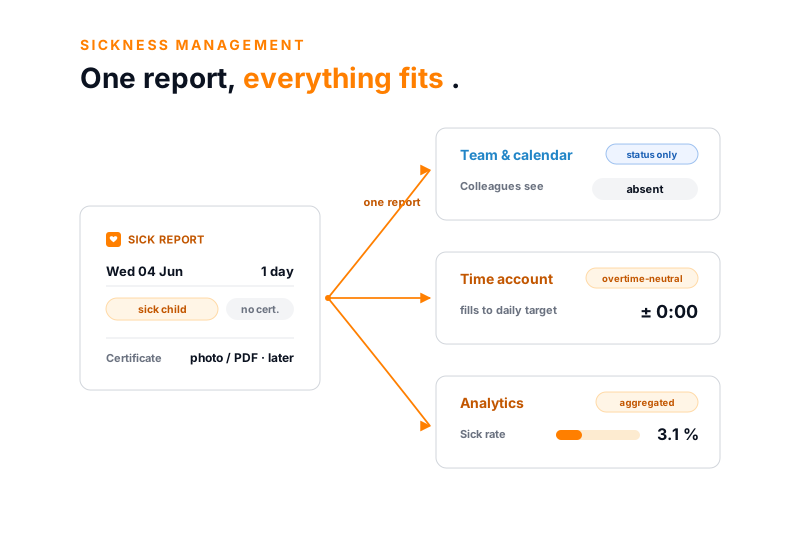
teamspace sickness management: on the left a sick report for Wednesday 4 June, type sick child, one day, certificate as photo or PDF. Three orange arrows lead to the right to three effects: team and calendar see only absent, the time account stays overtime-neutral at plus minus zero, and the analytics show an aggregated sick rate of 3.1 per cent without individual data.

Overview

Sickness can't be planned, its management can.

A sick report rarely comes at the right time. But how a company handles it can be ordered: who reports sick, who sees the absence, how the day counts on the account and what can be evaluated in the end.

teamspace keeps sick reports, absences and their evaluation in one place, in the same system as leave and working time. So an unplannable matter becomes a calm, traceable process, without extra effort for staff.

Starting point

Sick reports don't belong on a sticky note.

Phone, note, Excel

  • The morning call lands on a sticky note that disappears by the afternoon.
  • Who takes over the cover is clarified verbally in the corridor.
  • Someone enters sick days by hand into an Excel list at month-end.
  • No one knows who may see the state and who may not.
  • Whether a sick day makes plus or minus hours, someone recalculates by formula.
Recommended

teamspace

  • Staff report sick themselves in the system, with date and type.
  • Team and calendar see the absence, the deputy can be assigned.
  • The sick day fills the time account up to the daily target, without a minus.
  • Who sees which data hangs on the permission, not on word of mouth.
  • Sick reports and absences are ready separately for evaluation.

Day to day

This is how a sick report comes about.

The most common case needs no form and no call to HR. Staff report sick directly in teamspace, via the overview of working time tracking.

  • Report yourself: choose type and period, done. Whoever does not have this right is reported sick by managers or HR.
  • The team sees it straight away: the day appears as a sick report in "My day", colleagues and the team calendar show the absence.
  • Certificate later: the doctor's note comes as a photo, PDF or link into the record as soon as it is available.

So planning stays in motion, instead of improvising on the phone with last-minute cover.

What matters

Three things that matter for sick days.

A sick report is more than a calendar entry. It must be cleanly separated, fairly evaluated and reliably analysed.

Types

Three sickness types separate

  • Without certificate, with certificate and sick child
  • Any absence types can be created freely
  • Each type recorded and evaluated separately

Evaluation

Sick day stays overtime-neutral

  • Fills the time account up to the daily target
  • Neither plus nor minus hours on the day
  • Working-time accounts stay fair and correct

Analytics

Reports and absences counted separately

  • Sick reports count the sick days
  • Absences count the lost working time
  • Two questions, two distinct metrics

Evaluation

A sick day produces no minus hours.

Whoever is sick should not be worse off on the time account than someone who worked. teamspace therefore evaluates a sick day overtime-neutral, instead of booking it as missing hours.

  • Fill up to the daily target: the sick day covers exactly the hours that were planned for the day.
  • No minus, no plus: neither a deficit nor a credit arises, no matter how the day was scheduled.
  • Accounts stay clean: the working-time and the overtime account are correct at month-end, without recalculating.

The same applies to leave and public holidays. Whoever is absent because they may be absent accumulates no minus.

Data protection

One sick report, four views.

Sickness data is especially sensitive. In teamspace each role sees exactly as much as it may, from the mere absence to the record with certificate.

one sick note Volker V. · Wed 04 Jun · 1 day

Colleague

status only

sees

  • absent (today)
  • nothing for past days

Manager

team

sees

  • absence + stand-in
  • workload adjusted

HR

record

sees

  • type + certificate
  • for payroll prep

Analytics

aggregated

sees

  • sick rate 3.1 %
  • no individual data

Who sees what is set by the permissions. Past days are visible only to authorised roles.

First call

Let's look at your sick-report processes.

In 20 minutes we walk through your sickness types, the permissions and the handover to the payroll office on an example employee. At the end you see where a report becomes fair accounts and reliable figures.

“Our staff appreciate how simple the system is.”

At WAHLER HR, staff report sick themselves, in the same system in which leave and working time also run.
WAHLER HR

Two metrics

A sick report and an absence are two different things.

In HR controlling, two questions are often mixed up, although they measure different things. teamspace keeps them separate so the figures stay meaningful.

  • Sick reports answer on how many days someone was sick.
  • Absences answer which working time was lost to sickness, that is the daily target minus the time actually worked.
  • Separated by type: without certificate, with certificate and sick child can be evaluated individually.

Anyone with half days and part time in the house notices the difference immediately: a sick day is not automatically a full lost day.

Analytics

Show the sick rate without exposing anyone.

Leadership needs a picture of absences without individual sickness data becoming widely accessible. teamspace therefore evaluates in aggregate.

  • Sick rate per team, department and site as a metric at the push of a button.
  • Development over time: quarters and years can be compared, peaks in strain become visible.
  • Without individual details: the analysis shows figures, not names, and only authorised roles see them.

This creates a factual basis for conversations and planning, without reporting becoming disclosure.

Value

What everyone involved gets from it.

Clear sickness management relieves more than just HR. Three groups notice the difference in everyday work.

Staff

  • Report sick themselves, without a call and a query
  • Clear, consistent handling of sick days
  • Sick days cost no hours on the account

HR

  • Sick reports central instead of in mails and lists
  • Permissions govern who may see what
  • Data without retyping for payroll preparation

Leadership

  • Sick rate and absences per team in view
  • Spot trends across quarters early
  • Factual basis for personnel decisions

From report to analysis

Five steps, reported once.

  1. 1

    Record the sick report

    Staff report sick in the overview, with date and type. Whoever has the right reports colleagues via the plus.

  2. 2

    Team and calendar see it

    Colleagues and managers see the absence, the team calendar is updated, a deputy can be assigned.

  3. 3

    Attach the certificate

    The doctor's note comes as a photo, PDF or link into the sickness record, where the permission provides for it.

  4. 4

    Evaluate overtime-neutral

    The sick day fills the time account up to the daily target. Neither a minus nor a plus arises.

  5. 5

    Analyse

    Sick reports and absences are counted separately, the sick rate per team is ready in aggregate at the push of a button.

Use cases

More HR functions on the same employee.

Sickness is one of several absences. These functions of the same system mesh without double entry.

Digital employee record

Master data, contracts, documents and the sickness record on one person.

Learn more

Working time

Attendance and project time, into which sick days flow overtime-neutral.

Learn more

Leave management

Requests, approval and deputy, with the same absence logic.

Learn more

Track overtime

Overtime account with thresholds and three ways to reduce it.

Learn more

Payroll preparation

Absences and time off as a data export for the payroll office.

Learn more

Capacity planning

Sickness and leave feed directly into the available capacity.

Learn more

In context

Sickness hangs on payroll, time and planning.

A sick report does not stand alone. It changes the time account, the available capacity and the data that goes to the payroll office. Because all of this sits in the same system, transferring lists falls away.

The lost hours and absences are ready as a data export for payroll preparation, separated by sickness type. Capacity planning routes the missing person out of utilisation, and in working time tracking the sick day stays overtime-neutral. teamspace does not take over a payroll run of its own; that happens with the tax advisor or in the payroll office.

Scope

Functions of sickness management at a glance.

Recording

  • Self sick report via the time-tracking overview
  • Three types: without certificate, with certificate, sick child
  • Certificate as photo, PDF or link in the record
  • Any absence types such as training or vocational school
  • Report colleagues sick via group rights

Seeing and protecting

  • Team and team calendar are informed
  • Permission governs who sees which data
  • Past days visible only to authorised roles
  • Sickness record per employee, certificate protected
  • Assign a deputy for the sickness case

Evaluating and analysing

  • Overtime-neutral evaluation up to the daily target
  • Sick reports and absences counted separately
  • Sick rate per team and site
  • Aggregated analysis without individual details
  • Data export for payroll preparation
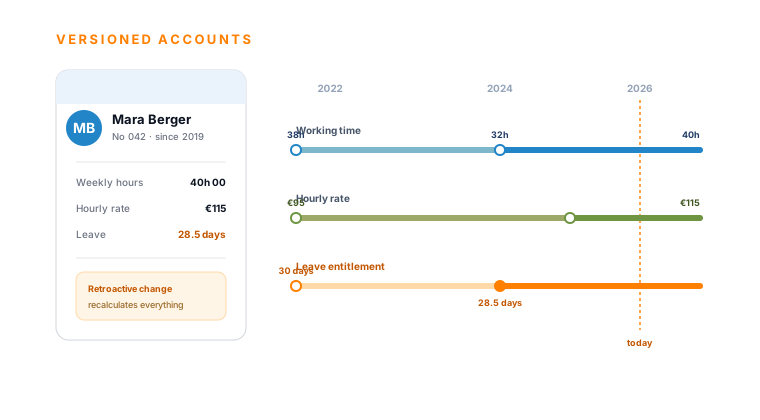
teamspace HR software: an employee's record with time-versioned contract data, hourly rate and leave entitlement on a timeline

Part of the HR software

Sickness management is a function of the HR software.

Sick report, leave, working time and overtime sit in the same system. A sick report fills the time account, spares utilisation and flows into payroll preparation, without anyone retyping lists. How the whole personnel module connects on one timeline is shown in the HR software overview.

To the HR software

What it is about

What sickness management covers and why it is sensitive.

Sickness management is the structured recording, evaluation and analysis of sick reports and absences in HR. It ranges from the individual sick report through the effect on the time account and planning to the aggregated sick rate. Because health data counts among the special categories of personal data under Art. 9 GDPR, handling it is especially protected by law.

In teamspace, sickness management forms not as a separate program but from the data already maintained in HR. The sick report runs via the time-tracking overview, the certificate sits in the record on the employee, and the permission decides who sees which data. Anyone already running working time and leave in teamspace manages sickness in the same place, without a media break and without double entry.

The sickness data sits in an ISO 27001 certified data centre in Frankfurt am Main, processing takes place exclusively within the EU. The contracting party is 5 POINT AG, a self-financed German public company from Darmstadt that has developed teamspace since 1999.

What comes together in sickness management

Sickness management brings sick reports, absences and their effects on accounts, planning and payroll together in one place. Staff report sick themselves, the team sees the absence in the calendar, the sick day stays overtime-neutral, and the sick rate is ready in aggregate for evaluation. Instead of sick reports being spread across sticky notes, mails and an Excel list, they form in the same system as working time, leave and overtime, protected on a need-to-know basis.

Frequently asked questions about sickness management

How do staff report sick in teamspace?
Directly in the system, via the time-tracking overview: new sick report, choose type and period, done. Whether someone may report sick themselves is governed by group rights. Via the right 'create a sick report for yourself' this can also be given to individual staff. Who may report colleagues sick, for example HR or a back office, is likewise configurable via permissions.
Which sickness types does teamspace distinguish?
Three: without certificate, with a doctor's note (the certificate) and sick child. Beyond that, any absence types can be created, for example training or vocational school. Each type is recorded separately and can be evaluated separately, without manual rework.
How does a sick day affect the time account?
Overtime-neutral. A sick day fills the working-time account up to the daily target, whether or not work was planned for that day. Neither plus nor minus hours arise. So the accounts stay fair, and no one accumulates a deficit because they were sick.
What is the difference between sick reports and absences?
Sick reports answer on how many days someone was sick. Absences answer which working time was lost to sickness, that is the daily target minus the time actually worked. teamspace keeps both separate because they answer different questions. With part time and half days in particular, a sick day is not automatically a full lost day.
Who may see a sick report?
The permission governs this. Current absence is seen by colleagues as 'absent', so that planning is right. Past sick days are seen only by roles that may. Type and certificate can be protected, so that a colleague only sees that someone is absent, not why. The sick rate is shown in aggregate, without personal details, following the protection for special categories (Art. 9 GDPR).
How is sickness management connected to payroll?
Absences and time off are ready as a data export for payroll preparation, separated by sickness type. teamspace runs no payroll itself and has no own payroll interface; certified is the handover to DATEV Unternehmen online for financial accounting. The payroll run happens with the tax advisor or in the payroll office.
Where is the sickness data stored?
In an ISO 27001 certified data centre in Frankfurt am Main, processing takes place exclusively within the EU. Health data counts among the special categories under Art. 9 GDPR and is additionally secured via permissions and protection classes. The contracting party is 5 POINT AG, a German public company from Darmstadt, GDPR compliant with a data processing agreement.

See sickness management on an example.

We show the sick report, visibility by permission and the sick rate on a real workflow. You see how a report becomes fair accounts and reliable figures.