teamspace

Vibe coding: extend your ERP with apps of your own.

With vibe coding you build your own apps on the cloud ERP teamspace without writing the code yourself. Vibe coding means describing in plain language what an application should do and letting an AI coding agent such as Claude Code or Cursor write the code. With teamspace, that gives you small apps that work with your projects, time entries and open items through the REST API, with exactly the permissions you hold in teamspace.

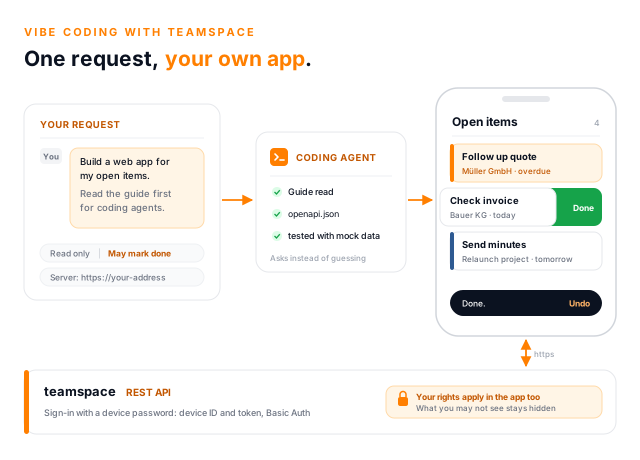
Vibe coding with teamspace as a light concept illustration: on the left a brief card with the sentence Build a web app for my open items and the instruction to read the coding agent guide first, in the centre a Coding agent card with the ticked steps guide read, openapi.json and tested with mock data, on the right a smartphone running the finished Open items app, in which an item for Bauer KG is being swiped left to mark it done, and along the bottom the teamspace REST API with sign-in by device password and the note that the user's permissions also apply in the app.

Three examples

Three apps we built in-house with a coding agent.

All three talk to teamspace through the REST API and run in the browser, on a phone as well as at a desk. None of them needs any server-side logic; ordinary web space with https is enough.

Open items on your smartphone

Shows the open items assigned to you, overdue ones first, with due date, project and colour marker. Swipe left to mark an item done, and you have five seconds to undo it. Swipe right to edit, and add new items with a subject and a quick-pick due date.

Project lead overview, read-only

Lists the main projects you are responsible for, with a traffic light comparing planned and booked hours. Inside a project you see the hours of the last twelve weeks per person, open items, tickets and the payment status of invoices. The app changes nothing in teamspace.

Time capture for today

Find the project, start recording, and book the time with its activity area and field when you stop. If something is still missing, the entry is saved as a draft. Today's entries can be tapped and changed, as long as they have not been invoiced.

What vibe coding is

Describing software instead of programming it yourself.

Vibe coding is a way of developing software in which a person describes the desired result in natural language and an AI coding agent writes, runs and revises the source code. The term was coined in early 2025 by the AI researcher Andrej Karpathy. Typical tools are Claude Code, Cursor and similar agents that can create files, start programs and read web pages.

For a business, this gets interesting wherever standard software almost fits. A view is missing, a routine step should be quicker on the phone, a report needs exactly your own figure. That used to mean a project with an outside developer or a spreadsheet on the side. Today a well-written brief to a coding agent is often enough.

For the result to work with real data, the agent needs three things: an interface, a precise description of that interface and rules for how it behaves in practice. teamspace provides all three. The REST API opens up projects, time entries, open items, tickets and invoices. From version 26.2, every server describes it in a machine-readable OpenAPI file. And the help centre has a dedicated guide for coding agents, which the agent reads before it writes a single line.

The route to your own app

From device password to an app on your phone.

Five steps, and only the second one takes real thought: what should the app do, and what is it allowed to do?

  1. 1

    Create a device password

    In teamspace under Personal settings, Devices tab, New device password. You receive a device ID and a token; the token is shown only once. Your account needs the Synchronisation permission for this. Create a separate device password for each app.

  2. 2

    Write the brief

    What should the app show, may it only read or also write, and where will it run? Add the server address you use to open teamspace, plus any business terms that have no field of their own. What budget means in your firm is your call, not the agent's.

  3. 3

    The agent reads before it writes

    First the coding agent guide in the help centre, then the OpenAPI description of your server at <server>/api/openapi.json. It can be read without signing in; the data itself stays protected. Anything no source covers, the agent asks you about. Since version 2026.3, the new API Explorer in teamspace also helps when developing your own apps.

  4. 4

    Test, first without real data

    The agent checks the app against mocked responses. Only then does your server come in, with a separate device password for testing and on a test record of its own, which it deletes at the end.

  5. 5

    Deploy and sign in

    The finished files go onto web space with https, ideally on a subdomain of their own. You sign in there with the server address, device ID and token. The app never needs your login password.

The first sentence

One sentence is enough to start. The agent gets the rest from the sources.

The coding agent receives not just the idea but also the sources and the ground rules. The section below shows what a complete brief looks like.

You

Build me a web app for my open items.

  • Reads the guide first The coding agent guide explains how the API actually behaves, including where the technical description says nothing.
  • Checks your server's description Addresses, filters and fields come from the openapi.json of your installation, not from the language model's memory.
  • Asks rather than guesses Which priority matches which star, or which ticket statuses count as open, is set by each installation. The agent clarifies that with you.

Sample brief

The brief behind the Open items app, slightly shortened.

Paste this text into your coding agent. Replace the details in angle brackets first, above all the server address: if a placeholder is left in, the agent cannot read the description of your installation. The guide itself is currently available in German, which coding agents read without difficulty.

Build me a mobile web app "Open items" for teamspace.
Server address: <https://your-address> (the address we use to open teamspace in the browser)

First read the coding agent guide at
https://help.teamspace.de/thema/api/coding-agenten/ and then
<server address>/api/openapi.json (only the paths you need).
Make no assumptions that these sources do not support. Ask me.

Features
- Sign-in with server address, device ID and token (device password),
  optional "Stay signed in".
- List of my open items: overdue first, with due date,
  project and colour marker.
- Swipe left = done, 5 seconds to "Undo", only then save.
  Swipe right = edit.
- New items: subject, quick-pick due date, colour.

Ground rules
- A single HTML file with no external dependencies,
  English interface.
- https only. Credentials never in the code, stored permanently
  only with consent.
- Show server data as text only, error messages without stack traces.
- Test against mocked data first. Write tests on my server only
  after asking me, and only on a test item of their own.

The device ID and token are deliberately left out of the brief. You enter them in the finished app only, never in the chat with the AI and never in a screenshot. If that does happen, delete the device password in your Personal settings and create a new one. A general template for your own ideas sits at the end of the coding agent guide.

MCP server

A question to teamspace, right in the AI chat.

Through the MCP server, your AI assistant reaches into teamspace during the conversation. That suits questions you cannot predict. No application of your own is created, and the MCP server is included in every edition.

What the AI handles inside teamspace itself is described under AI in teamspace.

Vibe coding

An app of your own that does the same job every day.

With vibe coding, the coding agent writes an application once, and from then on it runs without any AI: the same list every morning, the same button for booking time. It uses the REST API, which is included from the enterprise edition upwards.

The two do not rule each other out. The AI chat handles the occasional question. Whatever you need every day deserves an app of its own.

What to watch

Built yourself means secured yourself.

These rules come from the help centre. They apply to any code, whether a person or a coding agent wrote it.

Permissions and access

  • The app can do anything its user may do in teamspace, including deleting. That holds even for an app meant only to read.
  • Decide up front: read-only or read and write
  • A separate device password per app, another one for testing
  • The app asks before any step with consequences

Credentials

  • Never paste the device ID or token into the AI chat
  • Never in the source code or a configuration file
  • "Stay signed in" only on your own device
  • If in doubt, delete the device password or regenerate it via "Change password"

Deployment

  • https only
  • A subdomain of its own without analytics, tracking or chat scripts, because any script on the same domain can read stored credentials
  • No scripts loaded from third-party servers
  • Server data output as text only, never as HTML

Worth knowing

An app you build yourself is your own software.

The coding agent writes the code; signing it off is up to you. As with any in-house development, you test the app before your team relies on it and take another look after a teamspace update. Whether and how we support you with an app of your own is something we discuss in the initial call.

Coding agents get things wrong too, and often in places no technical description mentions. One example from the guide: an update via PUT replaces the entire record in teamspace. If an app sends only the changed subject, the server clears project, priority and description, with no error message. That is why the guide sets out how to update safely: reload, check whether someone else has changed the record in the meantime, send back every field and compare afterwards.

An app in the browser talks directly to your teamspace server; no server in between is needed. For that, the server has to accept such requests from the browser. Whether that applies to your installation is something we clarify with you beforehand. Some fields can also only be written from a certain teamspace version onwards. The guide flags these cases, and your server's version is stated in its OpenAPI description.

Your idea

Have an idea for an app on your teamspace data?

Bring the idea along, even as a single sentence. In the initial call we work out whether the REST API provides the data you need, which edition that takes, and whether an MCP connection might be the simpler answer.

Book a call

Your own reports

Where the built-in reports stop, a dashboard of your own begins.

teamspace comes with reports and analyses, from the contribution margin of a project to the cost centre. If your management needs a figure defined exactly your way, or a view that does not exist, a coding agent can build it through the REST API. The project lead overview above came about that way.

Each project carries several pairs of plan and actual values for this: hours, billable hours, labour costs, costs and revenue. Which of them your firm calls the budget is something you set in the brief. Booked hours can be totalled across the whole project tree, per week and per person, and checked against the total in teamspace. If both match, filters and sub-projects have been picked up correctly.

What teamspace offers for controlling

Connect and extend

Other ways to link teamspace with your tools.

Vibe coding is one of four routes. Which one fits depends on whether you want to ask a question, need a connection or want an application of your own.

AI in your ERP

Your own AI access inside teamspace, for example to condense long ticket histories. teamspace does not run a language model of its own for this.

Learn more

MCP server

AI assistants such as Claude, ChatGPT or Cursor access teamspace in a controlled way, with the permissions of the signed-in user.

Learn more

Integrations and API

Ready-made connections to DATEV, Microsoft Teams and Outlook, and the open REST API for everything else.

Learn more

Controlling

Reports, cost and performance accounting and contribution margins that teamspace already includes.

Learn more

In brief

Vibe coding with teamspace at a glance.

Vibe coding means describing an application in natural language and having an AI coding agent write the code. With teamspace, that produces apps of your own on your own data: a list of open items for the phone, an overview for project leads, quick time capture. The apps work through the REST API, included from the enterprise edition upwards, and sign in by device password with a device ID and token. The same permissions apply in the app as in teamspace.

The agent relies on two sources: the OpenAPI description that every server provides at its own address, and the coding agent guide in the help centre. If you would rather ask questions in the AI chat than build an app, use the MCP server. teamspace has been developed by 5 POINT AG in Darmstadt since 1999 and is operated exclusively in the EU.

Initial call

Let's look at your app idea together.

Tell us which view or routine step you are missing in teamspace. In a short call we work out whether an app of your own, an MCP connection or an existing feature is the better route.

Frequently asked questions about vibe coding with teamspace

What is vibe coding?
Vibe coding is a way of developing software: a person describes in natural language what an application should do, and an AI coding agent such as Claude Code or Cursor writes, tests and revises the code. teamspace does not prescribe a particular agent. What matters is that it reads the coding agent guide and the OpenAPI description of your server.
Do I need programming skills?
Not for the brief. You describe what the app should show and do, and decide whether it only reads or also writes. It helps to have someone on the team who checks the finished app before everyone uses it and puts it on web space with https.
Which teamspace edition do I need?
Apps of your own work through the REST API, which is included from the enterprise edition upwards. The MCP server for AI assistants, on the other hand, comes with every edition. Which edition suits your plans is something we clarify in the initial call.
How does an app of my own sign in to teamspace?
With a device password, which you create under Personal settings, Devices tab. The app sends the device ID and token via HTTP Basic Auth with every request. It never needs or stores your login password. Your account needs the Synchronisation permission to create the device password. The details are in Create and use a device password.
Can an app of my own do more than I am allowed to in teamspace?
No. Through the API, exactly the permissions you have in the interface apply. Anyone who may not see a personnel file in teamspace will not see it in their own app either. Conversely, an app can do everything you are allowed to do, even if it is only meant to read. That is why each app gets its own device password, which you can revoke individually.
What is the difference between vibe coding and the MCP server?
Through the MCP server, your AI assistant asks teamspace questions in the chat, which suits questions you cannot predict. Vibe coding creates an application of your own that then runs without any AI and does the same job every day. The help centre sets out the trade-off under MCP or API.