teamspace

AI in your ERP for professional services firms: your AI, your data, your permissions.

teamspace is a cloud ERP for professional services firms with its own MCP server and built-in AI features. Through the MCP connection, Claude, ChatGPT or Cursor work directly with your projects, times, tickets, contacts and invoices; inside teamspace itself, the AI condenses long tickets and reads reports. Both run on your own AI and only with the rights of the signed-in user, in every edition.

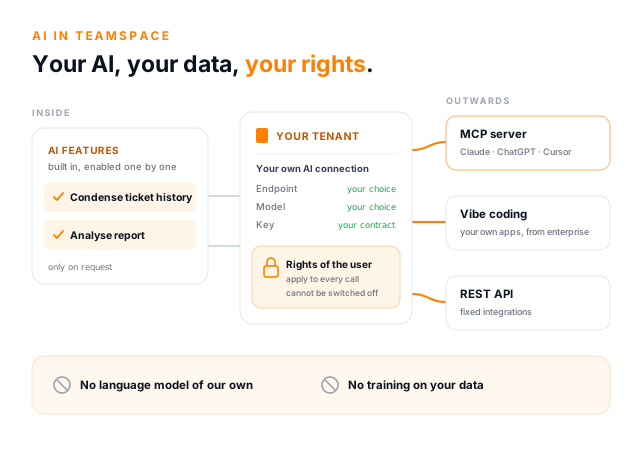
AI in teamspace as a light concept illustration: in the centre the card Your tenant with your own AI connection made of endpoint, model and key and a lock labelled Rights of the user; on the left the built-in AI features Condense ticket history and Analyse report; on the right three routes outwards: MCP server for Claude, ChatGPT and Cursor, vibe coding for your own apps and the REST API; below, a band stating no language model of our own and no training on your data.

What AI in your ERP brings

The AI works where your data already lives.

An AI is only as useful as what it knows about your work. Inside the ERP it knows your projects, tickets, contacts and appointments, without anyone exporting lists or pasting text into some outside chat window. Day to day, that takes reading, searching and piecing things together off your plate.

Understand a long ticket at a glance

Forty posts, three people, two weeks of back and forth: the AI sums up the history in a few sentences, with decisions, open questions and the current state. Useful for handovers, after a holiday, before you call the client and during an escalation, when someone has to get up to speed without the long backstory.

See what stands out in a report

Instead of checking line by line, you let the AI read the report on screen. It points out what stands out, such as a project well over plan or a client whose revenue is falling away. The figures in the report remain what counts.

Ask questions instead of filtering lists

Through the MCP server you simply ask in Claude or ChatGPT: "Which tickets for Müller GmbH are still open?", "What is in my agenda this week?" or "Summarise what I worked on last month." The answer comes from your teamspace, provided a suitable MCP connection has been enabled for you, and it only shows what you are allowed to see there yourself.

Learn more

Turn the last minutes into the next ones

After the weekly meeting you tell your assistant: "Take the last minutes from the marketing meeting, drop items 2, 5 and 6 and add the autumn trade fair." Through a separate MCP connection for minutes it creates the new Markdown file in the teamspace file store. This requires that the connection is enabled for you and that you have write rights for that folder in teamspace itself.

Learn more

No pasting into outside chat windows

Anyone using AI today often pastes client data into whatever chat is to hand. With AI in your ERP, your own approved AI works on current data, and it only sees what the signed-in person is allowed to see.

Learn more

Your AI, your data

You decide which AI works with your data.

Many software vendors handle AI the same way: they sign a contract with a large model provider, build that model in and switch it on for every customer. As a customer, you are left not quite knowing where your data is processed, or on what terms.

teamspace takes the other route. We do not run a language model of our own. Each tenant enters its own AI access: endpoint, model and key. That way your organisation answers the question of where the data goes, not us. Processing happens with the provider you have a contract with yourself, or on your own server. No additional data processing arrangement arises through teamspace.

Your tenant data is not used to train AI models. That applies to today's AI features and to every one still to come.

  • Staying on premises is possible. If you run a model in your own data centre, you enter its address, and not a single character leaves the building.
  • Switching models means changing one field. You are not tied to a choice a vendor made two years ago.
  • The key is yours. Quota and billing run through your own contract with the provider.
Background in the help centre: your AI, your data

AI-ready ERP

How to tell whether an ERP system is ready for AI.

"AI-ready" now appears in almost every brochure. Six questions separate the label from what holds up in day-to-day work. Next to each one is how teamspace answers it.

Can your AI get to the data?

An AI assistant needs controlled access to the ERP, otherwise it is left guessing. teamspace comes with its own MCP server for that, in every edition.

Learn more

Which AI does the work, and who decides?

A built-in model ties you to the vendor's choice. In teamspace you enter your own AI and switch it by changing one field.

Does the AI see more than the person?

It must not. In teamspace the signed-in user's rights apply to every AI call, and that cannot be switched off.

Is your data used for training?

Not by teamspace, neither today nor in future features. Whether your own AI provider stores data is governed by your contract with that provider.

Learn more

Does the AI calculate, or do rules?

Invoices and key figures have to come out the same every time. In teamspace rules do the calculating; the AI may check and flag anomalies.

Can you build things on top yourself?

An open API turns the ERP into a foundation for your own tools. With a coding agent you build small apps on your data; the REST API is available from enterprise.

Learn more

What always applies

Four principles every AI feature follows.

Whatever feature is added to teamspace, these four points stay the same.

It runs on your AI

There is no teamspace AI. Without a connected endpoint, no AI feature appears at all. That is the default.

It only runs when asked

No background process transfers data and your tenant is never indexed in advance. Every call is something a person does, and only what the feature needs leaves the system.

It supports, it does not decide

No AI feature closes a case, writes an invoice or settles anything you have to answer for.

It is bound by permissions

An AI feature never shows you anything you could not see anyway. The same holds for any AI assistant you connect through the MCP server.

Two routes

AI in teamspace and AI with teamspace are two different things.

People call both "AI in teamspace". They mean different things, and the difference decides who sets up what.

AI features in teamspace

Your assistant via MCP

What happens
teamspace uses an AI internally
your assistant accesses teamspace from outside
Where you work
in teamspace itself
in Claude, ChatGPT, Cursor and others
Who sets it up
an administrator connects the AI and enables features
an administrator creates the connection, you link your client
What you do
nothing, the feature is simply there
connect once and give OAuth consent
Which AI does the work
the AI your organisation has connected
your assistant's AI, on its terms
Example
condense a long ticket history in one click
"Show me all open bug tickets by status."

AI features in your ERP

Two features are live today. That is deliberate.

teamspace uses AI where it makes a visible difference and where a mistake shows up rather than hiding. Both features only appear once your tenant has an AI of its own connected and your administrator has enabled them. They are included in every edition.

  • Condense ticket history

    The action that generates the ticket subject turns a ticket with forty entries into a few sentences, organised in four parts: overall picture (what is this about?), decisions (what has already been agreed?), open questions (what still needs settling?) and current status. The summary goes into the ticket's subject field and replaces the text that was there; the individual entries stay unchanged.

  • Analyse report

    In a report's three-dot menu, the AI analysis sits right below Export. It adapts to the kind of report: on a timesheet it thinks about plan versus actual; on an invoicing analysis, about revenue spread and clients dropping away. The result is organised into overall picture, anomalies, trend and questions worth a closer look. The AI sees exactly the data you have on screen and writes nothing back. Its pointers are an assessment, not a verdict; the report remains authoritative.

  • In progress, not yet available

    A ticket dispatcher that routes incoming tickets to the right channel or person, a ticket prioritiser, and a CRM data fetcher that fills in details on organisations. The descriptions may still change before release.

Available AI features in the help centre

AI and rules

Rules do the calculating. AI may check.

You could build business software today in which an AI writes the invoices. It would be right most of the time. For an invoice, though, "most of the time" is not enough: across a thousand invoices a month, one would eventually be wrong, it would look just like the others, and nobody could explain why that one.

That is why invoices, billing and figures in teamspace are produced by rules. The rules are stored, traceable and run the same way every time. If a rule is wrong, you find it and fix it, and from then on it is right for good. The AI may take a look and ask: "This project has been billed for three months without the framework agreement discount, although the client has one. Sure?" Whether it has a point is for a person to decide.

Where AI beats any rule, teamspace is glad to use it: condensing long histories, spotting anomalies in a report and explaining things in full sentences. These are tasks where you can judge the result at a glance.

Why teamspace relies on rules for AI

Setting up

How your AI gets into teamspace.

An administrator decides once. The connection applies to the whole tenant, not per user or per module, and from then on users simply see that the features are there.

  1. 1

    Choose a provider

    An AI provider you have a contract with, or a model you run yourself.

  2. 2

    Check the terms

    Does the provider train on your data, how long does it store it, where are the servers? Those are questions for your contract.

  3. 3

    Enter the access details

    Under Configuration, Interfaces, Actions, AI integration: endpoint, model, key (optional for a model you host in-house) and a maximum input length. It limits how much a single call transfers, and with it cost and data volume. Around 50,000 characters is typical; check that this suits your model.

  4. 4

    Enable features

    Your administrator enables what your organisation wants to use. The Enabled switch turns every AI feature off at once.

Short call

Which AI fits your requirements?

A provider in the EU, your own model in your data centre, or just the MCP server for now: in a first call we go through what your data protection rules demand and how teamspace fits.

Making the call

MCP or API: what do you need for what?

The shortest way to put it: the API is for software that always does the same thing. MCP is for questions you do not know in advance.

REST API

MCP server

Who calls it
a program someone has written
an AI assistant
Who uses it
developers, in code
business users, in plain language
When it pays off
processes that run the same every day
questions that differ every time
Effort
development, testing, operation, maintenance
click a connection together, link a client
Permissions
those of the technical account
those of the signed-in user
Included in
the enterprise edition and above
every edition

Both together

Start with MCP, firm it up with the API.

In practice the two routes do not exclude each other. The REST API keeps the nightly handover to accounting running, reliably and the same way every time. The MCP server answers the afternoon question of why the figures from that handover look odd.

A proven approach is to start with MCP. Once it turns out that a particular question is asked every week and the answer always comes about the same way, that is the moment to build it as a report in teamspace or as an integration via the API. For customers on the office edition, the MCP server is often the first way to connect teamspace to other tools at all, because the REST API is only included from enterprise.

For figures that must be exact and repeatable, the report remains the reliable source: an assistant words its answer afresh every time. How teamspace handles your data overall is set out on the security and data protection page.

MCP or API: the trade-off in the help centre

First call

Let us show you AI on an example of your own.

Bring a long ticket or a report you would like to get to grips with faster. In the call you will see what the AI makes of it, and which data leaves your organisation in the process.

Book a call

Frequently asked questions about AI in your ERP

Which ERP system has an MCP connection and AI features?
teamspace, the cloud ERP for professional services firms from 5 POINT AG in Darmstadt, comes with its own MCP server and built-in AI features, both in every edition. Through the MCP server you connect AI assistants such as Claude, ChatGPT or Cursor to projects, times, tickets, contacts and invoices. The assistant always works through an MCP connection that your administrator has configured and enabled for you, and only with your rights: nothing goes through MCP that you could not do in teamspace yourself. Inside teamspace itself, the AI condenses long ticket histories and analyses reports. Details are on the MCP server page.
How do I recognise an AI-ready ERP system?
By six points: there is controlled access for AI assistants such as an MCP server, you choose the AI yourself, the AI never sees more than the signed-in person, your data is not used for training, figures are produced by rules rather than by AI, and an open API allows extensions of your own. teamspace meets all six; the REST API is available from the enterprise edition.
How do I integrate AI into my ERP?
In teamspace, in two ways. For the built-in features, your administrator enters the endpoint, model and key of your AI once and enables what may be used. For AI assistants, they create an MCP connection, and you link your client, such as Claude or ChatGPT, once via OAuth. Nobody has to write any code for this.
An off-the-shelf ERP with AI, or an AI solution built in-house?
The two can be combined. The ERP provides the reliable foundation: invoices, times and key figures are produced by fixed rules. On top of that you connect your own AI through the MCP server and, if needed, build small applications of your own via the REST API, for example with vibe coding. An AI built entirely in-house does not replace the rule-based booking logic of an ERP.
Is an ERP with AI suitable for small and mid-sized professional services firms too?
Yes. In teamspace the MCP server and the AI features are included in every edition, office included. There is no separate AI package. For the AI itself you use a provider your organisation has a contract with, or a model of your own.
Which AI does teamspace use?
Your own. teamspace runs no language model of its own and brings no AI provider along. Your administrator enters an endpoint, a model and a key once, either from a provider your organisation has a contract with or from a model you run yourself. There is one endpoint per tenant.
Is our data used to train AI?
No. Tenant data is not used to train AI models, and that includes future AI features. Whether your own AI provider stores data or trains on it is governed by your contract with that provider, so it is worth checking those terms when you choose one. More on the security page.
Which AI features are available today?
Two are live: condensing a ticket's history and analysing a report. A ticket dispatcher, a ticket prioritiser and a CRM data fetcher are in progress and not yet available. The help centre keeps the current list under available AI features.
Can the AI see more than the user?
No. An AI feature shows nothing the signed-in user is not already allowed to see. The same goes for AI assistants that access teamspace through the MCP server: the normal permission profile applies to every call, and that cannot be switched off.
What does an AI-powered ERP system cost?
In teamspace the AI comes at no extra charge: the AI features and the MCP server are included in every edition, and the prices are listed under pricing. The cost of the AI itself runs through your contract with your provider. The maximum input length in the configuration limits how much a single call transfers, and with it the cost.
Does the AI write our invoices?
No, and that is deliberate. Invoices in teamspace are produced by the rules you have stored. The AI may support and flag anomalies; it does not write an invoice and it does not decide.

Want to use AI without giving up control of your data?

In a first call we work out which route suits you: built-in AI features, the MCP server for your assistants, or an application of your own via the API.