
Location-independent
Clock in in the browser or as an app
- Installable web app (PWA) on iOS and Android
- No VPN requirement, no hardware, no installation
- Optionally a tablet as a clock-in terminal at the entrance
In the home office staff clock in just as they do in the office, in the browser or as an app. Start, end and breaks are documented in line with the BAG ruling, GDPR-aligned, without any loss of trust. Home office time tracking is part of online time tracking, with no module surcharge.
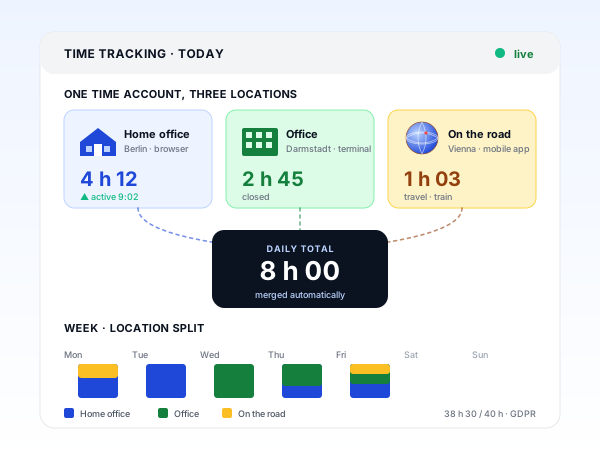
One system, many locations
Whether in the browser at home in the morning, on the office tablet in the afternoon or in the app at the client site: every clock-in lands in the same application and the same daily balance.
Home office
Browser · 08:04
Office
Tablet · afternoon
On the move
App (PWA) · client
Daily balance
8:10 h
Target 8:00
+0:10
Three work locations, one hour balance: one entry, no matter where it starts.
Requirements
Location-independent
Law
Trust
Capture
teamspace solves home office clocking in without additional devices. Staff open the browser or the installable web app, click Start, and the stopwatch runs. One click at the start of a break, a second when they resume, a third in the evening.
Every route books into the same system. An hour that starts at home in the morning and ends at the client site at midday stays one consistent entry.
Law
With its ruling of 13 September 2022 (1 ABR 22/21), the German Federal Labour Court (BAG) made clear that the duty to record working time applies regardless of work location. It follows the ECJ ruling of 14 May 2019 (C-55/18) on recording working time. Anyone offering home office must reliably record start, end and breaks there too.
This is how teamspace supports time tracking in line with the ruling. An Excel timesheet that arrives by email on Monday cannot do that.
“Time tracking is far simpler and more convenient than in Excel.”

Comparison
Trust
In recent years trackers have come to market that record screenshots, mouse movements or activity points in the home office. teamspace deliberately does not. What is recorded is working time and work location, not the way someone works.
This decision by 5 POINT AG protects staff from inappropriate monitoring and the company from data protection problems, because activity surveillance in the home office is delicate. That keeps working from home a productive place on equal footing, not a climate of distrust.
Breaks
In the home office the line between work and time off blurs easily. teamspace automatically deducts the breaks defined in the configuration, depending on attendance time, without anyone having to book them by hand.
A quick chat
In 15 minutes we frame your work locations, break rules and the approval path together.
Transparency
Anyone working from home has a right to know how much of it is counted. In their overview, staff see their hour balance, the plan vs actual for the current week, remaining leave and overtime balance, at any time.
Managers get the aggregated view: utilisation per team, person and project, plus the analysable home office share. Person-level detailed analytics are secured by the permission system. The result is an overview, without micromanagement.
Scope of functions
Fully included in the plan.
Use cases
Home office time hangs on the same hours as the rest of time tracking. Six use cases that come together in the same system.
Clock arrivals and departures at the terminal, in the app or in the browser.
Learn moreHours on project, phase and task, distinguished as billable or internal.
Learn moreReplace the Excel template with a cloud application with an activatable GoBD mode.
Learn moreAn hours record per client as a PDF at the push of a button.
Learn morePlan vs actual live, premiums by collective agreement, payout or time off in lieu.
Learn moreRequests and sick notes from time tracking, with a remaining-leave balance.
Learn more
Part of online time tracking
Home office time tracking is not a separate tool but the same recording as in the office. Clocking in, project hours, breaks, leave and analytics sit in the same system. How the areas fit together is shown in the time tracking overview.
To online time trackingWhat it is about
Home office time tracking refers to recording the start, end and breaks for work that takes place outside the office: at the kitchen table, in a co-working space or at the client site. Since the BAG ruling of 13 September 2022, the duty to record working time applies regardless of work location.
With hybrid and remote work this is no longer a special case but the regular state. teamspace reflects it without splitting into two worlds: the work location is captured via categories, the home office share is analysable, and from the same hours come project hours, overtime and capacity planning. Anyone keeping lists on the side loses the overview exactly here.
Working time data is worth protecting. teamspace is hosted in an ISO 27001 certified data centre in Frankfurt am Main, data processing stays in the EU, and the contracting party is 5 POINT AG from Darmstadt. So the hours from office and home office sit in one place, GDPR-aligned.
Related modules
The time recorded in the home office does not end in time tracking. It feeds into planning, into the invoice and into payroll. Here are the shortest routes there.
Logged hours and absences show who is available when, instead of finding out too late.
Approved hours become the basis for invoicing without an export, with hourly rates and flat rates.
Hours, overtime and absences flow prepared into payroll, without duplicate maintenance.
Book a call
We look at your work locations, your break rules and the handover to payroll. Afterwards you will know whether teamspace fits your hybrid model.