
Staff
- Capture hours quickly, alongside the working day.
- Own hours always in view.
- Fewer queries, more focus on the work.
The teamspace digital timesheet replaces Excel spreadsheets and paper lists. Logged hours assemble themselves for approval, are retained with activatable GoBD mode and go to payroll and invoicing without double entry. Part of online time tracking, with no per-module surcharge.
Where you stand
That costs the office team hours of manual work every week
Why go digital
The Excel timesheet is still standard at many service firms: a template with columns for start, end, break and project, emailed to accounting once a week. Cheap, but outdated. Three points make the switch overdue.
teamspace solves all three in one cloud application. Hours land end to end, every change stays traceable, and the finished timesheet moves on without a detour.
The timesheet collects the logged project hours and runs through a review workflow that you define per project. Once approved, the hours are locked and ready to send.
For review
Employees submit their week
Approved
Project lead reviews, can adjust times
Finalised
GoBD lock · 10 years · Frankfurt data centre
After approval the hours can no longer be edited. The timesheet is ready to send and feeds into payroll and invoicing.
For every role
The same timesheet answers three different questions, depending on who opens it.
“Our staff appreciate how simple the system is.”

Part of online time tracking
Timesheet, activity record, project hours, travel expenses and overtime all run in the same system. One entry feeds the hour balance, the project analysis and the payroll data at once. The overview page shows how the whole module fits together.
Go to online time trackingAutomatic
Unlike with handwritten or Excel lists, the timesheet in teamspace comes together on its own. You select the staff member, project and period, and the system assembles the matching entries.
That way the timesheet is no longer a separate task, but a press of a button on hours that are already logged.
From the day to approval
One click on Start in the browser, in the installable app or at the tablet terminal by the entrance. Start, end and breaks are captured according to the stored rules.
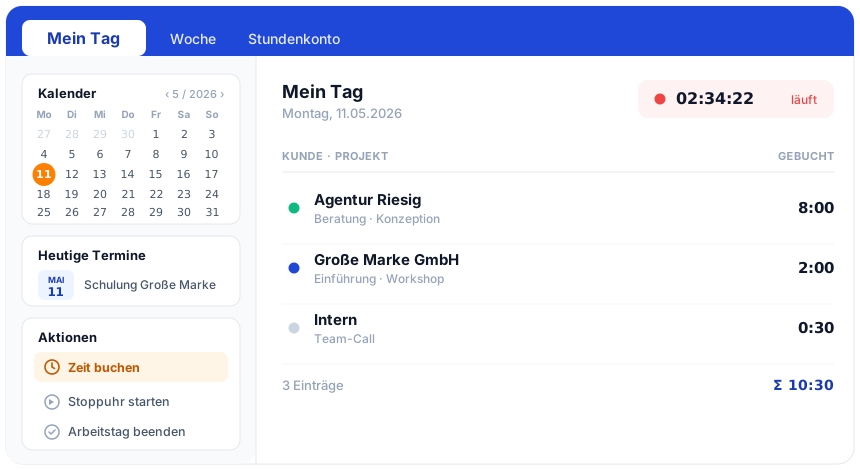
During the day, hours are logged on projects or tickets. One entry feeds the timesheet and project reporting at once.
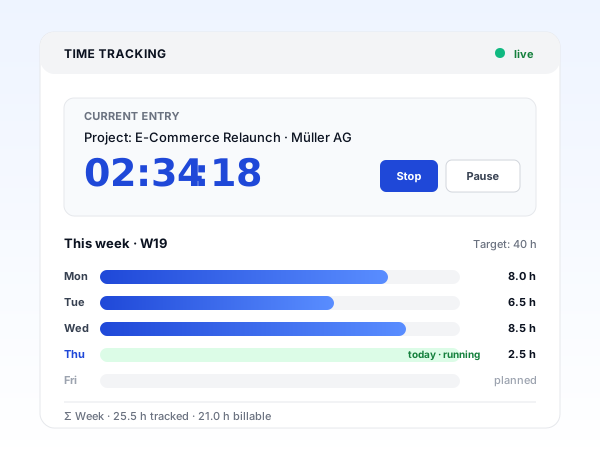
At the weekend, staff see their timesheet in weekly format: day bars, breaks, project totals, plan vs actual.
Typos and forgotten entries can be added later. Each correction notes the editor and timestamp.
Staff submit, managers review and approve. Approved hours go to payroll and invoicing and are locked afterwards.
Excel or teamspace
A side-by-side comparison for everyone still working with an Excel template and weighing up whether the switch is worth it.
Feature
Excel timesheet
teamspace
RecommendedThree views
Staff see their timesheet in three views, all from the same entries.
A correction in the day view takes effect immediately on the week and the month. If needed, the overview can be downloaded as an Excel report.
Initial call
In 15 to 30 minutes we go through your current template, your approval path and the integrations. After that you'll know whether moving off Excel is worth it for your team.
More use cases
From logging project time to managing absences: six use cases in the same system as the timesheet.
Hours on project, phase and task, distinguished as billable or internal.
Learn moreHours record per client as a PDF at the press of a button.
Learn moreMeal allowances automatically by duration and country, receipts included.
Learn morePlan vs actual live, premiums by collective agreement, payout or time off in lieu.
Learn moreRequest and approve absences and offset them in the hour balance.
Learn moreClock arrival and departure at the terminal, in the app or in the browser.
Learn moreLocking
A record only holds up if it cannot be quietly changed. Approval makes the timesheet final, locking makes it immutable, two steps with different effects.
In the activatable GoBD mode the locked data is held in an audit-proof way for more than 10 years, in certified data centres in Frankfurt am Main. A tax audit then receives the same version the staff member signed off.
Hand-over
A timesheet is only valuable once the data flows into the downstream processes without retyping. teamspace hands over approved hours in a single run.
The timesheet thus does not end up in a folder, but becomes the data basis for payroll and profitability.
Records
For tax advisors, law firms, management consultancies and everyone who bills on a client basis, the activity record is mandatory. teamspace produces it from the same hours.
Scope
What it's about
A digital timesheet captures a staff member's working time, that is start, end and breaks, together with the project hours logged against it, in a cloud application instead of an Excel template. It forms the basis for payroll, fee invoices and records.
The difference from a spreadsheet lies not in the appearance, but in the downstream processes. An Excel list has to be reviewed, totalled and transferred by someone at the end. A digital timesheet is up to date daily, documents every change and passes its data on to payroll and invoicing without retyping.
The move off Excel typically takes two to four weeks. First the inventory: which template is in use, which fields are critical, which integrations exist. Then the configuration of break rules, hourly rates and cost centres. One team captures a week in parallel to resolve discrepancies, after which the remaining teams follow with a short induction. Finally the Excel template is archived.
Related modules
The approved timesheet is not the end. From it come project metrics, invoices and payroll data. Here are the shortest paths to them.
Logged hours land on project and phase and carry plan vs actual, margin and utilisation.
Approved hours become the invoicing basis with no export, with hourly rates, flat rates and travel expenses.
Hours, overtime and absences run prepared into payroll, with no double maintenance.
We look at your timesheet template, your approval path and your integrations with payroll and invoicing. A short call shows whether teamspace fits your team.