
Logged on the job, not in Excel.
- Logging on job, ticket or service case
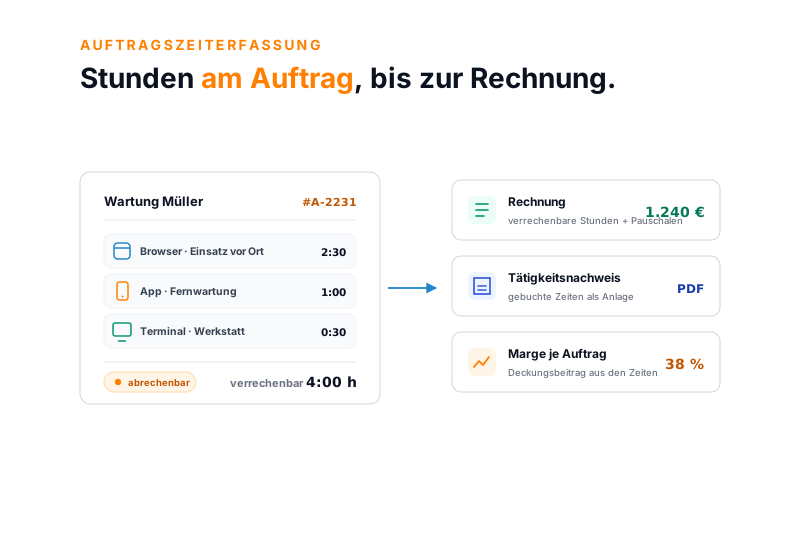
- Browser, installable app and terminal
- Category billable or internal per entry
Staff log their hours to the job, the ticket or the service case. A billing rule separates billable from internal time, and from it the invoice and the activity record grow. Part of teamspace time tracking, with no module surcharge.
Billable or internal
Staff log honestly what they worked on the job. What of it the customer pays for is decided by a billing rule: by interval, by cap per visit, by SLA period. The internal and the goodwill shares stay visible, but out of the invoice.
lands on the invoice
not charged to the client
Recorded is not the same as charged. The rule decides what reaches the client.
What it is about
Job time tracking is the logging of working time onto the operational job object: a service case, a maintenance visit, a repair, a ticket. Unlike a pure attendance or project time tracking approach, staff do not log against an abstract phase, but against the job that is billable to the customer.
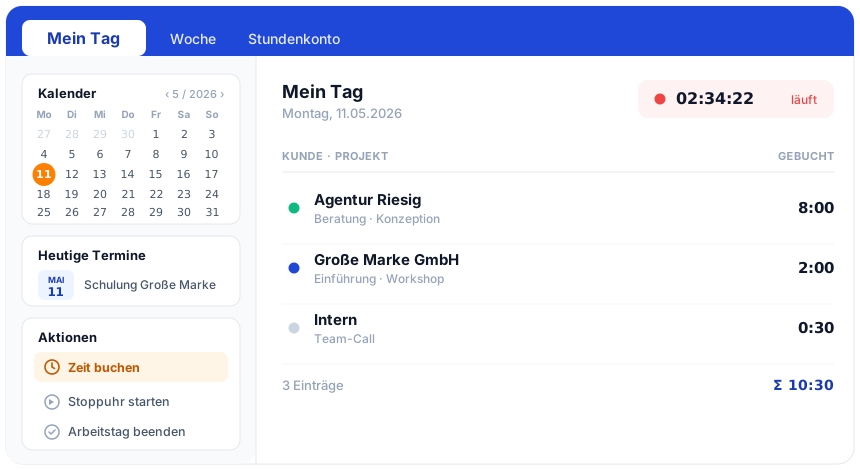
The entry runs the same way as the rest of the time tracking: in the browser at the desk, in the installable web app on the move, at the tablet as a terminal in the workshop. Every hour gets a category, typically the distinction billable or internal, and a short description.
At the click of a button it is therefore clear what a job cost in effort and how much of that belongs on the invoice. No second system, no gathering up at month end.
Scope
Three things decide whether logged hours turn into a clean invoice.
Data model
teamspace holds the concept of a job in a flexible data model that can be set up per engagement. So the same logic fits different job types, without a second application running alongside.
Each type can carry its own fields, rates and approval paths. A job turns into a project at the click of a button, when the work needs a structure of subprojects and work packages.
From job to invoice
From a quote, a maintenance contract or a service case a job is created with customer, rates and flat fees. Templates speed up recurring job types.
Staff log on site via the installable web app, in the back office via the browser, in the workshop at the terminal. Every hour lands on the job.
Travel time to the visit is captured with it, travel costs are posted as a per-kilometre flat rate or a per-kilometre rate. The travel expenses run into the same billing.
Dispatch and job leads review the hours, release them or correct them. Every change carries the editor and a time stamp.
From the released hours the customer invoice grows, with an activity record, while attendance and overtime data run in parallel into payroll preparation.
Where you stand
In 30 minutes we go through your job types and rates and clarify how the billing rules should apply for you. Afterwards you can see whether teamspace fits your job handling.
“I save a lot of time writing invoices.”

Billing
Not every job is billed in one sum at the end. teamspace runs a payment plan per job and decides per line item when and how it is billed.
The software reports when the next invoice is due and adds the billable line items. More complex cases from order billing and maintenance follow the same rules.
Use cases
The logged hour on the job is the way in. From the same entry these use cases grow, without a second system.
Hours on project and phase, distinguished billable or internal.
Learn moreUtilisation and margin in real time for longer-running projects.
Learn moreHours record per job as a PDF at the click of a button.
Learn moreReplace the Excel template with an auditable approval workflow.
Learn moreTravel time and travel costs to the visit, straight on the job.
Learn moreClock in with one click, in the browser, in the app or at the terminal.
Learn moreAnalysis
Because the hours hang on the job and the internal rates are stored, teamspace keeps calculating labour costs and contribution margin as it goes. No one has to gather figures from three lists for that.
If you like, in project controlling you can be warned as soon as a job runs out of margin or a maintenance contract falls behind. So you can steer against it before the customer complains.
In numbers
What sets job time tracking apart from a stopwatch app are the rules in between, not the capture alone.
Billing rules
Interval, cap, category, editor
Payment plan types
Instalment, percentage, line item, final invoice
Capture paths
Browser, app, terminal
System all the way to the invoice
with no export in between
Scope
Who for
Log hours on site, capture travel time, billable and internal kept cleanly apart.
Maintenance contracts with periodic visits and interval billing, a separate rate per contract type.
Hours on tickets and service cases, support flat fees, SLA periods in one application.
A mix of fixed contracts and one-off jobs, each with its own rate and payment plan.
Part of teamspace time tracking
The same logged hour maintains attendance and overtime accounts, fills timesheets and the activity record and becomes the billing base. How the whole module fits together is shown in the time tracking overview.
To teamspace time trackingWhat matters
In the service and maintenance business the captured time is rarely the same as the billed time. An SLA sets fixed intervals, a maintenance contract covers a certain number of hours, some work runs on goodwill. Whoever recalculates that by hand at month end loses time and margin.
teamspace solves this with rules rather than rework. A captured job time can be rounded up or down to the agreed interval, a cap per visit limits the billable time, a category separates billable from internal shares. What remains is a traceable invoice that matches the contract.
From the same data the activity record grows as an attachment to the invoice, and the job status shows which services are delivered, issued and still open. So the job handling stays in one application from the first entry to the final invoice, with no transfer into a second.
Introductory call
We discuss your job types, the rates and flat fees and the path from the logged hour into invoice and payroll. A short call shows whether teamspace fits.
Related modules
From the logged hour on the job come project figures, invoices and payroll data. Here are the shortest paths into the adjacent modules.
From a job a project with structure, plan-vs-actual and contribution margin grows at the click of a button.
Released job hours become the billing base with no export, with rates, flat fees and travel costs.
Attendance, overtime and absences run prepared into the payroll office, with no double maintenance.
We go through your job types and billing rules and show the path from the entry on site to the final invoice. A short call clarifies whether teamspace fits your job handling.