
Plain time tracking app
- Time is measured but never used
- No link to project, phase and category
- No billing, no payroll export
- Utilisation only via an Excel analysis
Project hours are the time a staff member books specifically against a project, a phase or a task. teamspace turns every entry into a data source for utilisation, margin and fees. Part of online time tracking, with no module surcharge.
Context
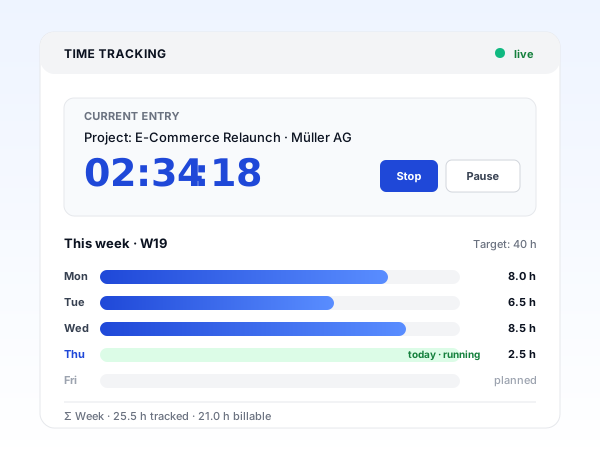
Beyond date and duration, every project hour records what it is booked against and whether it is billable. The category is the small field with the biggest effect: the utilisation ratio later hangs on it.
Project · Phase
Duration
Stopwatch
Category
Activity description
Project, phase or task
What the time is booked against. At phase level the plan-vs-actual comparison becomes meaningful.
The category decides billability
Billable, internal or non-billable. A division can additionally be enforced when the time is billable.
Draft while the project is still open
Half-finished entries stay visible in the sidebar. A description can be made a mandatory field.
Why log hours
The question comes up at every rollout: why should staff book project hours on top of attendance? Three answers that hold up in practice.
“I save a lot of time writing invoices.”

Attendance and project
Attendance time and project time are two different things that many companies capture twice. In teamspace both arise from one entry.
Anyone who clocks in at 09:00 and books onto a project feeds both views in parallel. On a switch only the project time changes, attendance keeps counting. In the evening you clock out once and both views are consistent.
Billability
Every entry carries a category. It sounds like a detail, but it is the lever that moves utilisation and margin.
The utilisation ratio is the ratio of billable hours to target working time. In consultancies, agencies and IT firms this is the figure by which management measures profitability. Categories can be filtered, analysed and set to a quarter-hour increment.
Capturing in everyday work
Time tracking is tedious but important. In teamspace it therefore runs alongside rather than being a task in its own right.
Stopwatch
One click starts the measurement, one click ends it. More precise than any estimate in the evening.
Drafts
If the project is not yet decided, the entry stays parked as a draft, visible in the sidebar.
Templates
Save recurring activities as a template, copy a whole day via a reference day.
Part of online time tracking
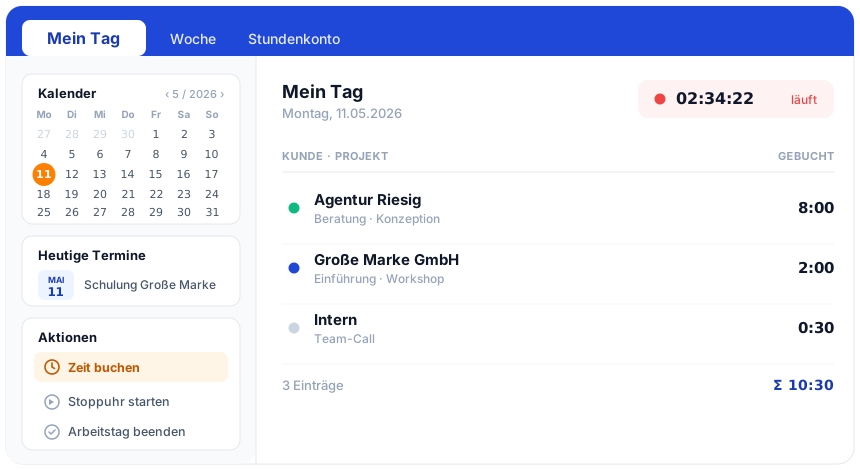
The digital timesheet, activity record, travel expenses and overtime run in the same system as project hours. One capture feeds the hour balance, project analysis and payroll data at once. The overview page shows how the whole module fits together.
To online time trackingFrom click to invoice
Staff pick a project, phase or task and click Start. The stopwatch runs, attendance time runs in parallel.
A short description per entry, mandatory for engagements with an activity record. Templates speed up the routine.
Switching to the next project takes one click: the old entry closes, the new one begins. Breaks are captured separately.
Typos and mis-bookings can be corrected after the fact. Every change records editor and timestamp.
At period end managers approve the hours. Utilisation, margin and fee preview update, the invoice emerges from the approved hours.
Correction
Typos, mis-bookings or late capture are unavoidable in practice. teamspace documents every correction instead of quietly overwriting it.
In the activatable GoBD mode, approved periods can be locked against later entries. After the weekly or monthly lock-down no one can get into a closed month, only finance administration can still make changes.
First call
In 30 minutes we go through your project structure and the interface to invoicing. By the end you can see where booked hours turn into clean fee lines.
Reporting
Project hours produce a service firm's steering reports. They are not a weekly snapshot but update with every entry.
Anyone who notices on the 10th of the month that a project is drifting off course can react. Anyone who only sees it at month-end close can only explain it.
Billing
Approved project hours automatically become the billing base in the teamspace invoicing software. The category steers the path there: only billable hours land in the fee line.
Excel export and manual transfer fall away. Anyone who does not have the hours cleanly in the system sells them, at the latest in the invoice run, more cheaply than planned.
What matters
Highlight 1
Only at phase level does the plan-vs-actual comparison become meaningful, and time and materials, fixed price and flat rate mix within one invoice.
Highlight 2
Browser with a stopwatch, an installable app on iOS and Android or a tablet at reception, all on the same data base.
Highlight 3
The approved hour flows on without an export into fees, payroll data and controlling, with no CSV and no interface upkeep.
Scope of functions
What it is about
Project hours are the time a staff member has actually spent on a project, a phase or a task. Unlike pure attendance time they carry an additional piece of information: the project object. At the press of a button you can see who worked how long on which job, whether that time is billable and what margin results from it.
For service firms that work by hourly rate or fixed price, project hours are the commercial data core. From them flow fee invoices, utilisation reports and margin analyses. Clean capture is therefore not a question of accounting but of profitability.
A note on the most common worry at rollouts: "We don't want to monitor people's hours." Understandable. Two points on that. First, this can be separated technically, analyses can be set per team rather than per person. Second, in practice it is usually the other way around: staff feel better when their work is documented and does not disappear into the manager's head. Sustained overload becomes visible in the report, not only when someone goes off sick.
Use cases
Six further use cases of the same system, each focused on a concrete question around the hour.
Replace the Excel template with a cloud application with an activatable GoBD mode.
Learn moreHours record per client as a PDF at the press of a button.
Learn moreMeal allowances automatically by duration and country, receipts included.
Learn morePlan vs actual live, premiums by collective agreement, payout or time off in lieu.
Learn moreRequest, approve and offset absences in the hour balance.
Learn moreClock in and out at a terminal, in the app or in the browser.
Learn moreRelated modules
The captured hour does not end in time tracking. It flows on into the project, into the invoice and into payroll preparation. Here are the shortest routes there.
Booked hours land on project and phase and carry plan-vs-actual, margin and utilisation.
Approved hours become the billing base without an export, with hourly rates, flat rates and travel expenses.
Hours, overtime and absences flow prepared into payroll, with no double upkeep.
We discuss your project structure, your hourly rates and the path from entry to invoice. A short call shows whether teamspace fits the way you work.