
Highlight 1
One click in, one click out.
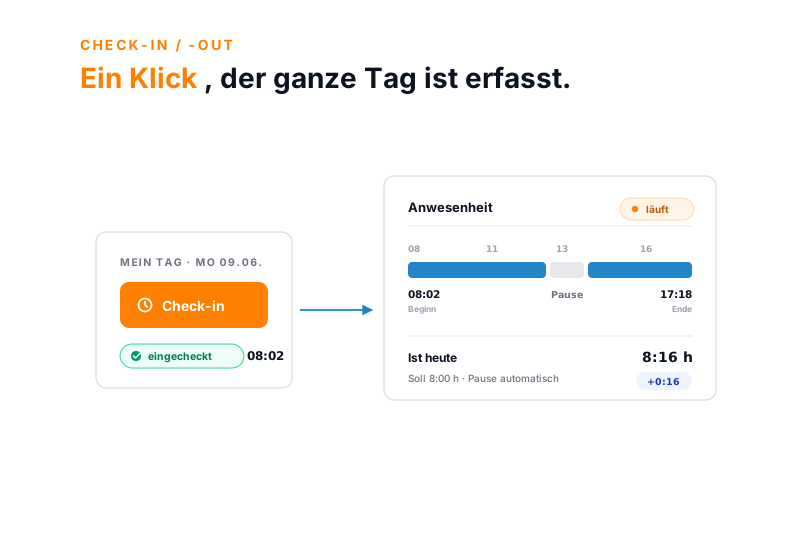
Click Check-in at the start of the day, Check-out at the end, and the same for breaks. No Excel column, no formula, no gathering up the hours at month-end.
Check-in means staff clock in and out via browser, app or a tablet at reception. Start, end and breaks are documented end to end, with editor and timestamp, while the approval workflow runs in the background. Part of online time tracking, with no per-module surcharge.
At a glance
Highlight 1
Click Check-in at the start of the day, Check-out at the end, and the same for breaks. No Excel column, no formula, no gathering up the hours at month-end.
Highlight 2
Browser at the desk, an installable web app on iOS and Android, a tablet at reception. Every click lands in the same attendance record.
Highlight 3
Start, end and breaks are recorded to the second, every correction with editor and timestamp. That supports a record in line with the ECJ ruling C-55/18.
Three paths, one record
Browser, app and terminal do not write to three separate lists, they write to the same attendance record. Someone who checks in at home in the morning and carries on at reception at midday still ends up with one continuous day.
Browser
at the desk
App
on the go · iOS & Android
Terminal
at reception · tablet
K. Schmidt · Mon 09 Jun
Wherever the punch happens, one record for the hour balance, the week and payroll.
Breaks
Breaks can be set manually with a check-out and a check-in. Or teamspace deducts them automatically, following the break rules you set up once.
The working-time model also decides how precisely people clock in. With flexitime, staff record start and end via check-in. With a trust-based model, the working duration alone is enough. Both can be chosen per staff group.
Work location
teamspace records where someone has worked through categories, not through location tracking. Office, home office, work on site at a client: each category is freely named, with a colour and an icon.
No GPS, no activity surveillance. For most small and medium-sized teams, that is precisely the condition under which time tracking is accepted at all.
“Staff in both support and project planning can see orders and invoices. That was not possible before.”

A working day
Open the browser, app or terminal, click Check-in. The start is recorded with date and time, and the attendance timer starts running.
Break start and resumption with a click. Or the configured break rule deducts the break automatically.
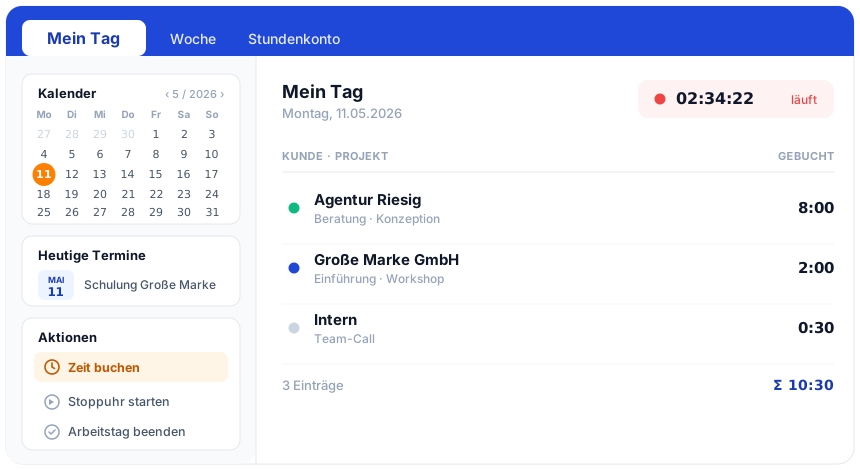
Anyone who wants to can log time on projects or tickets in parallel. With day templates this can be automated: check-in and check-out then log the project time straight away, with no second entry.
One click, done. The hour balance, the overtime balance and the weekly overview are updated immediately.
Managers review their team's hours, approve them or send them back with a comment. Approved hours move into payroll and invoicing.
Correction
A forgotten check-out, a typo, a late entry: it happens. teamspace overwrites nothing silently, it documents every correction.
This way the recording supports a working-time record in line with the ECJ ruling C-55/18 and the German Federal Labour Court (BAG) ruling 1 ABR 22/21. A forgotten check-out can be added the next day with a comment, while a deliberate distortion would be visible.
First call
In 30 minutes we look at your working-time models, shifts or flexitime, office or home office, and how the approval should run at your company.
Use cases
Check-in is the way in. From the same attendance record these six use cases follow, with no second system.
Hours on project, phase and task, split into billable or internal.
Learn moreReplace the Excel template with a cloud application with an activatable GoBD mode.
Learn moreHour record per client as a PDF at the press of a button.
Learn morePer diems calculated automatically by duration and country, receipts included.
Learn morePlan vs actual live, premiums per collective agreement, payout or time off in lieu.
Learn moreRequest and approve absences and offset them against the hour balance.
Learn moreTerminal
Not everyone sits at a desk. For reception, the workshop or the warehouse, teamspace turns an existing device into a clocking terminal.
The terminal needs an active connection; without a network there is no clocking. For most entrances that is no issue, for remote sites it is worth knowing.
After clocking in
Clocked in is not the same as billed. Three steps stand between the attendance record and the closed period.
Approval
At week-end or month-end the responsible person reviews their team's times.
Self-view
In their own overview the current week is open at any time, without asking the manager.
Locking
After locking, no one gets back into a billed month.
Part of online time tracking
From the recorded attendance the overtime and leave balances are maintained; anyone who wants to logs the same time on projects. Timesheet, activity record and travel expenses all run in the same system. The overview page shows how the whole module fits together.
Go to online time trackingFeature set
What it is about
Check-in time tracking means staff clock their working time with a click, instead of reconstructing it from memory at month-end. The term has replaced the classic punch clock because it works regardless of location: in the browser, in the app or at a tablet terminal, depending on where the work happens.
Since the German Federal Labour Court ruling of 13 September 2022 (1 ABR 22/21), employers in Germany must record the start, end and duration of daily working time. The court builds on the ECJ ruling C-55/18 of 14 May 2019. teamspace supports such a record: times are kept end to end, corrections carry editor and timestamp, periods can be locked. We do not promise blanket legal compliance, that always depends on the specific setup.
For service providers, check-in is at the same time the way into more. From the attendance record the overtime and leave balances are maintained, and anyone who logs the same time on projects has the basis for utilisation, margin and fee invoicing. That turns the duty to record from an irksome obligation into a usable data base.
Related modules
From the recorded attendance come project metrics, invoices and payroll data. Here are the shortest paths into the adjacent modules.
Logged hours land on project and phase and feed plan vs actual, margin and utilisation.
Approved hours become the basis for invoicing without an export, with hourly rates, flat rates and travel expenses.
Hours, overtime and absences move prepared into payroll, without duplicate maintenance.
We go through your working-time models, settle the terminal question and the path from attendance into payroll. A short call shows whether teamspace fits the way you work.