
One basis for everything
Client, project, hour and invoice live in the same system. The quote becomes the project, the hours become the invoice, without an export between four tools.
teamspace runs in the browser, without your own server and without your own IT team. You roll it out in stages, each productive at once, and extend later without a migration.
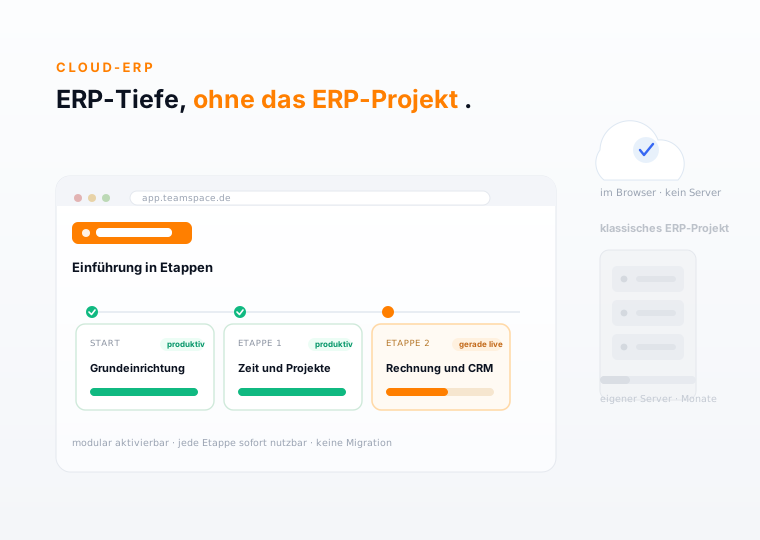
Rollout in stages
Whoever hears ERP thinks of months of rollout, your own IT and cost long before impact. With teamspace the system grows out of the base setup, stage by stage, and each one is productive at once.
Grundeinrichtung
Stammdaten, Nutzer, erste Vorlagen
Zeit und Projekte
Stunden buchen, Projekte führen
Rechnung und CRM
Aus Stunden wird der Rechnungsvorschlag
Service Desk
Tickets und Wartung dazu, wenn so weit
Jede Etappe ist sofort nutzbar. Kein Big Bang, kein Stillstand, bis alles steht.
The operating model
Cloud here means above all one thing: you operate nothing yourself. teamspace runs in the browser, can be installed as an app on smartphone and tablet and is always up to date. Operation, updates and backup sit in the data centre.
Scope of functions
Three properties separate it from a classic ERP and from a bunch of single tools.
Client, project, hour and invoice live in the same system. The quote becomes the project, the hours become the invoice, without an export between four tools.
You activate what you need today and add more later without a data move. office and enterprise are configuration, not a migration.
teamspace runs in the browser and as an installable app. Operation, updates and backup sit in the data centre, no IT team of your own is needed.
One system
What becomes ready to go here is not a bunch of tools in the browser, but a system: projects, time, invoicing, CRM and service work on the same data. Client, project, hour and invoice exist only once.
Struktur, Plan-Ist, Forecast
Stunden im Browser und in der App
Aus Stunden wird der Beleg
Kontakte, Pipeline, Historie
Ein Datenstamm
Kunde, Projekt, Stunde und Rechnung, einmal angelegt
Tickets mit SLA und Portal
Wiki, Dateien, Kalender
Personalakte, Urlaub, Abwesenheit
Plätze, Ressourcen, Buchung
Ein Login, ein Datenstamm, kein Export zwischen acht Werkzeugen.
Where it sits
What you gain with cloud ERP
The full depth of an ERP, without its weight: all areas on one basis, productive in weeks rather than months, and extendable without migrating again.
One system
Lead, project, hour and invoice run in one logic, on one basis, with one login.
Pace
Base setup first, then module by module. Each stage is productive at once, no standstill until everything is in place.
Growing with you
From the five-person team to the group with several offices. An edition change is a setting, not a move.
Projects and time
The project arises from the confirmed order: order items become subprojects and work packages, hourly rates and billing type are set from the start. Staff log their time directly on it, in the browser or in the app.
“Staff in both support and project planning can see orders and invoices. That was not possible before.”

The path of a service
One continuous path, without an export between CRM, project tool and accounting: the quote becomes a project, the hours become the invoice.
Contacts, opportunities and quotes sit in the CRM. The accepted quote becomes an order in one click.
The project arises from the order with structure, hourly rates and billing type, without re-entering it.
The team logs hours on project, task or ticket, in the browser and in the app, each with its category.
Approved hours, flat rates and expenses flow into the invoice, the activity record is created automatically alongside.
Plan-actual, margin and utilisation arise from the same transactions, current to the day, not from parallel spreadsheets.
Seen in the system
Target, actual and forecast sit on every project, the contribution margin arises from the logged hours. The full project control is ready on its own module page.
Customer portal · Relaunch
PRJ-014 · 240 h plan
CRM rollout
PRJ-021 · 180 h plan
Data migration
PRJ-009 · 90 h plan
Activated by module
You start with the areas that have the biggest lever today, often time tracking and billing. You switch on further modules later, without migrating data. Configuration and data store grow with you.
From the hour to the invoice
At the end of the period the project lead approves the hours. The invoice arises from the approved, billable hours, the flat rates and the expenses, without an intermediate export.
Your questions
Let us look at your processes.
Bring a typical flow, from quote to invoice. In the first call you see which modules have a lever first and what the path through teamspace looks like.
Service desk
Many professional services firms run the ongoing service alongside the project: maintenance, support, small changes. Whoever has promised a response time for it needs it in view, not in the contract folder.
CRM
Emails, calls, appointments, quotes and logged hours land on the same contact. Whoever opens a customer sees the whole story, without searching in five tools.
Seen in the system
Quote, order, invoice, open item and payment hang together as one chain, on the same data rail from CRM, time and project. No document starts from zero.
AN-2026-0042
AB-2026-0031
RE-2026-0051
Mahnstufe 1
Zahlungseingang
Aus denselben Daten
Eine Kette: jeder Beleg kennt seinen Vorgänger und seinen Nachfolger.
Who benefits
One system on one data basis pays off differently for each role. Three views we hear especially often.
Comparison
Both bring depth. The difference lies in rollout, operation and extension.
Feature
Classic ERP
teamspace cloud ERP
RecommendedWhat matters
Highlight 1
Staff log in the browser, in the app or on the tablet, on project, task or ticket. Every hour carries its category, billable or internal.
Highlight 2
Client, project, hour and invoice exist only once. What begins in sales carries through to the analysis, without a CSV in between.
Highlight 3
The department switches on new modules, the edition change is configuration. The system grows with the firm.
Feasibility
Show us a typical flow. We show which modules have a lever first, what the stages look like and where your current setup is already enough.
Why teamspace
We have been developing teamspace in Darmstadt for over 25 years, self-financed and without outside capital. More than 20,000 users in around 400 companies work with it every day.
Operation in two geo-redundant, ISO 27001 certified data centres in Frankfurt am Main, data processing exclusively in the EU. The data centre is certified, not teamspace itself.
Project, time, CRM, service and invoicing work on the same data basis. No export between tools, and one contact who knows your processes.
Case Study
Hypothetical practical example to illustrate how it works. Concrete values depend on the starting point, industry and implementation and are not guaranteed. A typical switching scenario: a project-based professional services firm with 60 staff that runs CRM, projects, time tracking and invoicing in separate tools.
Leads lived in the CRM tool, projects in a second, hours in a time-tracking app, invoices in accounting. Between every step lay an export. Analyses arose from spreadsheets that someone merged at the end of the month, and were two weeks old by the time they were read.
Today sales, projects, time and billing run in one system. The quote becomes the project, the hours become the invoice, the activity record is created automatically. The rollout ran in stages: first time and projects, then invoicing and CRM, without a standstill and without a migration in between.
1
system instead of four separate tools
0
exports between the steps
current to the day
numbers, not only at month end
Security
Projects, quotes and customer files hold sensitive things: terms, strategies, internal numbers. teamspace processes this data exclusively in the EU.
What cloud ERP software has to do
Cloud ERP software is an integrated business software that runs in the browser and carries the core processes of a company on one data store: sales, projects, time, billing and service. The word cloud stands for the operating model, no own server, no own operation, always on the current version. It is activated by module, what is needed.
teamspace is the ERP for professional services firms whose value creation arises from the work of their people. Materials management, warehousing and production stay deliberately out of scope; posting data goes to DATEV over the certified interface, the accounting stays with the tax adviser. This is how the depth of an ERP arises, without the weight of a classic ERP project from production and trade.
Module overview
Nine areas mesh together on one data basis. Each has its own page with all the details.
Structure, plan-actual, forecast and capacity planning across all projects.
Learn moreWorking and project time in the browser, in the app or on the tablet terminal.
Learn moreFrom hours and flat rates to the document, with ZUGFeRD, XRechnung and DATEV.
Learn moreContacts, pipeline and customer history, the quote becomes the project in one click.
Learn moreTickets with an SLA traffic light, customer portal and escalation, service time billed directly.
Learn moreTeam calendar, company wiki, file and document store, Teams and Outlook integration.
Learn moreDigital personnel file, leave, sickness and cover in one team calendar.
Learn moreBook desks, rooms and resources, for hybrid teams and desk sharing.
Learn moreDocument control, approvals and audit-proof versions for your QM.
Learn moreScope of functions
Activatable by edition, all on one data basis.
Terms
Words that come up again and again when comparing cloud ERP and classic ERP.
Related solutions
Depending on what you are looking for, a different entry point gets you there faster.
The breadth and steering view: all areas and the reporting that management needs.
Read moreThe path of an order: from confirmation via the delivery note to the netted final invoice.
Read moreFrom lead to paid invoice, the overview of all solutions and modules.
Read moreWho the cloud fits
teamspace is built for project-based professional services firms with 5 to 250 staff. Each industry has its own page with fitting examples.
Engagement structure, fee models, consulting days and utilisation across practices and offices.
Industry pageSprint deliveries, maintenance contracts, recurring invoices and service desk with SLA.
Industry pageProjects, managed services, tickets, maintenance contracts and licence resale on one platform.
Industry pageBudget management, media budgets, freelancer steering and creative shops with mixed billing.
Industry pageHOAI phases, hour accounts, fixed-fee contracts with amendments and travel expenses.
Industry pageWho it is built for
First call
In 15 to 30 minutes we discuss your processes and suggest an order for the rollout. You hear a clear assessment of whether teamspace fits. Free and non-binding.