teamspace

SME business software: every operational process in one cloud.

With teamspace SME business software you run projects, time tracking, invoicing, CRM, service desk and HR on a single cloud platform. From first lead to paid invoice, one data foundation, one login, one reporting layer. Made in Germany, hosted in Frankfurt, GDPR compliant and free of tool sprawl.

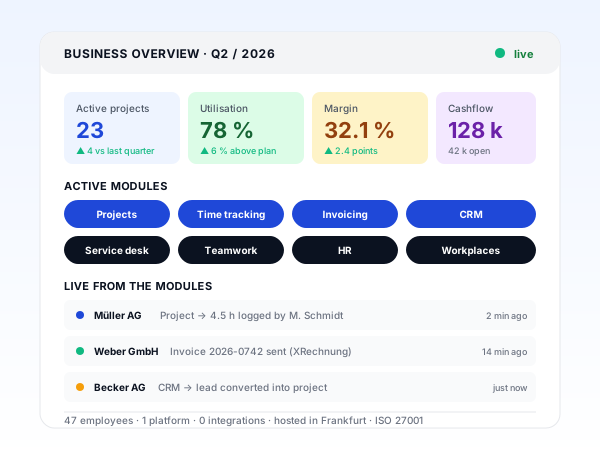
teamspace SME business software dashboard with pulsing live indicator, four KPI cards (23 active projects, 78 percent utilisation, 32.1 percent margin, 128 thousand euros cashflow), an active modules row covering projects, time tracking, invoicing, CRM, service desk, teamwork, HR and workplaces, and a live activity feed

What teamspace SME business software delivers

Three properties that distinguish teamspace from a classic ERP system or a patchwork of standalone tools.

1

One platform instead of ten tools

Projects, time tracking, invoicing, CRM, service desk, teamwork, HR and workplace management on one platform. One login, one permission model, one data foundation. No integrations to maintain, no duplicate master data, no Excel bridges.

2

Grows with you from five people upwards

Activate exactly the modules you need today and add more later without migration. Data model and configuration grow with you, from a five-person team to a 250-person group across multiple sites.

3

Made in Germany, operated in Frankfurt

Built in Darmstadt, operated in certified data centres in Frankfurt am Main, contracted with 5 POINT AG. ISO 27001 certified, GDPR compliant, no US CLOUD Act exposure.

How mid-market firms run operations on teamspace

Six steps from first lead to follow-on order across every module, with no Excel bridge and no tool gap.

  1. 1

    Lead and quote in CRM

    Inbound enquiries from website, email or referral land directly in CRM. Structured pipeline with stages, weighted forecast in real time, quotes with rate cards, fixed packages and options pulled from master data.

  2. 2

    Project created in one click

    When a deal is won, the quote turns into a project with budget, phases, team and rates. No data transfer, no double entry, the handover from sales to delivery is seamless.

  3. 3

    Capture time and effort

    Staff log time at the desktop, on mobile or at a terminal. Travel expenses, flat rates and material cost land directly on the project. Hour balances, leave and sickness run on the same platform.

  4. 4

    Steer and control the project

    Plan-vs-actual, earned value, rolling forecast and utilisation per person, practice or location. Leadership sees aggregated views, project leads see the detail. Daily-fresh, no CSV exports.

  5. 5

    Invoice automatically

    Tracked hours, flat rates and travel expenses turn into a draft invoice automatically. Send as ZUGFeRD or XRechnung to public-sector buyers, run automated dunning, export to DATEV for finance.

  6. 6

    Service and follow-on

    Tickets and maintenance requests are captured in service desk and either drawn from an hour pool or billed separately. The customer stays active in CRM with cross-sell, contract terms and renewal dates visible at a glance.

Who teamspace is built for

Business software for the mid-market sounds generic, but it is not. teamspace is purpose-built for service firms with project-based delivery. These industries fit particularly well:

Management consultancies

Engagement structure, fee models, consultant days, utilisation across practices and locations, forecast and margin per engagement.

Industry page

IT service providers and systems houses

Sprint deliverables, maintenance contracts, SaaS billing, recurring invoices, service desk with SLA management.

Industry page

Agencies and creative studios

Account budgets, media spend, freelancer steering, mixed billing across fixed price and time and materials.

Industry page

Architects and engineering firms

HOAI service phases, hour banks, fixed-price contracts with addenda, travel expenses, project files.

Industry page

Growing service firms with 5 to 250 employees

Useful from five people, ideal at 20 to 250, scalable for several hundred consultants per tenant across multiple sites and subsidiaries.

Service and maintenance providers

Service contracts, hosting, licences, retainers, automated recurring invoices and ticket-based billing.

Classic ERP vs teamspace SME business software

A comparison for managing directors who run today on a 2000s-era ERP or a patchwork of finance tool, Excel project plans and Outlook-as-CRM, and wonder whether moving to an integrated cloud platform is worth it.

Feature Classic ERP / tool mix teamspace
One platform for every module - βœ“
Cloud, ready out of the box, no servers rare βœ“
Data model built for service firms - βœ“
Project β†’ hour β†’ invoice on one data foundation - βœ“
Utilisation and forecast in real time - βœ“
ZUGFeRD and XRechnung built in add-on βœ“
DATEV export and Lexware connector manual βœ“
Mobile time tracking and approvals add-on βœ“
Service desk with SLA and customer portal - βœ“
Modules added without migration - βœ“
Hosting in Frankfurt am Main varies βœ“
ISO 27001 certified varies βœ“
Made in Germany, German law varies βœ“

Capabilities of the SME business software at a glance

All core capabilities of teamspace SME business software, grouped by business area. One data foundation, one login, one permission model.

Sales and CRM

  • Contact database with engagement structure and group hierarchies
  • Pipeline with stages and weighted forecast
  • Quotes with rate cards, flat packages and options
  • Email integration with Microsoft 365 and Google Workspace
  • Lead β†’ project conversion in one click
  • Cross-sell view across the existing customer base

Projects and steering

  • Work breakdown structure with phases, packages, tasks
  • Plan-vs-actual and rolling forecast
  • Earned value analysis for fixed-price work
  • Multi-project management and portfolio view
  • Capacity and utilisation planning
  • Kanban and Scrum boards for agile delivery

Time and people

  • Working and project time tracking on desktop, mobile and terminals
  • Travel expenses and out-of-pockets posted to the project
  • Leave and sickness management
  • Payroll preparation with DATEV export
  • Digital employee record with GDPR-compliant storage
  • Hour balances, overtime, flexitime

Order and invoice

  • Order processing from confirmation to delivery note to invoice
  • ZUGFeRD and XRechnung for public-sector buyers
  • Recurring invoices for maintenance and retainers
  • Automated dunning with escalation tiers
  • Down payment, final invoices and reversals
  • DATEV export, Lexware and Sage connectors

Service and communication

  • Ticket system with SLA monitoring and escalation
  • Self-service customer portal with knowledge base
  • Microsoft Teams integration for calls and chat
  • Team forum and team chat for internal communication
  • Company wiki and shared file storage
  • Audit trail and compliance reports

Security and compliance

  • Hosting in Frankfurt am Main, EU-only processing
  • ISO 27001 certified data centre and operation
  • GDPR compliant with data processing agreement
  • with activatable GoBD mode accounting and invoicing
  • Need-to-know permission model and two-factor login
  • Backup, disaster recovery, annual penetration tests

Case Study

Typical migration scenario from practice

Hypothetical practice example for illustration. Concrete values depend on starting point, industry and execution and are not guaranteed. A typical migration scenario: a strategy consultancy with 80 employees and three locations across Germany and Austria. They were running Salesforce for CRM, Jira for projects, Toggl for time tracking, Lexware for invoicing and a hand-maintained Excel capacity plan.

Starting point

The tool landscape had grown over years. Integrations were maintained manually, hours had to be reconciled across Toggl, Jira and Lexware. Utilisation reporting lived in Excel with two days of lag. Forecasts came from a separate CFO workbook, plan-vs-actual was weekly rather than daily. Three full-time roles were tied up in integration maintenance, reporting and data hygiene without the steering quality matching the effort.

Solution

With teamspace, CRM, projects, time tracking, invoicing and capacity planning were brought together on one platform. Migration from Salesforce and Jira was delivered at fixed price by the 5 POINT AG customer success team. Toggl, Lexware and the Excel capacity plan were retired. Reporting became daily, the CFO received a rolling forecast from pipeline and utilisation. Integration maintenance disappeared, three full-time roles were redirected into consulting and project steering.

5 β†’ 1

tools running operations

+4 pts

margin after 12 months

βˆ’3 FTE

effort on integrations and reports

What is SME business software?

SME business software is an integrated application that bundles the operational processes of a mid-market firm into a single platform: contacts and sales, quotes and projects, time and people, invoices and dunning, service and customer communication. Where classic ERP comes from manufacturing and is optimised for materials, production and inventory, business software for service firms focuses on what really needs to be steered in the mid-market: project, hour, invoice, utilisation and margin.

Moving from a tool mix of Excel project plans, Outlook-as-CRM, Toggl time tracking, Lexware accounting and a standalone helpdesk to an integrated cloud platform pays off when three conditions come together: the firm has more than 20 employees, runs several projects in parallel and leadership expects daily reporting on utilisation, margin and forecast. Most growing service firms hit this point between 20 and 50 employees.

One platform instead of ten tools

The biggest leverage in teamspace is not the list of modules but their shared foundation. An hour booked on a project today is part of plan-vs-actual tomorrow and an invoice line the day after, with no CSV export, no Excel bridge, no integration maintenance. The same applies to leads turning into projects, tickets turning into bills, leave entries showing up in capacity plans.

In a classic tool mix exactly these handovers are the weak points: data is moved manually, intermediate states are stale, reporting lags two days and three full-time roles maintain integrations rather than serve customers. teamspace replaces the tool mix with a system that runs on one data foundation, one login and one permission model.

Module overview: what teamspace covers

teamspace bundles nine functional pillars that can be activated individually but reinforce each other:

  • Project management with work breakdown, plan-vs-actual, earned value, multi-project and capacity planning
  • Time tracking for working and project time across desktop, mobile and terminals
  • Invoicing software with ZUGFeRD, XRechnung, automated dunning and DATEV export
  • CRM software with pipeline, weighted forecast, email integration and engagement structure
  • Service desk with ticketing, SLA monitoring, customer portal and knowledge base
  • Teamwork with team chat, team forum, company wiki and shared file storage
  • HR software with digital employee record, leave and sickness management, payroll preparation
  • Workplace management with desk sharing, room booking and hybrid working
  • Quality management with ISO 9001, audit management and CIP tooling

You activate exactly the modules you need today and add more later without data migration.

Grows with you from five to 250 people

teamspace is built for growing service firms. In practice this means:

  • Useful from five employees, particularly valuable from 20 employees upwards
  • Up to 250 employees per tenant, scalable across multiple sites and subsidiaries
  • Edition switches without data migration, light β†’ office β†’ enterprise β†’ projectfacts
  • Additional modules at the click of a button, without resetting data or configuration
  • Multiple tenants in one instance with aggregated reporting at group level

This grow-with-you capability is the main difference from monolithic ERP systems, which typically trigger a major migration every three to five years.

Reporting for leadership

SME business software has to deliver one thing above all: daily clarity about the operational state of the business. teamspace provides that clarity at several levels:

  • Utilisation per person, practice, location and engagement, with actuals and plan
  • Margin per project, engagement and practice, calculated automatically from hours, rates and cost
  • Forecast rolling for the next 3 to 12 months, weighted from pipeline and active projects
  • Cashflow with open invoices, dunned invoices, posted incoming payments
  • Pipeline value per salesperson, practice and industry with hit rate and sales-cycle length
  • Order book for the coming quarters as a basis for capacity and hiring decisions

Leadership sees aggregated views, practice leads see their practice, employees see their own data. Need-to-know permissions are the default.

Integration with the existing tool landscape

teamspace is an integrated platform, but does not replace every tool in the company. Accounting, payroll, calendars and the office suite typically stay with the established vendor. teamspace integrates:

  • DATEV for accounting and payroll preparation, with export of invoice and posting data
  • Lexware and Sage through standard connectors
  • Microsoft 365 and Google Workspace for email, calendar and single sign-on
  • Microsoft Teams for calls, chat and customer context
  • REST API and webhooks for custom integrations
  • Outlook add-in for capturing contacts and meetings from the inbox

Integrations are kept as lean as sensible and as robust as the business demands.

Security, data protection and hosting in Germany

Business software stores the most sensitive data in a mid-market firm: customer contacts, contract terms, fee rates, project margins, employee master data, leave, sickness, payroll preparation. teamspace addresses this on several levels:

  • Hosting in Frankfurt am Main, processing exclusively within the European Union
  • ISO 27001 certified, the international standard for information security
  • GDPR compliant and with activatable GoBD mode with data processing agreement and a named data protection officer
  • Need-to-know permissions by default, with views per group, subsidiary and engagement
  • Encryption TLS in transit and at rest, backups encrypted with separate keys
  • Penetration tests annually, summary results available to customers on request
  • Made in Germany, built, supported and operated by 5 POINT AG headquartered in Darmstadt

The contracting party is 5 POINT AG, a German stock corporation, German contract law, no CLOUD Act exposure. That is the meaningful difference from US cloud business software like Salesforce, HubSpot, Microsoft Dynamics or Oracle NetSuite.

Migration from existing systems

Moving to integrated business software is always a migration project. The 5 POINT AG customer success team delivers this migration at fixed price on request:

  • CRM migration from Salesforce, HubSpot, Pipedrive, Zoho or Excel
  • Project migration from Jira, Asana, Monday, Smartsheet or MS Project
  • Time-tracking migration from Toggl, Clockify, Harvest or Excel timesheets
  • Invoicing migration from Lexware, sevDesk, Easybill, Billomat or Excel
  • HR migration from Personio, BambooHR, Sage HR or Excel
  • DATEV connection for accounting and payroll preparation

The fixed-price migration is the alternative to monolithic ERP rollouts with open-ended consulting days. Mid-market firms get a clear budget and a clear endpoint.

Mid-market business software that actually fits

If you are looking for SME business software today, you are probably looking for more than a list of modules. You are looking for a platform that is genuinely integrated, grows with you instead of blocking you, runs GDPR compliant and gives leadership daily numbers without anyone maintaining three Excel workbooks.

teamspace is built for that. Not as a tool federation with integrations, but as a cloud platform for service firms that see sales, delivery and billing as one process. Made in Germany, hosted in Frankfurt, operated by a German stock corporation.

In the 15 to 30-minute requirements check we evaluate together whether teamspace fits your processes, your size and your current tool landscape. You receive an honest first opinion and save weeks of fruitless self-evaluation.

Frequently asked questions about SME business software

What is SME business software and how does it differ from ERP?
SME business software bundles the operational processes of a service firm into a single application: sales and CRM, quotes and projects, time and people, invoicing and dunning, service and customer communication. Classic ERP comes from manufacturing and centres on materials, production and inventory. For mid-market service firms with project-based delivery it is overdimensioned and the data model does not fit. teamspace is built as a cloud platform exactly for this gap, with the focus on project, hour, invoice.
From what company size is teamspace worthwhile?
Useful from five employees, ideal between 20 and 250, scalable for several hundred consultants per tenant. Growing service firms benefit most because they do not have to swap their core system every three years. The platform grows with you, individual modules are activated later without migrating master data.
Do we have to roll out every module at once?
No. Start with the modules you need today. Typical sequences are time tracking β†’ projects β†’ invoicing β†’ CRM for consultancies and IT services, or projects β†’ time tracking β†’ invoicing β†’ service desk for agencies. Adding modules later is a configuration step, not a data migration. Data and permissions grow with you.
How long does a teamspace rollout take?
Base configuration takes a few days. Most mid-market service firms are fully live within 4 to 8 weeks, depending on data migration and module count. Migration from Salesforce, HubSpot, Jira, Toggl, Lexware or DATEV is delivered at fixed price by the 5 POINT AG customer success team on request.
How does teamspace integrate with DATEV, Lexware and Sage?
For finance there is a DATEV export covering invoice, customer and posting data. Lexware and Sage are connected through standard interfaces. Incoming invoices can be captured digitally and pushed to your finance system through DATEV or REST API. Payroll preparation runs with DATEV LODAS and LuG.
What integrations exist with Microsoft 365 and Google Workspace?
Email integration through IMAP/SMTP, Outlook add-in for contacts and meetings, Microsoft Teams integration for calls and chat, calendar sync with Outlook and Google Calendar. Single sign-on through Microsoft Entra (formerly Azure AD) and Google Workspace SSO.
Where is our business data stored?
All teamspace data is processed in certified data centres in Frankfurt am Main, exclusively within the European Union. teamspace is Made in Germany, hosted in an ISO 27001 certified data centre in Frankfurt, GDPR compliant and with activatable GoBD mode. Sub-processors are based exclusively in Germany. The contracting party is 5 POINT AG, a German stock corporation headquartered in Darmstadt.
What does SME business software like teamspace cost?
teamspace is billed per active user per month, with no setup fee, no minimum term and monthly cancellation. The right edition (light, office, enterprise or projectfacts) depends on the modules you need. A full breakdown is on the pricing page and the feature overview, the right edition for you we discuss in the 15-minute requirements check.
Can teamspace integrate with our existing infrastructure?
teamspace offers REST APIs for custom integrations, webhooks for event-driven workflows and standard connectors for DATEV, Lexware, Sage, Microsoft 365, Google Workspace and Microsoft Teams. CTI integrations for telephone systems (3CX, Placetel, Microsoft Teams Phone) are available through the REST API.
How does the permission model work across multiple sites or subsidiaries?
teamspace models group, subsidiary and engagement levels with separate views and permissions per level. Leadership sees aggregated views across the group, practice leads see their practice, locations see their site, employees see their own data. Need-to-know is the default, two-factor authentication is optional.
What does leadership reporting look like?
Leadership dashboards show utilisation, margin, forecast, cashflow, pipeline value, open invoices and order book per practice and location. Daily-fresh, no CSV exports. Custom dashboards are configurable. Drill-down to engagement level is available with permission control.
What sets teamspace apart from US-based cloud business software?
teamspace is built by 5 POINT AG in Darmstadt and operated in certified data centres in Frankfurt am Main. The contracting party is a German stock corporation, German law applies, no US CLOUD Act exposure. Data protection, GoBD and GDPR are built into the architecture. For mid-market leadership teams that value data sovereignty and German contract law, this is a meaningful difference compared with Salesforce, HubSpot, Microsoft Dynamics or Oracle NetSuite.
Can we trial teamspace first?
Instead of an unguided 30-day trial in which most real questions stay unanswered, we offer a 15 to 30-minute requirements check with the customer success team. Together we evaluate whether teamspace fits your processes, size and integrations, and you see the relevant modules live.

Which modules fit your mid-market business?

In a 15 to 30-minute requirements check we discuss your business processes, your current tool landscape and which modules make sense to start with. Free of charge and without obligation.