
It is created with every invoice
- Automatically with every invoice that bills time.
- No second list, no Excel, no retyping.
- Before sending, the record can still be edited.
The activity record lists the logged project hours per engagement: date, activity, hours, totals. teamspace generates it with every invoice that bills time, as a PDF in your own layout. Part of time tracking online, with no module surcharge.
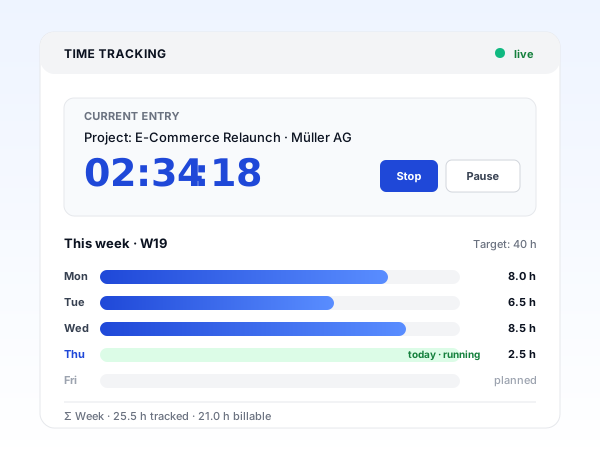
What it takes off your plate
The activity record is the proof of work that many clients require with the invoice. In teamspace it is created from the hours that are logged anyway, with no second spreadsheet.
Straight from the invoice
Anyone who bills hours knows the second step: the proof that the billed time was actually delivered. In teamspace this activity record is created automatically as soon as an invoice bills time.
Invoice and record come from the same data source, the released hours. They stay consistent, even when something is corrected before sending. The Excel export and the manual gathering by hand fall away.
“Time tracking is far simpler and more convenient than in Excel.”

Record or timesheet
teamspace knows two time records drawn from the same logged hours. The activity record accompanies the invoice without a detour. The timesheet puts a review and approval process in front of it.
from the same booked hours
Σ 11.5 h · Berger engagement
Hours booked
activity described when booking
Automatically added to the invoice
as a PDF attachment, editable before sending
Hours submitted
compiled per project for review
Approval by reviewer approval
project manager or client, weekly or at project end
Locked and sent
once approved, the hours can no longer be changed
Both show the same booked hours. The difference is approval: whoever needs it takes the timesheet.
Captured when logging
The level of detail in an activity description depends on the engagement. For an internal project a keyword is enough. A consulting engagement demands more: "Strategy workshop, steering the discussion, 4 hours". In teamspace this description is created right where the hour is logged.
That way, at period close a readable record is ready, without anyone having to add the descriptions after the fact. Describe cleanly when logging, and the proof of work is already done.
From click to dispatch
Staff log hours on an engagement or project and describe the activity. Templates make recurring tasks easier.
When billing, teamspace assigns the logged project hours to the invoice lines following the rules defined in the work order.
The activity record is created automatically with the invoice. Before sending it can be reviewed and edited online.
Record and invoice go to the client together, for signature on request. One dispatch, one consistent document.
In your own layout
The activity record follows your company's layout templates. It appears in the same look as your invoices and other documents, in the house typeface, with your letterhead.
Before sending, the record can be reviewed online. For the signature, teamspace sends the PDF directly for a legally valid signature via the connected services. The client sees the same document that the accounts team released.
Intro call
Does this fit your engagements and records?
In 30 minutes we go through your engagement structure, the activity templates and the layout of the record. Afterwards you will know whether the record can be created automatically with the invoice in your setup.
Retention
Activity records are documents of relevance under tax law. In activated GoBD mode teamspace retains them in an audit-proof way for ten years. 5 POINT activates the mode; after that, released documents can no longer be deleted.
Blanket compliance always depends on the processes within the company as well. What the software contributes is concrete: an end-to-end trail and locked periods after the entries are finalised.
What it is about
An activity record is a structured listing of the services rendered per client or customer, usually with date, activity, duration and totals per period. It accompanies the fee invoice as an attachment and proves that the billed hours were actually delivered. In consulting, project and engineering engagements it is standard; with public-sector clients it is often required.
It differs clearly from a work record or a certificate of employment: those concern the employment relationship between employer and staff. The activity record, by contrast, is addressed to the client and creates transparency about the scope and duration of the work delivered. The client sees what they are paying for and does not have to settle the invoice on good faith.
For the service provider the record is also a source of analysis. Plan-versus-actual comparisons and project metrics emerge from the documented hours. What begins as a mandatory document thus becomes the basis for more precise quotes on the next engagement.
Who it is for
Wherever billing is by time and materials and the client expects a document, the automatic record saves the tedious manual work at period close.
Time and materials per client and service case, the record as an attachment to the invoice rather than as an Excel list.
Industry pageConsulting days per engagement with a short description, the activity record as back-up to the fee invoice.
Industry pageMaintenance and project hours against the contract, the proof of work documents every billed effort.
Industry pageHours per work phase, the record as an attachment to the fee or final invoice.
Industry pageProject hours per client, the proof of work documents what the budget was spent on.
Industry page
Part of time tracking online
This is where the captured time reaches the client, as a record with the invoice. The hours for it are created in time tracking, alongside the timesheet, travel expenses and overtime. One capture, one document, with no second tool. The overview page shows how the whole module fits together.
To time tracking onlineScope of features
In context
The activity record is not a separate tool but the link between captured time and the invoice issued. Anyone who logs project hours cleanly has the record ready at period close with no extra effort.
If a project needs an approval before billing, the timesheet takes care of the review: the project manager or the client signs off the hours, after which they are locked. The activity record shows the same data but skips this step and accompanies the invoice instead.
From the released hours, the fee line emerges in the invoicing software, alongside the record as a PDF attachment. That keeps the chain from the click when logging to the document at the client in one system, with no export and no double entry.
Related use cases
Six use cases of time tracking, from project logging to absence, all on the same logged hour.
Hours on project, phase and task, distinguished as billable or internal.
Learn moreSubmit hours for approval, with activatable GoBD mode.
Learn moreMeal allowances automatically by duration and country, receipts included.
Learn morePlan vs actual live, premiums by collective agreement, payout or time off in lieu.
Learn moreRequest and approve absences and offset them against the hour balance.
Learn moreClock in and out at the terminal, in the app or in the browser.
Learn moreRelated modules
The record is the link to the invoice. Alongside it, the same hours carry the project and the payroll preparation. Here are the shortest paths to them.
Logged hours land on project and phase and carry plan vs actual, margin and utilisation.
Released hours become the invoicing basis with no export, with hourly rates, flat rates and travel expenses.
Hours, overtime and absences flow prepared into payroll, with no double entry.
We discuss your engagement structure, the activity templates and the layout of the record. A short call shows whether teamspace fits your billing.