
Entwurf 1/4
Reisekosten erfasst
Beleg · 320 km · Verpflegung
Travel expense software captures travel expenses digitally, calculates the meal allowances under the German Federal Travel Expenses Act (BRKG) and hands them over to accounting. teamspace bills approved travel expenses straight onto the client invoice at the same time, without a second programme.
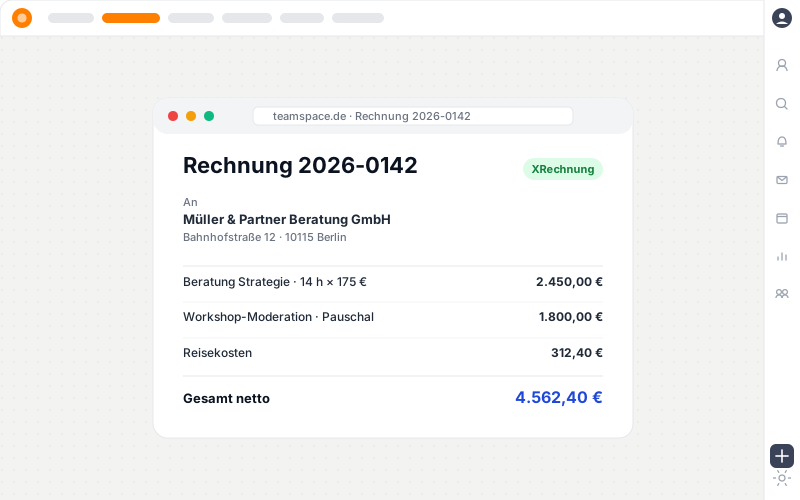
Before the software
teamspace carries travel expenses from capture all the way onto the invoice in one system.
On the trip
Travel expenses arise on the road. Employees photograph the receipt or upload it and assign it to the trip, in the browser or via the installable web app.
Whatever is captured on the road is ready for review and billing later, without re-typing.
Pass-through billing
Travel expenses borne by the client can be passed on to the next invoice. teamspace collects the open items and turns the approved entry into an invoice line item, with the receipt as an attachment.
Beleg · 320 km · Verpflegung
im Finanzmodul, Status nachvollziehbar
Mehrfachauswahl pro Kunde
RE-2026-0042 · Beleg als Anlage
Eigenkosten gehen stattdessen an die Mitarbeiterabrechnung. Dieselbe geprüfte Position fließt zugleich in den Deckungsbeitrag des Projekts.
Stored rates
Whoever creates a travel expense report chooses the line item, and the system suggests the matching rate. teamspace maintains the mileage rate, meal allowances and the international tables centrally.
Mileage rate
or your own mileage rate
Domestic meals
staggered by absence
International meals
per country-specific table
Retention
in activated GoBD mode
Billing types
Travel expenses can be billed individually or bundled. teamspace keeps the right form ready for every rhythm.
per trip
A dedicated trip, from departure to return.
freely chosen
Several costs over a freely defined period.
per month
Reimbursements and premiums per employee at month-end.
“Our staff appreciate how simple the system is.”

To accounting
Whatever has been billed has to reach financial accounting. In the Enterprise edition, travel expenses go straight to DATEV Unternehmen online via the DATEV-certified posting data service.
No one sends files back and forth, the entry lands with the tax advisor.
Intro call
Do your travel expenses make it cleanly onto the invoice?
In the intro call we look at your cost elements, the pass-through to the client and the route into accounting.
What this is about
A travel expense report records the costs of a business trip and documents them for reimbursement and pass-through billing. This includes travel costs (rail, hire car, flight or the private vehicle via the mileage rate), accommodation costs, the additional meal expense as an allowance based on the duration of absence, and incidental travel costs such as parking or tolls. A travel expense software brings these items together from capture all the way onto the invoice in a single process.
Travel expenses touch accounting-relevant data. teamspace processes them exclusively in the EU, in an ISO 27001-certified data centre in Frankfurt am Main, GDPR-compliant with a data processing agreement as standard. In activated GoBD mode, approved receipts can no longer be deleted, and the system enforces retention over ten years.
Capture happens in time tracking, billing in the invoicing software; approved travel expenses go into financial accounting via the DATEV-certified interface. The travel time spent on the trip is recorded separately from this as working time. The contracting party is 5 POINT AG, a German public limited company.
Use cases
Travel expenses are one building block. These use cases draw on the same receipts, orders and interfaces.
Receipt by photo, stored centrally, assigned to the relevant report.
Learn moreBill time and materials, fixed price and duration on the same order.
Learn moreRecognise incoming invoices by barcode and process them digitally.
Learn moreHand over invoices and travel expenses via the certified interface.
Learn moreOpen receivables escalate through several stages, each with its own deadline.
Learn moreThe case becomes the quote, and from it the order.
Learn more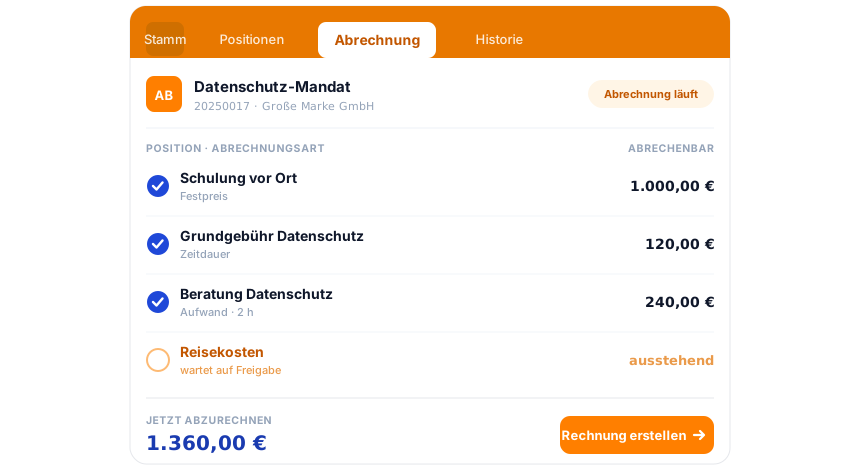
Part of the invoicing software
Travel expenses gather on the order, alongside hours and flat rates, until it proposes the finished invoice. E-invoicing, dunning and the DATEV posting data service run in the same system. The invoicing software overview shows how it all fits together.
To the invoicing softwareRelated modules
Travel expenses begin in time tracking and end on the invoice. Three modules access them directly.
The approved hours are the basis of every time-and-materials line item. Capture and billing run on the same employee, in the same login.
The order becomes the project with budget, phases and team. Flat rates and progress flow back into the invoice.
Organisation, contact and case supply the address, contact person and layout for the document. The case becomes the quote.
First call
We check how travel expenses make it onto the invoice and via DATEV into accounting at your company. A short conversation, a clear picture.