teamspace

Create quotes, from proposal to the ordered project.

A quote is built from templates with sections, line items and the right billing type. Once it is accepted, teamspace turns it into the order and the project in one click. Part of the invoicing software, with no module surcharge.

teamspace creating quotes: on the left a quote with two sections, line items with billing type and a net total, an arrow leads through an accepted node to the right onto an order confirmation with status Ordered and below it a project with budget and phases.

Instead of Word and Excel

Quotes do not belong in a Word template.

Word, Excel, silo solution

  • Prices maintained by hand, with no link to the later invoice
  • Versions live in file names, nobody knows the latest one
  • Acceptance stays an email, the order is retyped
  • There is no path from quote to project, only copy and paste
Recommended

Quote in teamspace

  • Prices come from the article master and the price list
  • Every change is recorded in the document history
  • Acceptance creates the order in one click
  • The order becomes the project, without a file export

The quote

A quote that already knows how it bills.

Sections group line items together, and each line item carries its billing type. Once the quote is accepted, the same structure moves into the order.

ItemsMaster dataPreviewHistory
QUO-2026-0042 · IT PROJECT released
Section · Implementation Subtotal 27,600 €
Consulting Time & material planned 120 h
18,000 €
Licences Fixed price
9,600 €
Onboarding Fixed price Optional
2,400 €
Section · Maintenance Subtotal 490 €/mo
Service contract Recurring monthly
490 €/mo
Extended SLA Recurring Alternative
690 €/mo
Convert to order
Net total 27,600 €

Every item carries its billing type: time & material, fixed price or recurring. On acceptance the quote becomes the order, and the items move with it.

Templates

Templates bring the structure with them.

For the common engagement types, templates are ready to go, with standard phases, line items and the matching rates. You pick the template, adjust the values and add what this particular quote needs.

  • Consulting engagement with concept, build and coaching phases.
  • IT project with a fixed-price phase and time-and-materials packages.
  • Maintenance contract as a monthly retainer with a quota.
  • Architecture engagement with HOAI work phases and a fee zone.

The template is not a rigid stencil. You adjust phases, packages and prices freely per quote, while the structured base remains. Agency budgets and training retainers can be prepared the same way.

Structure

Sections organise the quote.

Larger quotes are split into sections, for instance installation, licence costs and rollout. Each section bundles its line items and forms its own subtotal.

  • Subtotal per section, calculated automatically or set by hand.
  • Prefix and ordering arrange the line item numbers.
  • A separate page per section, when the printout needs it.
  • Amounts can be hidden, when only the scope should be shown.

That way the customer reads an orderly document instead of one long list of line items, and the cost types stay cleanly separated.

“I save a lot of time writing invoices.”

con|energy writes quotes and invoices from the same data base, with no tool switch between sales and billing.
con|energy consult

Line item types

Line items the customer can choose.

Not every line item belongs firmly in the quote. Three types keep the proposal flexible, without distorting the total.

fixed part

Standard

The regular line item that counts towards the final total.

  • Quantity, unit and price per line item
  • Description text for the document
  • Counts in subtotal and final total

to choose

Alternative

Another variant of a line item, with the customer deciding.

  • Counterpart to a regular line item
  • Useful when there are two possible routes
  • Makes the proposal comparable

on request

Optional

An add-on service the customer can include.

  • Does not count towards the final total
  • Stands ready for selection
  • Activated on acceptance

Prices

Prices come from the article master.

Line items come from the article master, not from memory. Per quote you pick the price list, and the stored price pulls into the line item.

  • Price list per quote, for instance separated by country or customer group.
  • Unit price locked or free, depending on the article.
  • Tiered prices and volume discounts for larger quantities.
  • Discount level per line item, when one line item should be cheaper.

Because the same rates later carry the project billing, the quote stays consistent with the invoice.

Attachments on the quote

The Word quote is created on the document.

Consultancies often place a detailed Word document next to the commercial quote: approach, methodology, references. In teamspace this does not live in a second program. Every document has its own file storage.

  • Any attachments on the quote, sent straight from the storage by email.
  • Word documents from templates, edited in the browser with Office.
  • Dynamic blocks pre-fill address and prices, with no retyping.

That way the prose quote carries the right address and the current calculation from the start. More on this in document management.

Use cases

Around the quote.

The quote is the first document in the order. These use cases carry on working with the same documents, orders and prices.

Quote follow-up

Open quotes in view, a reminder on the due date, no lead lost.

Learn more

Order billing

Bill time and materials, fixed price and duration on the same order.

Learn more

Order management

The accepted quote becomes the order, with status and contract data.

Learn more

Project billing

The order becomes the project, and logged hours turn into the invoice.

Learn more

HOAI calculator

Fee zones and work phases in the quote, with the project straight from it.

Learn more

Writing dunning letters

If the invoice stays open, the claim escalates in stages, each with its own deadline.

Learn more

Overview

Every quote shows its status.

Quote tracking gathers all quotes in one list and sorts them by status. At a glance you see what is open and where things are stuck.

  • Draft, Open, Rejected, Ordered as fixed statuses.
  • Action needed, as soon as the binding period has expired.
  • Ordered is set by teamspace automatically, as soon as the order emerges.

That way the sales team knows which quotes are in circulation and which need a response. The next step is shown by the follow-up.

Optionally a quote hangs on a sales opportunity. Then the sales funnel shows which phase it is in, and two alternative quotes on the same opportunity stay read correctly, even though only one will land. Effort and open points hang on the same activity. A quote works just as well without a sales opportunity.

Review

Review and release before dispatch.

Some quotes should not go out without a second pair of eyes. An approval workflow couples the quote to a review before it can be dispatched.

  • Either always or only from a defined total upwards.
  • The reviewer is notified and grants the release in the system.
  • Every change is recorded with editor and timestamp in the history.

That way no unfinished quote goes to the customer, and the negotiation history stays traceable.

First call

How do your quotes turn into the order?

In the call we look at your templates, your price lists and the path from the accepted quote into the order and the project.

Acceptance

Accepted, and the order stands.

Dispatch by email or as a PDF. When the customer accepts, you document that in teamspace, and the quote becomes the order in one click.

  • Legally valid e-signature via the providers Skribble or Scrive.
  • Or a written purchase order, booked manually.
  • Line items carry over, and the quote status changes to Ordered.

The order becomes the project with budget, phases and team. How order and project work together is shown by order management.

For architecture and engineering firms

HOAI does the maths in the quote.

Anyone billing by HOAI does not need the fee tables by hand. The HOAI calculator knows the 2013 and 2021 editions of HOAI and works out all work phases directly in the quote from scope of services, fee zone, rate and chargeable costs.

  • Work phases automatically, including surcharges and incidental costs.
  • Several calculations possible in one document.
  • From the quote the project emerges directly on request.

For consulting and IT the free structure with time and materials, fixed price and retainer stays in place; the HOAI route is only there where it is needed.

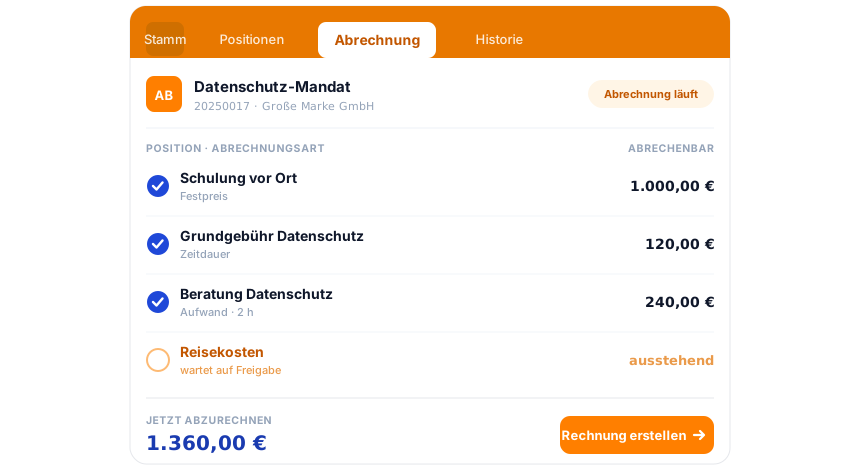
teamspace invoicing software: an order in the Billing tab, three line items billable with a blue tick, the Travel costs line item awaiting release, below it the total now to bill and the action Create invoice.

Part of the invoicing software

The quote is the first document in the order.

The quote becomes the order, the order becomes the invoice. E-invoicing, dunning and the DATEV booking data service all run in the same system. How it all connects is shown by the invoicing software overview.

To the invoicing software

What this is about

What makes a good quote.

A quote states the service a provider is willing to deliver at a price. It is created when a prospect shows a need, and becomes a contract as soon as the customer accepts. A good quote is structured, complete and traceable.

Structured means: clear sections, line items with description, quantity, unit and price. Complete means: sender and recipient, quote number and date, net and gross price details, delivery and payment terms and a binding period. teamspace fills these fields from the master data and the chosen template.

The document layout sits in your own house font, consistent for quote, order and invoice. Capture happens in time tracking, billing in the invoicing software, without maintaining the values twice.

Creating quotes that match the invoice later

The quote sits between sales and delivery. Whoever writes it in Word or Excel maintains prices by hand, manages versions through file names and retypes the order after the go-ahead. As you grow, this costs time and creates discrepancies between quote and invoice.

In teamspace the quote is the first document in a continuous chain. The quote emerges from the activity in the CRM, the accepted quote becomes the order, and the order becomes the project. One data base, no tool switch, no double maintenance.

First call

Quote structure outlined in 15 minutes.

We look at your engagement types, the price lists and the path from quote to order. A short call, a clear picture.

Frequently asked questions on quotes software

How does a quote turn into an order?
Via the Convert to order action. The line items carry over, and the quote status changes to Ordered. The order then becomes the project with budget and phases.
Which billing type can a line item have?
Three: Time and materials, when time bookings decide (with a planned number of hours in the quote), Fixed price independent of effort, and Duration for regularly recurring amounts such as a monthly maintenance. Each line item carries its type individually.
How do I structure a large quote?
Via sections. Each section groups line items together and forms its own subtotal, with prefix, ordering and, on request, its own page in the printout. That keeps an extensive quote clear and the cost types separated.
What is the difference between alternative and optional line items?
An alternative line item offers another variant of a regular line item, with the customer choosing between two routes. An optional line item is an add-on service that does not count towards the final total but stands available for selection.
How do quote prices stay consistent with the invoice?
Line items come from the article master, and per quote you pick the matching price list. Unit prices are locked or free per article, plus tiered prices, volume discounts and discount levels per line item. The same rates later carry the billing.
Can quotes be reviewed before dispatch?
Yes. An approval workflow couples the quote to a review, either always or from a defined total upwards. The stored reviewer is notified and grants the release in the system. Only then does the quote go out.
Can a quote be linked with a sales opportunity?
Yes, optionally. If the quote hangs on a sales opportunity, you see via the sales funnel which phase it is in, and several alternative quotes on the same opportunity stay cleanly interpretable, even though only one is ordered. Effort, tasks and reminders run on the same activity. A quote can be created just as well without a sales opportunity.
Does the invoice always have to run via the order?
The route via the order is recommended, because billing rules, payment plan and post-calculation come together there. An invoice can also be created directly from the quote, though, when it needs to be quick.
How does the customer accept a quote?
By legally valid electronic signature via the integrated providers Skribble or Scrive, or by the receipt of a written purchase order. After that the order is created and the project prepared. More on the Skribble integration.
Can the quote be designed in our own layout?
Yes. The document layouts sit in your own house font, consistent for quote, order, invoice and dunning letter. In the Enterprise edition you manage the layouts yourself.
Which mandatory details should a quote contain?
For calculation and acceptance these belong in it: sender with address, recipient, quote date and quote number, a description of services with line items, net and gross price details with VAT, delivery and payment terms and a binding period. teamspace fills these fields from master data and template.
What does quotes software cost?
The internet prices are annual prices per activated user and month. For a shorter term a surcharge applies: plus 10 per cent half-yearly, plus 15 per cent quarterly, plus 20 per cent monthly. No setup fee. Notice period of three months for an annual term, one month for a monthly term. The quotes feature is part of the invoicing software, with no module surcharge. Details on the pricing page.