
Plain invoicing app
- Assemble every invoice by hand
- Little link to project and work delivered
- Instalments and repeats are laborious
- Quote, order, invoice in separate tools
- Open items in an Excel list
Billing software creates and manages quotes, orders and invoices in one place. In teamspace the order gathers the logged hours, flat rates and due dates and proposes the invoice, from ZUGFeRD to dunning level. Billing is included in every edition, with no extra module fee.
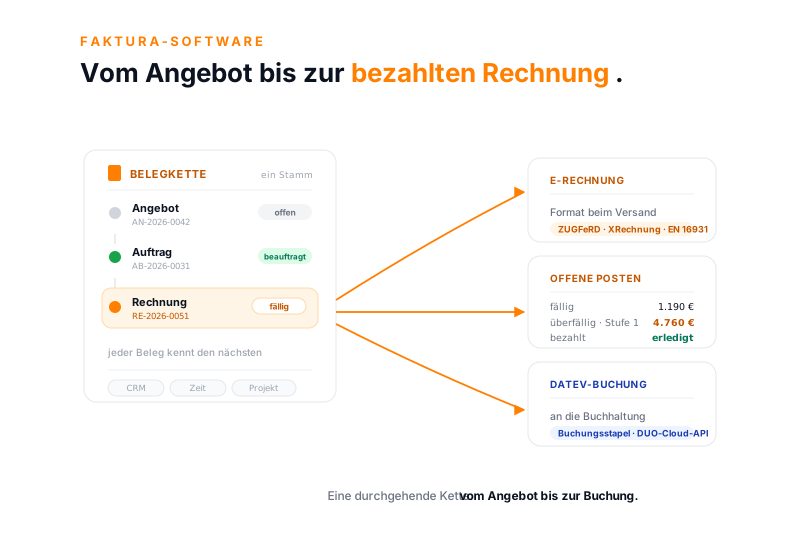
The document chain
Quote, order, invoice and open item hang on a single case. The order takes over the line items of the quote, the invoice those of the order, and all of them draw on the same customer and project record.
AN-2026-0042
AB-2026-0031
RE-2026-0051
Mahnstufe 1
Zahlungseingang
Aus denselben Daten
Eine Kette: jeder Beleg kennt seinen Vorgänger und seinen Nachfolger.
The difference
Document types
Billing knows more than the invoice. In teamspace you keep the outgoing documents (quote, order, invoice) and the incoming documents (purchase order, incoming invoice) in one place. Each type can be used on its own, all of them collect in the document overview, filtered by status.
That keeps it traceable which document grew out of which, from the first quote to the corrected invoice.
Billing logic
Instead of a rigid template, you define how each line item turns into money and when the order bills it. So fixed price, time and material, and flat rate sit side by side even within a mixed contract.
Per line item
Per order
Splitting
“Staff in both support and project planning can see orders and invoices. That was not possible before.”

Recurring
Billing maintenance, services and subscriptions otherwise means remembering the same invoice every month. In teamspace a duration line item with a fixed rhythm takes care of that.
So recurring billing runs in the background, and no one maintains a follow-up reminder by hand.
Open items
As soon as an invoice goes out, it becomes an open item. teamspace shows them by status, from open through due to overdue and action required, with colour dots in a list.
So the tone stays graduated and friendly, and no claim is forgotten.
Feasibility
Tell us about your contracts and documents, and we will walk the path from quote to paid invoice in teamspace through with you.
E-invoicing
Since 2025 companies in Germany must be able to receive e-invoices, and sending them becomes mandatory step by step in the following years. teamspace generates ZUGFeRD and XRechnung as soon as billing is active, to the standard EN 16931.
Authorities receive the XRechnung through their inbound portals such as ZRE or OZG-RE, by upload or email.
To accounting
At the end of the chain stands accounting. teamspace hands over invoices, cancellations and incoming invoices via the DATEV-certified interface, in the enterprise edition.
No one sends files back and forth, the posting sits with the tax adviser.
Use cases
Every step of billing has its own depth. These areas share the same document and the same customer with it.
Structured quotes with sections, line items and billing method.
Learn moreKeep sent quotes in view and chase them up on the due date.
Learn moreRun orders with status, contract data and hand-over to the project.
Learn moreBill fixed price, time and material, and flat rate on the same order.
Learn moreFee tables, service phases and surcharges as document line items.
Capture and check receipts and pass them on to the customer.
Learn moreOpen items by status, graduated dunning with interest.
Learn moreArticles, price lists and recurring services on the order.
Learn moreCreate and receive ZUGFeRD and XRechnung, to EN 16931.
Learn moreReceive supplier invoices, check them and assign them to the project.
Learn moreCapture receipts by photo, upload or email and file them centrally.
Learn morePosting records with account, cost centre and tax key to DATEV.
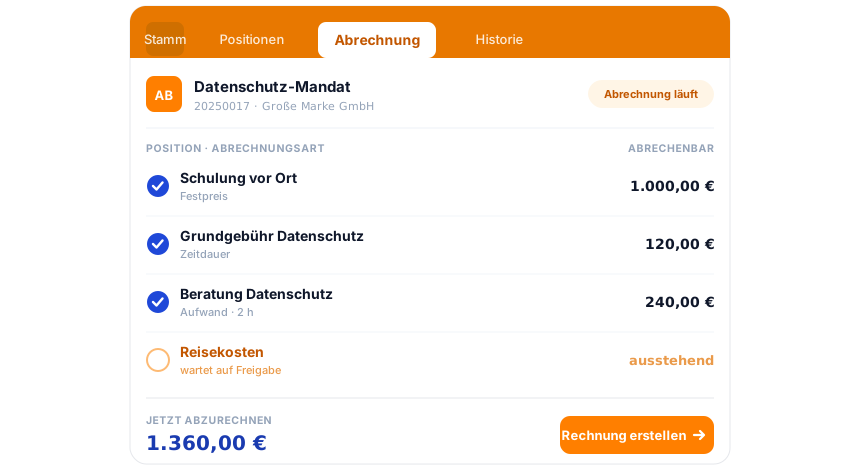
Part of the invoicing software
Sales writes quotes, the project logs the hours, accounting posts the invoice. In teamspace all three run through the same billing, from one customer record. Quotes, orders, invoices and dunning are included in every edition, incoming invoices and the DATEV interface belong to the enterprise edition. How it all fits together is shown by the invoicing software overview.
To the invoicing softwareWhat this is about
Billing software maps the billing process between work delivered and payment received. Unlike a plain invoicing program, the focus is not the single document but the chain: quote, order, invoice, open item. For project-based professional services firms the link to the work delivered comes on top, because logged hours and flat rates flow from the project into the invoice.
Three things matter in practice. First, e-invoicing: since 2025 companies in Germany must be able to receive ZUGFeRD and XRechnung, and sending them becomes mandatory step by step in the following years. teamspace generates and reads both formats to EN 16931. Second, the hand-over to accounting via the DATEV-certified interface to DATEV Unternehmen online, as a cloud API instead of CSV. Third, audit-proof retention: in GoBD mode, which 5 POINT activates on request, invoices and approved documents stay preserved for ten years and can no longer be deleted technically.
teamspace processes this data exclusively in the EU, in an ISO-27001-certified data centre in Frankfurt am Main, GDPR-compliant with a data processing agreement as standard. The contracting partner is 5 POINT AG, a German stock corporation that has developed teamspace since 1999. Hours are captured in time tracking, the project arises in project management, billing happens in the invoicing software.
First meeting
In twenty minutes we clarify which documents you keep, which billing rules apply and what the hand-over to your accounting looks like.
Related modules
Billing draws on three modules and gives back to them.
Logged hours become a billable line item. Capture and invoice run in the same login.
From the order the project arises. Plan, actual and margin sit next to the billing.
Customers and suppliers are organisations in the CRM. Quote, order and invoice hang on the same record.