
Straight from hours to invoice
Logged project hours, flat rates and travel costs become the billing base in one action. The stored rate applies automatically per entry.
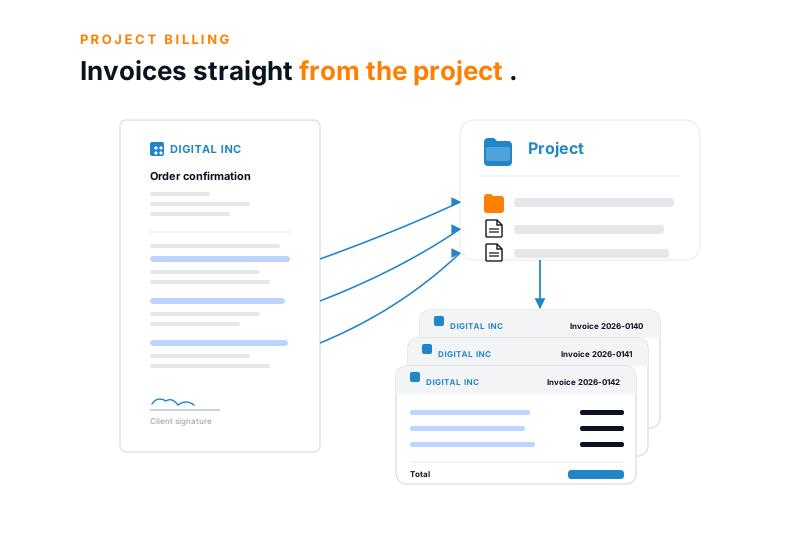
Logged project hours, flat rates and travel costs turn into the client invoice in one click. Fixed price and time-and-materials run side by side in the same engagement, with no one copying values between Excel tabs.
Feature set
Three properties separate project billing from plain invoice writing.
Logged project hours, flat rates and travel costs become the billing base in one action. The stored rate applies automatically per entry.
One engagement can carry several billing models at once: fixed price per phase, time-and-materials for extra work, a flat rate for maintenance.
Progress payments, partial invoices, recurring invoices for maintenance and retainers, credit notes referencing the original. All in standard, no special development.
The billing run
A project billing run condenses what already sits in the project: valued hours, flat rates and expenses. teamspace assembles them into one invoice, with the activity record attached directly.
Consulting
Time-and-materials
Concept phase
Fixed price
Travel costs
rebilled
Activity record
generated from the hours
From the logged data the invoice emerges in a single run, with no transfer into a second spreadsheet.
Project link
Project billing software turns logged project hours, flat rates and expenses into the finished client invoice. What many service firms handle today with Excel sheets, rate-card lists and PDF templates runs here as one continuous process: hours are logged, marked as billable, valued with rates, topped up with flat rates and travel costs, and dispatched as an e-invoice.
The difference from plain invoice writing is the project link. Every entry knows its project, phase and client, knows whether it is billable, and knows which rate applies. From this structure the invoice, the activity record and the margin in controlling all emerge, without anyone switching between tabs.
Terms
teamspace holds rates not in a single table but through articles and client-specific price lists. A separate rate can be stored per person and per subproject; the system adds night, weekend and public-holiday surcharges automatically.
Each client draws the right price list, with its own language, currency and graduated prices. That removes the classic sources of error: the forgotten special price for a key account, the wrong rate after a promotion, the manual correction at month-end.
A click turns the order into a project, and the order line items become subprojects or work packages. Terms, rates and billing rhythm are fixed from the start.
The team logs time on a project, phase or task. Travel costs and material come in through the installable web app (PWA) with a receipt photo.
Anyone who wants a check in place can have the hours reviewed and approved on the timesheet. This is optional; many teams bill directly from the logged hours marked as billable. Every correction stays traceable.
From the logged, billable data the invoice is built with all line items. teamspace flags an engagement as soon as it has billable amounts outstanding.
ZUGFeRD or XRechnung dispatch, discount and payment rules, multi-step dunning, payment matching from the bank statement.
Billing models
Growing consultancies and IT service providers often run several models in parallel within one engagement: a fixed price for the concept phase, time-and-materials for the build, a flat rate for ongoing maintenance. teamspace carries these models at once and resolves every line item on the invoice correctly.
Fixed-price hours show up internally in the margin without appearing as a T&M line on the invoice. Three billing types per line item (effort, fixed price, duration) and five billing modes per engagement cover the mixed cases where Excel otherwise breaks.
Billing rules
The real lever sits in the rules teamspace uses to translate logged hours into invoice line items. They range from a simple flat rate to a multi-tier allowance, and the system sorts every entry into the right pot itself.
So a bill can be steered as simply or as finely as the contract demands, without special development and without a second spreadsheet alongside.
“I save a lot of time writing invoices.”

Invoice types
The system covers five standard scenarios without special logic. Anyone who maintains partial, credit-note and offset cases in Excel today knows how quickly inconsistencies creep in.
Anyone billing with Excel sheets knows the weak points: typos, forgotten hours, the error-prone upkeep of rates.
| Feature | Excel billing | teamspace |
|---|---|---|
| Billing base from hours, no transfer | - | ✓ |
| Hourly rates per person, subproject, client | manual | ✓ |
| Fixed price and T&M in parallel | hard | ✓ |
| Allowances and graduated rates by rule | - | ✓ |
| Progress, partial, final and credit note | manual | ✓ |
| Recurring invoices (maintenance, retainer) | manual | ✓ |
| ZUGFeRD and XRechnung | - | ✓ |
| Activity record as attachment | manual | ✓ |
| Audit-proof retention (GoBD mode, activated by us) | uncertain | ✓ |
| Hosting in Frankfurt am Main | varies | ✓ |
E-invoicing
Since 1 January 2025 every German business must be able to receive e-invoices, and from 2027 and 2028 to send them in stages too. teamspace produces ZUGFeRD (PDF with embedded XML, the standard in B2B) and XRechnung (pure XML, mandatory for public-sector clients) without an extra tool.
Incoming e-invoices are recognised in the mail attachment and taken in with one click. The formats follow the EN 16931 standard, and activation applies globally or per client organisation. More background on the e-invoicing page.
Where you stand
Let's run your rate model through once.
Bring a typical engagement. In the call you see how the invoice emerges from the logged hours, flat rates and expenses, and where your billing logic is mapped.
Record
Consulting, legal and tax engagements often require an activity record as an attachment to the invoice: a structured list of the work delivered with date, hours and description.
teamspace produces this record from the logged hours at the press of a button and attaches it to the invoice. The client sees what they are paying for, without anyone compiling the list by hand. More on the activity record page.
Payment received
Once the invoice is issued, the multi-step dunning process takes over the rest: payment terms, dunning levels with their own texts, deadlines and fees, default interest right in the run. An automatic dunning run picks up due invoices on a fixed rhythm.
In the enterprise edition the bank statement is read in electronically, and payments received sort themselves to the right invoice. What remains is a short list of genuine cases to clarify each week, instead of hundreds of open items in a spreadsheet.
More from project management
Billing is one view of the same project. These areas go deeper into individual questions around figures and steering.
Plan vs actual, forecast and margin, current to the day from the logged hours.
Learn moreSteer progress and cost together, with plan and cost deviation.
Learn moreThe logged hour, from which valuation and invoice emerge.
Learn moreSeveral projects in parallel, each with its own billing and margin.
Learn moreThe invoicing around project billing: documents, dunning, incoming invoices.
Learn moreFive building blocks with budget and owners, the basis for billing rules.
Learn more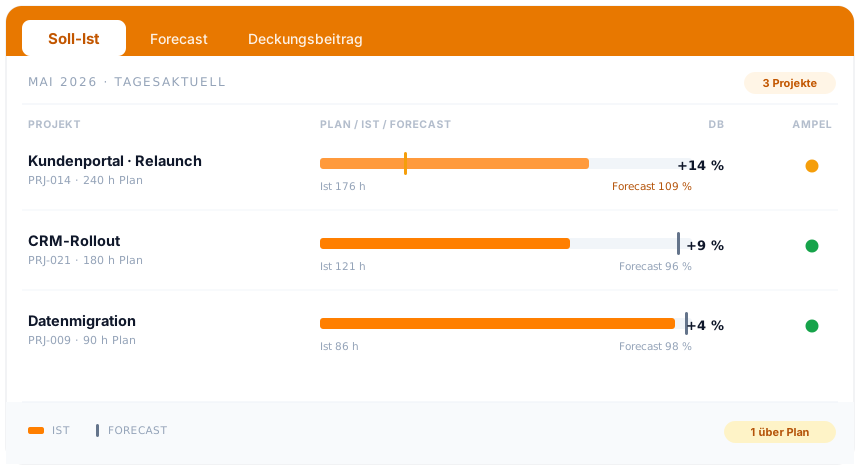
In overview
The order becomes the project, the project becomes the invoice. How teamspace plans, steers and analyses projects, from plan vs actual through earned value to capacity, is shown in the project management overview.
To project managementContinuous
Project billing software shows its value not at a single point but along the continuous chain. An hour is logged, reviewed on the timesheet where needed, valued with the right rate, topped up with flat rates and travel costs, condensed into the invoice and dispatched as ZUGFeRD or XRechnung. At the end the bank statement matches the payment received. The same data sits on every step; no one copies anything into a second spreadsheet.
This is exactly where project billing parts from a plain invoicing program. Because the invoice points back to the underlying entries, you can post-calculate later: what the order promised, what the project consumed, what was finally billed. This post-calculation per order and the running margin make it visible which engagements carry and which run tight, while there is still room to steer.
teamspace has been developed in Darmstadt since 1999 and runs in an ISO 27001 certified data centre in Frankfurt am Main, with data processing staying in the EU. For service firms that have kept projects and billing in separate tools, this is the point where the two come together.
Related modules
Behind every client invoice stand the logged hour, the invoicing and the client with their terms. These three modules mesh directly.
The logged hour is the basis of the invoice and of plan vs actual.
The invoicing around project billing: documents, dunning, incoming invoices.
The client's address, contact and terms sit on the contact.
Fit
Intro call
You show us your rate models and the accounting interface, and we set the billing up around them. By the end you know whether teamspace fits your setup.