
Anchored to the structure node
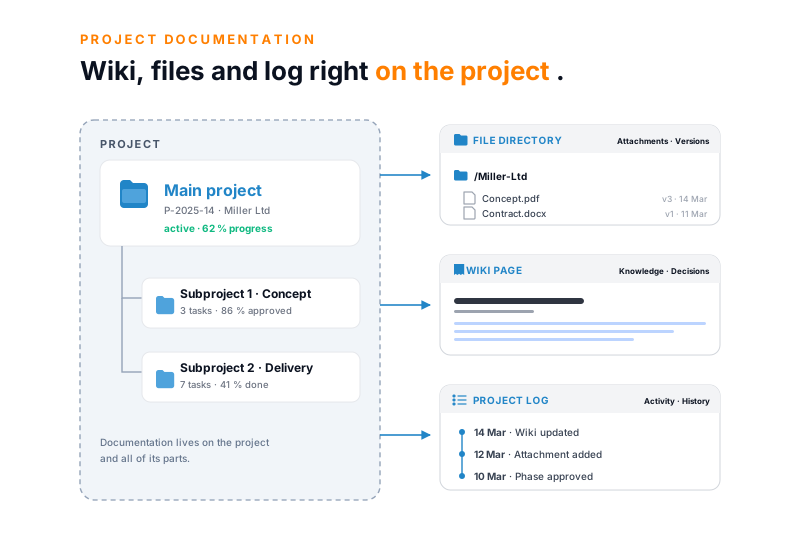
A wiki page sits on the project, an attachment on the work package, a report on the phase. Open a task and the specification is one click away.
Wiki pages, files, minutes and reports sit on the project, the phase or the work package. Every version is kept, with editor and timestamp. With no switch to Confluence, SharePoint or a folder drive. Part of the teamspace cloud software.
Feature set
A wiki page sits on the project, an attachment on the work package, a report on the phase. Open a task and the specification is one click away.
Every save is kept, with editor and timestamp. You bring earlier states back at any time.
Edit Word, Excel and PowerPoint right on the project. Contracts, concepts and minutes sit alongside, not in a second tool.
The core
A project documentation gathers a project's knowledge in one place: requirements, minutes, decisions, concepts and sign-offs. In consulting, IT and architecture projects this knowledge builds up continuously, and a good part of it gets lost once it sits scattered across mailboxes and folder drives.
Tools like Confluence, SharePoint or Notion are a separate silo in many firms. The knowledge lives there, the hours in the time tool, the tasks in the ticket. Three consequences are familiar to anyone who works this way:
In teamspace the documentation is part of the project. A wiki page sits on the project, an attachment on the work package, a decision on the phase.
Project, phase and work package are where documentation is created. Wiki page, files, minutes, report, forum and open points sit on the same node, instead of living in six separate tools.
Traceable
Each save of a wiki page creates a new version. Who saved when stays visible, and you bring an earlier state back with one click.
If a dispute about the delivery or sign-off state comes up later, the historical state can be reconstructed.
“Our staff appreciate how simple the system is.”

Across the project
Documentation does not appear in one go at the end but in every phase. Five steps, most of them alongside the work.
After the kickoff, the minutes become a wiki page on the project, with participants, decisions and next steps.
One page per phase with specification, approach and open points. Documented while working, not two weeks later.
Each architecture or process decision as its own page, with date, participants and rationale. Found at once when questions come up later.
Concepts as PDF, tables as Excel, diagrams as images, all on the work package. Every revision with editor and timestamp.
At the project end the documentation freezes and becomes the template for the next project with a similar profile.
Files
Whoever writes a specification as a Word document or keeps a calculation as an Excel sheet files it directly against the project structure. You open and edit Office files online, with no download and no sending back and forth.
The work breakdown structure is also the filing: where the work package sits, the file sits too.
Reports
Status reports and work orders come from their own layouts. One click, and the new document looks like all the others, without anyone rebuilding the formatting.
teamspace keeps the project log itself: when a status changes or the schedule shifts, the system records it with a timestamp.
In figures
What makes the difference between scattered filing and a documentation that comes together on the project.
Project, phase, package
where wiki page, file and minutes sit
restorable
with editor and timestamp
instead of many tools
wiki, files and tasks on the same project
Hosting in Frankfurt
ISO 27001 certified data centre
Access
With fine-grained permissions, external staff and clients get access to individual documents, not to the whole project. Permissions follow the need-to-know principle.
Whatever is not approved stays internal.
Next step
In 20 minutes we walk through where your project knowledge sits today and which tools can be brought together. After that you see clearly whether your documentation landscape can be consolidated onto one system.
In detail
More from project management
Documentation is one of several views of the same project. These areas go deeper into specific questions.
Phases and work packages that the documentation hangs on.
Learn moreOpen points and tasks, linked to the wiki pages.
Learn moreTasks as cards, on the same project as the documentation.
Learn morePlan vs actual and margin from the project's logged hours.
Learn moreMany projects in parallel, each with its own filing.
Learn moreEarned value and forecast from plan and actual cost.
Learn more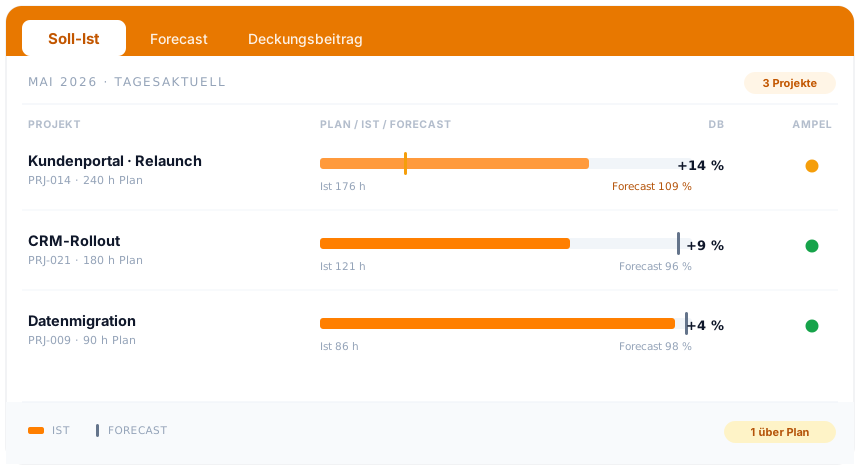
At a glance
The documentation holds the knowledge on the project. How teamspace plans, steers and bills projects, from structure through plan vs actual to the invoice from the project, is shown in the project management overview.
To project managementBackground
The value of a documentation rarely shows on the day it is created. It shows when a new team member joins, when a client asks a question after two years, or when a similar project starts again.
Keep decisions traceable. An architecture or process decision lives as its own page, with context, the options considered and a rationale. Whoever later asks why it was solved this way reads it back instead of reconstructing it. A template from an existing page gives the decision page a fixed frame.
Shorten onboarding. Whoever joins a project finds specification, minutes and status in one place, instead of asking through three mailboxes. That is the quiet gain of a documentation that sits on the project.
Learn from projects. At the close, a report records what was planned and what was achieved. This documentation becomes the basis for the next quote with a similar profile, rather than starting from scratch with each project.
Related modules
Whoever documents a project almost always deals with the hour, the invoice and the client. Here are the shortest routes there.
Staff log hours on the work package that the documentation also hangs on.
The documented order becomes the invoice, with rates, flat rates and billing rules.
Contracts and correspondence with the client sit in the customer file, linked to the project.
Intro call
You show us where your project knowledge sits today, we show you how it comes together on the project. After that you decide whether that is the right route for your projects.