teamspace

The DATEV interface hands over your postings directly, with no CSV.

Invoices and receipts reach the bookkeepers without anyone preparing data at month-end. teamspace uses the DATEV-certified interface to DATEV Unternehmen online: outgoing and incoming invoices, credit notes and travel expenses go straight across as a posting batch, one per client, with no CSV file.
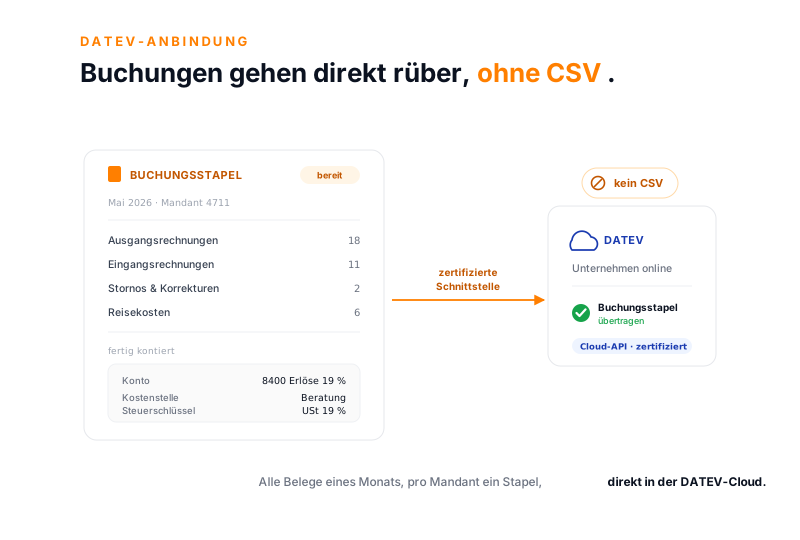
teamspace DATEV integration as a light concept illustration: on the left a posting-batch card with period, client and receipt types plus a fully coded posting record, an arrow labelled certified interface carries the batch to DATEV Unternehmen online on the right, and a mark reads no CSV.

At a glance

The key points in four lines.

  • Certified cloud interface to DATEV Unternehmen online (DUO), with no CSV file.
  • Invoices, credit notes, incoming invoices and travel expenses go across as a posting batch in a single run, fully coded.
  • One dedicated batch per DATEV client, kept apart by financial year, in the enterprise edition.
  • Lexware and Sage run through standard exports, and payroll data goes separately through payroll preparation.

What you gain

What the certified connection saves you.

A certified DATEV route takes the manual work out of the monthly close, the work that otherwise sits between your software and your accountant.

Nobody keys anything in again

  • Posting records come from the receipts that already sit in teamspace.
  • No CSV export, no Excel preparation at month-end.
  • Your accountant carries on posting in DATEV, and the data is already there.

Every receipt arrives fully coded

  • The account and tax code sit on the article, the cost centre on the cost type.
  • Customer and supplier account numbers sit on the client record.
  • Invoices, credit notes, incoming invoices and travel expenses in a single run.

One dedicated batch per client

  • Every DATEV client gets its own posting batch.
  • Receipts from different financial years stay apart.
  • The interface is part of the enterprise edition.

The route

Receipts cross over as a posting batch.

What people casually call a DATEV export is, in teamspace, a certified cloud interface to DATEV Unternehmen online. A finished outgoing invoice or a checked incoming invoice moves straight into the DATEV cloud as a posting batch, with no CSV file in between.

  • Invoices, credit notes, corrections, incoming invoices and travel expenses go across in a single run.
  • Receipt images such as PDFs or scans are handed over with them on request, and are optional.
  • The transfer starts from the posting batch, and once DATEV has processed it, you get a notification.

Your accountant carries on posting in DATEV, and the data is already there. No file travels back and forth.

See incoming invoices

Posting batch

Every receipt for a month in one batch.

A posting batch gathers the receipts for a period and a client, fully coded. Only then does it go to DATEV over the certified interface.

in teamspace
Ausgangsrechnungen 18
Eingangsrechnungen 11
Stornos 2
Reisekosten 6
Mai 2026 · Mandant 4711 Entwurf

ein Buchungssatz

Konto 8400 · 19 %
Kostenstelle Beratung
Steuerschlüssel USt 19 %

Mandant 1002 · eigener Stapel

zertifizierte Schnittstelle
DATEV Unternehmen online

Buchungsstapel

übertragen

Cloud-API · kein CSV

Alle Belege eines Zeitraums, pro Mandant ein Stapel, fertig kontiert und zertifiziert übergeben.

Coding

Every posting record arrives fully coded.

For a posting record to be correct, it needs an account, a cost centre and a tax code. teamspace derives them from the master data you already maintain. Nobody codes each receipt by hand.

  • The article and cost-type master data carries the general ledger account and the tax code; you set the length of the account number yourself.
  • The client record holds the customer and supplier account numbers, and for staff expense claims the supplier account number of the person.
  • The posting text takes the line-item name, for example, capped at sixty characters by DATEV.

Whatever is set once on the article and the client record comes through correctly in every batch.

“Our staff appreciate how simple the system is.”

What WAHLER HR values in teamspace holds for the DATEV route too: set up once, the posting batch goes to the accountant with no detour.
WAHLER HR

Correction

A correction stays traceable.

If an invoice has already been transferred and turns out to be wrong, it is not quietly amended. teamspace cancels it in full and creates an invoice correction as a receipt in its own right, with a reference to the original.

  • Cancellation and correction are two receipts, and both stay in the invoice history.
  • With GoBD mode switched on, invoices, cancellations and approved receipts can no longer be deleted.
  • 5 POINT enables this mode at the customer's request; retention then stays audit-proof for ten years.

Every correction stays cleanly documented, without an original posting disappearing.

Introductory call

What does your DATEV setup look like today?

Tell us about your bookkeeping software and your clients. In twenty minutes we work out which receipts run through the interface and what your accountant receives.

Book a call

Other routes

The export works even without Unternehmen online.

The certified interface requires DATEV Unternehmen online. Anyone who does not use it, or who works with different bookkeeping, is still not cut off.

  • Without DATEV Unternehmen online there is the classic DATEV export: a file in DATEV format that your accountant reads in.
  • For Lexware and Sage there are standard exports in the respective format, as a file, with no product-specific connector.
  • Other systems take the data over the REST API of the enterprise edition.
  • There is no LODAS or DATEV payroll interface; only the financial accounting through DUO is certified.

The certified route is the direct way with no file. The classic export keeps the connection open when DATEV Unternehmen online is not in use.

Payroll separate

The payroll data takes a different route.

Payroll does not run through the certified DATEV interface, because that carries the financial accounting. teamspace does not run payroll itself, but it does prepare the data for it.

  • Attendance, overtime, allowances and absences feed into an approved monthly data set.
  • This data set goes as a data export to the payroll office or the accountant, who produces the payslips.
  • The whole route from time tracking to handover is shown by payroll preparation.

Financial accounting over the interface, payroll prepared separately: two routes, each where it belongs.

See payroll preparation

Use cases

What else the posting batch draws on.

The DATEV handover sits at the end of the receipt route and reaches into these areas.

Incoming invoices

Check supplier invoices, approve them and hand them over as a posting.

Learn more

Digital receipt capture

Capture receipts by photo, upload or email and code them.

Learn more

Order billing

The order produces the invoice, which is later posted.

Learn more

E-invoicing

Receive and create ZUGFeRD and XRechnung, to EN 16931.

Learn more

Travel expenses

Checked travel expenses go into the batch as line items.

Learn more

Dunning

Chase overdue receivables automatically, with four dunning levels.

Learn more
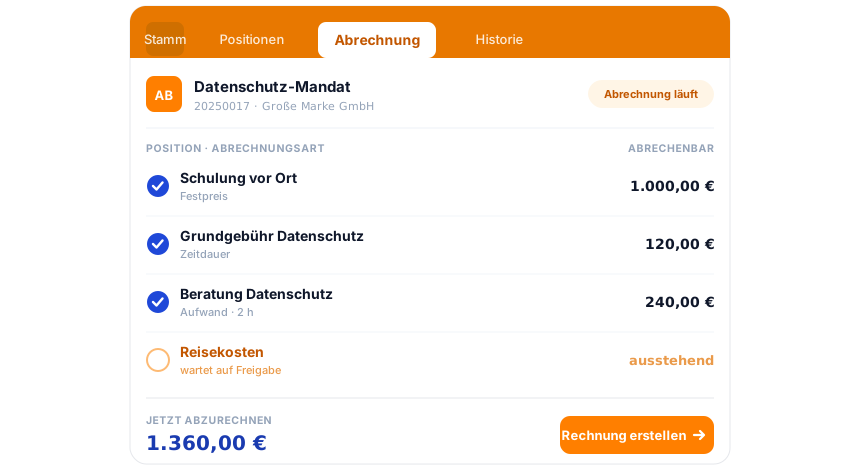
teamspace invoicing software: an order on the Billing tab, three line items billable with a blue tick, the Travel expenses line item waiting for approval, and below it the amount due to bill now and the Create invoice action.

Part of the invoicing software

From quote to posting, one system.

Hours and line items become the order, the order becomes the invoice, the invoice becomes the posting record. The DATEV handover is the last step in a chain that runs in the same system, from quote to receivables. The invoicing software overview shows how it all fits together.

See the invoicing software

What this is about

Posting data reaches the accountant with no detour.

A DATEV interface hands posting data straight to DATEV, the central platform used by accountants across the German-speaking world, without anyone preparing files. Anyone who runs time tracking, invoicing and receipts in their own software needs a DATEV connection that reaches the bookkeepers without a break in the media.

teamspace takes this route over the DATEV-certified interface to DATEV Unternehmen online. The feature is activated through the DATEV shop and set up in the configuration with the adviser and client number. A posting batch gathers the invoices, credit notes, incoming invoices and travel expenses of a period for exactly one client; receipts from different financial years or from different clients stay apart. Before the first transfer, a test run checks that accounts, tax codes and customer accounts are correct.

The data is processed exclusively within the EU, in an ISO 27001-certified data centre in Frankfurt am Main, GDPR-compliant with a data processing agreement as standard. The contracting party is 5 POINT AG, which has been developing teamspace in Darmstadt since 1999. Hours are captured in time tracking, billed in the invoicing software and prepared for payroll in payroll preparation.

Introductory call

DATEV integration reviewed in 15 minutes.

We look at your bookkeeping software, your clients and the actual receipts, and show what runs through the certified interface.

Common questions about the DATEV integration

Which DATEV interface does teamspace use?
A DATEV-certified interface to DATEV Unternehmen online (DUO), in the enterprise edition. Through it, posting records and receipts of the financial accounting go straight into the DATEV cloud as a cloud API, with no CSV export. The feature is activated through the DATEV shop and set up with the adviser and client number.
What goes to DATEV over the interface?
From invoicing, the receipt types invoice, correction invoice, cancellation and incoming invoice, plus the travel expenses from the cost module. Master data and posting data always go with them, and receipt images as PDF are optional. Everything gathers per client in one posting batch for a period.
Are travel expenses handed over to DATEV as well?
Yes. Travel expenses and staff expense claims go into the posting batch like invoice line items. This requires the cost types to have a standard account and a contra account, and staff to carry a supplier account number. The receipt image and receipt number come from the expense claim.
How does the split by client work?
A dedicated posting batch is created per DATEV client. Receipts from different financial years or from different clients must not sit in one batch. The client that applies is set by the department of the ordering party for outgoing invoices, or of the contractor for incoming invoices.
Is payroll data handed over through DATEV too?
No. Payroll runs through the payroll office or the accountant, not through the certified DUO interface. There is no LODAS or DATEV payroll interface. teamspace prepares the payroll data from attendance, overtime, allowances and absences and hands it over as a data export. More on payroll preparation.
Does it also work without DATEV Unternehmen online?
Yes. Anyone who does not use DATEV Unternehmen online can use the classic DATEV export: a file in DATEV format that your accountant reads in. The certified cloud interface is the direct way with no file, and the classic export is the alternative.
Does it work with Lexware and Sage too?
Lexware and Sage are supported through standard exports, as a file in the respective format. There is no product-specific interface for them like the one to DATEV Unternehmen online. Other systems take the data over the REST API of the enterprise edition.
What happens when there is an error in a transferred invoice?
The invoice is cancelled in full, and teamspace creates an invoice correction as a receipt in its own right with a reference to the original. Both stay in the history. There are no partial cancellations; instead there is the correction as a receipt type of its own.
Is the handover audit-proof?
With GoBD mode switched on, invoices, cancellations and approved receipts can no longer be deleted, and retention stays audit-proof for ten years. Only 5 POINT enables this mode, at the customer's request. We do not give a blanket assurance of GoBD compliance, since GoBD also concerns organisational processes at the customer's end.