teamspace

Payroll preparation for service businesses that collects all payroll data in one place.

Hours, surcharges, absences, commissions and payouts arise spread across the month in teamspace. At the close they are ready, checked and released, as one data set for the payroll office. The actual payroll run is handled by the tax advisor or the payroll system; teamspace prepares the data for it.

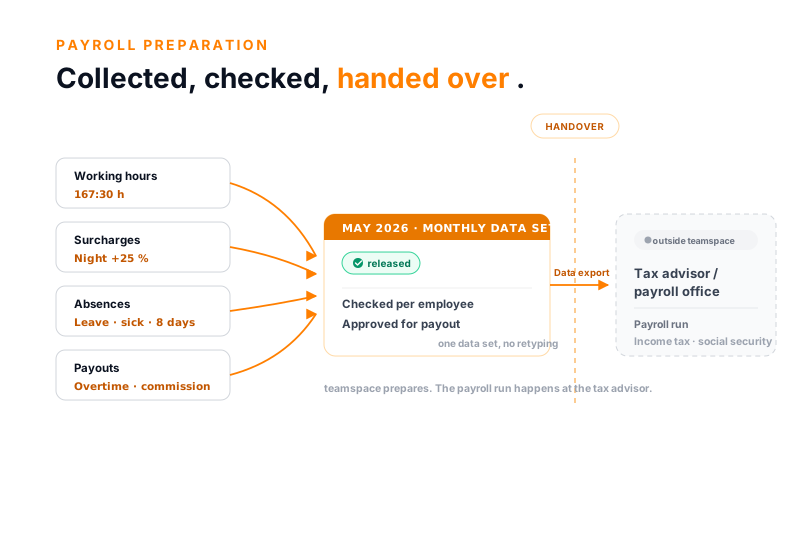
teamspace payroll preparation: on the left four cards with working hours, surcharges, absences and payouts that flow together into a released monthly data set for May 2026, on the right behind a handover boundary the card tax advisor and payroll office

The data for the payroll office already sits in teamspace.

For payroll preparation, teamspace provides the data the tax advisor needs for payroll: fixed and variable salary, overtime payouts, commissions and more. It arises day to day in the digital employee record and time tracking and is ready, checked, at month-end, instead of being gathered from lists on the cut-off date.

  • Master and contract data central per employee
  • Fixed and variable salary, bonuses and commissions
  • Internal and external hourly rates, time-versioned
  • Leave, sickness and overtime from the record

Month-end close

Do you still gather the payroll data by hand?

Month-end from many sources

  • Hours lists come from Excel, surcharges are recalculated by hand.
  • Leave and sickness go to the payroll office by mail.
  • Overtime and commissions are added up separately by someone.
  • On the cut-off date half of it is missing, the rest does not match.
Recommended

teamspace

  • Hours, surcharges and absences come from the running record.
  • Commissions are calculated per invoice automatically.
  • Overtime payouts and flat rates gather in the employee billing.
  • One checked, released data set goes to the payroll office.

How payroll preparation runs

Collect and release, the run happens elsewhere.

teamspace brings a month's payroll-relevant data together, checks it and releases it. What is released goes as an export to the tax advisor. The payroll run itself happens there, not in teamspace.

in teamspace

Working hours

167:30 h

Surcharges

night +25 %

Absences

8 days

Payouts

overtime · commission

May 2026 · monthly data set released
Checked per employee
Approved for payout

one data set, no retyping

handover · data export
outside teamspace

Tax advisor / payroll office

Payroll run
Income tax filing
Social security

teamspace runs no payroll of its own.

teamspace collects, checks and releases. The payroll run itself happens at the tax advisor.

Scope

What payroll preparation has to deliver.

Three things so that the month-end close does not become a gathering operation across three mailboxes and four spreadsheets.

Data from the running record

Hours, surcharges and absences arise while working, not at month-end. Whoever records the time already has the payroll data.

Variable pay in one place

Overtime payout, commission and per-diem gather per employee in the employee billing.

Hand over instead of running it yourself

One checked data set goes as an export to the payroll office. Income tax and social-security contributions stay with the tax advisor.

Employee billing

Variable pay gathers in one place.

Besides the fixed salary, variable amounts arise every month. Otherwise they spread across travel-expense receipts, overtime accounts and commission arrangements. teamspace brings them together per employee in the employee billing.

  • Overtime payouts from the overtime account, with your own rates.
  • Commissions and bonuses, calculated per invoice and proposed.
  • Per-diems from the stored country rates and employee-related receipts.

The line items run the same path: check, approve, release for payout. Only then do they go into the data set for the payroll office. The employee billing is part of HR+ in the office edition.

Commission and bonus

The system calculates commission per invoice.

Whoever shares revenue with staff otherwise recalculates the commission individually at month-end. In teamspace the rule is stored once per employee, after which the system calculates along.

  • Fixed amount per invoice or percentage share of the gross profit, depending on the arrangement.
  • Automatic per invoice: every matching invoice raises the commission amount, without recalculating.
  • Proposal for payout in the employee billing, checkable before release.

Overtime can be paid out the same way, monthly or on the employee's request. Whether it is paid out or taken as time off is decided by the overtime account.

“We mostly work with the budget column.”

brandwerk keeps variable pay and payouts in one place, instead of gathering them from several lists at the month-end close.
brandwerk consulting group

What comes together

One monthly run instead of many lists.

The payroll-relevant data arises over the month at various places. At the close it is ready as one checked state, not as a stack of individual sources.

Monthly run

instead of collecting hours, surcharges and absences separately

5

Data types

hours, surcharges, absences, payouts, commissions

released

Data set

checked and locked before it goes to the payroll office

HR+

Employee billing

payouts and commissions from the office edition

Contract data

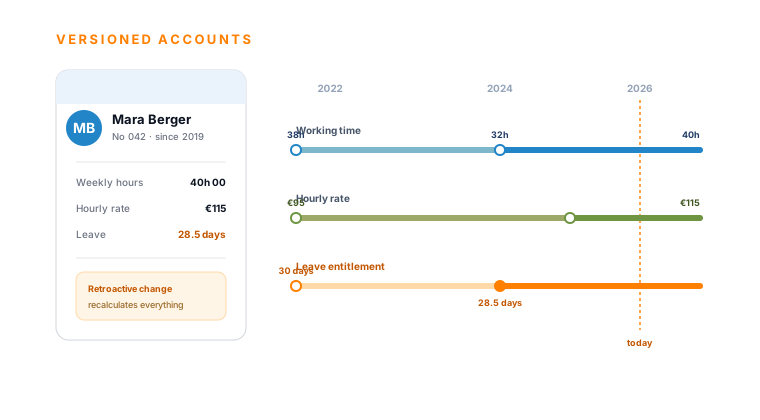
A retroactive change recalculates everything.

Pay components and hourly rates are not fixed values but the result of periods. In teamspace they live on a timeline, with validity from a date.

  • Base salary, bonuses and surcharges per employee, time-versioned.
  • Retroactive change: a pay rise from March recalculates the affected months, without correcting by hand.
  • Internal hourly rate historically correct, even if it is a different one today.

So it stays traceable which value applied in which month. That is the basis on which the payroll data is right before it leaves the house.

First call

Let's walk through your month-end close once.

In 30 minutes we discuss your surcharges, payouts and the handover to the payroll office on an example month. At the end you see which data teamspace collects and how it is released.

Cut-off

What goes to the payroll office is fixed.

Payroll data must not shift unnoticed after the handover. Before the export, teamspace closes the month, instead of trusting a spreadsheet everyone can still change.

  • Write-once locking on the cut-off, weekly or monthly; after that the period is locked.
  • After the cut-off only finance administration changes anything, no one else.
  • Every correction logged, with editor, timestamp and the old and new value.

So a closed state leaves the house. If someone asks later, it is visible who changed what and when, instead of a spreadsheet without a history.

Handover

What goes to payroll and what does not.

This clarification belongs in the conversation early, because it avoids misunderstandings. teamspace prepares the payroll data and hands it over, but runs no payroll itself.

  • Payroll data as a data export: hours, surcharges, absences and payouts go to the payroll office or the tax advisor, reusable in a standard format.
  • No own payroll run: income-tax filing and social-security contributions run in the external payroll system, not in teamspace. A DATEV payroll interface like LODAS does not exist.
  • Financial accounting separate: the certified interface to DATEV Unternehmen online carries invoices and receipts, not payroll.

Two separate routes, then: the payroll data to the payroll office, the financial accounting to DATEV. Both prepared from one system, each run where it belongs.

Scope

Functions around payroll preparation.

What comes together

  • Attendance and hours from the record
  • Overtime from the plan-actual comparison
  • Surcharges as a percentage per time block via attendance categories
  • Absences: leave, sickness, training
  • Commissions and bonuses per invoice
  • Per-diems from country templates

Check and hand over

  • Employee billing for payouts and flat rates (HR+, office)
  • Write-once locking weekly or monthly
  • Corrections with editor and timestamp
  • Data export to the accounting or payroll system
  • Financial accounting separately to DATEV Unternehmen online

Use cases

Where the payroll data on the employee comes from.

Payroll preparation accesses the same data as the rest of the HR function. Six functions whose data the handover to the payroll office hangs on.

Working time

Attendance, surcharges and the hours account, the basis for the payroll data.

Learn more

Track overtime

Three calculation rules, payout with your own rates or time off in lieu.

Learn more

Leave management

Requests, remaining leave and absences that go along into the payroll run.

Learn more

Sickness management

Sick report with certificate, certified days fill the time account.

Learn more

Digital employee record

Contract data, hourly rates and pay components time-versioned.

Learn more

Capacity planning

Contract times and skills from HR feed into resource planning.

Learn more
teamspace HR software: an employee's record with time-versioned contract data, hourly rate and leave entitlement on a timeline

Part of the HR software

Payroll preparation is a function of the HR software.

Employee record, working time, leave, sickness and overtime sit in the same system as payroll preparation. From the recorded time come the hours, from the overtime account the payouts, from the contract data the versioned rate. At month-end they are ready as one data set. How the whole module connects is shown on the overview page.

To the HR software

What payroll preparation is

Payroll preparation collects the data, the run happens externally.

Payroll preparation is the assembly of all payroll-relevant data of a month before payroll runs. It includes working hours, surcharges, absences, overtime payouts, commissions and per-diems. teamspace collects this data where it arises, checks it and releases it. From the released state comes a data set that can be reused in the accounting or payroll system.

The actual run, that is income-tax filing and social-security contributions, stays with the tax advisor or in the external payroll system. That is the honest boundary: teamspace prepares, the run happens elsewhere. The personnel data sits in two geo-redundant, ISO 27001 certified data centres in Frankfurt am Main, exclusively within the EU and GDPR compliant with a data processing agreement. We have developed teamspace since 1999 in Darmstadt, without outside capital. The contracting party is 5 POINT AG, a German public company under German law.

What payroll preparation delivers

Payroll preparation is the bridge between time tracking, HR and payroll. Whoever records attendance in one tool, calculates overtime by hand, maintains surcharges in Excel and sends absences to accounting by mail spends a day or two at month-end gathering it together. teamspace lets this data arise where the work happens and brings it together in one run at the close.

From hours, accounts and receipts comes a data set

From a month’s released data comes:

  • Attendance and working hours from the record.
  • Overtime from the plan-actual comparison, optionally for payout.
  • Surcharges as a percentage per time block via the attendance category.
  • Absences such as leave, sickness and training.
  • Commissions and per-diems from the employee billing.

All values are ready, checked and released, as one data set for the payroll office, in a standard format for reuse.

Hand over, do not run it yourself

teamspace hands the prepared payroll data over as a data export to the payroll office or the tax advisor. The actual payroll run happens there: income-tax filing and social-security contributions belong in the external payroll system, not in teamspace. A DATEV payroll interface like LODAS does not exist. Separate from that, the DATEV-certified interface to DATEV Unternehmen online carries the financial accounting, that is invoices and receipts.

Provable up to the handover

Recorded times can be written once weekly or monthly; afterwards the periods are locked, and only finance administration still changes anything. Every correction carries editor and timestamp with the old and new value. If a contract value changes retroactively, teamspace recalculates the affected months. So a traceable state goes into payroll preparation.

Does this fit your requirements?

Wondering whether teamspace can take over payroll preparation in your organisation? In the call we walk through your surcharges, your payouts and the handover to the payroll office on an example month.

Frequently asked questions about payroll preparation

Does teamspace run payroll?
No. teamspace prepares the data for payroll and hands it over as an export. Income-tax filing, social-security contributions and the actual run happen with the tax advisor or in the external payroll system. A DATEV payroll interface like LODAS does not exist.
Which data goes to the payroll office?
Working hours, surcharges, absences such as leave and sickness, overtime payouts, commissions and per-diems. They come together per employee and are ready after release as a data export, in a standard format for reuse in the accounting or payroll system.
What runs over the DATEV interface?
The DATEV-certified interface to DATEV Unternehmen online transfers the financial accounting: invoices, receipts and postings. Payroll data does not go over this interface. Payroll and financial accounting are two separate routes.
How are surcharges calculated?
Night, weekend and holiday surcharges are recorded as a percentage per time block via the attendance category, freely configurable. teamspace records the surcharge in the payroll data; the final payroll calculation happens in the external payroll system. We clarify specific collective-agreement situations in the first call.
How are commissions modelled?
A rule can be stored per employee: a fixed amount per invoice or a percentage share of the gross profit. Once set up, the system calculates the commission per invoice automatically and proposes it for payout in the employee billing.
What happens with corrections after the month-end close?
Contract data lives on a timeline: a retroactive change recalculates the affected months. Recorded times are written once on the cut-off and locked afterwards; every correction carries editor and timestamp, after which only finance administration changes anything.
In which edition is the employee billing included?
The employee billing with per-diems, commissions and overtime payouts is part of HR+ in the office edition. The basic functions of time and absence recording are in the light edition.

Show us your month-end close.

We walk through your surcharges, payouts and the handover to the payroll office on an example month. A short call shows whether teamspace fits your payroll preparation.