
Clock in where the work happens
- Browser, installable web app or tablet terminal.
- Work location via categories: office, home office, on the road.
- Breaks automatic per the stored rule.
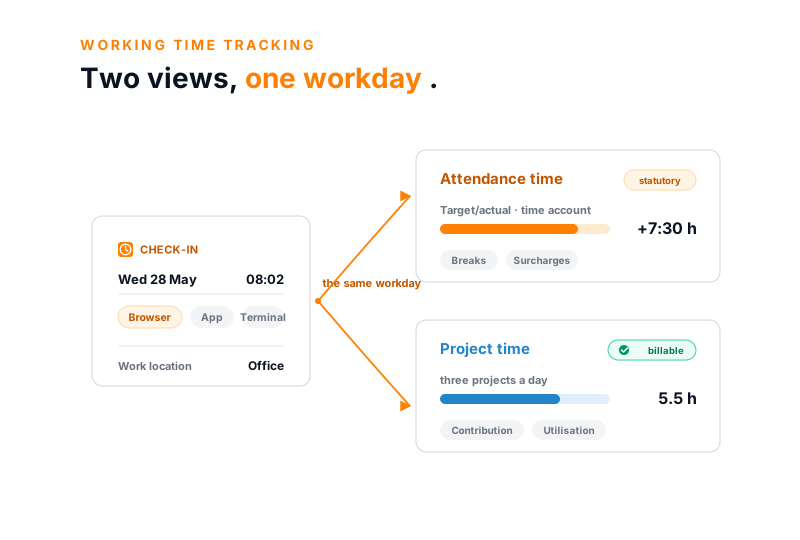
Attendance time and project time are two independent views of the workday in teamspace. One meets the recording duty and is the basis for surcharges, the other makes work billable. Staff clock in via browser, in the installable web app or at the tablet terminal. Breaks, surcharges, overtime and the time account are calculated by the system.
Overview
Working time can be recorded in teamspace in two ways, independent of one another. The attendance time records when someone was there: start, end, breaks, work location. It is the basis for the statutory record and the only basis on which night, Sunday and holiday surcharges arise. The project time records what was worked on and whether the hour is billable. From it come project profitability, customer invoicing and the activity record.
The two need not match. Whoever is clocked in for four hours can book them across three projects. Some companies run only project times, others need attendance for the surcharges. In HR you set which of the two times feeds overtime and flexitime. Whoever uses both gets the most out of it, and that is exactly what we recommend.
Starting point
Since the German Federal Labour Court ruling of 2022, recording working time is mandatory. teamspace brings it into a record that runs along in everyday work.
What it delivers
Three things a working-time record in a mid-sized business must do, so that the recording duty does not become a second administrative task.
Two time types
Attendance time meets the recording duty and is the basis for surcharges, project time makes work billable. Both run independently and need not match. Whoever needs surcharges uses attendance; whoever bills uses project time. Most effective is both together, and that is what we recommend.
the same workday
Wed 28 May · two views
Where attendance and booked project time drift apart, the time matrix flags it.
Recording day to day
Recording has to work in daily business, otherwise first the clock-ins fail, then the record. teamspace lets everyone clock in where they work.
The work location is recorded via categories, for example office, home office or external work. If needed, categories can be restricted to certain IP ranges or to office hours. There is no GPS tracking, the location is a category, not a tracker.
Evaluation
Working time is not all the same. Depending on the time of day, weekday and model, surcharges arise or other rules apply. teamspace evaluates this from the recorded attendance times, instead of recalculating it by hand at month-end.
Collective special rules and company agreements are modelled via the categories. This produces correct hours accounts without anyone maintaining an Excel formula at month-end.
From clocking in to payroll preparation
Start, break, end, in the browser, in the app or at the terminal. The work location comes along as a category.
Breaks are accounted for per rule, surcharges evaluated via the attendance category, overtime goes into the time account.
Managers see the aggregated weekly view and approve. Every correction carries editor and timestamp.
Staff see their time account, overtime and remaining leave. Leadership sees sick-leave rate, home-office share and utilisation at the push of a button.
Approved hours, surcharges and absences are ready as a data export for payroll preparation.
“Time tracking is far simpler and more convenient than in Excel.”

Accounts
Staff and managers need clarity about hours, not only in a dispute. teamspace keeps the accounts running continuously, with a traffic light for the state.
Sickness, leave and public holidays fill the account up to the daily target, so no minus arises where no one is absent. The remaining leave is calculated by the system including previous-year carry-over and expiry.
First call
In 30 minutes we walk through your attendance categories, your surcharges and the handover to the payroll office on an example employee. At the end you see where a clock-in becomes statutory data and billable hours at once.
Evidence
Corrections are part of everyday work, typos and late clock-ins cannot be avoided. teamspace documents every change, instead of overwriting it silently.
Written-once periods are locked, after which only finance administration changes them. So it stays provable when work was done. Start, end, breaks and corrections are recorded with editor and timestamp; that supports a record in the spirit of the ECJ ruling C-55/18 and the German Federal Labour Court ruling 1 ABR 22/21.
Made in Germany
Working-time data is personnel data. teamspace stores it in two geo-redundant, ISO 27001 certified data centres in Frankfurt am Main, exclusively within the EU, GDPR compliant with a data processing agreement. We have developed teamspace since 1999 in Darmstadt, without outside capital. The contracting party is 5 POINT AG, a German public company under German law.
Start, end, breaks and corrections are recorded objectively and with a timestamp. That supports a working-time record in the spirit of the German Federal Labour Court ruling and the ECJ ruling. We do not claim blanket conformity with working-time law; that depends on how a company uses the record. That is exactly what we look at on your model in the first call.
Handover
Working time tracking does not stand alone. Once the hours are approved, they are ready for the next step, without retyping.
teamspace runs no payroll itself, there is no income-tax filing and no social-security contributions. The data sits prepared for the payroll office or the tax advisor. Recorded once, available in every view.
Part of the HR software
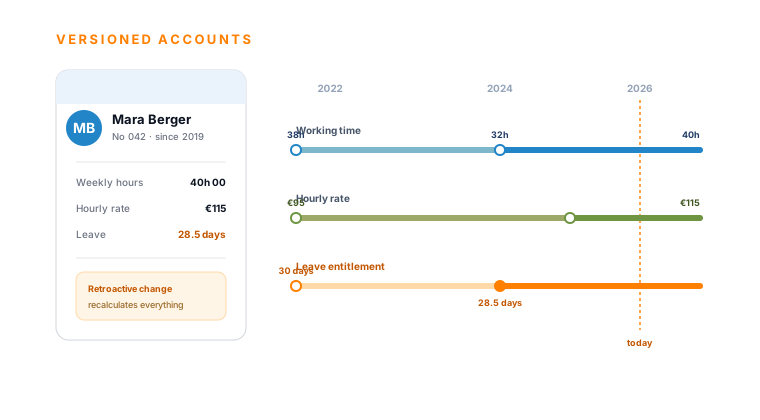
Employee record, leave, sickness, overtime and payroll preparation sit in the same system as working time. The clock-in feeds the time account, the versioned hourly rate the project costs, the approved hours the payroll preparation. How the whole module connects is shown on the overview page.
To the HR softwareUse cases
Six functions of the same system, each with its own view of the employee, all without double entry.
Master data, contracts, documents and reviews in one composed record.
Learn moreSubmit and approve requests, keep remaining leave and deputy in view.
Learn moreSick report with certificate, certified days fill the time account.
Learn moreThree calculation rules, thresholds per month or year, three ways to reduce it.
Learn moreHours, surcharges and absences as a data export for the payroll office.
Learn moreContract times and skills from HR feed into resource planning.
Learn moreScope
What it is about
Working time tracking is the recording of the start, end and duration of daily working time. Since the German Federal Labour Court ruling 1 ABR 22/21 of 2022, which the ECJ ruling C-55/18 of 2019 preceded, it is mandatory for German employers. It protects staff, safeguards rest periods and provides the basis for surcharges, overtime and payroll.
It relates to working-time law, the ECJ case law and time management. Beyond plain attendance, breaks, night, Sunday and holiday work, rest periods as well as home office and mobile work play a role. This view answers the question of when, where and how long work was done.
The second job is economic. The project time records what the hour was used for and whether it is billable. It is not legally required, but for service businesses it is the data core of fees, utilisation and margin. Both views run independently in teamspace: some companies run only project times, whoever wants to give surcharges needs attendance. They need not match, and most effectively they work together.
A working time tracking software takes on both jobs: it records staff working time in a tamper-proof way and at the same time makes it usable for surcharges, overtime accounts and billing. teamspace is built as such software for mid-sized businesses, not as a plain time clock.
Fit
Related modules
Anyone who records working time almost always touches time on the project, capacity and the invoice too. Here are the shortest routes there.
Attendance and project time on the same employee. From the entries, the hours account and the overtime account calculate.
Skills and contract times from HR flow into capacity planning. The versioned hourly rate calculates the internal cost in every phase.
From approved project times comes the fee invoice, with the hourly rate valid on the booking day from the HR timeline.
We talk through your attendance categories, surcharges and the handover to the payroll office. A short call shows whether teamspace fits your way of working.