teamspace

Leave management online, with an account and a binding deputy.

Staff request leave in the browser, managers approve it with one click. Remaining leave, previous-year carry-over and expiry are calculated by the account itself, the deputy is fixed per request.

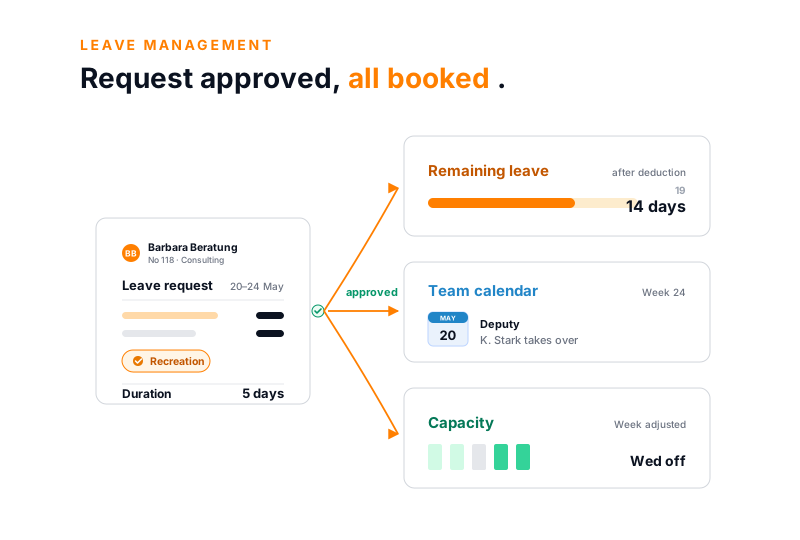
teamspace leave management: from an approved leave request over five days come the new remaining leave of 14 days, the deputy entry in the team calendar and the adjusted capacity planning

Overview

Plan leave without daily coordination by mail.

Managing leave costs time as long as requests come by mail and the remaining leave sits in an Excel list. Request, approval and absence belong in one place, where staff, managers and HR see the same thing.

In teamspace, staff submit their request themselves, managers approve it with one click, and approved absences are immediately in the team calendar and in planning. One place for request, approval and account, instead of four side by side.

The comparison

Leave by mail and Excel, or in the system?

Mailbox and Excel list

  • Requests come by mail, the approval gets lost in the inbox
  • Someone maintains the remaining leave by hand in a spreadsheet
  • Who covers for whom is only clarified once someone is already away
  • Two from one department are away at the same time, noticed too late
Recommended

Leave management in teamspace

  • Request in the browser, approval with a click, all in one place
  • Remaining leave, carry-over and expiry are calculated by the account itself
  • The deputy is fixed per request, already before departure
  • A minimum staffing per department warns before too few are present

My leave

Submit a request, approve with one click.

Staff choose the period, the system deducts weekends and public holidays and shows the remaining leave straight away. The manager approves with a green tick or rejects with a red cross.

My leave Approval Leave account
Barbara Beratung · week 24 For review
May 2026 < 5 / 2026 >
MonTueWedThuFriSatSun
27282930123
45678910
11121314151617
18192021222324
25262728293031
20–24 May · 5 working days
Leave type Recreation leave

Remaining leave after deduction

Weekend and holidays deducted

19 14 days
Deputy KS K. Stark
Reviewer: V. Vorstand Approve
One click, and the entry is in the team calendar.

Leave account

The leave account calculates by itself.

Every employee has a leave account in the employee record. The annual entitlement is in the contract, for example 30 days. What has been taken, carried over or expired is settled by the account continuously.

  • Previous-year carry-over with its own expiry date, in many companies 31 March. Remainders expire automatically on this date.
  • Pro rata on joining and leaving: whoever starts in May gets the entitlement calculated to the day, not the full year.
  • Special leave sits in its own allowance alongside the recreation entitlement, with its own logic.

Staff see their remaining leave at any time in their own login. If a remainder is about to expire, the system warns in time: the note already appears with the next request.

Why digital

What digital leave management delivers.

Less effort for HR

  • Requests, approvals and accounts in one place instead of in mail and spreadsheet
  • The remaining leave calculates itself, no one maintains a list
  • Cancellation request and correction run the same path as the request

Plannability for teams

  • The manager sees on approval who from the team is already away
  • Minimum staffing per department: the system warns at the request, before too few are present
  • Capacity planning routes around approved absences automatically

Transparency for staff

  • Remaining leave and request status at any time in their own login
  • Approval or rejection comes as a notification
  • The same rules for everyone, traceable instead of by word of mouth

“Our staff appreciate how simple the system is.”

At WAHLER HR, staff request their leave in self-service, without anyone having to explain how to use it.
WAHLER HR

Deputy

The deputy is fixed before anyone leaves.

For each leave request a deputy is named. So before departure it is clear who takes over the daily business, not only when the first query comes in.

  • Deputy rules go further: if an approver is on leave themselves, their deputy takes over the approving, with the rights only for that time.
  • Who approves is governed by the user group or the registered manager, not a fixed name in the system.
  • In the team calendar and in capacity planning the absence appears as soon as it is approved.

Approved leave can be taken back via a cancellation request, the same path back. If someone falls ill during their leave, the system writes the days back when the leave type provides for it.

Absence types

The system knows every absence type.

Special leave, overtime reduction or vocational school run the same request and approval path as recreation leave.

Recreation

The classic request.

Full or half days, with remaining leave visible straight away when choosing the date.

  • Full and half leave days
  • Remaining leave visible when choosing the date
  • Weekends and public holidays deducted automatically

Overtime

Time off from the overtime account.

Reducing extra work is its own leave type, with a deduction directly from the account.

  • Request 'reduce overtime' directly in the system
  • Approved reduction comes off the overtime account
  • Overtime and leave days can be converted

Other

Training, vocational school, special leave.

Create any absence types, approve them uniformly and show them in the calendar.

  • Special leave with its own allowance
  • Own categories for training or vocational school
  • All types uniformly in the team calendar

Holidays and part time

The system calculates weekends, holidays and half days.

A leave day is not worth the same everywhere. Whoever works shorter on Fridays loses less working time on a free Friday than on a Thursday. teamspace accounts for this, instead of deducting a full day across the board.

  • Public-holiday calendar per region: Hesse, Bavaria or your own, importable as a template and assigned per employee. If colleagues sit in different regions, the same period counts differently accordingly.
  • Weekends and public holidays are deducted by the system automatically, they cost no leave day.
  • Half working days for part time: a short day costs half a leave day, the entitlement stays fairly calculated.

The system also models half public holidays. If a half holiday coincides with a half leave day, the day stays free, without anyone recalculating.

First call

Does this fit your leave rules?

In 30 minutes we walk through your contract models, expiry rules and the deputy logic. At the end you see whether teamspace fits your HR work.

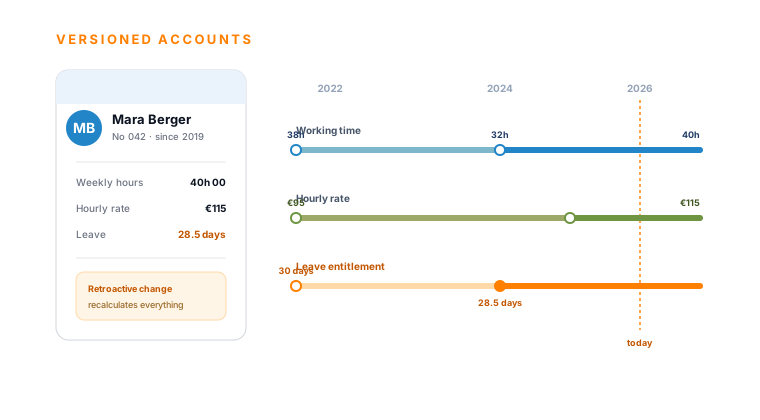
teamspace HR software, employee timeline: versioned tracks for working time, hourly rate and leave entitlement on one employee, with year markers and a today line

Part of the HR software

Leave management is a part of the HR software.

Leave, overtime, sickness and contract data live on the same employee. One upkeep, and the time account, employee record and payroll preparation calculate along. How the whole module connects is shown in the HR software overview.

To the HR software

Payroll preparation

Approved days are ready for payroll.

Approved leave and absence days are ready at month-end for payroll preparation. Employee and working-time data can be exported and reused in the payroll system.

  • Leave, sickness and overtime reduction sit on the employee, cleanly separated by type.
  • Export instead of retyping: the data goes prepared to the payroll office, not via a hand-maintained list.
  • The payroll run itself happens in the external payroll system or with the tax advisor. teamspace does not run it and has no own payroll interface like LODAS.

That boundary belongs openly in the selection meeting: teamspace prepares the payroll data, the run stays where it already runs today.

Use cases

The employee record and its accounts.

Six further areas of the HR software, each hung on the same employee.

Digital employee record

Master data, contracts and documents in one place, protected per group.

Learn more

Working time

Attendance and project time per employee, with breaks and day limit.

Learn more

Sickness management

Sick report with certificate, absences separated from sick days.

Learn more

Track overtime

Three calculation rules, account with thresholds, payout or time off in lieu.

Learn more

Payroll preparation

Export employee and time data, the run happens externally.

Learn more

Travel expenses

Per-diems by duration and country, receipts included.

Learn more

What leave management is

What makes up leave management.

A leave management is the digital administration of leave requests, absences and leave accounts in one place. Staff request freely, managers approve, and the account carries forward entitlement, carry-over and expiry automatically. For service businesses with several departments it is the point where plannability and HR effort come together.

In teamspace, leave management is not a separate island tool but part of the HR software. The leave entitlement sits on the contract timeline, the absence appears in the team calendar, overtime reduction comes off the overtime account, approved days are ready for payroll preparation. Whoever maintains it once changes the reality for all downstream steps.

The practical gain lies less in the individual request than in the shared data basis. No one maintains a second list, no one asks about the current remaining leave, and no absence is missing in planning because it sat only in a mailbox.

Frequently asked questions about leave management

How is the remaining leave calculated?
Every employee has a contract model with an annual entitlement, for example 30 days. On joining or leaving, the system calculates pro rata. Remaining leave from the previous year is carried over and expires automatically on the set date, often 31 March. Special leave sits in its own allowance.
Who may approve leave?
The user group or the registered manager governs this, not a fixed name. If an approver is on leave themselves, via the deputy rule their deputy takes over the approving, with the rights only for that time.
How does the deputy work?
For each request a deputy is named, so that before departure it is clear who takes over. Approved absences appear in the team calendar and in capacity planning, so that planning considers them by itself.
Does the system warn when too many want time off at once?
Yes. A minimum staffing can be stored for a department. If someone requests leave that would fall below it, the system points it out at the request, and the manager sees it before approval. So no team accidentally leaves itself empty. The type of leave, for example annual leave, special leave or overtime reduction, is taken into account.
Are weekends and public holidays deducted?
Yes. Weekends and public holidays are deducted by the system automatically. The public-holiday calendar can be kept per region, for example Hesse or Bavaria, and assigned per employee. For part time, half working days map the correct value of a leave day.
Can overtime be converted into leave?
Yes. Reducing overtime is its own leave type; approved reduction comes off the overtime account. Overtime and leave days can be converted into one another on request.
Does the leave go into payroll?
Approved leave and absence days are ready for payroll preparation and can be exported. The actual payroll run happens in the external payroll system or with the tax advisor; there is no own DATEV payroll interface like LODAS.

We look at your leave rules together.

Contract models, expiry dates and deputy logic: in a short call we clarify what of it can be mapped in teamspace.