teamspace

Digital employee record: all personnel data in one place.

An employee's contract, salary, references, training and review notes come together in teamspace in one record, time-versioned and protected on a need-to-know basis. It is part of the HR software and forms from the data you maintain anyway, instead of sitting in a paper folder and on a network drive alongside.

Why an employee record

Three wins of the digital employee record.

The benefit shows less in setting it up than in the daily lookup and when responsibilities change hands.

Everything in one place

  • Contract, salary, documents and accounts per employee
  • Master data maintained once, visible in the CRM too
  • No more searching, because everything hangs on the employee

Always the current state

  • Contract data and hourly rate on one timeline
  • A retroactive change recalculates dependent values
  • Earlier states stay traceable

Confidential on a need-to-know basis

  • Access via user groups, sensitive fields protected
  • Staff see their own record
  • Processing exclusively in the EU

The record

A record made of tabs, not a second system.

The employee record is not a separate module but the employee detail view: master data, contract, salary, reviews, training and documents sit as tabs on one person. What is maintained in the HR module comes together here.

Master data HR Profile Files Permissions
Pia Personal · HR officer Joined 04/2021
Master data
Pia Personal · pia@… from CRM
Hourly rates & salaries
€95/h · base + bonus protected
Contract data & working time
38 h/week · 30 leave days
Employee reviews
4 documented
Training
3 certificates on file
Documents
6 files protected
Employee detail view one record made of tabs, no separate record module

Permissions

You decide exactly who sees what.

Personnel data is among the most sensitive records in the house. teamspace controls access finely, instead of opening one record for everyone.

  • Access via user groups: HR sees its area, managers see their staff, leadership sees the whole. Who may do what hangs on the group, not on word of mouth.
  • Protected fields and directories: individual areas such as salary can be restricted via protection classes, and so can files and folders on the employee.
  • Their own self view: staff see their own record and can request a full export under the right of access (Art. 15 GDPR).

That keeps the record central and still confidential, without anyone holding files out of the system just to be safe.

“Our staff appreciate how simple the system is.”
At WAHLER HR, personnel administration sits in one system that staff operate without training.
WAHLER HR

History

Every change recalculates retroactively.

Contract data changes: the weekly working time, the leave entitlement, the internal hourly rate. In teamspace these values sit on a timeline, every entry applies to a period.

  • Valid from a date: you create a new hourly rate from the effective date, the old one stays in place for the time before.
  • Retroactive without a break: change a past period and the system recalculates the affected projects with the correct rate.
  • Gapless: the last element stays open, the system lets no gaps arise on the timeline.

Retention follows legal duty: payroll accounts and income-tax records for six years, social-security records partly much longer. Earlier document states are preserved via file management.

First call

Let's look at your personnel processes.

In 20 minutes we walk through where your personnel data sits today and what of it would come together in one record in teamspace.

Book a call

Documents

Contracts and references sit on the employee.

Over time many documents gather on one person: application, CV, employment contract, references, review notes, certificates. In teamspace they sit on the employee, not on a network drive alongside.

  • Own storage trees per employee, for example separated into contracts, references and training.
  • Protected: directories and files can be protected so that only certain people have access.
  • Versioned: via file management every edit stays traceable, older states are not lost.

Office files can be edited directly in the browser, without download and without sending back and forth by mail.

People development

People development stays documented.

What forms on one person over the years, teamspace documents chronologically in the record, instead of scattering it across individual files.

Reviews

Employee reviews chronological

  • Planning and execution in one sequence
  • Files, assessments and notes included
  • The history stays readable over the years

Training

Training with certificate

  • Completed and planned training
  • Certificates kept as attachments
  • Record annual goals and attainment

Skills

Skill profile per employee

  • Technical, language and social skills with a rating
  • Visible who is suited for a task
  • Feeds into capacity planning

Payroll

A clean handover to payroll.

teamspace is not a payroll program and does not want to be one. It prepares the data; the payroll run itself happens with the tax advisor or in the payroll office.

  • Export for payroll preparation: employee and working-time data can be exported and reused in the payroll system.
  • No own payroll interface: certified is the handover to DATEV Unternehmen online for financial accounting, that is receipts and invoices, not payroll.
  • Data without double entry: because contract, hourly rate and overtime already sit in the record, retyping lists for payroll preparation falls away.

How far the preparation reaches in a given case depends on your payroll system. We clarify that concretely in the first call, instead of promising a blanket interface.

Scope

Functions of the digital employee record at a glance

Record and content

  • Employee detail view with tabs for master data, HR, profile and files
  • Master data maintained once, visible in the CRM contact too
  • Contract data, hourly rates and pay components time-versioned
  • Org chart per company with staff by department
  • Overtime and leave account on the employee

Development and profile

  • Employee reviews chronological with files and assessments
  • Training with attached certificates
  • Record annual goals and attainment
  • Skill profile for technical, language and social skills
  • Skill profile feeds into capacity planning

Security and compliance

  • Access on a need-to-know basis via user groups
  • Protection classes for sensitive fields such as salary
  • Protected directories and files on the employee
  • Self view for staff, export under Art. 15 GDPR
  • Hosting in the ISO 27001 certified data centre in Frankfurt, processing in the EU

Interfaces and handovers

  • Export of employee and working-time data for payroll preparation
  • Handover to DATEV Unternehmen online for financial accounting
  • Document versioning via file management
  • Import of existing master data via Excel and the REST API

More from the HR software

More from the HR software.

The employee record is the collection point. These areas go deeper on individual questions around the employee.

Working time

Attendance and project time on the same employee, via browser, app or tablet.

Learn more

Leave management

Request, approval, deputy and leave account with carry-over and expiry.

Learn more

Sickness management

Sick reports with certificate, evaluated separately from absences.

Learn more

Track overtime

Overtime account with thresholds, expiry and three ways to reduce it.

Learn more

Payroll preparation

Export employee and working-time data and reuse it in the payroll system.

Learn more

Capacity planning

Skills and contract times from the record feed into resource planning.

Learn more

What a digital employee record is

The digital employee record gathers all of an employee's data in one central place.

A digital employee record is the central view of all the data that forms about an employee: master and contact data, employment contract and working time, hourly rate and pay components, leave and overtime account, reviews, training and documents. In classic setups these traces spread across a filing cabinet, several mailboxes and a network drive.

The difference at teamspace lies not in another database but in the bundling. The record forms as a composed view from the tabs of the employee detail view, without a separate record module. Much of it is time-versioned: contract data and the internal hourly rate sit on a timeline, so a retroactive change triggers all dependent calculations afresh.

The need becomes tangible as soon as several people handle personnel topics and no one keeps track by hand of which contract applies and which reference is already on file. Anyone who records attendance and project time in teamspace anyway keeps the personnel data in the same place where time tracking and capacity planning also run.
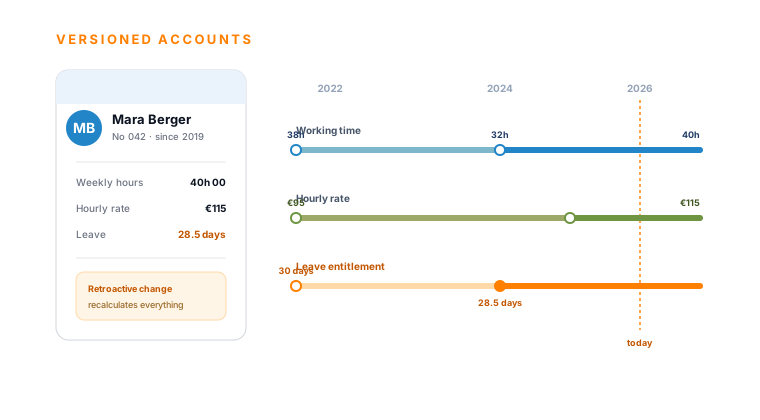
teamspace HR timeline: an employee record card and next to it a timeline with three versioned tracks for working time, hourly rate and leave entitlement over several years, with a today line and the note that a retroactive change recalculates everything.

Part of the HR software

The record is the view, the HR software the system behind it.

Contract data, accounts and thresholds sit on a timeline: every time-dependent fact on the employee applies to a period, a retroactive change recalculates everything dependent. How teamspace builds working time, leave, overtime and payroll preparation from this is shown in the HR software overview.

To the HR software

First call

Let's look at your employee record on an example.

You show us an employee with contract, salary, documents and accounts. We show how this data sits in one record in teamspace, and say honestly where it fits.

What comes together in the employee record

The digital employee record brings contract data, pay components, references, training records and review notes together centrally on one person. Instead of personnel documents being spread across HR drawers, mailboxes and network drives, they form as a composed view in the employee detail view, time-versioned and protected on a need-to-know basis.

Frequently asked questions about the digital employee record

Is the employee record a separate module?
No. The employee record forms as a composed view in the employee detail view: master data, contract and working time, hourly rates and salaries, reviews, training and documents sit as tabs on one person. So there is a complete record without having to maintain a separate record module.
Who has access to the employee record?
Access runs via user groups on a need-to-know basis: HR sees its area, managers their staff, leadership the whole. Sensitive fields such as salary can be restricted via protection classes, and individual directories and files too. Staff see their own record.
How does the versioning of contract data work?
Contract data, the internal hourly rate and the leave entitlement sit on a timeline, every entry applies to a period. A retroactive change, for example a higher hourly rate from an effective date, recalculates the affected projects automatically with the value valid on the booking day. Earlier states stay traceable.
Can staff view their record?
Yes. In the self view, staff see their own record and can request a full export under the right of access (Art. 15 GDPR).
Does teamspace hand the data over to payroll?
teamspace prepares payroll but does not replace it. Employee and working-time data can be exported for payroll preparation and reused in the payroll system. There is no own payroll interface: certified is the handover to DATEV Unternehmen online for financial accounting, that is receipts and invoices, not payroll. That happens with the tax advisor or in the payroll office.
How long is the data retained?
Per legal duty: payroll accounts and income-tax records for six years, social-security records partly much longer; the employment contract during the employment. The data sits centrally and access-controlled, so that retention and later deletion after the deadlines can be ordered.
Where is the personnel data, and who operates the system?
The employee record sits in an ISO 27001 certified data centre in Frankfurt am Main, processing takes place exclusively in the EU; the storage volumes are encrypted at the data-centre level. teamspace is developed, operated and supported by 5 POINT AG from Darmstadt, a self-financed German public company, since 1999. GDPR compliant with a data processing agreement.