teamspace

Automated invoicing turns CRM, project and time data into a finished bill on its own.

Typing invoices by hand in Word or Excel costs time and invites transposed figures. teamspace assembles them from the customer, project and time data already in the system, and issues them automatically in a billing run if you want.

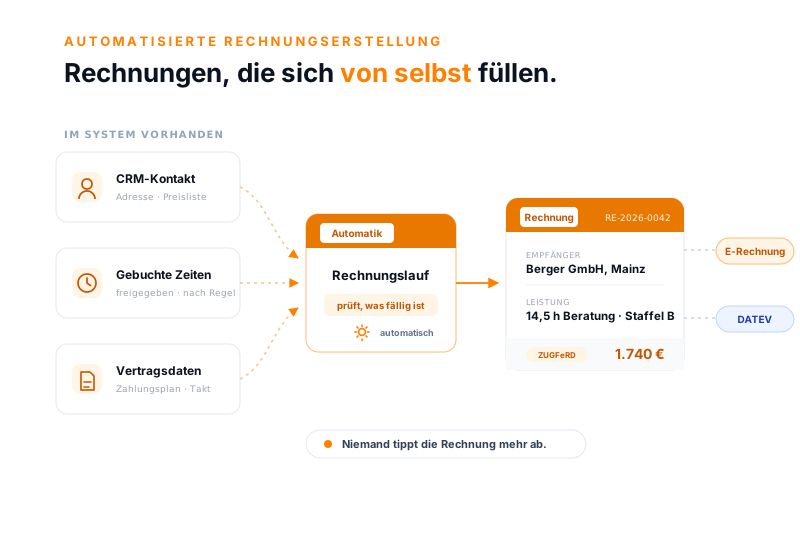
Automated invoicing in teamspace: three data sources (CRM contact, logged time, contract data) flow into an automation node with the billing run, producing a finished invoice for 1,740 euros for Berger GmbH that continues as an e-invoice and via DATEV.
How it comes together

The invoice fills itself from data that is already there.

The recipient comes from the CRM contact, the work from the approved time entries, the price from the price list. Nobody gathers these values together, they have been in the system all along.

Jede Zeile kommt aus den Daten, die schon im System stehen. Niemand tippt sie ab.

By hand or from the system

Typed by hand, or generated from the system?

Word, Excel, copy a template

  • Customer number, line items and amounts gathered from several sources
  • Every figure copied by hand, and a transposed digit slips in
  • A forgotten line item only surfaces at the customer
  • Past a certain number of orders, even filing them becomes a problem
Recommended

Invoice in teamspace

  • Recipient, work and price come from the CRM, time tracking and price list
  • The billing rule turns approved time entries into line items
  • The proposal shows every billable item, nothing is left behind
  • The invoice goes out as an e-invoice and stays in the same system

What it means

What automated invoicing really means.

Automated invoicing means that software assembles the invoice from the customer, project and time data already held in the system, instead of someone rewriting it in Word or Excel. The end result is the same document, only the path to it is different.

  • From the CRM come the address and the customer's own price list.
  • From time tracking come the approved hours, which become line items by rule.
  • From the order come the payment plan and the billing cadence.

Because the data is maintained only once, the gathering from different sources falls away, and with it the most common source of error.

The classic way

Why doing it by hand gets expensive.

Word and Excel are not built for invoices. An invoice is written from scratch or copied from an old file and adjusted. Both carry the same risks.

  • Customer number, invoice number, line items, date: every detail is copied by hand.
  • The data is scattered, so someone gathers it from several sources.
  • A transposed digit shows up at the customer or the tax office, not before.

On top of that, writing, filing and finding invoices again costs time that grows with every invoice. Excel chaos and transposed digits then become the rule rather than the exception.

What you gain

What automation saves day to day.

When the invoice is built from existing data, three things change noticeably.

Fewer errors

  • No copying by hand, no transposed digits.
  • Prices and rates come from the master data.
  • The proposal shows every billable line item.

Less office time

  • No gathering from several sources.
  • Recurring invoices run without any input.
  • The system handles the filing.

Paid faster

  • The invoice reaches the customer sooner.
  • As an e-invoice, straight in the right format.
  • Open items and dunning are attached.

“I save a lot of time writing invoices.”

con|energy generates its invoices from ongoing projects and contracts, instead of writing them out by hand every month.
con|energy consult

The order

The order knows which line item is due now.

At the centre of every bill sits the order. From it grows the project with its work packages, onto which staff log their time. What of that ends up on the invoice is decided by the billing mode on the order.

  • By rule: the system checks conditions such as project progress, down to each subproject.
  • By payment plan: instalment, percentage or line item on fixed dates, with the final invoice last.
  • By duration: maintenance and subscriptions run along at the set cadence.

A filter shows what is ready. So you can see which line item belongs on the invoice today, without searching through individual orders.

From time to line item

Logged hours become an invoice line.

Professional services firms sell the work of their people. The recorded hours therefore have to reach the invoice, and correctly allocated. That is what the billing rule takes care of.

  • Approved time entries are turned by the rule into the matching line item, by category, staff member or period.
  • Allowances and tiers are factored in: the first hours included, the rest by effort.
  • An activity record is created automatically for every invoice and can be checked before it is sent.

A logged hour becomes a document line item this way, without anyone typing figures from time tracking into the invoice.

Intro call

Which of your invoices could create themselves?

We look at a typical order to see which line items automation fills and which you deliberately keep by hand.

Book a call

Billing run

The whole billing run works without a click.

Once the rules are set up, nobody has to think about the individual invoice any more. A billing run checks at a fixed rhythm which orders are due and creates the invoices.

  • Per order you set how far the run goes: not at all, as a draft only, checked, or created and sent.
  • At the highest level the due invoice goes out on its own, with the contact details from the CRM.
  • Whatever stays open is picked up by the multi-stage dunning run.

Turn everything on, and there is little left to do with ongoing orders at the end of the month.

Before sending

Checks catch the error before the customer does.

Automation does not mean the invoice goes out unseen. teamspace builds checks in before sending that are often missing in a manual process.

  • A warning before the cut-off date reminds you to lock time entries before billing.
  • An approval workflow holds the document until the responsible person has checked it.
  • Follow-up tasks are created automatically, such as a note to accounting when the document is created.

That keeps the invoice fast without the review falling by the wayside.

Use cases

Where automation reaches into the document.

The automatic invoice sits in many places within billing. These areas go deeper into it.

Order billing

One order mixes fixed price, effort and flat rate and proposes the invoice in a single click.

Learn more

Recurring invoices

Maintenance, licences and subscriptions run as a contract that bills itself every period.

Learn more

Cumulative invoices

Instalment, cumulative and final invoices show the status of the whole order.

Learn more

Dunning

Open receivables climb through multiple stages, each with its own deadline and fee.

Learn more

E-invoicing

ZUGFeRD and XRechnung are created on sending, without anyone switching format.

Learn more

DATEV interface

Invoices, cancellations and travel expenses go to the tax adviser over the certified interface.

Learn more

All the way to the tax adviser

From the system straight into the accounts.

The finished invoice should not only reach the customer but also the accounts. teamspace creates the e-invoice on sending and hands the documents over to the tax adviser.

  • ZUGFeRD and XRechnung are created from the finished invoice, depending on the recipient, without anyone switching format. More on this on the e-invoicing page.
  • The certified DATEV interface sends invoices, cancellations and travel expenses straight into the DATEV cloud, one posting batch per client. Details on the DATEV interface.
  • Tax rate and ledger account sit on the article and travel along.

So the automatic invoice does not end at sending but only once it is fully posted.

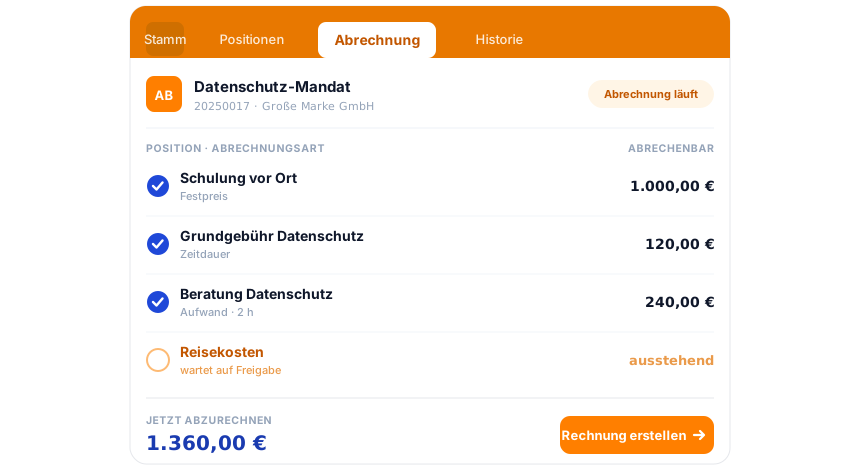
teamspace invoicing software: an order on the Billing tab, three line items billable with a blue tick, one line item awaiting approval, below it the total to bill now and the Create invoice action.

Part of the invoicing software

The order is the billing hub.

The automatic invoice always arises at the order. That is where line items, flat rates and approved time entries collect, until it proposes the finished invoice. Quotes, dunning, e-invoicing and the DATEV posting-data service all run in the same system. How it all fits together is shown by the invoicing software overview.

To the invoicing software

What it means

What automated invoicing software delivers.

Automated invoicing software creates the invoice from data that arises in the business anyway: from the customer contact in the CRM, from the logged project hours and from the contract data on the order. Instead of writing every invoice in Word or Excel, the system assembles it according to the stored billing rules and issues it itself in a billing run if you want.

Day to day that means less copying by hand and fewer transposed digits. Order billing bills the individual order with its mixed line items, recurring invoices carry on as a contract, and in the end everything goes out as an e-invoice and via the DATEV interface to the tax adviser.

We have been developing teamspace in Darmstadt since 1999. It runs in an ISO 27001 certified data centre in Frankfurt am Main, with data processing exclusively in the EU. The contracting party is 5 POINT AG, a German public limited company under German law.

Intro call

Bring along a typical order.

In a short call we show, using your example, where the invoice creates itself and which steps you deliberately keep.

Frequently asked questions about automated invoicing

What does automated invoicing mean?
The software creates the invoice from existing data instead of someone typing it in Word or Excel. Recipient and price list come from the CRM contact, the work from the logged time entries, the cadence from the order. The end result is the same document, just without the retyping.
Can I still change the invoice before it is sent?
Yes. The automatically created invoice is a proposal at first. You check, correct and approve it before it goes out. An approval workflow can additionally hold the document until the responsible person has seen it.
Does teamspace really issue the invoices on its own?
Yes, through the billing run. It checks at a fixed rhythm which orders are due. Per order you choose how far the run goes: do not take part, draft only, checked, or created and sent automatically. At the highest level, due invoices go out without any input.
What if one project runs by effort and another as a flat rate?
Both sit as line items on the same order. Each line item carries its billing type: effort by logged time, fixed price independent of time, duration on a cadence. The order proposes the invoice with all due line items in a single proposal.
Do I need DATEV for this?
No. Automatic creation works without DATEV too. Anyone using DATEV Unternehmen online can additionally hand the documents over through the certified interface (enterprise); otherwise the classic DATEV export as a file remains for the tax adviser.
Does this also work for recurring invoices?
Yes. Maintenance, licences and subscriptions run through duration line items as a recurring contract that issues its invoice monthly, quarterly or yearly by itself. More on this under recurring invoices.
How does the system know the prices?
From the price list on the customer. teamspace keeps a separate price list per customer with tiers and volume discounts; tax rate and ledger account sit on the article. So the price carries from the price list all the way to the finished invoice.
How can I automate invoices?
You set up the billing rules once on the order, after which teamspace takes care of the rest: approved time entries become line items, the billing run creates the due invoices at a fixed rhythm and sends them itself if you want. To automate invoices you therefore need neither a template nor retyping, just well-maintained customer, project and time data.
Can teamspace replace Excel for creating invoices?
Yes. Anyone keeping invoices in Excel copies customer numbers, line items and amounts by hand, and that is exactly where most transposed digits arise. teamspace instead captures the billable work automatically from the logged time entries and contracts and assembles the invoice from it. This way automatic invoicing replaces the Excel spreadsheet without a single line item being left behind.