
XRechnung and ZUGFeRD validator: check and read an e-invoice
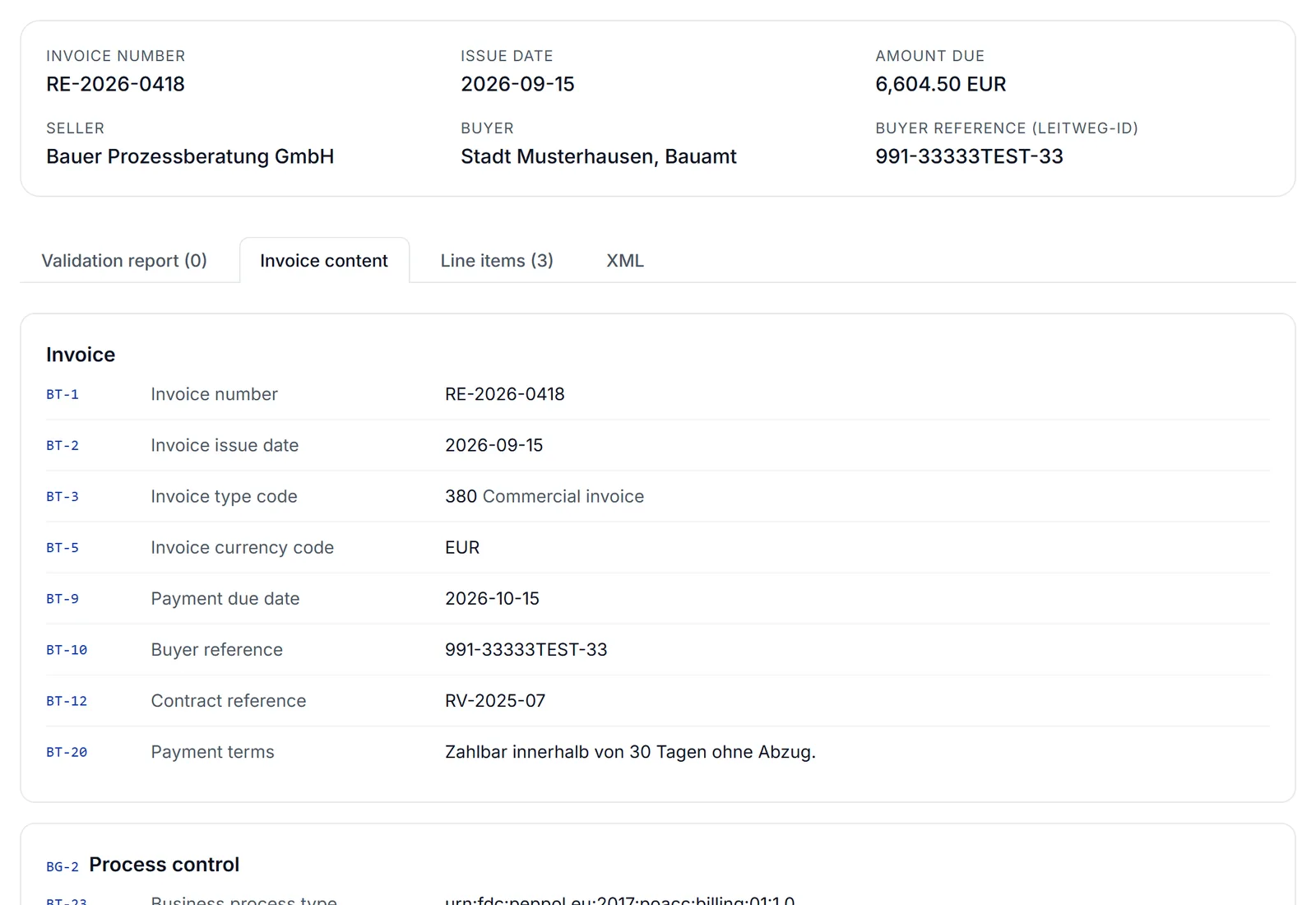
Validator and viewer in one: the tool shows every field of an e-invoice with its BT number and checks the file against the official EN 16931 and XRechnung rules. The check runs in your browser; the invoice is not uploaded.
- No upload of your invoice
- Rules published by CEN and KoSIT
- XML, or PDF with embedded XML
Rule set: EN 16931 1.3.16 and XRechnung 3.0.2, updated 22 September 2026
The file is read in your browser only and never uploaded.
Reading an XRechnung: the viewer
An XRechnung is an XML file. A browser or editor shows only code, and a ZUGFeRD PDF shows only the visible page, not the data the recipient actually books. The viewer presents the data set as an invoice.
The Invoice content tab lists every filled field with its BT number, its name and plain text for codes, such as "58 SEPA credit transfer" or "HUR hour". Line items appear as a table, each with all its fields to expand. Embedded attachments can be downloaded. For a ZUGFeRD PDF this lets you compare the XML data with the visible invoice.
Why no upload?
An invoice carries customer names, prices, bank details and often project information. Many checking services upload the file to a server for this. This validator works differently:
- The file is read, parsed and checked in your browser. It is not sent to any server, including ours.
- Only the rule files and the validation engine come from our website, loaded once when you first check a file.
- There is no sign-up and no account, and the number of checks is not limited.
What is checked, and what is not
Checked
- Mandatory EN 16931 fields such as invoice number, date, seller, buyer and totals
- Calculation rules: line totals, VAT per rate, invoice total and amount due
- Code lists for invoice type, units, currencies, countries and VAT categories
- For XRechnung, the additional German KoSIT rules (BR-DE), for example the Leitweg-ID, contact details and payment data
Not checked
- Whether the content is right: no format check can judge the service, VAT rate, price or period
- XML schema validation (XSD). An error that only the schema catches will not show up here
- Signatures or PDF/A conformance of a ZUGFeRD PDF
Why BT numbers?
EN 16931 describes an invoice as a fixed data model. Every field has a number: BT-1 is the invoice number, BT-10 the buyer reference, which carries the Leitweg-ID for German public bodies, BT-115 the amount due. Related fields form groups, such as BG-4 for the seller or BG-25 for an invoice line.
XRechnung and ZUGFeRD are two ways of writing the same model. That is why the validator shows both in the same structure, and each finding in the report names the BT number it concerns.
Typical error messages and what to do about them
These rule IDs cover typical reasons why an e-invoice is sent back. The rule ID appears in front of each finding in the report, and the matching tip is shown right below it.
The buyer reference (BT-10) is missing. For German public bodies this carries the Leitweg-ID.
Ask the contracting authority for its Leitweg-ID, which is usually on the purchase order. For businesses an agreed reference such as the order number or the buyer’s name is enough.
The seller contact (BG-6) is missing, or its name, telephone (BT-42) or email (BT-43).
Store a contact person with telephone number and email address in your invoicing program. XRechnung requires all three.
Payment instructions (BG-16) are missing, the bank details for a credit transfer (BG-17) are missing, or the IBAN is invalid.
State the payment means, for a credit transfer code 58 (SEPA) with your IBAN. Check the IBAN for typos; the rule recalculates its check digits.
Neither the seller VAT identifier (BT-31) nor the tax registration number (BT-32) is given.
Enter the VAT ID or tax number in the company details of your invoicing program so that every invoice carries it.
BR-CO-10BR-CO-13BR-CO-15BR-CO-16
The totals do not add up, for example line total (BT-106), net total (BT-109), gross total (BT-112) or amount due (BT-115).
Usually a rounding issue in the program that creates the file: totals have to be built from line amounts rounded to two decimals. For partial payments, the amount already paid belongs in BT-113.
The VAT per rate (BG-23) does not match the lines or the stated VAT total.
VAT is calculated per rate on the sum of net amounts and then rounded, not rounded per line and added up. The VAT total (BT-110) is the sum of these amounts.
The specification identifier (BT-24) does not match XRechnung, or the invoice type (BT-3) uses a code that is not allowed.
Set your program to the current XRechnung version. Common invoice types are 380 (invoice), 381 (credit note), 384 (corrected invoice), 326 (partial invoice) and 875 to 877 for construction work.
The unit code (BT-130) is not on the UN/ECE list, for example "hrs" or "pcs".
Map the units in your item master to the codes: HUR for hour, DAY for day, C62 for piece, LS for lump sum.
The invoice has no line (BG-25). This happens with ZUGFeRD MINIMUM and BASIC WL.
Choose the EN 16931 profile (formerly COMFORT) or XRechnung in your program. MINIMUM and BASIC WL do not count as e-invoices in Germany.
As a rule, do not edit the XML file by hand. Change the details in the program that creates the invoice, generate the file again and check it once more.
KoSIT validator or checking in the browser?
The KoSIT validator is the validation program of Germany’s Coordination Office for IT Standards. It is a Java program that you download with an XRechnung configuration and run on your own computer or server. It checks the XML schema and the EN 16931 and XRechnung rules and produces a validation report.
This validator uses the same published rule files for EN 16931 and XRechnung but needs no installation. It does not check the XML schema.
| Aspect | KoSIT validator | This validator |
|---|---|---|
| Installation | Java and a validation configuration | none, runs in the browser |
| EN 16931 and XRechnung rules | yes | yes, the same rule files |
| XML schema (XSD) | yes | no |
| ZUGFeRD as PDF | no, XML file only | yes, the XML is read from the PDF |
| Display of invoice fields | validation report | every BT field in plain text |
| Intended for | automated checking of many invoices | checking and reading single invoices |
If you want to check incoming invoices automatically, for example in an intake platform, the KoSIT validator is the right tool. For a single invoice that came back or needs checking before it goes out, the browser is enough.
Frequently asked questions
What is an XRechnung and ZUGFeRD validator?
A validator checks whether an e-invoice meets the technical rules of the European standard EN 16931 and, for an XRechnung, the additional German KoSIT rules. It reports every breach with a rule ID, such as BR-DE-15 for a missing Leitweg-ID. The teamspace validator also shows every field of the invoice in readable form.
How can I check an XRechnung for free?
Drop the XML file or the ZUGFeRD PDF into the box at the top of this page. Within seconds the validator shows whether mandatory rules are broken and lists each finding with its rule and location in the file. No sign-up is needed.
How can I open and read an XRechnung?
An XRechnung is an XML file without a view of its own; a browser or editor shows only code. The validator presents the content as an invoice: number, seller, buyer, lines, VAT and payment details, each with its EN 16931 BT number. Embedded attachments can be downloaded.
How can I tell whether a PDF is a ZUGFeRD invoice?
A ZUGFeRD or Factur-X invoice carries its data as an XML attachment inside the PDF, usually named factur-x.xml or zugferd-invoice.xml. Drop the PDF into the validator: if it finds the attachment it checks it, otherwise it tells you the file is a plain PDF invoice.
Is this the official KoSIT validator?
No. The validator is a teamspace tool that uses the published CEN and KoSIT rule files unchanged. The KoSIT validator is a Java program that also checks the XML schema, so in rare cases involving schema errors the result can differ.
What should I do if an e-invoice was rejected?
Check the file here and read the errors in the report. Each finding names the rule and the field concerned. Correct the details in the program that creates the invoice, generate the file again and check it once more before sending it again.
Is my invoice uploaded?
No. The file is read and checked in your browser. Only the rule files and the validation engine are loaded from our website; the invoice itself is not sent to any server.
Which formats does the validator recognise?
XRechnung in both syntaxes (UBL and CII), ZUGFeRD and Factur-X from version 2 as a PDF with embedded XML or as a plain XML file, and Peppol BIS Billing. Invoices in the old ZUGFeRD 1.0 format are recognised but not checked.
Does "no findings" mean the invoice is legally sound?
No. The validator checks the technical form against the EN 16931 and XRechnung rules. It does not judge whether the invoice carries all the details required by VAT law, or whether the service and VAT rate are correct.
Why do ZUGFeRD MINIMUM and BASIC WL not count as e-invoices?
These two profiles carry no invoice lines and not all mandatory invoice details. The German Federal Ministry of Finance therefore does not treat them as e-invoices. B2B invoicing in Germany needs at least the EN 16931 profile (formerly COMFORT), EXTENDED or an XRechnung.
What is the difference between an error, a warning and a notice?
An error breaks a mandatory rule; recipients that validate electronically will usually reject such an invoice. Warnings and notices point to details that should or could be there without making the invoice invalid.
How does teamspace create e-invoices?
In teamspace you write the invoice as usual, and ZUGFeRD and XRechnung are created from the same data when you send it. teamspace also reads incoming e-invoices. See the page on e-invoicing in teamspace for details.
E-invoices without building them by hand
In teamspace, the XRechnung or ZUGFeRD file is created from the invoice you write anyway, at the moment you send it. On a call we look at your billing and your recipients.
Sources and licences: Rules: EN 16931 Validation Artefacts (CEN, European Commission, licensed under EUPL 1.2) and XRechnung Schematron (KoSIT, licensed under Apache 2.0). Engine: SaxonJS, copyright Saxonica Ltd., redistributed under its licence.
Licence texts: EN 16931 (EUPL) · XRechnung (Apache 2.0) · SaxonJS