teamspace

Lead management for service businesses: prospects become orders.

With teamspace lead management the enquiry becomes a case on the contact, the open case becomes a follow-up, and the won opportunity becomes the quote. Everything runs on the same contacts as the rest of the [CRM software](/crm-software/), with the sales funnel and forecast as a step up in the Enterprise edition.

The comparison

Separate lists cost you the deal.

Excel list plus a separate tool

  • The lead list sits in Excel, maintained by changing hands
  • Whoever has already been approached isn't in the CRM
  • Follow-ups run through a private calendar
  • At closing someone re-types the data into the quoting tool
Recommended

teamspace

  • The lead is a case on the contact, with source and date
  • The open case turns into a follow-up by itself
  • The whole history sits in the digital customer record
  • The won opportunity becomes the quote, no re-typing

Opportunity

Probability and value move with every phase.

Each opportunity carries a target value and a probability. As it moves up a phase, teamspace recalculates the current value, and the status moves with it.

Phase 1 25 %

First contact

Value €20k
Phase 2 50 %

Needs

Value €40k
Phase 3 75 %

Quote

Value €60k
Phase 4 90 %

Negotiation

Value €72k

While the opportunity is open

The follow-up reminds you on the due date until the status switches to won.

Status open won enterprise

One value per opportunity, target times probability, recalculated at every phase.

Capture the lead

The enquiry becomes the lead.

A lead is a prospect whose intent to buy is not yet certain. When an enquiry comes in by email or phone, you create it with a single click. teamspace carries the address and phone number over at the same time.

  • Email or call becomes the prospect, with no one re-typing contact data.
  • Source and date sit on the case, so it stays visible later where the enquiry came from.
  • The prospect is an organisation with a role that becomes a client automatically with the first invoice.

So no second data set appears. The lead lives in the CRM from the start, together with every later touch.

To customer records

Timeline

Email, meeting and quote gather on the lead.

Whoever opens an opportunity sees its whole story in a timeline: the last email, the booked meeting, the open quote, the call from a fortnight ago.

  • Cases, meetings, emails, documents and files hang on the same opportunity, each kind with its own counter.
  • Whoever takes over an account reads in within minutes instead of asking colleagues.
  • Incoming emails land on the contact, matched by sender address; the Outlook add-in syncs contacts and meetings with Microsoft 365.

The timeline is also the basis for planning: what comes next follows from what happened last.

To the digital customer record

Intro call

Let's talk about your sales funnel.

In 30 minutes we walk through your phases, follow-ups and the hand-over to the quote, and check which of it fits your edition.

Lifecycle

This is how a lead becomes an order.

Three steps from the CRM, all on the same contacts, without anyone creating anything twice.

Capture

Create the prospect without re-typing.

  • Enquiry from email or phone in one click
  • Address and number carried over, source noted
  • Prospect as an organisation with a role

Develop

Move the lead through the phases.

  • Sales funnel with your own phase sequence
  • Probability and value per opportunity
  • Follow-up keeps the opportunity warm

Win

The opportunity becomes the order.

  • Quote from the organisation's master data
  • One click to the order
  • From the order comes the project

More from the CRM

Use cases around sales.

Lead management is one of several views on the same contact base. These areas go deeper on individual questions.

Digital customer record

Every touch in chronological order on the organisation, from email to quote.

Learn more

Customer records

Organisations and contacts maintained centrally, the basis of every lead.

Learn more

Key account management

Important clients with their own owner and a deputy.

Learn more

Campaign management

Accompany prospects over weeks with relevant content.

Learn more

Sales forecast

Forecast, conversion and phase analysis as a standard report.

Learn more

“Time tracking is far simpler and more convenient than in Excel.”

At kwsoft, teamspace replaced the Excel lists. The same effect carries the sales work: contacts, cases and follow-ups in one system, not in spreadsheets on the side.
kwsoft

Follow up

Follow up before the lead goes cold.

Most orders come on the third or fourth contact, not the first. teamspace keeps the opportunity warm for as long as it is open.

  • Every open case becomes a follow-up on its due date, with no separate reminder list.
  • If contact lapses for too long, the "My opportunities" view warns the responsible owner.
  • A follow-up case collects the call attempts instead of creating a new entry for each one.
  • When the phone rings, the phone interface shows the caller and their open cases.

So no lead slips through just because no one answered on the first try.

Hand-over

The opportunity becomes the order.

A won opportunity is not an end point but a hand-over. From it comes the quote, and the path to the project stays in the same system.

  • From the opportunity comes the quote, with address, contact person and layout from the master data.
  • If the client accepts, the quote becomes the order in one click.
  • From the order comes the project with budget, team and phases.

The funnel itself, with phases, probability and forecast, runs in the Enterprise edition. The lead as a case with a follow-up already sits in the CRM core of the Office edition.
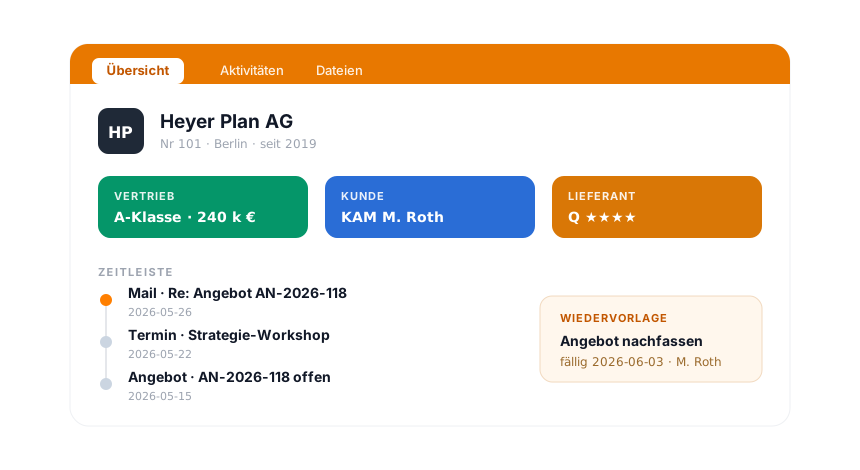
teamspace CRM customer record Heyer Plan AG with three aspect pills for sales, client and supplier, a case timeline of email, meeting and quote, and a follow-up on its due date.

In overview

Lead management is part of the CRM.

The lead works with the same organisations, contacts and cases as the rest of the CRM. The CRM software overview shows how teamspace runs the customer record, follow-ups and the link to email, phone and Teams.

To the CRM software

What lead management is about

Contacts become orders when someone stays on it.

Lead management means the systematic work with prospects: from the first enquiry through development in phases to the close. The term lead stands for a prospect whose intent to buy is not yet certain.

In B2B it is rarely the first conversation that decides, but the persistence afterwards. What makes sales expensive is seldom the conversation but the admin around it: who has already replied, when the last contact was, which quote is still open. Move that trail out of your head and into a system, and you win time for the actual conversation, and forget no follow-up.

The need becomes tangible as soon as several people work the same base and follow-on orders should no longer depend on personal memory. That is when a CRM software that keeps leads, cases and follow-ups in one place helps, together with the sales forecast that shows where the funnel runs thin.

Intro call

Let's talk about your pipeline.

You show us how your prospects become orders today. We tell you honestly what sits in the CRM core and where the sales step up is worth it.

Frequently asked questions on lead management

How does a lead enter the system?
Manually, from an incoming email or call, or by import from Excel. With one click it becomes a prospect on the contact; teamspace carries the address and phone number over, and source and date sit on the case.
How does the sales funnel work?
You set up any number of funnels with your own phases. Each phase carries a probability. Per opportunity you enter a target value; the current value follows from target times probability and moves automatically on a phase change. Funnel and forecast belong to the Enterprise edition.
Is there lead scoring?
There is no separate point score on fixed criteria. Instead each opportunity carries a current value of target times probability, and that value can be weighted by your own rules, for example by order volume. In addition the ABC analysis classifies every organisation for sales, client and supplier, top 20 percent A, middle 60 B, weakest 20 C. So you prioritise by value and classification, both traceable.
What does the forecast show?
Over the funnel you see how many prospects sit in the pipeline and how likely a close is. That makes order peaks and revenue gaps visible early, before they show up in the quarter.
How does this connect to the quote?
From the opportunity you create the quote, with address and contact person from the master data. If the client accepts, it becomes the order in one click, and from the order the project.
Which edition do I need?
The lead as a case with a follow-up and the digital customer record sit in the CRM of the Office edition. Opportunities, funnels and forecast belong to the sales process of the Enterprise edition.
Does teamspace remind me to follow up?
Yes. Every open case becomes a follow-up on its due date. If contact lapses for too long, the "My opportunities" view warns the responsible owner. A follow-up case holds several call attempts in one entry.
Where is the data stored?
In an ISO 27001 certified data centre in Frankfurt am Main, exclusively in the EU. teamspace is made in Germany and set up GDPR compliant. The contracting party is 5 POINT AG, a German public limited company based in Darmstadt.