
One view per customer
Contacts, active engagements, invoices, open tickets, logged hours and documents of one organisation, in a single timeline instead of in five tools.
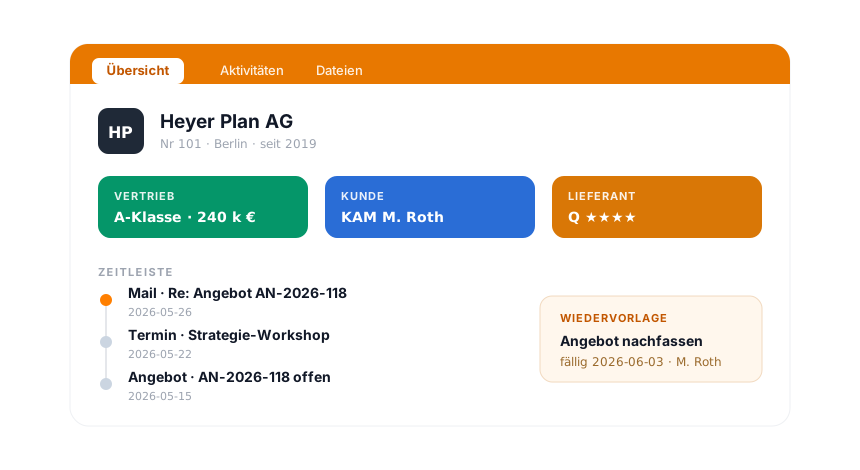
In the digital customer record from teamspace, contacts, projects, invoices, tickets, hours and documents come together per customer in one view. No more scattered Outlook folders and Excel lists alongside.
At a glance
Contacts, active engagements, invoices, open tickets, logged hours and documents of one organisation, in a single timeline instead of in five tools.
Emails, calls and appointments assign themselves to the right contact. Nobody updates the customer record by hand.
Every organisation gets its ABC rating. The system recognises contacts without activity as due for deletion.
One customer record
What arises in the project, in the invoice, in the ticket, in time logging and in storage gathers at the same organisation. The customer record is not a separate database but the consolidated view of everything that is already there.
Heyer Plan AG
Nr 101 · A-Kunde · KAM S. Berg
Mandate
2 laufend · Marge 31 %
Rechnungen
4.200 € offen · 1 gemahnt
Tickets
1 offen · SLA 4 h
Stunden
142 h diesen Monat
Jede Buchung, jede Rechnung, jedes Ticket findet von selbst den richtigen Kunden, ohne Export, ohne zweite Liste.
Inbound
A customer record only carries its weight if it fills itself. Manual upkeep fails in daily operations, so teamspace assigns incoming contacts automatically.
This way the history emerges in passing while the team works, instead of being typed up at the end of the day.
“Staff in both support and project planning can see orders and invoices. That was not possible before.”

Why one customer record
The benefit shows less in the creating than in the daily looking-up.
ABC analysis
Not every contact carries the same weight. teamspace rates every organisation automatically, and separately by aspect, because an important customer can be an unimportant supplier.
This way the support team knows where attention pays off, and purchasing sees which suppliers carry their weight.
Your questions
Let's look at your customer data.
In 20 minutes we go through where your customer information sits today and which modules at teamspace would already come together into one customer record.
Documents
Contracts, quotes, deliverables and correspondence belong in the customer record, not on a network drive alongside. teamspace files them at the organisation.
Office files can be edited directly in the browser, with no download and no sending back and forth by email.
More from the CRM
The customer record is one of several views of the same contact base. These areas go deeper on individual questions.
Organisations, people and addresses maintained centrally, the base behind every customer record.
Learn moreKey customers with their own contact person, deputy and VIP marking.
Learn moreBulk email, mail merge and phone campaign directly from the contact list.
Learn moreFrom the open activity comes the reminder, enquiry, requirement, quote.
Learn moreCustomer analysis and activities over time as a standard report.
Learn moreData protection
Customer data is among the most sensitive records in the house. teamspace governs access finely and keeps upkeep GDPR compliant, without management having to worry about infrastructure.
Hosting is in an ISO 27001 certified data centre in Frankfurt am Main, processing takes place exclusively within the EU. The contracting party is 5 POINT AG, a German stock corporation, with a data processing agreement.
In the workflow
Company with address, VAT ID and conditions, optionally as prospect, customer or supplier at the same time. Captured once, available in every module.
People with function and responsibility, address inherited from the organisation, one key account manager per customer.
Emails, calls, appointments, quotes, tickets and hours assign themselves to the organisation, chronologically in the timeline.
Contracts, quotes and correspondence in separate folder trees, versioned and permission-controlled.
ABC analysis per aspect and an activity analysis show where support pays off and who did how much.
Scope of features
What makes a digital customer record
A digital customer record is the central view of all information that arises in daily business about a customer: contacts and contact persons, contracts and conditions, quotes and invoices, open tickets and active engagements, logged hours and documents. In classic setups these traces spread across five to ten systems, from Outlook through Excel to the helpdesk and the network drive.
The difference at teamspace lies not in yet another database but in the bundling. Because project, invoice, ticket and hour hang at the same organisation anyway, the customer record emerges from the data that daily business produces anyway. An hour logged today on the engagement is in the customer record tomorrow and on the invoice the day after, with no export and no second list.
The need becomes tangible as soon as several people look after the same customer and nobody tracks by hand any longer what was last discussed, delivered and billed. The customer records hold the base; the customer record is the view that makes everything operational visible against it.
Part of the CRM
Organisation, contact and activity are the three data types from which the customer record is composed. How teamspace forms reminders, the sales view and the analyses from them, and how email, phone and Teams are connected, is shown in the overview of the CRM software.
To the CRM softwareRelated modules
What hangs at a customer continues in the adjacent modules. Here are the shortest routes there.
From the won order the engagement emerges with budget, phases and team, visible in the customer record.
From the quote comes the invoice, with hourly rates, flat rates and e-invoicing.
Enquiries from a customer run as tickets, with SLA and standard project at the contact.
First call
You show us a customer with engagements, invoices, tickets and documents. We show how these traces come together into one view in teamspace, and tell you honestly where it fits.