
Without a portal
- Every status question comes in by email or phone
- The invoice PDF is requested one at a time
- Files travel through overflowing mailboxes
- The customer waits for an answer that was settled long ago
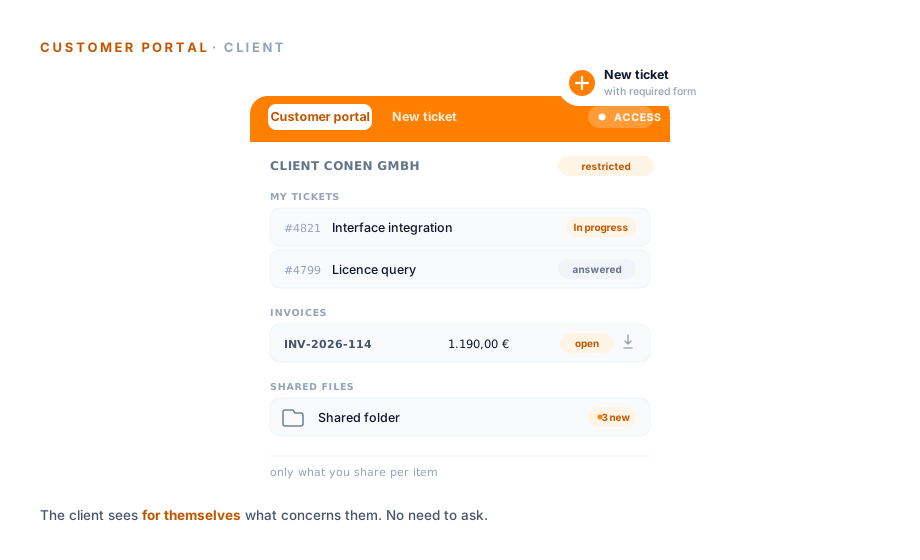
A customer portal gives your customers their own restricted access: they raise tickets themselves, see their status, their invoices and shared files. What is visible to the outside is something you release per item.
With and without a portal
Visibility
The decisive point of a customer portal is not that the customer sees everything, but that you decide per item what goes to the outside. The same ticket therefore has two views.
Antwort an Kunde
Vorgang
Interne Notiz · Lizenz prüfen
Vorgang
Status: In Arbeit
Vorgang
Lösung dokumentiert
Vorgang
alle Vorgänge, interne Notizen inklusive
Antwort an Kunde
beantwortet
Status: In Arbeit
läuft
Lösung dokumentiert
abgeschlossen
nur freigegebene Vorgänge, kein interner Verlauf
Dasselbe Ticket, zwei Sichten: Sie entscheiden je Vorgang, was intern bleibt und was im Portal erscheint.
Raising tickets
Giving your customers a direct line takes the informal email out of the equation. Requests come in structured and land in the right channel, instead of in a shared mailbox.
When the team replies, the answer goes to the customer by email, and the history stays on the same ticket. If the customer closes a ticket, a later follow-up reopens it automatically.
Permissions
Not every contact at a customer should see everything. A project lead needs an overview of their organisation's requests, an individual user only their own.
That keeps access tightly matched to what the customer really needs. Internal notes and other customers' data stay out of reach.
“Staff in both support and project planning can see orders and invoices. That was not possible before.”

Invoices
The most common query in service is often not a service question at all: which invoice is outstanding, where is the PDF? In the portal the customer answers that themselves.
That takes the small queries off your accounts team, the ones that add up over the month.
Files
Some requests need more than text: a configuration document, a service slip, a photo. Instead of sending it back and forth by email, you share it through the portal.
That way everything to do with a request sits in one place, instead of scattered across mailboxes and versions.
No obligation
In half an hour we will look at which requests your customers could handle themselves and what you want to release to the outside per item. After that you will know whether a portal fits your service.
Scope of functions
External access splits into three areas: what the customer does themselves, what they view and how tightly access is scoped.
Use cases
The portal is the side opened to the outside. These areas go deeper into the remaining parts of the service desk, each on its own page.
Requests as tickets with channels, responsibility at the status and SLA time remaining.
Learn moreTickets from email, phone and web service, assigned to the right channel.
Learn moreService time from the ticket booked to a project and invoice, visible per customer.
Learn moreTurn a growing request into a project with its own structure and finances.
Learn moreAn email in the mailbox becomes a ticket, without leaving Outlook.
Learn moreResponse times per customer, with time remaining and a warning right in the ticket.
Learn more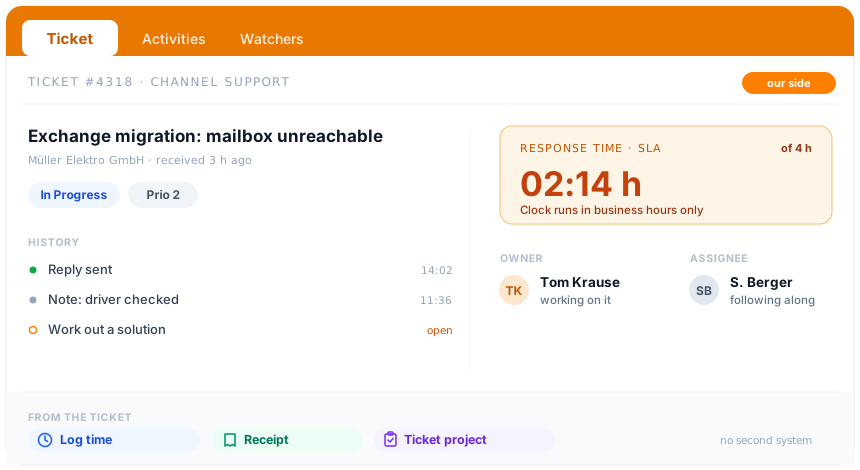
At a glance
In the portal the customer sees only what you release. How teamspace runs the whole service behind it, from channels through SLA and escalation to billing from the ticket, is shown in the Service Desk Software overview.
To the Service Desk SoftwareWhere it fits
A customer portal is a restricted access through which customers handle their own requests themselves: raise and track tickets, view invoices, exchange shared files. It is the outward-facing side of a service desk, not a second system alongside it.
The benefit grows with the number of recurring requests. If you are regularly asked about the status of a ticket, an invoice or a file, you shift exactly those routine questions into self-service. The team gains time for the requests that really need handling, and the customer does not wait for an answer they could see for themselves.
So that nothing internal leaks out in the process, teamspace decides visibility per item. An internal note stays internal, the reply to the customer becomes visible. That keeps the service open where it should be, and closed where it must be.
The portal belongs to the [Service Desk Software](/service-desk-software/) and hangs off the same [ticket system](/ticket-system/) as internal handling. What the customer does in the portal appears in the ticket with no detour.
Related modules
External access rarely stands alone. It hangs off the contact, the project and the hour that later becomes an invoice.
Access hangs off the contact in the CRM; incoming emails are matched to the customer record via the sender address.
When a request grows into an undertaking, the ticket becomes a project with its own structure and finances.
Service hours booked from the ticket to the project are the basis of the invoice in the portal.
Introductory call
Half an hour is enough for an honest look at your customer structure, the permissions per contact and the items that should be visible to the outside. After that you will know whether a customer portal fits your service.