
The SLA sits with the customer
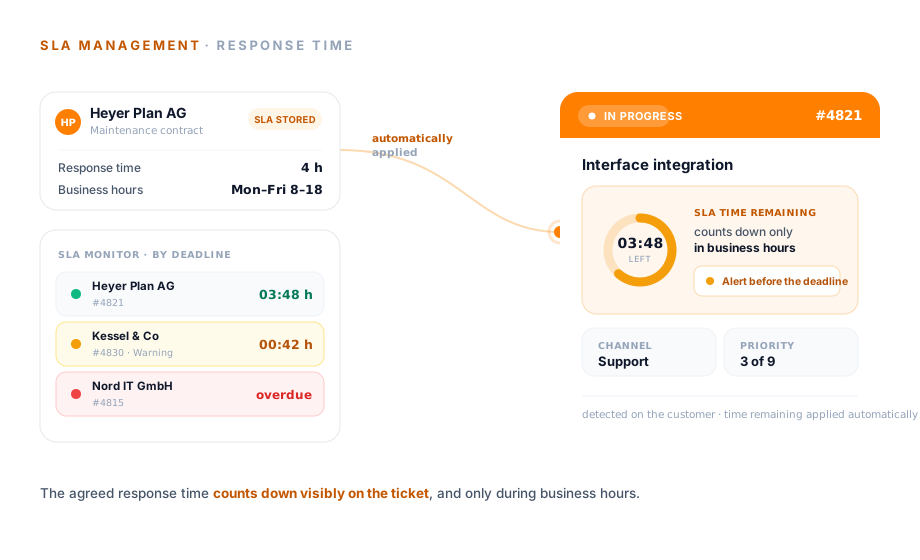
The response time is set per customer or per ticket. When the contact sends an email, teamspace assigns the SLA automatically as soon as the address is recognised.
A Service Level Agreement (SLA) sets out how quickly a service provider responds to an enquiry. In teamspace this response time is attached to the customer, assigned to every ticket automatically and runs visibly as a traffic light. Part of the Service Desk software in teamspace, with no module surcharge.
Scope
An agreed response time only becomes a promise once everyone can see how much time is left. Three things make that happen.
The response time is set per customer or per ticket. When the contact sends an email, teamspace assigns the SLA automatically as soon as the address is recognised.
The ticket shows how much response time is left, colour-coded as a traffic light by urgency. As the deadline approaches, a note goes out to everyone involved.
If a ticket goes a set period without a change, the owner is released or the channel is switched. Every escalation appears in the history.
Assignment
Whoever has promised a customer a response time records it as a Service Level Agreement against the customer, not against each individual ticket. When a contact of that customer sends an enquiry, teamspace fills in the SLA on its own as soon as the sender address is recognised.
“Time tracking is far simpler and more convenient than in Excel.”

Time remaining
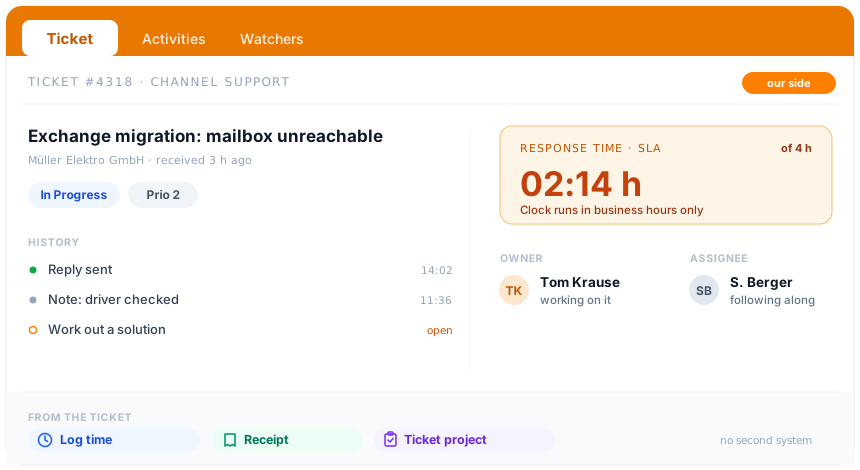
A deadline kept in someone's head helps no one. The ticket shows the response time remaining in the open, and it changes colour the more pressing it becomes. So the team sees at a glance which enquiry comes next.
Business hours
The SLA clock runs only within the defined business hours. The same enquiry, counted twice: once around the clock, once within business hours.
Vier Stunden meinen vier Arbeitsstunden. Nacht, Wochenende und Feiertage zählen nicht zur Restzeit.
Next step
Show us the agreed response times and business hours in your contracts. In 20 minutes we'll see where a visible deadline on the ticket takes the pressure out of the day.
Escalation
A ticket belongs to one person, the owner. That works well while they are there. If they are away or overlook an enquiry, the ticket must not stand still until someone notices.
Scope
What can be configured per customer, and what runs along on its own in operation.
Use cases
SLA monitoring sits in the ticket. These areas go deeper into what happens before and after, each on its own page.
Three ticket types, channels, statuses and responsibility in detail.
Learn moreEnquiries from email, phone and web service become one ticket.
Learn moreCustomers open tickets themselves and see the status.
Learn moreService time billed to the minute, by interval or as a flat rate.
Learn moreTurn a ticket into a main project, sub-project or work package.
Learn moreCreate a ticket from an email in Outlook.
Learn moreAnalysis
Whether the agreed response times hold shows not on the single ticket, but over the weeks. The ticket statistics make visible where the service runs smoothly and where enquiries are left behind.
teamspace in figures
Behind the Service Desk stands a manufacturer that has been developing for the German-speaking SME market for more than twenty years.
developed in Darmstadt
customers in the DACH region
active users
data processing exclusively
Comparison
Where a connected SLA monitoring differs from a deadline in the calendar.
Feature
Deadline in the calendar
teamspace
RecommendedSecurity
The tickets hold what matters to customers: terms, agreements, internal notes. teamspace processes this data exclusively in the EU, without management having to worry about the infrastructure.
At a glance
The SLA keeps the single response time in view. How teamspace runs the whole service, from channels through status and escalation to billing from the ticket, is shown in the Service Desk software overview.
To the Service Desk softwareContext
A Service Level Agreement governs how quickly a service provider responds to an enquiry. SLA monitoring makes sure this promise isn't buried in a contract file, but runs visibly on the ticket: with the time remaining, a note before the deadline and an escalation should no one respond.
The effort doesn't pay off from the first maintenance contract, but from the point at which several customers with different response times come together. As soon as a customer with a short agreed response time has to be served faster than the rest, and as soon as service time delivered is to go on the invoice, the deadline in your head no longer holds. From there, teamspace keeps every agreed response time on the right ticket, counts it only during business hours and passes a stalled ticket on by itself.
Glossary
Frequently confused terms, placed precisely in the teamspace model.
Related modules
A deadline rarely stands alone: the customer in the CRM, the project behind it, the hour that is booked. Here are the shortest routes there.
The SLA sits with the customer record, and every incoming email matches the customer file via the sender address.
A growing matter becomes a ticket project with its own structure, progress and finances.
Service hours are booked straight from the ticket onto the project and form the basis for billing.
Intro call
We'll look at your SLA stages, business hours and escalation and tell you whether teamspace fits your service.