
Book a desk, room and parking space
A desk, a whole office or a parking space, reserved a day in advance, for a half or full day.
Room booking organises who gets which desk, room or parking space on which day. In teamspace the company releases the spaces, and staff book them in advance, for a half or full day. Part of the workplace management software, included in every edition.
Scope of features
As long as occupancy lives in an Excel list and the team chat, some people drive to the office and find no desk free. Three things take the strain out of this day-by-day coordination.
A desk, a whole office or a parking space, reserved a day in advance, for a half or full day.
Anyone booking sees the free spaces for the day and who from the team is already coming, with no need to ask in the chat.
Categories carry the size, equipment and authorised group, so everyone finds the space that suits them.
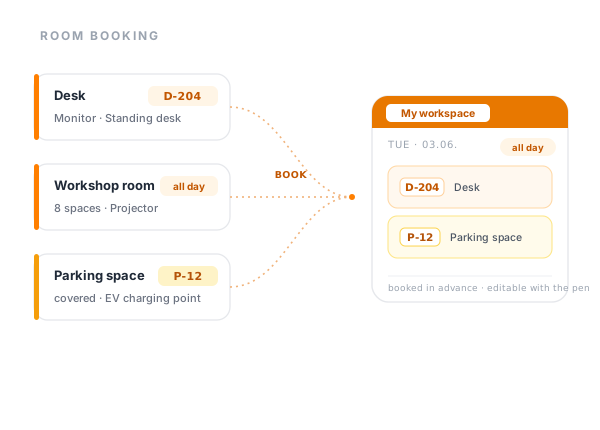
In room booking a space always takes the same route: management releases it and attaches equipment and the authorised group, the member of staff books it for a day, and on the office day it is ready and waiting. Three stages, one resource.
Plätze freigeben
Das Unternehmen legt fest, was buchbar ist.
Platz buchen
Tag wählen, Schreibtisch und Parkplatz dazu.
Platz steht bereit
Die Übersicht zeigt, wer vom Team da ist.
Dieselbe Ressource, ein Weg: das Unternehmen gibt sie frei, der Mitarbeiter bucht sie im Voraus, am Bürotag steht sie bereit.
Rooms
It is not only individual desks that can be reserved. In room booking, a whole room or office is its own bookable resource, for a half or full day. That is how a team secures the workshop room for their shared day, with capacity and equipment such as a projector or whiteboard recorded against it.
For a quick meeting in between, the right place is not the space booking but the team calendar: that is where the meeting is scheduled as an appointment. Room booking holds the room for the day, the calendar holds the time.
Free spaces
Before booking, the workspace overview shows for each day which desks are free and which are already taken. No one makes the trip for nothing, and on days with many open spaces it becomes clear that the floor is barely being used.
Where you stand
Tell us briefly how many desks and parking spaces you have and who comes in on which days. We will tell you how that maps onto teamspace.
Team day
The staff overview lays out side by side who has booked which space on which day. That does away with the morning question in the chat about whether enough colleagues are in to make the trip worthwhile. It is built on the bookings alone, with no floor plan and no sensor in the ceiling.
Anyone arranging an in-person meeting reads off the team's attendance beforehand and puts the shared day where most people are sitting anyway. That saves the email chain an on-site meeting usually starts with.
Default schedule
Some colleagues come in to a fixed pattern: on site on Tuesday and Thursday, the rest from home. For this, a default schedule records per weekday which space is reserved, and enters it automatically every week from a given start date. No one clicks the same desk anew week after week.
Every day still stays open to exceptions. Anyone who needs a different desk for once, or is not coming in at all, changes only that single entry and leaves the rhythm in place.
Absence
A release on absence can be set against each resource. When a member of staff is on leave, teamspace frees up their booked desk or parking space again for those days by itself. That way no space stays blocked just because someone has it fixed in their rhythm while they are not coming in at all.
Together with the default schedule in particular, that counts: the fixed weekly plan keeps running, yet the holiday week takes itself out of the occupancy picture on its own. The absence itself is maintained by leave and absence management in the same system, without anyone having to delete the booking by hand.
“Our staff appreciate how simple the system is.”

The comparison
Desk sharing
With desk sharing, no desk belongs permanently to one person any more. Whoever comes in on a given day grabs a free space in advance, often just for the one or two days they are on site. Where half the workforce works in rotation, the otherwise half-empty rooms fill up to good effect.
In teamspace this is a booking, not a clicked seating plan: the released spaces sit in categories, and the member of staff chooses the day, the desk and, if wanted, a parking space. How office and home office alternate is explored in more depth by desk sharing and hybrid work.
Parking space
A parking space counts as a resource in its own right, not as an accessory to the desk. Anyone coming by car reserves one for the same day, for a half or full day. At sites with few spaces, that puts an end to the morning loop around a full forecourt.
Parking spaces carry attributes too, such as covered or with a charging point, and sometimes belong to one particular group only. When booking, the member of staff sees which parking spaces are free and what they offer.
In numbers
What makes the difference between an occupancy list and a booking the whole office can rely on.
space booked
desk, room and parking space, half or full day
default schedule
fixed rhythm, individual days can differ
on occupancy
your own schedule, colleagues, free spaces
in Darmstadt
5 POINT AG, hosted in Frankfurt
Use cases
Room booking is one part of workplace management. These areas sit right next to it and share the same spaces and groups.
Shared desks with no fixed allocation, for hybrid teams with changing attendance.
Learn moreOffice and home office in one logic, from a fixed rhythm to a spontaneous booking.
Learn more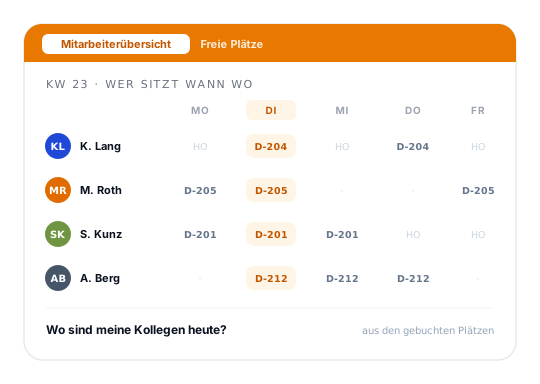
At a glance
Booking desks, rooms and parking spaces is one part of the bigger picture: flexible office floors for desk sharing and hybrid teams. How teamspace brings it all together is shown in the workplace management overview.
To workplace managementTerms
What the feature language means when it points to space booking, categories and the default schedule.
Access
Who may book which spaces is decided by the authorised user group on the category. A coworking area is thereby open to all, a specially equipped room only to the team that needs it. Because the right hangs off the group and not the individual name, anyone who leaves the group loses it automatically, with no manual work on individual rights.
The booking and attendance data sits in an ISO 27001-certified data centre in Frankfurt am Main and is processed exclusively within the EU. The contracting party is 5 POINT AG of Darmstadt. Room booking is included in every edition and shares its login with Teamwork, time tracking and the core HR functions.
Related modules
Those who book spaces usually work with time, team and personnel data in the same system too. Here are the shortest routes to them.
Whoever is in the office records attendance and project time there. Both run against the same member of staff, in the same login.
Calendar, boards, wiki and forum for hybrid collaboration. Whoever plans the office day plans the team meeting at the same time.
Personnel file, leave and absences on the member of staff. A person's fixed place of work lives in the same personnel records.
Next step
You show us your occupancy today, we show you what a booking makes of it. Then you decide whether the switch is worth it for your team.
Room booking is an online tool with which a company releases its desks, rooms and parking spaces and staff book them in advance. It suits flexible office concepts such as desk sharing, flex office and hot desking, where no one has a permanently assigned space any more.
Instead of an Excel list and questions in the chat, each member of staff chooses their own day and a free space, for a half or full day. The company decides which spaces are bookable at all, sorts them into categories and sets the equipment and authorised group per space. That keeps occupancy clear, even when half the workforce comes in on a rotating basis.
Intro call
We go through your spaces, parking spaces and office days and tell you honestly whether room booking suits your day-to-day.